
KAPURUI YD-886
KAPURUI YD-886 Solar Power Bank User Manual
Model: YD-886 | Brand: KAPURUI
1. Introduction
Thank you for choosing the KAPURUI YD-886 Solar Power Bank. This device is designed to provide reliable portable power for your electronic devices, featuring a high-capacity battery, solar charging capabilities, and a durable, rugged design. It is an ideal companion for outdoor activities, travel, and emergency situations.
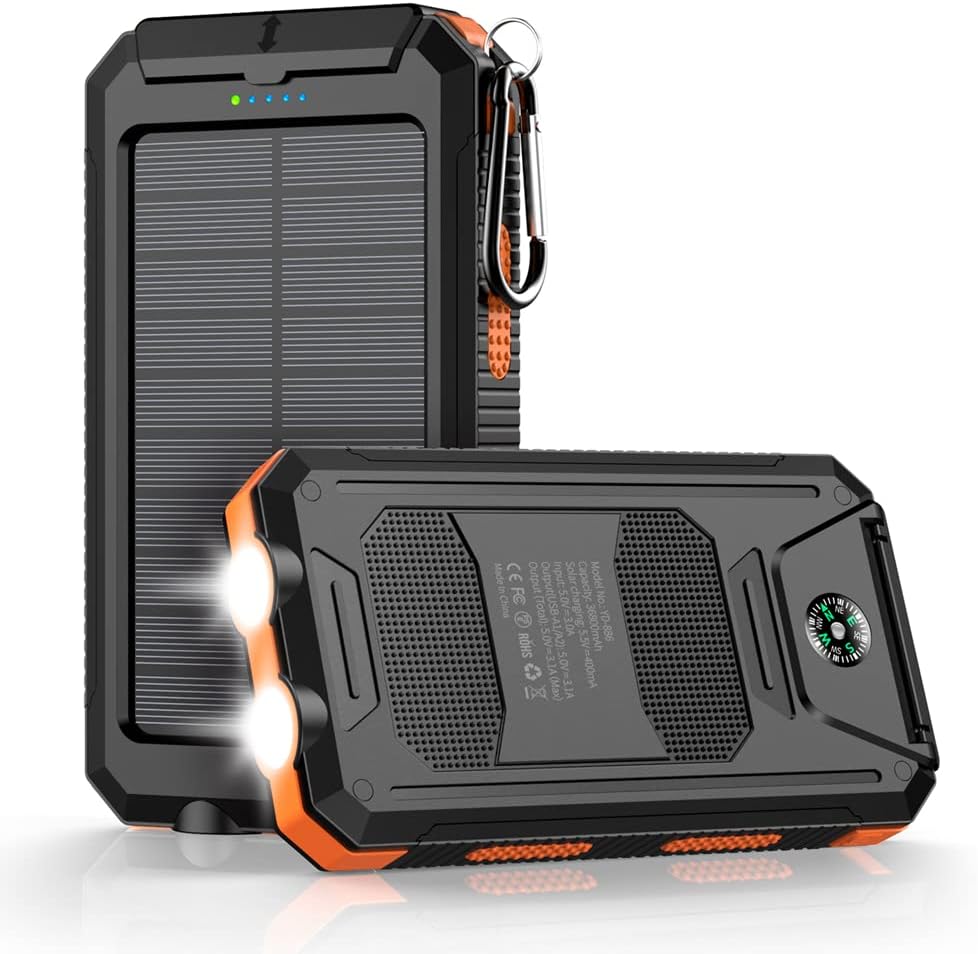
Figure 1: KAPURUI YD-886 Solar Power Bank Overview
What's in the Box:
- KAPURUI YD-886 Solar Power Bank
- USB Charging Cable
- User Manual
2. Key Features
- High Capacity Battery: Built-in high-density lithium polymer batteries with 36800mAh capacity, capable of charging multiple devices several times.
- Dual Fast Charging Ports: Features dual QC 3.0 5V3.1A USB outputs for rapid charging of two devices simultaneously.
- Solar Charging Capability: Supports environmentally friendly solar charging, providing an emergency power source when conventional power is unavailable.
- Integrated Flashlight: Equipped with two bright LED flashlights offering up to 100 hours of continuous illumination, including strobe and SOS modes for emergencies.
- Built-in Compass: A professional calibrated compass is integrated into the device to assist with navigation during outdoor adventures.
- Rugged and Durable Design: Constructed from high-strength engineering ABS material, making it flame-retardant and anti-drop. Multi-channel waterproof and sealing processes ensure IP67 waterproof and dustproof functionality.
- Smart Chip Protection: Features a built-in smart chip for intelligent identification of electronic devices and conversion of fluctuating current into stable current, protecting your devices from overcharging, short circuits, and other electrical issues.

Figure 2: High Capacity Charging

Figure 3: Dual Bright LED Flashlight

Figure 4: High Precision Compass

Figure 5: IP67 Waterproof Design
3. Setup and Initial Charging
3.1 Initial Charging via Wall Charger:
Before first use, it is recommended to fully charge your power bank using a wall adapter. This ensures optimal battery performance.
- Locate the charging input port on the power bank (typically under a protective flap).
- Connect the provided USB charging cable to the power bank's input port.
- Connect the other end of the USB cable to a compatible USB wall adapter (not included).
- Plug the wall adapter into a power outlet. The LED indicators on the power bank will illuminate to show charging progress.
- Charging via wall adapter typically takes approximately 10.5 hours for a full charge.

Figure 6: Charging via Wall Adapter
3.2 Solar Charging:
The solar panel provides an emergency charging option. While convenient for outdoor use, solar charging is slower than wall charging and is primarily intended for maintaining charge or emergency power, not as a primary charging method.
- Place the power bank with the solar panel facing direct sunlight.
- Ensure the solar panel is unobstructed for maximum efficiency.
- The solar charging indicator light (green) will turn on when solar charging is active.
- Avoid leaving the power bank in extreme high temperatures (e.g., inside a hot car) during solar charging, as this may damage the device.

Figure 7: Solar Charging in Use
4. Operating Instructions
4.1 Charging Electronic Devices:
- Open the protective flap covering the USB output ports.
- Connect your device's charging cable to one of the USB output ports (USB Type A or USB Type C).
- Connect the other end of the cable to your electronic device (phone, tablet, gaming console, camera, etc.).
- The power bank will automatically begin charging your device. The blue LED indicators will show the remaining battery level.
- To stop charging, simply disconnect your device.

Figure 8: Charging a Smartphone
4.2 Using the Flashlight:
- To turn on the flashlight, long press the power button for 3-4 seconds.
- Press the power button once more to cycle through modes: Bright -> Strobe -> SOS.
- To turn off the flashlight, long press the power button again for 3-4 seconds.
4.3 Using the Compass:
The integrated compass is located on the back of the power bank. Hold the power bank flat and level to ensure accurate readings. The compass will indicate cardinal directions (North, South, East, West).
5. Care and Maintenance
- Cleaning: Wipe the device with a soft, dry cloth. Do not use harsh chemicals or abrasive cleaners.
- Storage: Store the power bank in a cool, dry place away from direct sunlight and extreme temperatures.
- Water Resistance: While waterproof (IP67), ensure the port cover is securely closed before exposing the device to water or dust. Avoid prolonged submersion.
- Temperature: Do not expose the product to high temperatures (e.g., inside a hot car) as this can damage the battery and internal components.
- Impact: Although anti-drop, avoid dropping the device from significant heights or subjecting it to strong impacts.
6. Troubleshooting
| Problem | Possible Cause | Solution |
|---|---|---|
| Power bank not charging | Charging cable faulty; Wall adapter not working; Power bank battery depleted; Port connection loose. | Try a different USB cable and wall adapter. Ensure connections are secure. Allow sufficient time for initial charge. |
| Device not charging from power bank | Power bank battery depleted; Device cable faulty; Incompatible device; Loose connection. | Ensure power bank is charged. Try a different cable. Verify device compatibility. Check all connections. |
| Flashlight not turning on | Incorrect button press; Power bank battery depleted. | Long press the power button for 3-4 seconds. Charge the power bank. |
| Solar charging indicator not lit | Insufficient sunlight; Solar panel obstructed. | Move to direct sunlight. Clear any obstructions from the solar panel. |
| Product in self-protection mode | Ambient temperature outside normal operating range. | Move the product to a normal temperature environment and press the button to restore output. |
7. Specifications
| Feature | Detail |
|---|---|
| Model Number | YD-886 |
| Battery Capacity | 36800 Milliamp Hours (mAh) |
| Product Dimensions | 5.5 x 3 x 0.7 inches |
| Item Weight | 10.5 ounces |
| Connectivity Technologies | USB |
| Connector Type | USB Type C, USB Type A |
| Special Features | Flashlight, Fast Charger, Fast Charging, Portable Charger, Waterproof, Over Charging Protection, Short Circuit Protection |
| Waterproof Rating | IP67 |
| Manufacturer | Shenzhen jincheng Electronic Technology Co., Ltd |
8. Warranty and Support
For warranty information or technical support, please refer to the contact details provided on the product packaging or visit the official KAPURUI website. Keep your purchase receipt as proof of purchase for any warranty claims.
Customer Service: Please contact your retailer or the manufacturer directly for assistance.
9. Important Safety Information
- Do not disassemble, open, or shred the battery pack.
- Do not expose the power bank to heat or fire. Avoid storage in direct sunlight.
- Do not short-circuit the battery pack. Do not store battery packs haphazardly in a box or drawer where they may short-circuit each other or be short-circuited by conductive materials.
- Do not subject battery packs to mechanical shock.
- In the event of a battery leaking, do not allow the liquid to come into contact with the skin or eyes. If contact has been made, wash the affected area with copious amounts of water and seek medical advice.
- Keep the power bank clean and dry.
- Do not leave a battery pack on charge when not in use.
- Do not use any charger other than that specifically provided for use with the equipment.
- Do not use any battery pack which is not designed for use with the equipment.
- Battery usage by children should be supervised.
- Dispose of the power bank properly according to local regulations.
Ask a question about this manual
Ask about setup, troubleshooting, compatibility, parts, safety, or missing instructions. Manuals+ will review the question and use this page’s manual context to help answer it.