
1. Product Overview
This manual provides essential information for the safe and effective use of your FITHOOD replacement battery. This high-quality Li-Polymer battery is designed to replace the BP-1S battery in compatible Stonex devices, ensuring reliable performance for your equipment.
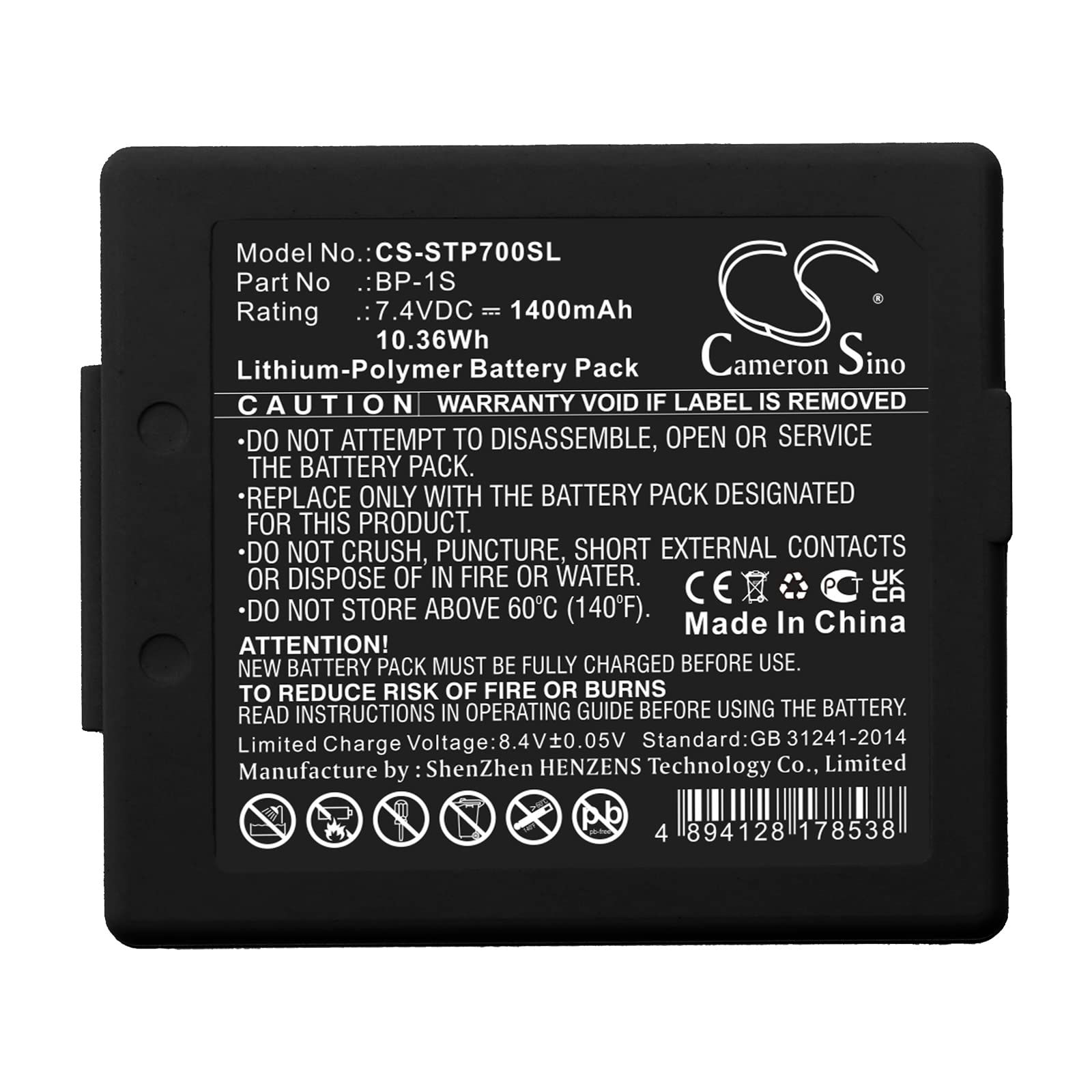
Image: The FITHOOD BP-1S replacement battery, showing its compact design and connectors. This battery is a direct replacement for the original BP-1S model.
2. Compatibility
This FITHOOD battery is compatible with the following device models and battery part numbers:
- Compatible Device Models: Stonex S6, Stonex S3, Stonex P7 Controller, Stonex S9
- Compatible Battery Part Number: BP-1S
Important: Please verify that both your device model and the original battery part number match the information above before installation to ensure proper fit and function.
3. Specifications
| Specification | Value |
|---|---|
| Battery Type | Li-Polymer |
| Capacity | 1400mAh |
| Watt-Hours (WH) | 10.36Wh |
| Voltage | 7.4V |
| Dimensions (L x W x H) | 55.0 x 47.4 x 15.2 mm (2.17 x 1.87 x 0.6 inches) |
| Weight | 86.0g (3.03 ounces) |
| Model Number | CS-STP700SL |
This battery is certified with ISO9001, RoHS, CE, UN38.3, and MSDS standards, ensuring quality and safety.
4. Safety Information
Please read and follow these safety guidelines carefully to prevent injury or damage to your device and battery:
- Do not disassemble, crush, puncture, or short-circuit the battery.
- Do not expose the battery to high temperatures (above 60°C / 140°F) or direct sunlight.
- Do not expose the battery to water or other liquids.
- Keep the battery away from children and pets.
- Use only the charger specified for your device.
- Dispose of used batteries according to local regulations. Do not dispose of in household waste.
- If the battery appears damaged, swollen, or leaks, discontinue use immediately and dispose of it properly.
5. Setup and Installation
Battery replacement in electronic devices can be complex. It is recommended that battery installation be performed by a qualified technician. If you choose to perform the installation yourself, proceed with caution.
- Power Off Device: Ensure your Stonex device is completely powered off and disconnected from any power source.
- Locate Battery Compartment: Refer to your Stonex device's original manual to locate and open the battery compartment. This may require specific tools.
- Remove Old Battery: Carefully disconnect the old battery from its connector and remove it from the compartment. Note its orientation.
- Insert New Battery: Align the FITHOOD replacement battery with the connector and compartment, ensuring correct polarity. Gently push the connector into place.
- Secure Battery: Place the new battery securely in the compartment.
- Close Compartment: Reassemble the device's battery compartment cover.
- Initial Charge: After installation, fully charge the new battery before its first use.
Disclaimer: Improper installation can damage your device. FITHOOD is not responsible for any damage caused by incorrect installation.
6. Operating Instructions
This battery functions as a direct replacement for your original BP-1S battery. Operate your device as usual, adhering to the manufacturer's guidelines for battery usage.
- Charging: Use the original charger provided with your Stonex device. Avoid using third-party chargers unless they are certified compatible.
- First Use: For optimal performance, fully charge the battery before its initial use.
- Discharge Cycles: Li-Polymer batteries do not suffer from a 'memory effect'. You can charge the battery at any time without needing to fully discharge it first.
- Temperature: Operate your device and battery within the recommended temperature range specified by the device manufacturer. Extreme temperatures can affect battery life and performance.
7. Maintenance
Proper maintenance can extend the life of your battery:
- Storage: If storing the battery for an extended period, charge it to approximately 50-60% and store it in a cool, dry place. Avoid storing fully charged or fully discharged batteries for long durations.
- Cleaning: Keep battery contacts clean and free from dust or debris. Use a dry, soft cloth for cleaning.
- Avoid Physical Damage: Protect the battery from drops, impacts, and excessive pressure.
8. Troubleshooting
If you encounter issues with your new battery, consider the following:
- Battery Not Charging:
- Ensure the charger is properly connected to both the device and a power outlet.
- Verify the charger is functional and compatible with your device.
- Check for any debris or damage in the charging port of your device.
- Confirm the battery is correctly installed and its connectors are clean.
- Short Battery Life:
- Ensure the battery has been fully charged.
- Check for background applications or settings on your device that may be consuming excessive power.
- Operating in extreme temperatures can reduce battery life.
- Device Not Powering On:
- Confirm the battery is fully charged and correctly installed.
- Attempt to power on the device while connected to its charger.
If issues persist, please contact the seller or a qualified service technician for further assistance.
9. Warranty and Support
For specific warranty information regarding your FITHOOD replacement battery, please refer to the documentation provided at the time of purchase or contact your seller directly. Keep your purchase receipt as proof of purchase.
If you require technical support or have questions not covered in this manual, please reach out to the FITHOOD customer service or the retailer from whom you purchased the battery. Providing your battery model number (CS-STP700SL) and device model will help expedite support.