
Product Overview
The LOFICOPER LED Alarm Clock features a large 6.5-inch display, making time easily visible. It includes a USB port for power, snooze function, and adjustable brightness. Designed for various users including teens, kids, and the elderly, this digital alarm clock offers multiple display modes and convenient operation.

Image: Front view of the LOFICOPER LED Alarm Clock displaying 12:00 with colorful digits.
Key Features
- 6.5-inch LED Display & 5 Display Modes: Large screen and font for easy readability. Includes clock, alarm, date, temperature, and night modes.
- Workday Modes & Snooze: Offers 3 alarm modes (Monday-Friday, Monday-Saturday, Monday-Sunday) and a 1-60 minute adjustable snooze function (default 5 minutes).
- Adjustable Brightness & Power Saving Mode: 3 levels of brightness (Bright/Medium/Low). Automatically enters power saving mode after 16 seconds of no operation when powered by batteries.
- Dual Power Supply Methods: Supports USB power supply and 3x AAA batteries (not included). Time memory function available when powered by AAA batteries.
- Smart Voice Control: Wake up the display with a tap, chirp, or clap when powered by AAA batteries.
Package Contents
- LOFICOPER LED Alarm Clock
- USB Power Cable (White, 39.37 inches / 1 meter)
- User Manual
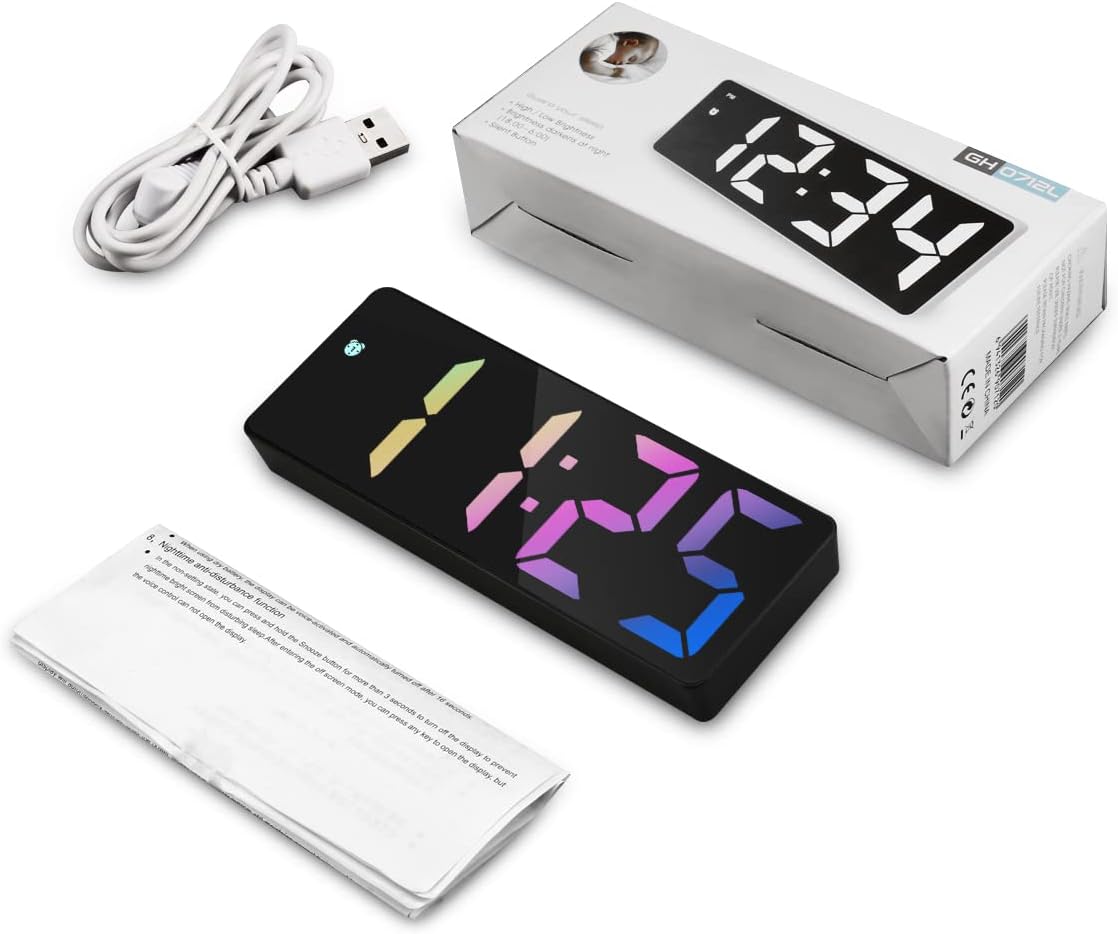
Image: The LOFICOPER LED Alarm Clock, its white USB cable, and the user manual, next to its product box.
Setup Guide
1. Powering the Alarm Clock
The alarm clock can be powered by two methods:
- USB Power Supply: Connect the provided USB cable to the DC 5V port on the back of the clock and plug the other end into a USB power adapter (not included) or a USB port on a device. The display will remain continuously on.
- AAA Batteries (Backup): Insert 3 AAA batteries (not included) into the battery compartment on the back. This provides a time memory function and allows for power-saving display (screen turns off after 16 seconds of inactivity).

Image: Illustration of the two power supply methods: USB cable connection and AAA battery insertion.
2. Setting Time and Date
To set the time and date, use the buttons on the back of the clock. The video below demonstrates the process:
Video: Demonstrates how to set the time and date on the LOFICOPER LED Alarm Clock. Press the 'MODE' button to cycle through settings, and 'UP'/'DOWN' buttons to adjust values. The video shows setting the hour, minute, year, month, and day.
- Press the MODE button to cycle through the display modes (Time, Date, Temperature).
- When in Time mode, press and hold MODE to enter time setting. Use UP and DOWN to adjust hours and minutes. Press MODE to confirm and move to the next setting.
- Continue pressing MODE to set the year, month, and day.
- The clock supports both 12-hour and 24-hour formats. You can switch between them during time setting.
3. Setting the Alarm
The alarm function allows you to set up to three different alarms with various workday modes. Refer to the video for a visual guide:
Video: Demonstrates how to set the alarm on the LOFICOPER LED Alarm Clock. It shows adjusting the alarm time and selecting different workday modes.
- Press the ALARM button to view the current alarm settings.
- Press and hold the ALARM button to enter alarm setting mode.
- Use UP and DOWN to adjust the alarm hour and minute. Press ALARM to confirm each step.
- Select one of the 3 workday modes:
- 1-5: Monday to Friday
- 1-6: Monday to Saturday
- 1-7: Everyday
- When the alarm sounds, you will hear "di~di~di~" and the alarm icon will flash. The alarm will last for 2 minutes.

Image: The alarm clock displaying different workday alarm modes (1-5, 1-6, 1-7) and highlighting the snooze function.
Operating Instructions
1. Adjusting Brightness
Simply press the UP button to cycle through the 3 levels of brightness: Bright, Medium, and Low. You can also adjust the screen to automatically dim at night (default 18:00-6:00), and this night interval can be reset.

Image: The alarm clock displaying different brightness levels (Bright, Medium, Low) and indicating automatic dimming at night.
2. Snooze Function
When the alarm sounds, press any button other than the ALARM button to activate the snooze function. This provides 1 to 60 minutes of extra sleep time. The default snooze time is 5 minutes. To turn off the snooze mode, press the ALARM button.

Image: A hand pressing the snooze button on the LOFICOPER LED Alarm Clock, with an inset showing the control buttons.
3. Night Mode
The night mode automatically dims the display during a set period (default 18:00-6:00) to prevent bright light from disturbing sleep. You can manually turn this feature on or off, and adjust the time interval. Refer to the video for setting night mode:
Video: Demonstrates how to set the night mode on the LOFICOPER LED Alarm Clock, showing how to turn it on/off and adjust the dimming period.
4. Smart Voice Control (Battery Mode Only)
When the clock is powered by AAA batteries and the display is off (power-saving mode), you can wake up the LED display by tapping the clock, chirping, or clapping your hands. The display will light up for 16 seconds. This feature is not active when the clock is continuously powered by USB.

Image: The alarm clock responding to a clap and a touch, demonstrating its sound control and power-saving features.
5. Temperature Display Function
In addition to time and date, the clock can display the ambient temperature. Press the MODE button to cycle through the display modes until the temperature is shown. The video demonstrates this function:
Video: Demonstrates the temperature display function of the LOFICOPER LED Alarm Clock, showing how to switch to temperature mode.

Image: The alarm clock displaying time, date, and temperature in different views, highlighting its multifunctionality.
Troubleshooting
| Problem | Possible Cause / Solution |
|---|---|
| Display is off or goes dark quickly. |
|
| Difficulty setting time/alarm. |
|
| Alarm sounds are not heard or are too quiet. |
|
| Display numbers appear distorted or have "shadows". |
|
| Random chirping sounds. |
|
Specifications
| Feature | Detail |
|---|---|
| Brand | LOFICOPER |
| Model Number | MC05US-WA33B&C |
| Display Type | Digital LED |
| Display Size | 6.5 inches |
| Product Dimensions | 6.3"W x 2.36"H |
| Power Source | Battery Powered (3x AAA, not included), Corded Electric (USB) |
| Special Features | Alarm, Snooze, Adjustable Brightness, Night Mode, Temperature Display, Voice Control (battery mode) |
| Material | Acrylonitrile Butadiene Styrene |
| Item Weight | 0.15 Kilograms (5.3 ounces) |
Care and Maintenance
- Clean the clock surface with a soft, dry cloth. Avoid using abrasive cleaners or solvents.
- Do not expose the clock to extreme temperatures, direct sunlight, or high humidity.
- If not using the clock for an extended period, remove the AAA batteries to prevent leakage.
Warranty and Support
LOFICOPER products are designed for reliability and performance. For any questions, technical support, or warranty claims, please contact LOFICOPER customer service through the retailer where you purchased the product or visit the official LOFICOPER website for contact information.
Please retain your proof of purchase for warranty purposes.