
1. Introduction
This user manual provides comprehensive instructions for the GENGQIANSI Replacement Remote Control, designed for specific Superfit Costway Treadmill models. Please read this manual carefully before use to ensure proper setup, operation, and maintenance of your remote control.
This remote control is intended for users aged 3 years and older.
2. Product Overview
The GENGQIANSI Replacement Remote Control allows you to start, stop, and adjust the speed of your compatible Superfit Costway Treadmill. It features a compact design with clearly marked buttons for ease of use.

Figure 2.1: Front view of the GENGQIANSI Replacement Remote Control. It features a black body with a yellow control panel containing four circular buttons and a small indicator light at the top. The model identifier 'NIU01' is visible at the bottom.
2.1 Button Functions
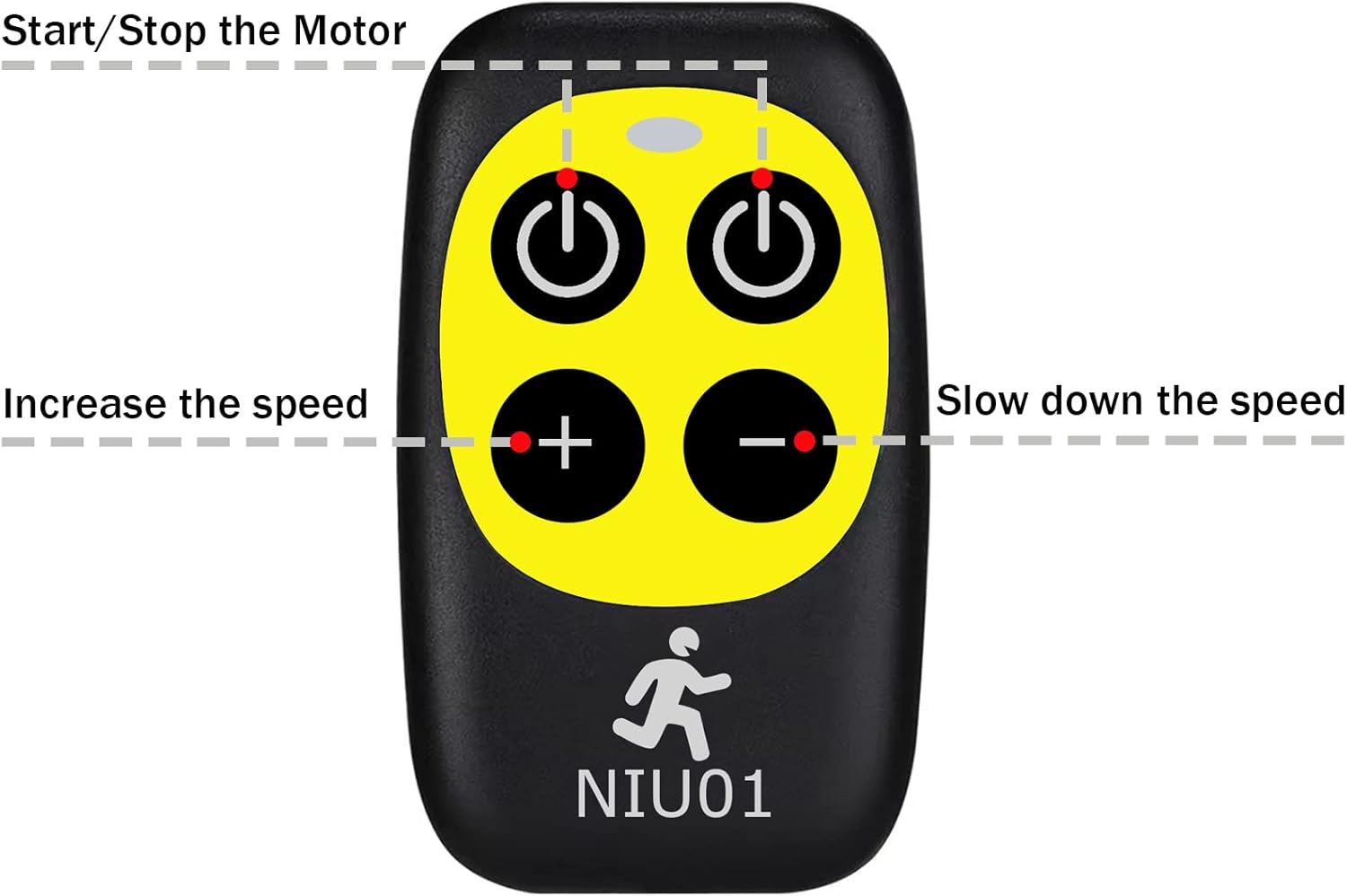
Figure 2.2: Diagram illustrating the functions of each button on the remote control.
- Top Left Button (Power Symbol): Start/Stop the treadmill motor.
- Top Right Button (Power Symbol): Start/Stop the treadmill motor. (Note: Both top buttons typically perform the same Start/Stop function).
- Bottom Left Button (+): Increase the treadmill speed.
- Bottom Right Button (-): Decrease the treadmill speed.
3. Setup and Pairing Instructions
To use your replacement remote control, it must first be paired with your Superfit Costway Treadmill. Follow these steps carefully:
- Prepare the Treadmill: Ensure your treadmill is powered on.
- Unplug Safety Lock: Locate and unplug the safety lock (or safety key) from the treadmill's console. This action typically causes the treadmill display to show an error message or enter a pairing mode.
- Initiate Pairing: Within 10 seconds of unplugging the safety lock, point the remote control directly at the display window of the treadmill.
- Press and Hold: Simultaneously press and hold down one of the "Start/Pause" buttons (either top button) on the remote control for approximately 3 seconds.
- Confirmation: Listen for an audible beep from the treadmill. A beep indicates that the pairing process was successful.
- Re-insert Safety Lock: Once paired, re-insert the safety lock into the treadmill console. The treadmill should now be ready for operation with the remote control.
Note: If pairing is unsuccessful, repeat the steps, ensuring the remote is pointed directly at the display and the buttons are held for the specified duration.
4. Operation
After successful pairing, you can use the remote control to operate your treadmill.
- Starting the Treadmill: Press either of the top "Start/Stop" buttons. The treadmill will typically start at a low speed.
- Adjusting Speed:
- Press the '+' button to increase the treadmill speed.
- Press the '-' button to decrease the treadmill speed.
- Stopping the Treadmill: Press either of the top "Start/Stop" buttons to bring the treadmill to a gradual stop. For emergency stops, pull the safety lock.
5. Compatible Treadmill Models
This replacement remote control is compatible with the following Superfit Costway Treadmill models:
- SP37146 (B081JDMJ4J)
- SP37036 (B07ZRSBP5S)
- SP37148 (B0842LPY98)
- SP37747US
- SP37514
- SP37513
- SP37522
- SP37514YE, SP37514RE, SP37514WH
- SP37038RE, SP37146BK, SP37038NY, SP37146YE, SP37146GN, SP37038SL, SP37146WH
- OST-SP37036RE, OST-SP37036YE, OST-SP37148BK, OST-SP37067GN, OST-SP37067SL, OST-SP37067NY
- OST-SP37747US-SL, OST-SP37747US-NY, OST-SP37747US-DK, OST-SP37747US-RE
- SUP37SP747US-NY, SUP37SP747US-DK, SUP37SP747US-SL, SUP37SP747US-RE
- SP37513BK, SP37513RE
- OST-OSTSP37036NY, OST-OSTSP37036GN, OST-OSTSP37036YE, OST-OSTSP37036WH, OST-OSTSP37036RE, OST-OSTSP37036BK, OST-OSTSP37036SL
Please verify your treadmill model number against this list to ensure compatibility.
6. Troubleshooting
- Remote Not Pairing:
- Ensure the safety lock is unplugged from the treadmill before attempting to pair.
- Point the remote directly at the treadmill's display window.
- Hold the Start/Pause button for the full 3 seconds.
- Ensure the pairing attempt is made within 10 seconds of unplugging the safety lock.
- Check the remote's battery. Replace if necessary.
- Treadmill Speed Limited:
- Some users have reported speed limitations with replacement remotes. Ensure your treadmill model is explicitly listed in the compatible models section. If issues persist, contact customer support.
- Remote Not Responding:
- Check the battery.
- Ensure there are no obstructions between the remote and the treadmill's display.
- Re-attempt the pairing process as described in Section 3.
7. Maintenance
- Cleaning: Wipe the remote control with a soft, dry cloth. Do not use abrasive cleaners or immerse the remote in water.
- Battery Replacement: If the remote's performance degrades, replace the battery. Refer to the remote's battery compartment for the correct battery type and replacement procedure.
- Storage: Store the remote control in a cool, dry place away from direct sunlight and extreme temperatures when not in use for extended periods.
8. Specifications
| Feature | Detail |
|---|---|
| Model Number | A520230506B01 |
| Brand | GENGQIANSI |
| Item Weight | 1.13 ounces |
| Color | Yellow (referring to button panel) |
| Max Number of Supported Devices | 1 |
| Compatible Devices | Specific Superfit Costway Treadmills |
| Connectivity Technology | Infrared, Radio Frequency |
| Date First Available | May 6, 2023 |
9. Warranty and Support
For warranty information or technical support regarding your GENGQIANSI Replacement Remote Control, please refer to the documentation provided with your purchase or contact the seller directly through the platform where the item was purchased.
Ensure you have your purchase details and product model number (A520230506B01) available when contacting support.