
Introduction
Thank you for purchasing the LEIKE Alarm Clock Radio. This device is designed to provide a comprehensive bedside experience, combining a digital alarm clock with FM radio, sleep sound machine, and adjustable RGB lighting. It features dual alarms, a snooze function, and convenient USB charging ports. Please read this manual carefully to ensure proper use and maintenance of your new alarm clock.

Figure 1: LEIKE Alarm Clock Radio, showcasing its digital display and vibrant RGB light base.
Product Overview
Key Features
- Dual Alarm Clock with everyday, weekday, and weekend settings.
- FM Radio functionality.
- Sleep Timer for automatic shut-off.
- 12/24 Hour Time Display Setting.
- Two USB Charging Ports for external devices.
- Integrated Night Light with dynamic RGB adjustable colors (5 single & 3 RGB colors).
- 9-minute Snooze Function.
- Adjustable Volume Control.
- Sleep Sound Machine with various natural sounds (Rain, Bird, River, Cricket, Seagulls, Frogs, Campfire, Wind, FM Radio Chimes).
- 0-100% LED Adjustable Light for display brightness.

Figure 2: Overview of the 8-in-1 multifunctional features, including dual alarm, FM radio, sleep timer, USB charging, and more.

Figure 3: The sleep music machine feature, offering a variety of natural and soothing sounds for gentle awakening or relaxation.
Setup
Follow these steps to set up your LEIKE Alarm Clock Radio:
- Unpack: Carefully remove the alarm clock, data line (USB cable), and power adapter from the packaging.
- Placement: Place the alarm clock on a stable, flat surface such as a bedside table or desk. Ensure it is away from direct sunlight, heat sources, and excessive moisture.
- Connect Power: Connect the data line to the alarm clock's power input port. Then, connect the other end of the data line to the provided power adapter. Plug the power adapter into a standard electrical outlet. The display should illuminate.
- Initial Time Setting: Upon first power-up, the clock display may flash or show a default time. Refer to the "Operating Instructions" section to set the correct time.
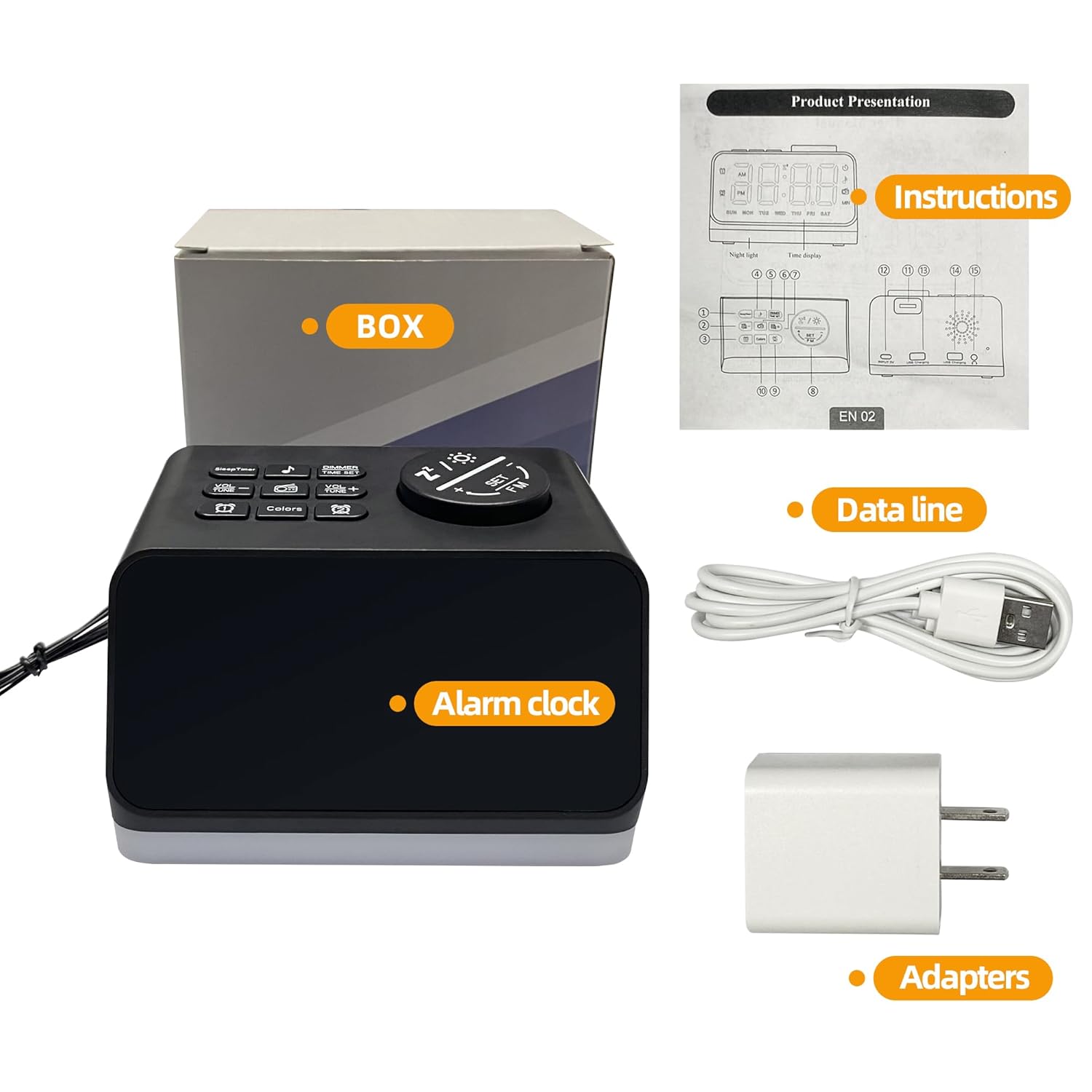
Figure 4: Contents of the product package, showing the alarm clock, data line, and power adapters.
Operating Instructions
Setting the Time
Press the "Time Set" button (usually indicated by a clock icon) to enter time setting mode. Use the "+" and "-" buttons to adjust hours and minutes. Press "Time Set" again to confirm each step. You can also switch between 12-hour and 24-hour formats.
Setting Alarms
This device supports dual alarms. Press the "Alarm 1" or "Alarm 2" button to activate and set the respective alarm. Use the "+" and "-" buttons to set the desired alarm time. You can choose between everyday, weekday, or weekend alarm settings. Press the alarm button again to confirm.

Figure 5: Illustration of the dual alarm clock settings and the 9-minute snooze function.
Snooze Function
When the alarm sounds, press the "Snooze" button (often a large button on top) to temporarily silence the alarm for 9 minutes. The alarm will sound again after the snooze period.
FM Radio Operation
Press the "FM" button to turn on the radio. Use the "Tune" or "+"/"-" buttons to scan for stations. Press and hold to auto-scan and save available stations. Adjust volume using the volume control buttons.
Sleep Timer
Activate the sleep timer function to automatically turn off the radio or sleep sounds after a set period. Press the "Sleep Timer" button repeatedly to cycle through available timer durations (e.g., 15, 30, 60, 90 minutes).
Night Light and RGB Colors
Press the "Light" or "RGB" button to cycle through different night light colors and modes. This includes 5 single colors and 3 RGB color modes. You can also adjust the brightness of the display and night light from 0% to 100% using dedicated dimming buttons.

Figure 6: Examples of dynamic RGB adjustable colors for the night light and time display, offering various aesthetic options.

Figure 7: Demonstration of the 0-100% LED adjustable light feature, allowing users to set the display brightness to their preference.
Sleep Sound Machine
Press the "Sound" or "Nature Sound" button to activate the sleep sound machine. Cycle through various built-in sounds like rain, bird, river, and more. Adjust the volume as needed.
USB Charging Ports
The two USB ports on the back of the unit can be used to charge your mobile devices. Simply connect your device's USB charging cable to one of the ports.
Maintenance
To ensure the longevity and optimal performance of your LEIKE Alarm Clock Radio, follow these maintenance guidelines:
- Cleaning: Disconnect the power before cleaning. Use a soft, dry cloth to wipe the exterior of the unit. Do not use abrasive cleaners, waxes, or solvents as they may damage the finish.
- Dust: Regularly dust the unit, especially around buttons and display areas, to prevent accumulation.
- Liquid Exposure: Avoid exposing the unit to water or excessive moisture. If liquid spills on the unit, immediately unplug it and allow it to dry completely before reconnecting power.
- Storage: If storing the unit for an extended period, unplug it and keep it in a cool, dry place.
Troubleshooting
If you encounter issues with your alarm clock, refer to the following common problems and solutions:
| Problem | Possible Cause | Solution |
|---|---|---|
| No power/Display off | Power adapter not connected or outlet not working. | Ensure the power adapter is securely plugged into the unit and a working electrical outlet. Try a different outlet. |
| Alarm not sounding | Alarm not set, alarm volume too low, or alarm turned off. | Verify alarm settings and ensure it is activated. Increase alarm volume. |
| Radio static/Poor reception | Weak signal or interference. | Adjust the position of the unit. Extend the FM antenna if available. Try auto-scanning for stations again. |
| Buttons unresponsive | Temporary software glitch. | Unplug the unit from power for a few minutes, then plug it back in to reset. |
Specifications
The following are the technical specifications for the LEIKE Alarm Clock Radio:
| Attribute | Detail |
|---|---|
| Brand | LEIKE |
| Model Number | B0C4GYKDHR |
| Color | Black |
| Display Type | Digital |
| Style | Art Deco |
| Special Features | Alarm, Auto Dimmable, Snooze, FM Radio, Sleep Sound Machine, USB Charging Ports, RGB Night Light |
| Power Source | Corded Electric |
| Room Type | Bedroom |
| Shape | Rectangular |
| Material | Plastic, Acrylonitrile Butadiene Styrene |
| Mounting Type | Tabletop |
| Item Weight | 331 g |
| Item Dimensions (LxWxH) | 11.9 x 3.8 x 7.9 Centimeters (4.7 x 1.5 x 3.1 inches approx.) |
| UPC | 607029147626 |

Figure 8: Product dimensions for the LEIKE Alarm Clock Radio.
Warranty and Support
LEIKE products are manufactured with high-quality standards. For specific warranty information, please refer to the warranty card included with your product or visit the official LEIKE website. If you require technical support or have questions regarding your alarm clock, please contact LEIKE customer service through the contact information provided on their official website or product packaging.
Please retain your purchase receipt as proof of purchase for warranty claims.