Introduction
The Yahboom Raspberry Pi Pico2 Smart Robot Car is an advanced educational robot kit designed for programming and electronics enthusiasts. Powered by the Raspberry Pi Pico2 microcontroller, it offers high-performance control and processing capabilities. This smart car provides a versatile platform for learning and experimentation, supporting MicroPython programming and a wide array of functionalities.
Product Overview
The Pico2 Smart Robot Car integrates multiple sensors and features for an interactive experience. Key functionalities include infrared remote control, APP remote control, line following, cliff detection, ultrasonic obstacle avoidance, object tracking, light seeking, and customizable RGB lights. Its design emphasizes ease of assembly and programming, making it suitable for educational projects.

Image: The Yahboom Pico2 Smart Robot Car showcasing its diverse capabilities, including remote control, obstacle detection, and light effects.
Setup and Assembly
The Pico2 Robot Car features a simple structure designed for quick assembly without the need for welding. Follow the detailed instructions provided in the tutorial materials to connect the components.
Components List

Image: A complete view of all parts included in the Yahboom Pico2 Smart Robot Car kit, ready for assembly.
The kit includes:
- Pico car expansion board
- Raspberry Pi Pico2 main controller
- N20 motors and fixing bases
- 18650 battery (included)
- N20 universal wheel
- OLED screen
- 5.0 BT module
- Micro USB cable
- Infrared remote control
- Screw package and screwdriver
- Tracking map
- N20 tires
Powering the Robot
The robot car requires one 18650 9V battery (included). Ensure the battery is properly installed according to the polarity markings on the expansion board. The charging interface is Micro USB.
Programming Environment
The robot car is programmed using MicroPython. Users can write custom code to control its various functions. Detailed tutorial materials and source code are available on the Yahboom website to assist with development.

Image: The Raspberry Pi Pico2 microcontroller, the core of the robot car.
Operating Instructions
The Pico2 Robot Car offers multiple control methods and intelligent functions.
Control Options
- Infrared Remote Control: Use the included infrared remote to control the robot's movement and light effects.
- APP Remote Control: A dedicated mobile application (iOS/Android) allows for comprehensive control over all robot functions via Bluetooth.
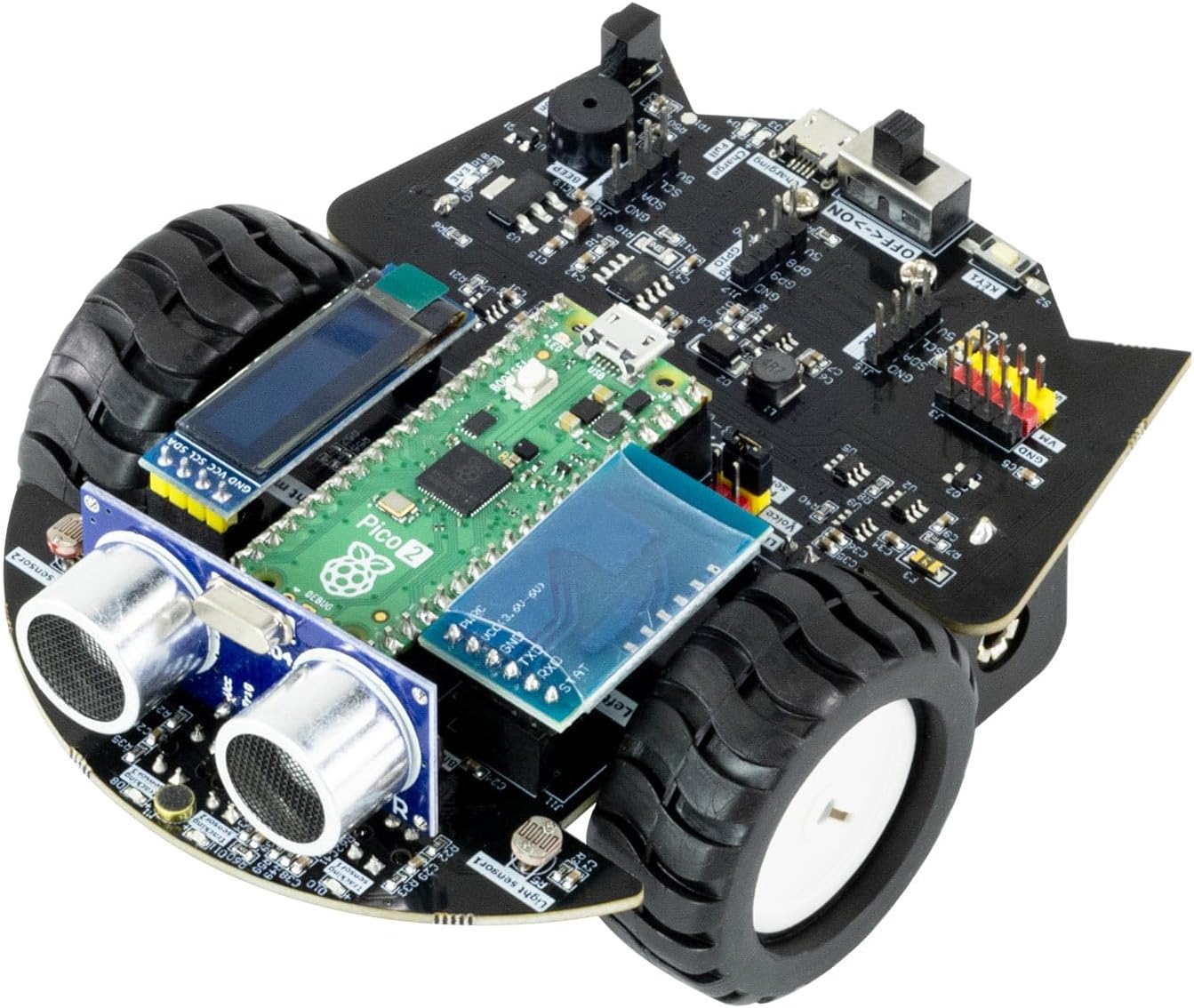
Image: Operating the robot car using the infrared remote control.
Key Functions
- Line Following: Utilize the 4-channel tracking sensors to drive along black lines on a designated track.
- Ultrasonic Obstacle Avoidance: The front-mounted ultrasonic module detects obstacles and enables the car to automatically navigate around them.
- Object Tracking: The ultrasonic module can also be programmed to follow objects.
- Cliff Detection: An infrared sensor at the bottom prevents the robot from falling off edges.
- Light Seeking: The light sensor detects ambient brightness, allowing the robot to move towards or away from light sources.
- RGB Lights: Eight high-brightness RGB lights offer various customizable lighting effects.
- Sound Sensor: An integrated sound sensor allows for control of robot behavior based on sound volume.

Image: Hardware configuration of the robot car, detailing sensor locations.
OLED Display
The optional OLED display can show real-time data detected by the ultrasonic module, sound sensor, and light sensor, providing immediate feedback during operation and programming.
Video: Demonstration of the Yahboom Pico2 Smart Robot Car's features, including MicroPython programming, line tracking, obstacle avoidance, RGB lights, OLED display, sound sensor, infrared remote control, light sensor, and Bluetooth APP control.
Maintenance
To ensure the longevity and optimal performance of your Yahboom Raspberry Pi Pico2 Smart Robot Car, follow these general maintenance guidelines:
- Cleaning: Regularly clean the robot's chassis and sensors with a soft, dry cloth to remove dust and debris. Avoid using liquids directly on electronic components.
- Battery Care: When not in use for extended periods, remove the battery. Store the battery in a cool, dry place. Do not overcharge or completely discharge the battery.
- Component Inspection: Periodically check all connections and ensure screws are tightened. Inspect wires for any signs of wear or damage.
- Software Updates: Keep the MicroPython firmware and any custom code updated to the latest versions available on the Yahboom website for improved functionality and bug fixes.
Troubleshooting
If you encounter issues with your Pico2 Robot Car, consider the following common troubleshooting steps:
- Robot Not Powering On: Ensure the battery is fully charged and correctly installed. Check the power switch.
- Robot Not Responding to Controls: Verify that the remote control has fresh batteries and is pointed correctly. For APP control, ensure Bluetooth is enabled on your device and the robot is paired. Check that the correct program is loaded onto the Pico2.
- Movement Issues: Check motor connections and ensure wheels are free from obstructions. If line tracking is erratic, clean the line tracking sensors and ensure the track has sufficient contrast.
- Sensor Malfunctions: Ensure sensors are clean and properly connected. Refer to the online tutorials for sensor calibration and testing procedures.
- App Connectivity Issues: Some users have reported issues with the mobile application. Ensure you have the latest version of the app and firmware. Try restarting both the robot and your mobile device.
For more detailed troubleshooting guides and community support, please visit the official Yahboom website.
Specifications
| Feature | Detail |
|---|---|
| Main Control Board | Raspberry Pi Pico2 |
| Microprocessor | RP2350 (Dual-core Cortex-M33 or RISC-V Hazard3 processors) |
| Main Frequency | 150MHz |
| On-chip SRAM | 520KB |
| On-board OSPI Flash | 4MB |
| Interface | 26 GPIO pins (3 can be used as ADC) |
| Programming Language | MicroPython, C, C++ |
| Control Modes | Mobile APP / Infrared Remote Control |
| Input Sensors | Photosensitive resistance, 4-channel line tracking, sound sensor, ultrasonic, infrared receiving |
| Output Devices | OLED display screen, passive buzzer, N20 motor, servo interface, programmable RGB lamp |
| Power Supply | 18650 2200mAh battery |
| Charging Interface | Micro USB |
| Endurance | Approx. 2.5 hours |
| Safety Protection | Over-current protection, over-charge protection, motor locked rotor protection |
| Assembly Size | 120*100*52mm |
| Item Weight | 13.7 ounces |
| Product Dimensions | 4.7 x 3.7 x 2.2 inches |

Image: Detailed parameter comparison between Pico 2 and the original Pico.
Support and Resources
Yahboom provides comprehensive resources to assist users with their Pico2 Smart Robot Car.
- Tutorial Materials: Complete tutorial materials and source code are available for download on the official Yahboom website. These resources cover assembly, programming, and advanced functionalities.
- Online Community: Engage with the Yahboom community for additional support, project ideas, and troubleshooting tips.
Visit www.yahboom.com/study/Pico_Robot for tutorials and downloads.


