1. Introduction
The tecmac FHOM-301 is a versatile handheld optical multimeter designed for comprehensive fiber optic and network cable testing. It integrates multiple functions including an Optical Power Meter (OPM), a Visual Fault Locator (VFL), and an RJ45 cable sequence test function. This device is engineered for ease of use, enabling field engineers to efficiently manage various communication network constructions and testing scenarios. Its unique probe-type and non-contact universal interface design eliminates the need for carrying multiple fiber patch cords, streamlining testing procedures.
2. Safety Information
- Always wear appropriate eye protection when working with fiber optic cables and laser devices.
- Do not look directly into the VFL output or any optical fiber connected to it, as this can cause eye damage.
- Ensure the device is powered off before cleaning or performing any maintenance.
- Use only the specified battery type and charger to prevent damage or fire hazards.
- Keep the device away from water, moisture, and extreme temperatures.
- Do not attempt to disassemble or repair the device yourself. Refer to qualified service personnel.
3. Package Contents
Please check the package contents upon receipt. If any items are missing or damaged, contact your supplier immediately.
- tecmac FHOM-301 Handheld Optical Multimeter
- USB Charging Cable
- User Manual (this document)
- Protective Carrying Case (may vary by region)
4. Device Overview
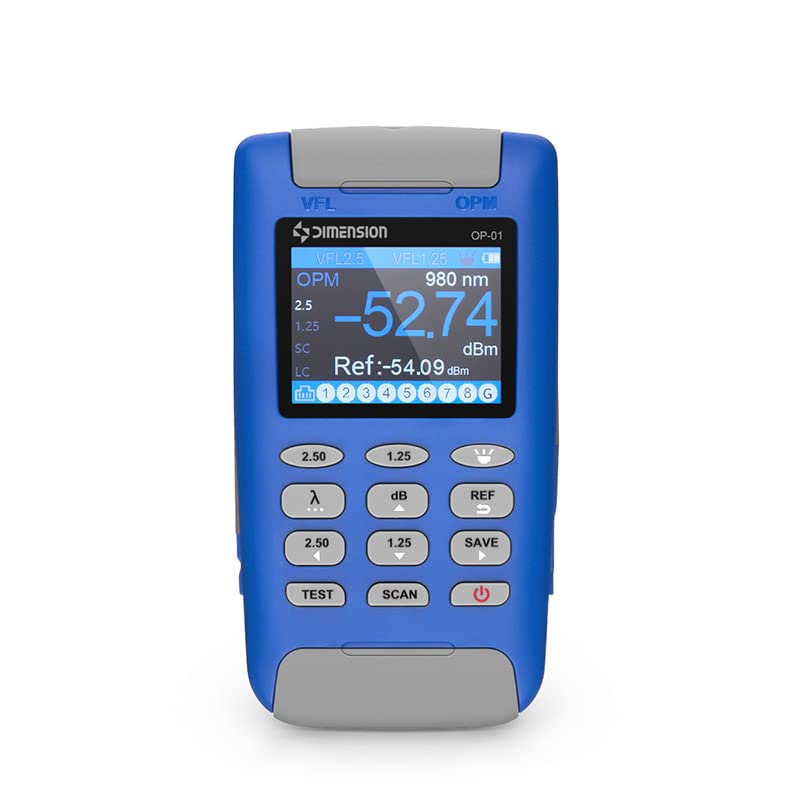
The FHOM-301 features a clear display and intuitive button layout for easy operation. Below is an image illustrating the main components of the device.
4.1. Key Components
- LCD Display: Shows measurement results, settings, and status indicators.
- Optical Ports: Located at the top for connecting fiber optic cables for OPM and VFL functions.
- RJ45 Port: For connecting Ethernet cables for sequence testing.
- VFL Button: Activates the Visual Fault Locator.
- OPM Button: Activates the Optical Power Meter.
- Wavelength Selection Buttons (2.50, 1.25): Used to select specific wavelengths for OPM measurements.
- dB/REF Button: Toggles between absolute (dBm) and relative (dB) power measurements, and sets reference values.
- SAVE Button: Saves current measurement data.
- TEST Button: Initiates RJ45 cable sequence test.
- SCAN Button: Used in conjunction with RJ45 testing or other scanning functions.
- Power Button: Turns the device on or off.
5. Setup
5.1. Battery Installation and Charging
The FHOM-301 is powered by an internal rechargeable battery. Before first use, ensure the device is fully charged.
- Connect the provided USB charging cable to the device's charging port.
- Connect the other end of the USB cable to a compatible USB power adapter (not included) or a computer's USB port.
- The charging indicator on the device will illuminate during charging and change color or turn off when fully charged.
5.2. Powering On/Off
- To power on: Press and hold the Power button until the display illuminates.
- To power off: Press and hold the Power button until the display turns off.
6. Operating Instructions
6.1. Optical Power Meter (OPM) Function
The OPM measures the absolute or relative optical power in fiber optic cables.
- Power on the device.
- Press the OPM button to enter OPM mode. The display will show 'OPM' and a default wavelength.
- Connect the fiber optic cable to be tested to the OPM input port.
- Use the Wavelength Selection buttons (e.g., 2.50, 1.25) to select the appropriate wavelength for your measurement (e.g., 850nm, 1300nm, 1310nm, 1490nm, 1550nm, 1625nm). The display will update with the selected wavelength.
- The optical power measurement will be displayed in dBm (absolute power).
- To measure relative power (dB loss), first establish a reference: connect a known good fiber and light source, then press the dB/REF button to set the current reading as the reference (0 dB). Subsequent measurements will show the loss relative to this reference. Press dB/REF again to switch back to absolute power.
- Press the SAVE button to store the current measurement.
6.2. Visual Fault Locator (VFL) Function
The VFL emits a visible red laser light into a fiber optic cable to locate breaks, bends, or poor connections.
- Power on the device.
- Connect the fiber optic cable to be tested to the VFL output port.
- Press the VFL button to activate the red laser.
- Observe the fiber along its path. A visible red glow or light leakage indicates a fault location.
- Press the VFL button again to turn off the laser.
- Caution: Never look directly into the VFL output or the end of a fiber connected to it.
6.3. RJ45 Cable Sequence Test Function
This function verifies the wiring sequence of RJ45 Ethernet cables.
- Power on the device.
- Connect one end of the RJ45 cable to the RJ45 port on the FHOM-301.
- Connect the other end of the RJ45 cable to a compatible remote unit (if applicable, or loopback connector).
- Press the TEST button to initiate the cable sequence test.
- The display will show the wiring sequence for each pin (1-8) and indicate any open circuits, shorts, or miswires.
- Press the SCAN button to cycle through different test modes or re-scan if available.
7. Maintenance
7.1. Cleaning
- Device Exterior: Use a soft, dry cloth to clean the exterior of the device. Do not use abrasive cleaners or solvents.
- Optical Ports: Keep optical ports clean. Use specialized fiber optic cleaning tools (e.g., lint-free wipes, cleaning sticks, or compressed air) to remove dust and debris. Contaminated ports can lead to inaccurate measurements and damage.
7.2. Storage
- Store the device in its protective carrying case when not in use.
- Store in a cool, dry place, away from direct sunlight and extreme temperatures.
- If storing for an extended period, ensure the battery is partially charged (around 50%) and recharge it every few months to maintain battery health.
8. Troubleshooting
| Problem | Possible Cause | Solution |
|---|---|---|
| Device does not power on. | Low battery or faulty battery. | Charge the device fully. If the problem persists, contact support. |
| Inaccurate OPM readings. | Dirty optical port or incorrect wavelength setting. | Clean the optical port. Ensure the correct wavelength is selected for the measurement. |
| VFL laser is weak or not visible. | Dirty VFL port or damaged fiber. | Clean the VFL output port. Check the fiber for severe bends or breaks. |
| RJ45 test fails or shows errors. | Faulty RJ45 cable or improper connection. | Ensure the RJ45 cable is properly seated. Test with a known good cable. |
| Display is blank or frozen. | Software glitch or low battery. | Try restarting the device. Charge the battery. If problem persists, contact support. |
9. Specifications
| Feature | Detail |
|---|---|
| Model | FHOM-301 |
| Measurement Type | Multimeter (Optical Power, VFL, RJ45) |
| Power Source | Battery Powered |
| Manufacturer | tecmac |
| ASIN | B0C4FG5VMV |
| Manufacturer Reference | FS160782XX |
| Date First Available | 5 May 2023 |
10. Warranty and Support
For warranty information, technical support, or any product-related inquiries, please contact your point of purchase or the manufacturer directly. Keep your purchase receipt as proof of purchase for warranty claims.
