
1. Introduction
The Chaoos AS8800C is a portable combustible gas detector designed to accurately and reliably detect the presence of various combustible gases. This device is equipped with a highly sensitive semiconductor sensor and a flexible gooseneck probe, making it suitable for locating gas leaks in diverse environments. It provides real-time gas concentration readings and features audible and visual alarms to alert users to potential hazards. This manual provides essential information for the safe and effective use of your gas detector.

Figure 1: Chaoos AS8800C Combustible Gas Detector
2. Safety Information
Please read and understand all safety instructions before operating the device. Failure to follow these instructions may result in serious injury or property damage.
- Do not use the device in environments with extremely high gas concentrations, as this may pose an explosion risk.
- Ensure proper ventilation when investigating gas leaks.
- Do not attempt to repair or modify the device. Refer all servicing to qualified personnel.
- Keep the device away from water and moisture to prevent electrical shock or damage.
- Replace batteries promptly when the low battery indicator appears to ensure accurate readings.
- This device is a detection tool and should not replace professional gas leak inspection services. Always contact your gas provider or a qualified technician if a significant gas leak is suspected.
3. Product Overview
The Chaoos AS8800C features a robust design with an intuitive interface for ease of use. Key components include a large LCD display, a flexible gooseneck probe for reaching confined spaces, and multiple control buttons for various functions.

Figure 2: Labeled components of the AS8800C Gas Detector
Key Features:
- 2.7" LCD Digital Backlit Display: Provides clear readings even in low-light conditions.
- Combustible Gas Detection: Monitors various combustible gases.
- Temperature Measurement: Displays ambient temperature in °C or °F.
- %LEL/PPM Switching: Allows selection of measurement units.
- °C/°F Switching: Toggles temperature units.
- High/Low Alarm: Customizable alarm thresholds for different gas concentrations.
- Auto Shutdown: Automatically powers off after 10 minutes of inactivity to conserve battery.
- Customized Alarm Value: User-definable alarm levels.
- Sound Alarm: Audible alerts for detected gas.
- Light Alarm: Visual alerts with indicator lights.
4. Setup
Battery Installation:
The Chaoos AS8800C requires 3 AA batteries (included). To install or replace batteries:
- Locate the battery compartment cover on the back of the device.
- Slide the cover open.
- Insert 3 AA batteries, ensuring correct polarity (+/-).
- Close the battery compartment cover securely.
5. Operating Instructions
Power On/Off:
Press and hold the Power Button () for approximately 2 seconds to turn the device ON or OFF.
Initial Calibration:
Upon powering on, the device will undergo a 60-second self-calibration process. During this time, ensure the sensor is in fresh air, free from any gas sources, to ensure accurate baseline readings.
Gas Detection:
Extend the flexible gooseneck probe and position the sensor head near the suspected area of a gas leak. The device will display the gas concentration in real-time on the LCD screen. Move the probe slowly to pinpoint the source of the leak.

Figure 3: Using the flexible probe for gas detection
Alarm Settings:
The device features customizable high and low concentration alarms. When the gas concentration exceeds the set alarm value, the buzzer will sound, and indicator lights will flash (yellow for low alarm, red for high alarm).
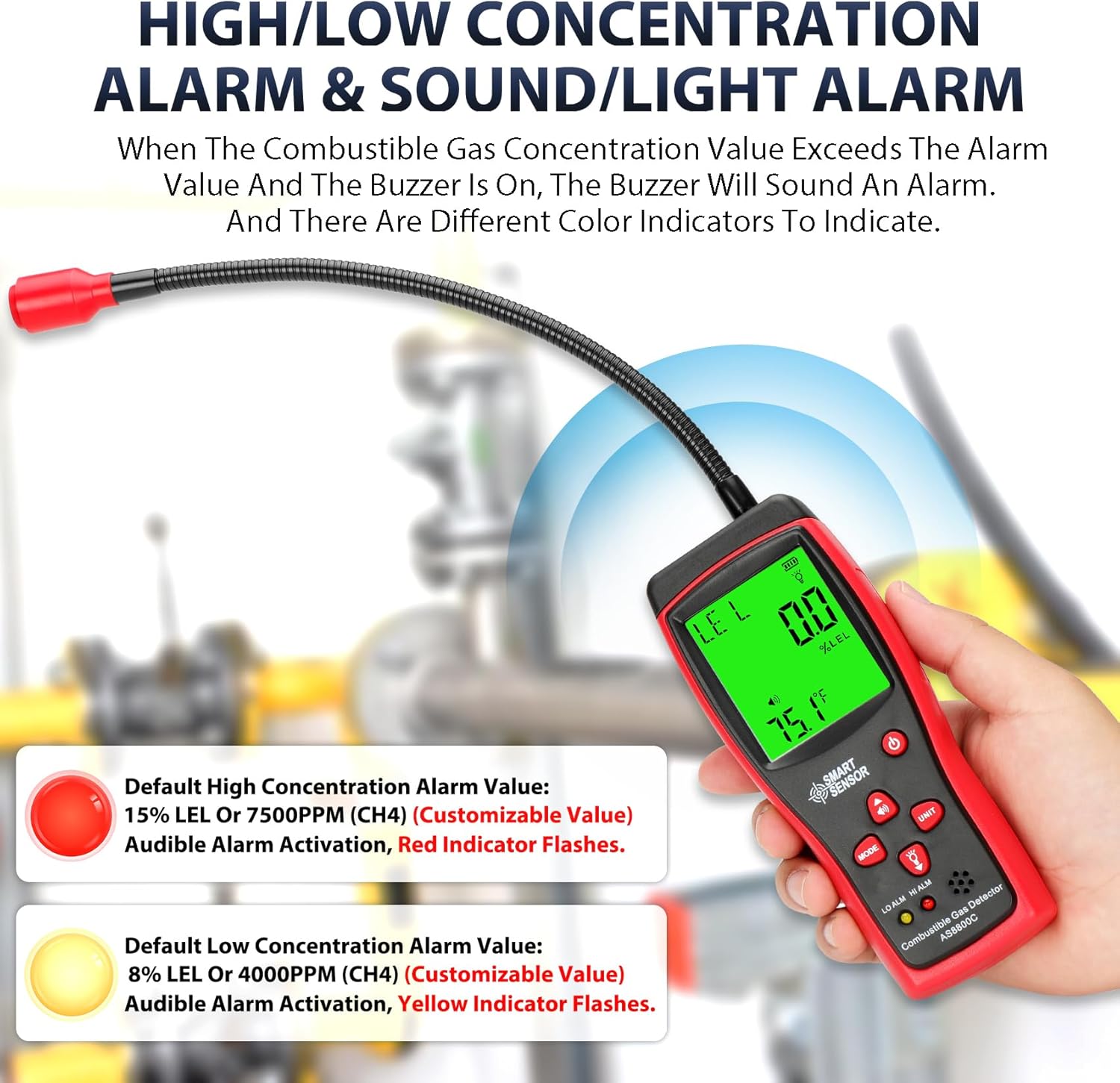
Figure 4: High/Low Concentration Alarm Indicators
To set custom alarm values:
- In measurement mode, press and hold the MODE Button to enter the custom alarm value setting.
- The screen will display "AL1" for the low concentration alarm. Use the UNIT Button to switch the value to be set, and the Up/Down Arrows to adjust the value.
- Press the MODE Button again to switch to "AL2" for the high concentration alarm and repeat the adjustment.
- Press the MODE Button to finish setting and return to measurement mode.
Unit Conversion:
Press the UNIT Button to switch between %LEL and PPM for gas concentration readings. Press the Up/Down Arrows to switch between Celsius (°C) and Fahrenheit (°F) for temperature readings.

Figure 5: LCD display showing measurement units
Automatic Shutdown:
The device has an automatic shutdown function that activates after 10 minutes of no key operation to save battery life. This feature can be toggled ON or OFF. To adjust this setting, press and hold the MODE Button in measurement mode to enter the automatic shutdown setting mode. The screen will display "APO" and flash "ON" or "OFF". Use the Up/Down Arrows to toggle the function and press the MODE Button to confirm and exit.
Types of Gases Detected:
The Chaoos AS8800C is capable of detecting a wide range of combustible gases, including but not limited to:
- Methane
- Ethane
- Propane
- Butane
- Natural Gas (LNG)
- Liquefied Petroleum Gas (LPG)
- Alcohol
- Gasoline
- Kerosene
- Turpentine

Figure 6: Detection of various combustible gases
6. Maintenance
- Cleaning: Wipe the device with a soft, dry cloth. Do not use abrasive cleaners or solvents.
- Battery Care: Remove batteries if the device will not be used for an extended period to prevent leakage and damage.
- Storage: Store the device in a cool, dry place, away from direct sunlight and extreme temperatures.
7. Troubleshooting
| Problem | Possible Cause | Solution |
|---|---|---|
| Device does not power on. | Low or dead batteries; incorrect battery installation. | Replace batteries with new AA batteries; ensure correct polarity. |
| Inaccurate readings or erratic behavior. | Sensor not calibrated in fresh air; sensor contamination. | Perform calibration in a clean, fresh air environment; ensure sensor is clean. |
| Alarm sounds continuously without gas presence. | High humidity; sensor malfunction. | Move to a drier environment; if problem persists, contact support. |
| Automatic shutdown activates too soon/not at all. | Auto-shutdown setting is incorrect. | Adjust the automatic shutdown setting as described in Section 5. |
8. Specifications
| Feature | Specification |
|---|---|
| Brand | Chaoos |
| Model Number | AS8800C |
| Power Source | 3 AA batteries (included) |
| Alarm Type | Visual, Audible |
| Operating Humidity | 95 percent |
| Upper Temperature Rating | 50 Degrees Celsius |
| Sensor Type | Gas Sensitive Semi Conductor |
| Item Weight | 13.4 ounces |
| Package Dimensions | 9.69 x 3.9 x 2.13 inches |
9. Warranty and Support
The Chaoos AS8800C Combustible Gas Detector comes with a manufacturer's warranty. For specific warranty details, product support, or technical assistance, please refer to the warranty card included with your product or contact Chaoos customer service directly. Keep your purchase receipt as proof of purchase for warranty claims.