
PDDAXLQUE DX-BT26
PDDAXLQUE DX-BT26 BLE 5.0 Multi-Connection Bluetooth Module User Manual
Model: DX-BT26
1. Introduction
The PDDAXLQUE DX-BT26 Bluetooth module is designed for multi-connection applications, utilizing the DIALOG 14585 chip and adhering to the Bluetooth BLE 5.0 specification. This module facilitates simultaneous connection and data transmission with up to 8 host devices, supporting dual UART communication. It integrates AT command support for flexible parameter configuration, including serial port baud rate and device name. The DX-BT26 offers low power consumption and high reception sensitivity, making it suitable for various embedded projects, including Arduino.

Figure 1: Front view of the DX-BT26 Bluetooth Module, showing the integrated shield and branding.
2. Key Features
- Multi-link Capability: Connects to up to 8 mobile phones simultaneously.
- Chipset: Renesas DA14585, compliant with BLE 5.0.
- Communication Distance: Up to 85 meters.
- Dual Channel UART: Supports two-way serial communication.
- AT Command Support: Extensive AT command set for configuration.
- Transmission Rate: Up to 11 KB/s.
- Low Power Consumption: As low as 2.30 µA.
- Antenna Options: Optional on-board or external antenna.
- Module Dimensions: 26.6(L) x 12.8(W) x 2.3(H) mm.
- Transmit Power: -20 ~ +0 dBm.
- Operating Temperature: -40°C to +85°C.
- Certifications: BQB, CE, FCC certified.
- Compatibility: Supports PC, iOS, and Android transmission.

Figure 2: Detailed list of key features and physical dimensions of the DX-BT26 module.
3. Specifications
| Parameter | Value |
|---|---|
| Module Model | DX-BT26-A |
| Chip Model | DA14585 |
| Bluetooth Specification | BLE 5.0 |
| Operating Voltage | 3.3V / 5V |
| MTU Value | 244 bytes |
| Operating Temperature | -40°C to +85°C |
| Default Serial Port Parameters | 9600bps / 8 / n / 1 (Baud rate / Data bit / No parity / Stop bit) |
| Hardware Interface | Bluetooth |
| Compatible Devices | Android, iPhone |
| Data Link Protocol | Bluetooth |
| Data Transfer Rate | 9600 Megabits Per Second |
4. Pin Definitions
Understanding the pin definitions is crucial for proper integration and operation of the DX-BT26 module. The module features various pins for power, UART communication, control, and status indication.
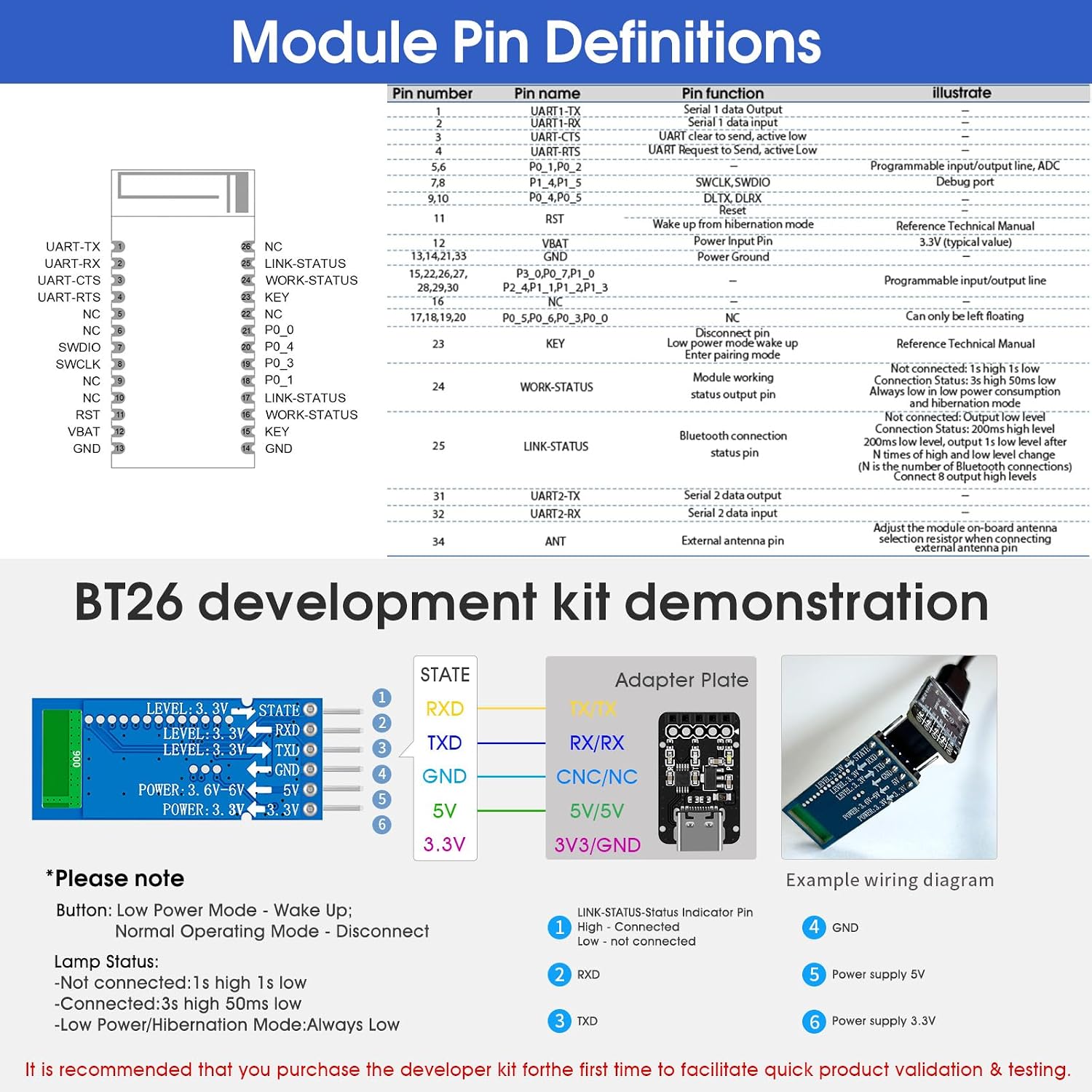
Figure 3: Detailed pin definitions for the DX-BT26 module, including pin number, function, and an illustrative diagram. An example wiring diagram for a development kit is also shown.
5. Setup and Connection
5.1 Dual UART Communication
The DX-BT26-A module provides two sets of UART signal pins (Serial Port 1 and Serial Port 2). Both sets can transmit data between the module and another digital device. Additionally, the module includes UART_CTS and UART_RTS signal pins for RS232 hardware flow control on both UART interfaces. These pins are active at low levels, allowing data transmission when low and stopping transmission when high.
5.2 Multi-Connection Diagram
The DX-BT26 module can establish connections with multiple mobile phones simultaneously, acting as a central hub for data exchange.

Figure 4: Diagram illustrating the DX-BT26 module's capability to connect to an MCU and simultaneously communicate with up to 8 mobile phones.
5.3 Development Kit Connection
For initial verification and accelerated product development, connecting the DX-BT26 module to a development kit is recommended. Ensure correct pin connections for power, data transmission, and control signals.
Figure 5: Example wiring diagram for connecting the DX-BT26 module to a development kit, showing power and UART signal connections.
6. Operation
6.1 AT Command Set
The DX-BT26 module supports a comprehensive set of AT commands for configuration and control. These commands allow users to modify parameters such as serial port baud rate, device name, and other Bluetooth settings.

Figure 6: A table listing common AT commands and their descriptions for configuring the DX-BT26 module.
6.2 Application Operation
The DX-BT26 module can communicate with phones, computers, and other devices through direct serial communication. The DX-SMART application is available for searching connections, modifying parameters, searching BLE devices, and sending/receiving data.
- Phone APP Communication: The phone application communicates with the module via Bluetooth.
- Computer Software Communication: Computer software can communicate with the module via Bluetooth.
- Device-to-Device Communication: Other devices can communicate with each other via the module's Bluetooth interface.

Figure 7: Screenshots of the DX-SMART application demonstrating function selection, parameter settings, Bluetooth device search, and transparent data transmission.
Note:
- The DX-BT26 Bluetooth module is BLE and cannot be directly searched and connected through the built-in Bluetooth of a mobile phone or computer. To connect, you need to use a host module or CP11 adapter and use serial software to communicate with the module.
- Free Android and iOS SDKs are available to support customization and development.
7. OTA (Over The Air) Upgrade
The DX-BT26-A Bluetooth module supports Over The Air (OTA) upgrades, allowing for quick updates to the Bluetooth program. This feature ensures the module can be easily updated with new functionalities or bug fixes.
7.1 Requirements for OTA Upgrade:
- An Android phone.
- The program files to be upgraded.
- The OTA upgrade software, such as "SUOTA-3.190.18.apk".
- The DX-BT26 module to be upgraded.
8. Technical Support and Documentation
Comprehensive technical support and documentation are available to assist users with the DX-BT26 module. This includes:
- Technical documentation
- AT command sets
- Module footprints
- Reference design schematics
- Development and test tools
For detailed information, please refer to the product guide and documentation links provided with the module. If you encounter any problems, please contact our service support team for assistance.
Ask a question about this manual
Ask about setup, troubleshooting, compatibility, parts, safety, or missing instructions. Manuals+ will review the question and use this page’s manual context to help answer it.