
Product Overview
The Cooler Depot Commercial Ice Maker with Dispenser, Model HD-130B, is an NSF Certified unit designed for commercial establishments requiring a high volume of ice production. This robust machine is capable of producing up to 350 lbs of ice per day and features a convenient built-in dispenser.

Figure 1: Front view of the Cooler Depot Commercial Ice Maker with Dispenser.
Key Features:
- Fast Production Speed: Produces up to 350 lbs of ice per 24 hours, ensuring a steady supply for high-demand environments.
- Integrated Ice Dispenser: Features a convenient dispenser for easy access to ice, suitable for various applications including cocktails and ice baths.
- Cost-Efficient Design: Utilizes a reliable and efficient cooling system with a one-touch concept for operational savings.
- Durable Construction: Built with durable stainless steel exterior paneling and a stainless steel evaporator for long-lasting commercial use.
- NSF Certified: Ensures compliance with public health and safety standards.
Specifications
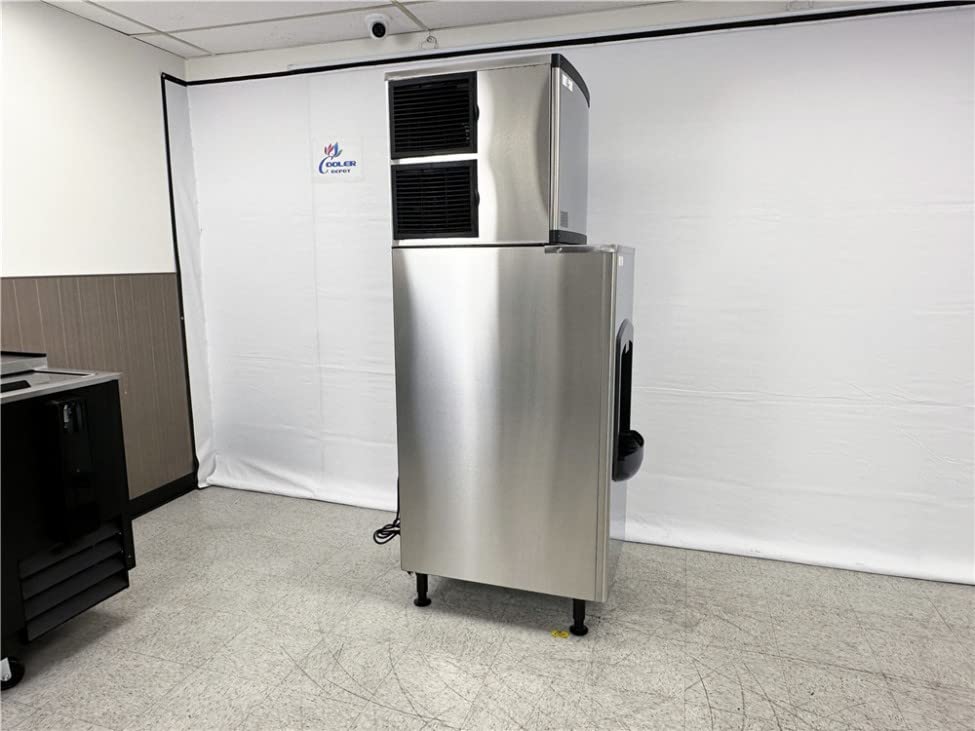
Figure 2: Product specification labels, including details for Model HD-130B.
| Attribute | Value |
|---|---|
| Model | HD-130B |
| Product Dimensions (D x W x H) | 31" x 23" x 76" |
| Capacity | 350 Pounds (per day) |
| Rated Voltage | 115V/60Hz |
| Rated Current | 2A |
| Rated Power | 210W |
| High Side Design Pressure | 295 PSIG |
| Low Side Design Pressure | 135 PSIG |
| Max. Water Pressure | 80 PSIG |
| Min. Water Pressure | 19 PSIG |
| Country of Origin | China |
Setup & Installation
Proper setup is crucial for the optimal performance and longevity of your ice maker. Please follow these instructions carefully.
Video 1: Official product demonstration video for the Cooler Depot Commercial Ice Maker HD-130B, showcasing its features and dimensions.
1. Unpacking and Placement:
- Carefully remove all packaging materials.
- Place the ice maker on a stable, level surface. The unit is equipped with adjustable legs for leveling.
- Ensure adequate clearance around the unit for proper ventilation, especially around the air intake and exhaust vents.
2. Electrical Connection:
- The unit operates on 115V/60Hz power.
- Locate the standard US plug at the back of the ice maker.
- Plug the unit into a dedicated, grounded electrical outlet. Do not use extension cords or adapters.

Figure 3: Rear view of the ice maker, highlighting the electrical plug and water connections.
3. Water Connections:
- Connect the ice maker to a potable water supply. Ensure water pressure is between 19 PSIG and 80 PSIG.
- Locate the water inlet and outlet connections at the back of the unit.
- Install a water filter (if not already integrated) to ensure clean water for ice production and to protect the machine.
- Ensure all connections are secure to prevent leaks.
Operating Instructions
1. Control Panel:
The control panel, located on the side of the ice maker head, allows you to manage various functions of the unit.

Figure 4: Digital control panel for the ice maker.
- Power On/Off: Use the designated button to turn the unit on or off.
- Clean Cycle: Initiate a cleaning cycle as needed to maintain hygiene.
- Ice Thickness: Adjust the thickness of the ice cubes using the control panel settings.
- Indicators: Monitor various indicators for operational status and potential faults (e.g., Ice Harvest Overtime, High System Temp Fault, Water Shortage Fault).
2. Ice Dispensing:
The integrated dispenser provides convenient access to ice.

Figure 5: Close-up of the ice dispenser.
- Place your cup or container under the ice chute.
- Press the "PUSH FOR ICE" lever to dispense ice.
- Release the lever to stop dispensing.
Maintenance
Regular maintenance ensures the efficiency and longevity of your ice maker.
1. Cleaning:
- Perform regular cleaning cycles using the control panel's "CLEAN" function.
- Clean the exterior stainless steel surfaces with a mild detergent and soft cloth. Avoid abrasive cleaners.
- Periodically clean the ice storage bin and dispenser chute to prevent mold and mildew buildup.
2. Filter Maintenance:
- Check and clean the air filters located on the side of the ice maker head regularly to ensure proper airflow and cooling efficiency.
- Replace water filters as recommended by the manufacturer to maintain ice quality and prevent mineral buildup in the machine.
Troubleshooting
This section provides solutions to common issues you might encounter with your ice maker. For problems not listed here, please contact customer support.
Common Issues:
- No Ice Production: Check power supply, water supply, and ensure the unit is not in a cleaning cycle. Verify water pressure.
- Low Ice Production: Ensure air filters are clean and not obstructed. Check water filter for clogs. Verify ambient temperature is within operating limits.
- Unusual Noises: Inspect for loose components or obstructions. If persistent, contact service.
- Error Codes: Refer to the control panel indicators (Figure 4) for specific fault codes and consult the full service manual or contact support for detailed resolution steps.
Warranty & Support
Cooler Depot stands behind the quality of its products.
Warranty Information:
- Parts Warranty: 3 years
- Compressor Warranty: 6 years
- Labor Warranty: 1 month (within 1 month of purchase)
- Returns: Free returns for functional issues only. Unit must be bound onto a pallet and covered on 4 sides by cardboard.
Customer Support:
For technical assistance, warranty claims, or any other inquiries, please visit the official Cooler Depot USA website or contact their customer service department. Contact details can typically be found on the product packaging or the manufacturer's website.