1. Product Overview
The Ekakashop Strap Replacement Tool is designed for efficient and precise clutch and drive belt removal and adjustment. Constructed from durable aluminum alloy with anti-rust treatment, this tool offers high hardness, wear resistance, and corrosion resistance, ensuring longevity and reliable performance.
Key Features:
- Durable Material: Made from aluminum alloy with anti-rust treatment for high hardness, wear resistance, and corrosion resistance.
- Perfect Fit: Engineered to meet strict quality control standards for a precise fit without modifications.
- Easy to Use: Simple operation for quick and effective belt changes.
- Wide Compatibility: Compatible with Can-Am Maverick X3/max/rs/ds/turbo/r models from 2017-2020, specifically for 72-inch/64-inch roadway widths.
Package Contents:
- 1 x Strap Replacement Tool
- 1 x Tray
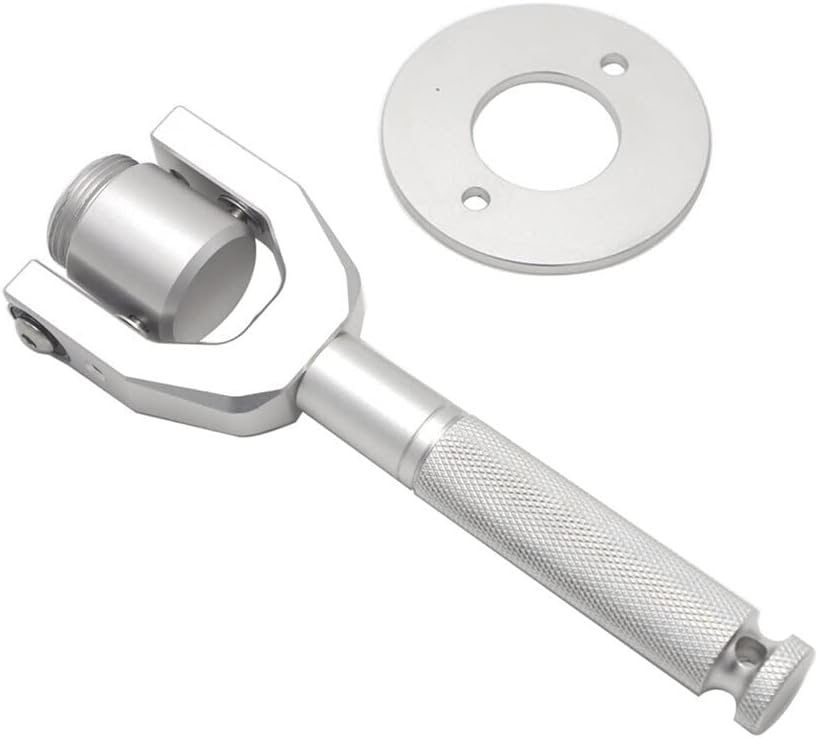
Figure 1: The Ekakashop Strap Replacement Tool and its accompanying tray.
2. Setup and Installation
Before beginning the belt replacement process, ensure your vehicle is safely parked and turned off. It is recommended to consult your vehicle's service manual for specific instructions regarding clutch and belt access.
Compatibility Check:
This tool is specifically designed for Can-Am Maverick X3/max/rs/ds/turbo/r models from 2017, 2018, 2019, and 2020, compatible with 72-inch and 64-inch roadway widths. Verify your vehicle's specifications before use.

Figure 2: Detailed dimensions of the strap replacement tool for compatibility verification.
3. Operating Instructions
Follow these steps to effectively use the strap replacement tool for clutch and belt removal:
- Prepare the Clutch: Ensure the secondary clutch is accessible and clean from debris.
- Position the Tray: Place the provided tray securely onto the secondary clutch. The tray is designed to guide and support the tool.
- Insert and Screw the Tool: Insert the strap replacement tool into the designated opening on the clutch. Begin to screw the tool in until you hear or feel a distinct click. This indicates that the tool is properly engaged and locked into position.
- Loosen the Strap: Once the tool is locked, gently pull the handle of the tool. This action will cause the strap (drive belt) to loosen, allowing for its removal.
- Remove the Strap: Carefully remove the loosened strap from the clutch system.
- Reverse for Installation: To install a new strap, reverse the process. Ensure the new strap is correctly seated before disengaging the tool.

Figure 3: The strap replacement tool correctly positioned and in use on a vehicle's secondary clutch.

Figure 4: A detailed view showing the tool engaging with the clutch mechanism.
4. Maintenance
To ensure the longevity and optimal performance of your Ekakashop Strap Replacement Tool, follow these maintenance guidelines:
- Cleaning: After each use, wipe down the tool with a clean, dry cloth to remove any dirt, grease, or debris.
- Storage: Store the tool in a dry environment to prevent moisture accumulation, which could lead to corrosion despite its anti-rust treatment.
- Inspection: Periodically inspect the tool for any signs of wear, damage, or deformation. Ensure all moving parts (if any) operate smoothly.
- Lubrication: While the tool is designed for durability, a light application of a suitable lubricant on threaded parts or pivot points (if applicable) can help maintain smooth operation over time.

Figure 5: Close-up view of the tool's head, highlighting its robust construction.
5. Troubleshooting
This section provides guidance for common issues you might encounter while using the strap replacement tool.
| Problem | Possible Cause | Solution |
|---|---|---|
| Tool does not engage or click into place. | Incorrect positioning on the clutch; debris obstructing engagement; tool not fully screwed in. | Ensure the tray is correctly seated and the tool is aligned with the clutch opening. Clean any debris from the clutch area. Screw the tool in firmly until it clicks. |
| Strap does not loosen sufficiently. | Tool not fully engaged; incorrect application of force; strap is stuck. | Verify the tool is fully locked. Apply steady, firm pressure when pulling the handle. Check for any obstructions preventing the strap from loosening. |
| Tool feels stiff or difficult to operate. | Lack of lubrication; minor corrosion; internal mechanism issues. | Apply a light lubricant to threaded parts. Clean the tool thoroughly. If issues persist, contact customer support. |
If you encounter issues not listed here or if the suggested solutions do not resolve the problem, please contact Ekakashop customer support for further assistance.
6. Specifications
| Feature | Detail |
|---|---|
| Brand | Ekakashop |
| Model Number | IT-YSHK05436S |
| Material | Aluminum Alloy |
| Color | Silver Tone (also available in Black) |
| Weight | Approximately 800g / 28.2oz |
| Compatibility | Can-Am Maverick X3/max/rs/ds/turbo/r (2017-2020) for 72"/64" roadway widths |
| Package Includes | 1 x Strap Replacement Tool, 1 x Tray |
7. Warranty and Support
For information regarding warranty coverage, returns, or technical support for your Ekakashop Strap Replacement Tool, please refer to the purchase documentation or contact Ekakashop customer service directly. Contact details can typically be found on the product packaging or the retailer's website where the product was purchased.
For general inquiries or assistance, please visit the official Ekakashop website or contact their support team.