
Introduction
Thank you for choosing the OQIMAX White Noise Machine. This device is designed to create a peaceful and relaxing environment, aiding sleep for babies, children, and adults. It features a variety of soothing sounds, a night light, timer functions, and a portable design. Please read this manual carefully before use to ensure proper operation and maintenance.
Safety Information
- Keep the device away from water and moisture.
- Do not disassemble or attempt to repair the device yourself. Contact customer support if issues arise.
- Use only the provided USB cable for charging.
- Keep out of reach of small children to prevent choking hazards from small parts.
- Avoid extreme temperatures and direct sunlight.
Package Contents
- OQIMAX White Noise Machine (Model BH34-EU)
- USB Type-C Charging Cable
- User Manual
Product Features
- 10 Soothing Sounds: Includes white noise, nature sounds (stream, bird chirp, cicada chirp, sea wave), and lullabies.
- Wireless Speaker Function: Connect your phone via Bluetooth to play your preferred audio.
- 7-Color Night Light: Adjustable brightness with 7 color options and a breathing light function.
- Timer Function: Set auto-off timers for 15, 30, or 60 minutes.
- Memory Function: Automatically restores previous volume, sound, timer, and night light settings.
- Automatic Mode: Detects continuous noise for 10 seconds, then plays sound and turns off after 15 minutes of silence.
- USB Rechargeable & Portable: Built-in 1200mAh battery provides up to 20 hours of use. Compact and lightweight for travel.
Device Layout and Controls
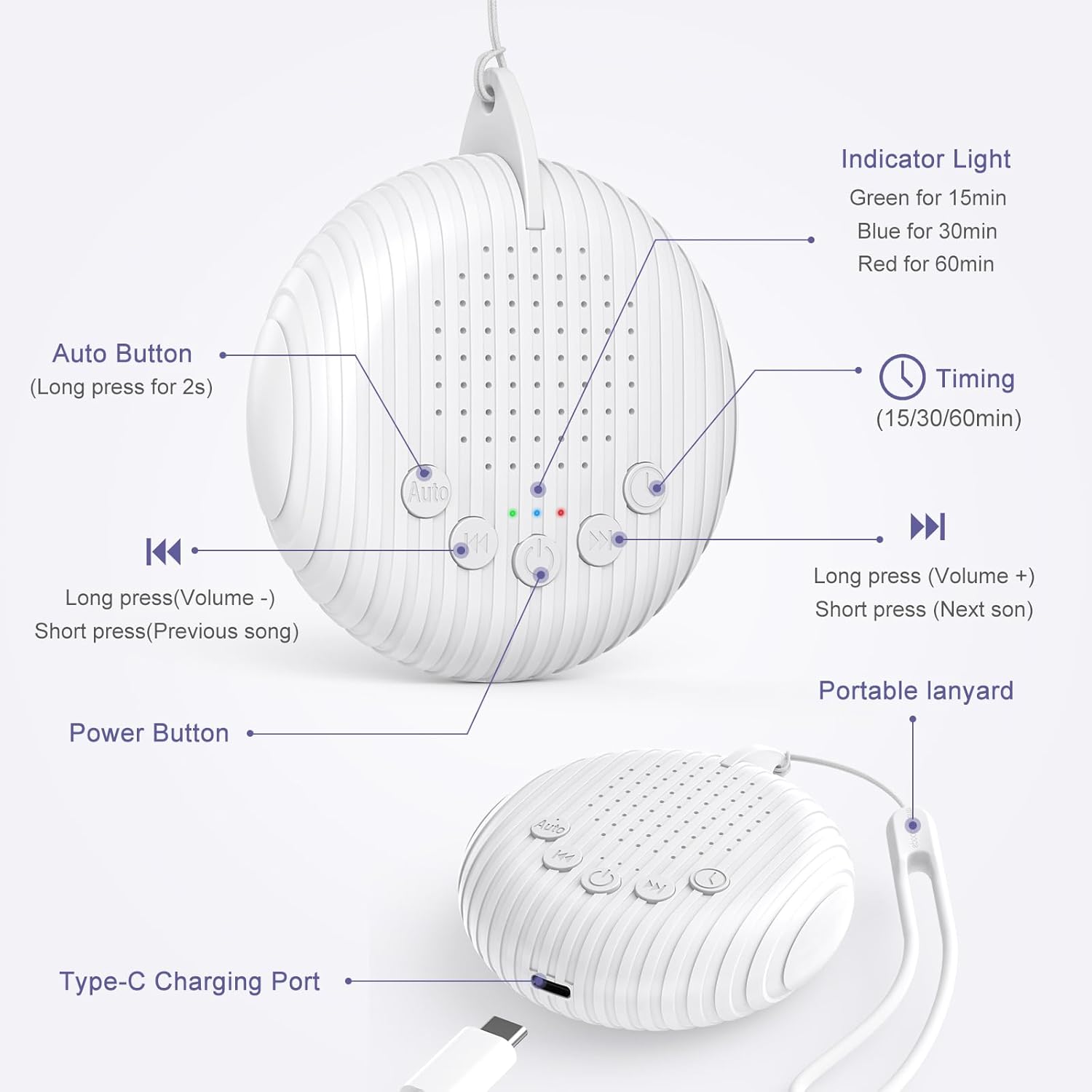
Image: Front and side view of the OQIMAX White Noise Machine, highlighting the Auto button, volume/track buttons, power button, indicator light, timing button, portable lanyard, and Type-C charging port.
- Power Button: Press to turn on/off.
- Auto Button: Long press for 2 seconds to activate Automatic Noise Detection Mode.
- Volume Down / Previous Track (K<): Long press to decrease volume. Short press to go to the previous sound track.
- Volume Up / Next Track (>K): Long press to increase volume. Short press to go to the next sound track.
- Timing Button: Press to cycle through timer options (15 min, 30 min, 60 min).
- Indicator Light: Green for 15 min timer, Blue for 30 min timer, Red for 60 min timer.
- Type-C Charging Port: For charging the device.
- Portable Lanyard: For easy carrying or hanging.
Setup
- Charging the Device: Before first use, fully charge the device using the provided USB Type-C cable. Connect the cable to the charging port on the device and to a USB power adapter (not included) or computer. A full charge takes approximately 2 hours and provides up to 20 hours of use.
- Placement: Place the white noise machine on a stable surface or use the portable lanyard to hang it securely near the user, ensuring the sound is clear and unobstructed.
Operating Instructions
1. Power On/Off
Press the Power Button once to turn the device on. Press it again to turn the device off.
2. Selecting Sounds

Image: A person sleeping peacefully with the white noise machine nearby, illustrating the 10 available soothing sounds: Stream, Bird Chirp, Clock, Heartbeat, Cicada Chirp, Sea Wave, White Noise, and Lullaby, categorized as 6 Nature Sounds, 3 Lullabies, and 1 White Noise.
After powering on, the device will play the last used sound (due to the memory function). Short press the Volume Down / Previous Track button (K<) to go to the previous sound. Short press the Volume Up / Next Track button (>K) to go to the next sound. The device offers 10 distinct soothing sounds, including white noise, various nature sounds, and lullabies.
3. Adjusting Volume

Image: A person exercising with the white noise machine, demonstrating the long press action on the volume buttons to increase or decrease the sound level.
To adjust the volume, long press the Volume Down / Previous Track button (K<) to decrease the volume, or long press the Volume Up / Next Track button (>K) to increase the volume.
4. Setting the Timer
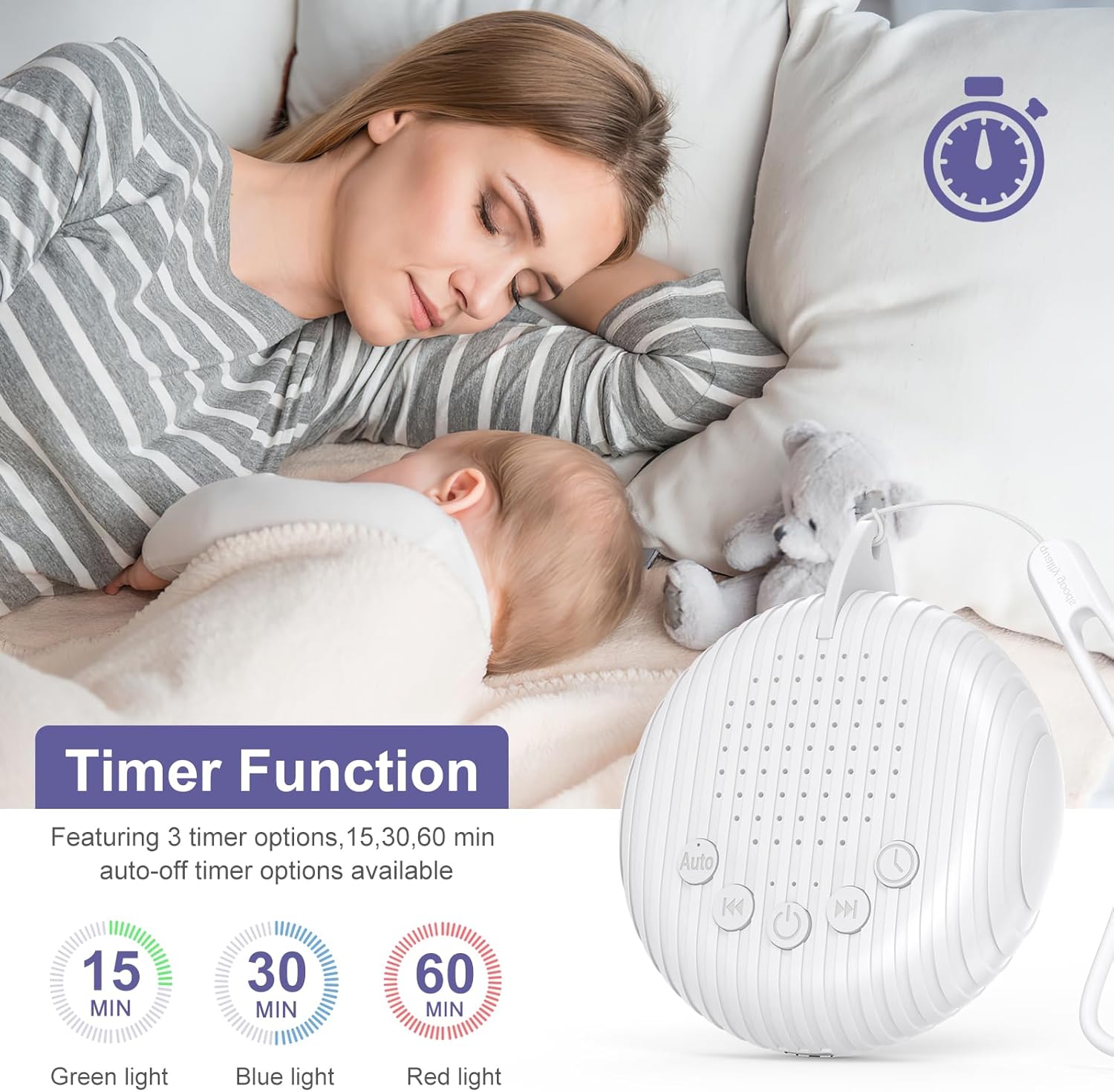
Image: A mother and baby sleeping, with an overlay showing the timer function and its 15, 30, and 60-minute auto-off options, indicated by green, blue, and red lights respectively.
Press the Timing Button to set an auto-off timer. Each press cycles through the available options: 15 minutes, 30 minutes, 60 minutes, or continuous play. The indicator light will change color to show the selected timer setting:
- Green light: 15-minute timer
- Blue light: 30-minute timer
- Red light: 60-minute timer
If no light is on, the device is set for continuous play.
5. Automatic Noise Detection Mode

Image: A crying baby and a smiling baby, demonstrating how the automatic mode detects noise, starts playing sound, and then turns off after 15 minutes of silence.
Long press the Auto Button for 2 seconds to activate this mode. In Automatic Mode, if the device detects 10 seconds of continuous noise (e.g., a baby crying), it will automatically start playing the selected sound. The device will then turn off automatically after 15 minutes if no further continuous noise is detected.
6. Wireless Speaker Function (Bluetooth)
The device can also function as a wireless speaker. To activate Bluetooth mode, ensure the device is powered on.
- Turn on the OQIMAX White Noise Machine.
- On your smartphone or other Bluetooth-enabled device, search for available Bluetooth devices.
- Select "OQIMAX" (or similar name) from the list to pair.
- Once paired, you can play your preferred music or audio through the machine's speaker.
Maintenance
- Cleaning: Wipe the device with a soft, dry cloth. Do not use liquid cleaners or abrasive materials.
- Storage: Store the device in a cool, dry place when not in use for extended periods.
- Battery Care: To prolong battery life, avoid fully discharging the battery frequently. Charge regularly.
Troubleshooting
| Problem | Possible Solution |
|---|---|
| Device does not turn on. | Ensure the device is charged. Connect to a power source using the USB-C cable and allow it to charge for at least 30 minutes before attempting to power on again. |
| No sound or low volume. | Check the volume level by long pressing the Volume Up button. Ensure the device is not muted. If using Bluetooth, check the volume on your connected device. |
| Bluetooth pairing fails. | Ensure the device is in pairing mode (usually indicated by a flashing light, though not specified). Turn off and on both the white noise machine and your Bluetooth device. Make sure the device is not already connected to another phone. |
| Automatic Mode not working. | Ensure the Auto Button has been long-pressed for 2 seconds to activate the mode. The device requires 10 seconds of continuous noise to trigger. |
| Timer function not setting correctly. | Press the Timing Button repeatedly to cycle through the 15, 30, and 60-minute options. Observe the indicator light color to confirm your selection. |
Specifications
- Model: BH34-EU
- Brand: OQIMAX
- Power Source: Battery Powered (1 Lithium-ion battery required)
- Battery Capacity: 1200 mAh
- Usage Time: Up to 20 hours
- Charging Time: Approximately 2 hours
- Material: Acrylonitrile Butadiene Styrene (ABS)
- Dimensions (approx.): 8 cm (width) x 9.3 cm (height) x 2 cm (depth)
- Weight: 72.0 Grams
- Connector Type: USB Type-C
- Sound Tracks: 10 (White Noise, Nature Sounds, Lullabies)
- Timer Options: 15, 30, 60 minutes
- Night Light: 7 colors, 6 adjustable brightness levels, breathing light function
Warranty and Support
OQIMAX products come with a standard manufacturer's warranty. For specific warranty details, technical support, or any questions regarding your device, please contact OQIMAX customer service through the retailer where you purchased the product or visit the official OQIMAX website (if available).