Product Overview
The HZD Portable Heating Pad is a cordless device designed to provide soothing warmth and massage for comfort. It features rapid heating, adjustable heat levels, and multiple massage modes, making it suitable for various situations.
- Rapid Heating: Achieves desired temperature in approximately 5 seconds.
- Customizable Comfort: Offers 3 heat levels and 3 vibration massage modes.
- Cordless & Portable: Equipped with an adjustable elastic belt and Type-C charging for use anywhere.
- Safety Features: Includes an intelligent 30-minute auto-shutoff timer.
- Comfortable Design: Features a soft velvet fabric cover for optimal skin contact.

Image: The HZD Portable Heating Pad, showcasing its compact design, adjustable elastic belt, and soft flocking material for comfortable wear. Dimensions are indicated on the image.
Setup Instructions
1. Charging the Device
Before first use, fully charge the heating pad. Connect the provided Type-C charging cable to the device and a suitable USB power source. The battery indicator will show charging status.

Image: An illustration detailing the 2000mAh battery, 1.5 hours charging time, 3 hours battery life, 30-minute automatic shutdown feature, and Type-C charging port.
A full charge typically takes approximately 1.5 hours and provides 2-5 hours of use, depending on the selected heat and massage settings.
2. Adjusting the Belt
The heating pad comes with an adjustable elastic belt. Adjust the belt to fit comfortably around your waist or desired area. The belt can stretch up to 55 inches to accommodate various waist sizes. Secure the buckle firmly.

Image: A visual guide demonstrating how to long press buttons to start/stop vibration and heating, and short press to switch modes. It also shows how to adjust the belt.
Operating Instructions
1. Power On/Off
To turn on the device, long press the power button (usually the left button with a power symbol) for 3 seconds. To turn off, long press the same button again.
Video: Demonstrates how to power on/off the HZD Portable Heating Pad and switch between heating and massage modes. This video is provided by the seller.
2. Selecting Heat Levels
After powering on, short press the temperature button (usually the right button with a thermometer symbol) to cycle through the 3 heat levels:
- Level 1: 113°F (45°C) - Daily warmth
- Level 2: 131°F (55°C) - Warm stomach
- Level 3: 149°F (65°C) - Menstrual care
Note: Due to efficient heating, it is recommended to wear a layer of clothing between the pad and your skin, especially for higher heat settings.
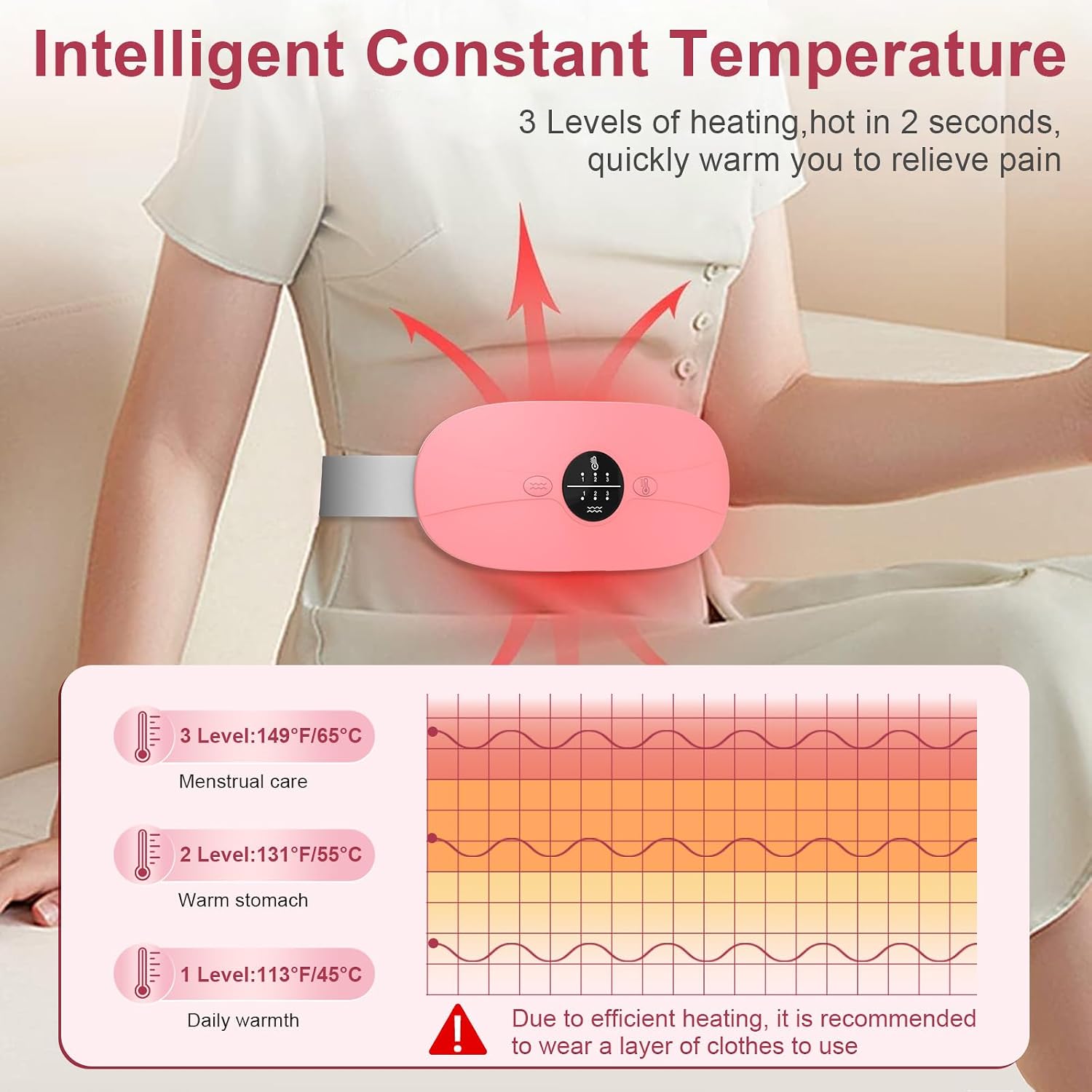
Image: An illustration showing the three intelligent constant temperature levels and their recommended uses, along with a warning to wear a layer of clothes.
3. Selecting Massage Modes
Short press the vibration button (usually the left button with wave symbols) to switch between the 3 vibration massage modes. You can use heating and massage functions simultaneously for a personalized comfort experience.
- Mode 1: Gentle, continuous vibration.
- Mode 2: Intermittent, rhythmic vibration.
- Mode 3: Stronger, pulsating vibration.
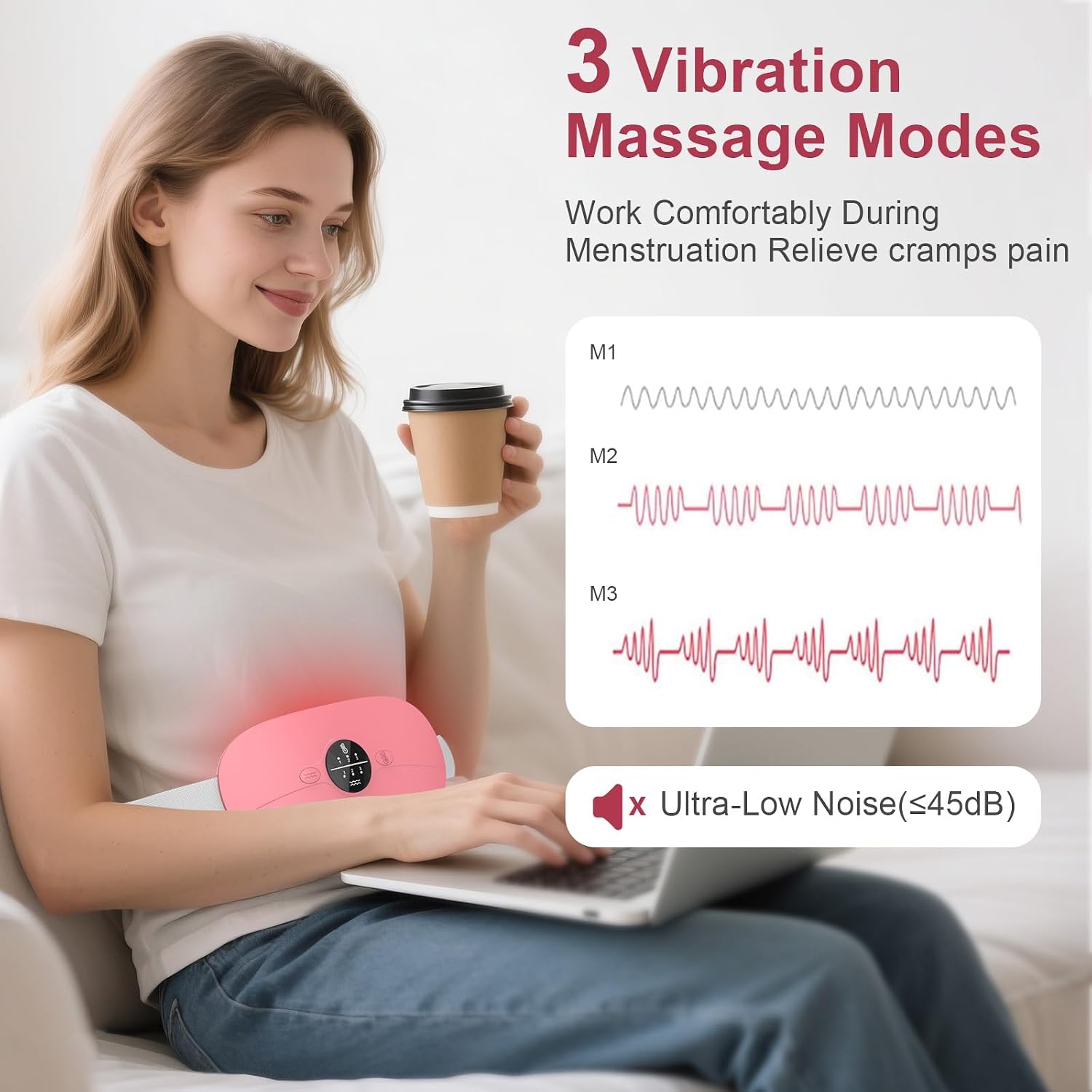
Image: A diagram illustrating the three distinct vibration massage modes (M1, M2, M3) and highlighting the ultra-low noise operation.
4. Automatic Shut-off
For safety and energy conservation, the device features an intelligent 30-minute auto-shutoff timer. If no activity is detected, the unit will power down automatically after 30 minutes.
Warranty and Support
This HZD Portable Heating Pad comes with a 1-year manufacturer warranty.
For any questions, concerns, or support needs regarding your product, please do not hesitate to contact HZD customer service. We are committed to your satisfaction.
Contact information can typically be found on the product packaging or the official HZD website.
