
1. Product Overview
The Vedo VDA208L is an 8-channel analog mixing console designed for professional audio applications. It provides a versatile solution for sound amplification systems in various environments, including live performances, meeting rooms, bars, and rental setups. Engineered to meet high standards, this mixer ensures reliable performance and excellent sound quality.
Key Features:
- 8-channel mixing console
- Main LR mix output
- 2 auxiliary inputs
- Recording capability
- 7-band equalizer
- +48V Phantom Power
- Individual and master channel controls with faders
- Electronically balanced XLR outputs (+26 dBu)
- Maximum pre-amplification capacity of +34 dBu for microphone or line inputs
- Integrated Bluetooth, MP3, and USB player
- Digital effects processor
- Durable metal jacks and gold-plated XLRs
- Automatic power supply (100-240 VAC)
2. Setup and Connections
Before operating the mixer, ensure all connections are secure and the power supply is correctly configured.
2.1 Unpacking and Placement
- Carefully remove the mixer from its packaging.
- Place the mixer on a stable, flat surface, ensuring adequate ventilation around the unit.
- Keep the mixer away from direct sunlight, heat sources, and moisture.
2.2 Power Connection
Connect the provided AC power cable to the AC INPUT on the rear panel of the mixer and then to a suitable power outlet. The mixer supports 100-240 VAC automatic power supply.

Image: Rear panel of the Vedo VDA208L mixer, highlighting the AC power input and ON/OFF switch. This panel also features balanced main outputs and balanced mic inputs.
2.3 Input Connections
The VDA208L mixer offers various input options:
- Microphone Inputs (XLR): Connect microphones to the XLR inputs (channels 1-8) on the top panel.
- Line Inputs (Jack): Connect line-level devices (e.g., keyboards, CD players) to the 1/4" jack inputs (channels 1-8).
- USB Input: Use the USB port for connecting a USB drive for MP3 playback or for connecting to a computer for recording/playback.
- Bluetooth: Pair a Bluetooth device for wireless audio streaming.
- MP3 Player: The integrated MP3 player can play audio files from a USB drive.
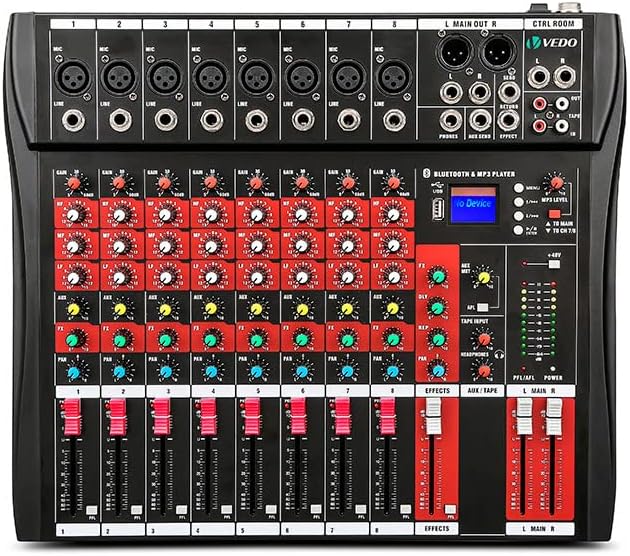
Image: Top view of the Vedo VDA208L 8-channel mixer, displaying the XLR and 1/4" jack inputs for each channel, along with various control knobs and faders.
2.4 Output Connections
- Main Outputs (XLR): Connect your main speakers or power amplifier to the "L MAIN OUT R" XLR outputs. These are electronically balanced for optimal signal integrity.
- Control Room Outputs: Connect studio monitors to the "CTRL ROOM" outputs.
- Headphones Output: Connect headphones to the dedicated 1/4" jack for monitoring.
- Auxiliary Outputs: Use the auxiliary outputs for sending signals to external effects processors or monitor speakers.
3. Operation
This section details the functions of the mixer's controls and how to operate them.
3.1 Channel Controls (Channels 1-8)
- GAIN Knob: Adjusts the input sensitivity for each channel. Set this to an appropriate level to prevent clipping.
- HIGH, MID, LOW Knobs: 3-band equalizer for adjusting the treble, midrange, and bass frequencies of each channel.
- AUX Knobs: Controls the amount of signal sent from the channel to the auxiliary sends.
- FX Knob: Controls the amount of signal sent from the channel to the internal effects processor.
- PAN Knob: Adjusts the stereo position (left/right) of the channel in the main mix.
- MUTE Button: Mutes the channel output.
- PFL (Pre-Fader Listen) Button: Sends the channel signal to the headphones for monitoring before the fader.
- Channel Fader: Controls the volume level of the individual channel in the main mix.
3.2 Master Section Controls
- MAIN L/R Faders: Control the overall volume of the main stereo output.
- EFFECTS Fader: Adjusts the overall level of the internal effects processor.
- AUX/TAPE Fader: Controls the level of the auxiliary return or tape input.
- 7-Band Equalizer: A graphic equalizer for fine-tuning the overall frequency response of the main mix.
- PHANTOM +48V Switch: Activates +48V phantom power for condenser microphones. Ensure microphones requiring phantom power are connected before activating.
- Headphones Level Knob: Adjusts the volume for the headphones output.
3.3 Bluetooth and MP3 Player
The mixer features an integrated Bluetooth and MP3 player module.
- Bluetooth Pairing: Activate Bluetooth on your device and search for "VDA208L" (or similar). Select to pair.
- MP3 Playback: Insert a USB drive containing MP3 files into the USB port. Use the module's controls (play, pause, skip) to manage playback.
- USB Audio Interface: The USB port can also function as an audio interface for recording or playing back audio from a computer.

Image: A person operating the Vedo VDA208L mixer, which is connected to two turntables, demonstrating its use in a DJ or live performance setup.
4. Maintenance
Proper maintenance ensures the longevity and optimal performance of your Vedo VDA208L mixer.
4.1 Cleaning
- Always disconnect the power before cleaning.
- Use a soft, dry cloth to wipe the exterior of the mixer.
- For stubborn dirt, a slightly damp cloth with mild soap can be used, followed by a dry cloth.
- Avoid using abrasive cleaners, solvents, or waxes, as these can damage the finish and internal components.
- Use a soft brush or compressed air to clean dust from faders, knobs, and connectors.
4.2 Storage
- When not in use for extended periods, store the mixer in a cool, dry place, away from direct sunlight and extreme temperatures.
- If possible, cover the mixer to protect it from dust accumulation.
4.3 General Care
- Avoid spilling liquids on the mixer.
- Do not place heavy objects on top of the mixer.
- Handle faders and knobs gently to prevent damage.
5. Troubleshooting
This section provides solutions to common issues you might encounter with your mixer.
| Problem | Possible Cause | Solution |
|---|---|---|
| No sound output |
|
|
| Distorted sound |
|
|
| Bluetooth not connecting |
|
|
| Phantom power not working |
|
|
6. Specifications
Detailed technical specifications for the Vedo VDA208L mixer.
| Feature | Detail |
|---|---|
| Brand | Vedo (Generic) |
| Model Number | VDA208L |
| Number of Channels | 8 |
| Connectivity Technology | Bluetooth, USB |
| Power Source Type | AC (100-240 VAC Automatic) |
| Compatible Audio Input | Microphone (XLR), Line (Jack), USB, Bluetooth, MP3 |
| Output Connector Type | XLR |
| Equalizer | 7-band graphic equalizer, 3-band per channel |
| Phantom Power | +48V |
| Max Pre-amplification | +34 dBu (Mic/Line) |
| Electronically Balanced Outputs | +26 dBu XLR |
| Digital Effects Processor | Included |
| Construction | Metal jacks, gold-plated XLRs |
7. Warranty Information
The Vedo VDA208L mixer comes with a 3-month manufacturer's warranty. This warranty covers defects in materials and workmanship under normal use. Please retain your proof of purchase for warranty claims. For specific terms and conditions, refer to the warranty documentation provided with your product or contact the manufacturer.
8. Customer Support
If you encounter any issues not covered in this manual or require further assistance, please contact your retailer or the manufacturer's customer support. Have your product model number (VDA208L) and purchase information ready when contacting support.


