
Introduction
Thank you for purchasing the Kisonli G11 Wireless Bluetooth Wooden Music Speaker. This manual provides essential information for the safe and efficient operation of your new speaker. Please read this manual thoroughly before using the product and retain it for future reference.

Image: The Kisonli G11 Wireless Bluetooth Wooden Music Speaker, featuring a brown wood finish and a metal speaker grille.
Safety Information
- Do not expose the speaker to water, moisture, or extreme temperatures.
- Avoid dropping or subjecting the speaker to strong impacts.
- Do not disassemble, repair, or modify the speaker yourself. Refer to qualified service personnel.
- Keep the speaker away from heat sources and direct sunlight.
- Use only the specified charging cable and power adapter.
Package Contents
Please check the package for the following items:
- Kisonli G11 Wireless Bluetooth Wooden Music Speaker
- USB Charging Cable
- AUX Cable
- User Manual
Product Overview
Familiarize yourself with the speaker's components and controls.

Image: A detailed view showing the USB port, AUX input, DC 5V charging port, TF card slot, and control buttons on the top panel of the speaker.
Controls and Ports:
- Power Button: Press and hold to turn on/off.
- Mode Button: Short press to switch between Bluetooth, AUX, TF Card, and USB modes.
- Play/Pause Button: Press to play or pause audio.
- Volume Up / Next Track: Short press for volume up, long press for next track.
- Volume Down / Previous Track: Short press for volume down, long press for previous track.
- USB Port: For USB drive playback.
- AUX Input: For wired connection to audio devices.
- TF Card Slot: For TF (MicroSD) card playback.
- DC 5V Port: For charging the speaker.

Image: The Kisonli G11 speaker in a light wood finish, showcasing the integrated phone holder slot on the top panel.
Setup
1. Charging the Speaker
Before first use, fully charge the speaker. Connect the USB charging cable to the DC 5V port on the speaker and the other end to a USB power adapter (not included) or a computer's USB port. The charging indicator will illuminate during charging and turn off when fully charged.
2. Powering On/Off
Press and hold the Power button for approximately 3 seconds to turn the speaker ON or OFF.
3. Bluetooth Pairing
- Turn on the speaker. It will automatically enter Bluetooth pairing mode.
- Enable Bluetooth on your device (smartphone, tablet, etc.).
- Search for "G11" in the list of available Bluetooth devices.
- Select "G11" to connect. A confirmation sound will indicate successful pairing.
4. AUX Connection
Connect one end of the provided AUX cable to the AUX input port on the speaker and the other end to the audio output jack of your device. The speaker will automatically switch to AUX mode.
5. USB/TF Card Playback
Insert a USB drive or TF (MicroSD) card with audio files into the respective port. The speaker will automatically detect the storage device and begin playback.
Operating
Volume Control
Short press the Volume Up (+) or Volume Down (-) buttons to adjust the volume.
Playback Control
- Play/Pause: Press the Play/Pause button.
- Next Track: Long press the Volume Up (+) button.
- Previous Track: Long press the Volume Down (-) button.
Mode Switching
Short press the Mode button to cycle through available input modes: Bluetooth, AUX, TF Card, and USB.

Image: An illustration of the Kisonli G11 speaker's 360-degree stereo sound capability, along with visual representations of the speaker in wood, red, and brown finishes.
Maintenance
- Cleaning: Use a soft, dry cloth to clean the speaker. Do not use abrasive cleaners or solvents.
- Storage: Store the speaker in a cool, dry place when not in use for extended periods.
- Battery Care: To prolong battery life, charge the speaker regularly, even if not in frequent use. Avoid fully discharging the battery for long periods.
Troubleshooting
| Problem | Possible Cause | Solution |
|---|---|---|
| Speaker does not turn on. | Low battery. | Charge the speaker fully. |
| No sound. | Volume too low; incorrect mode; device not connected. | Increase volume; switch to correct mode (Bluetooth/AUX/USB/TF); ensure device is paired/connected. |
| Bluetooth connection unstable. | Device too far; interference. | Move device closer to speaker; avoid obstacles; turn off other Bluetooth devices. |
| Cannot play from USB/TF card. | Unsupported file format; corrupted files; card/drive not inserted correctly. | Ensure files are in supported format (e.g., MP3); reinsert card/drive; try another card/drive. |
Specifications
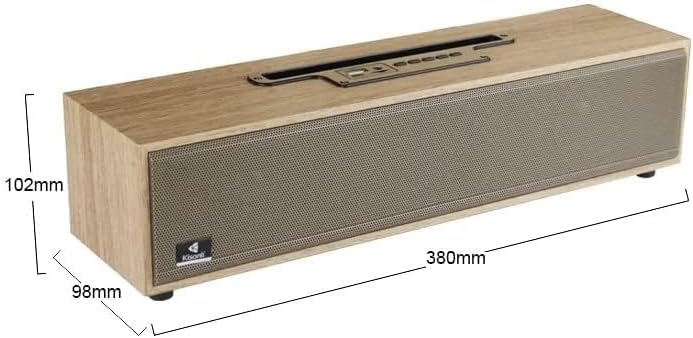
Image: The Kisonli G11 speaker with its dimensions indicated: 380mm in length, 98mm in depth, and 102mm in height.
| Feature | Detail |
|---|---|
| Model Name | G11 |
| Brand Name | Generic |
| Connectivity Technology | Bluetooth |
| Maximum Speaker Output Power | 16 Watt |
| Audio Output Mode | Stereo |
| Mounting Type | Tabletop Mount |
| Material | Wood |
| Special Features | Wireless, Bluetooth |
| Recommended Uses For Product | For Smartphones or Tablets, For Music Players, For Televisions, For Computers |
| Shipping Dimensions | 41.4 x 11.1 x 11.1 cm |
| Item Weight | 1.72 Kilograms |
| First Available Date | May 8, 2023 |
Warranty and Support
This product is covered by a standard manufacturer's warranty. For specific warranty terms and conditions, please refer to the product packaging or contact your retailer. For technical support or service inquiries, please contact the customer support provided by your place of purchase.


