
Introduction
This manual provides comprehensive instructions for the Vieta Pro Mute 2 True Wireless Earbuds. Please read this manual carefully before using the product to ensure proper operation and to maximize your listening experience. Keep this manual for future reference.
Setup
1. Unboxing and Package Contents
Carefully unpack your Vieta Pro Mute 2 earbuds. The package should contain the following items:
- Vieta Pro Mute 2 True Wireless Earbuds
- Charging Case
- Charging Cable
- Protective Cover
2. Charging the Earbuds and Case
Before first use, ensure both the earbuds and the charging case are fully charged.
Charging the Case: Connect the provided charging cable to the USB-C port on the charging case and to a compatible USB power source. The indicator light on the case will show charging status. A full charge typically takes approximately 1.5-2 hours.
Charging the Earbuds: Place the earbuds into their respective slots in the charging case. Ensure they are correctly seated. The earbuds will begin charging automatically. The indicator lights on the earbuds will confirm charging. The case holds multiple charges for the earbuds, providing up to 22 hours of total battery life.

Image: Vieta Pro Mute 2 earbuds and their charging case in lead grey.

Image: Top view of the Vieta Pro Mute 2 charging case, showing the indicator light.
3. Bluetooth Pairing
Follow these steps to pair your Vieta Pro Mute 2 earbuds with your device:
- Initial Pairing: Open the charging case. The earbuds will automatically enter pairing mode, indicated by a flashing light on the earbuds.
- Activate Bluetooth: On your smartphone, tablet, or other Bluetooth-enabled device, go to the Bluetooth settings and turn Bluetooth on.
- Select Device: In the list of available devices, select "Vieta Pro Mute 2".
- Confirm Connection: Once connected, the earbud indicator lights will stop flashing, and you may hear an audible confirmation.
- Dual Connection: The Mute 2 supports dual connection, allowing you to connect to two devices simultaneously. To enable this, ensure the earbuds are connected to the first device, then put them back in the case, close it, and reopen. On the second device, search for "Vieta Pro Mute 2" and connect. The earbuds will intelligently switch between devices based on audio playback.
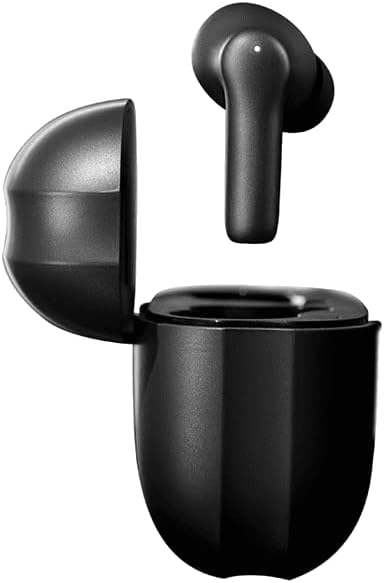
Image: The Vieta Pro Mute 2 earbuds resting inside their open charging case, ready for use or charging.
Operating the Earbuds
1. Touch Panel Controls
The Vieta Pro Mute 2 earbuds feature intuitive touch controls on each earbud. The specific functions may vary slightly depending on the operating system of your connected device.
| Action | Function |
|---|---|
| Single Tap (Left/Right) | Play/Pause music, Answer/End call |
| Double Tap (Right) | Next track |
| Double Tap (Left) | Previous track |
| Triple Tap (Left/Right) | Activate Voice Assistant |
| Long Press (Left/Right) | Toggle ANC/Transparency Mode |
| Incoming Call Long Press | Reject call |
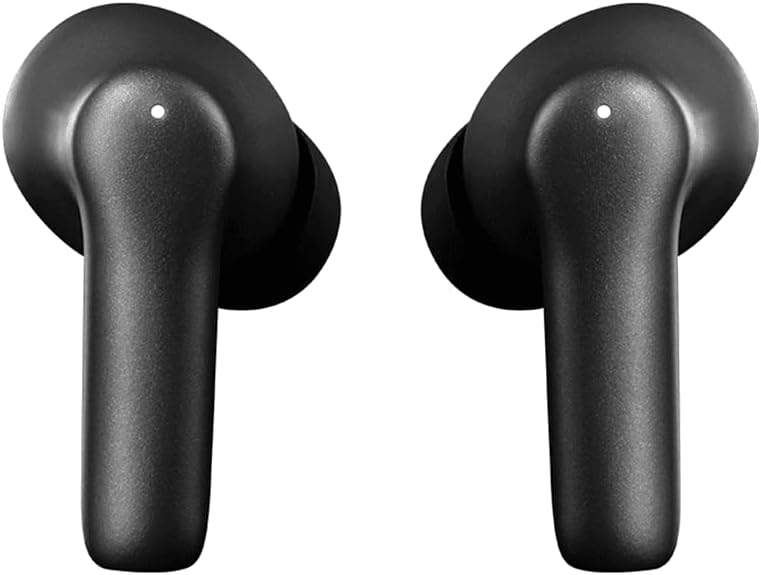
Image: A close-up view of the Vieta Pro Mute 2 earbuds, highlighting their design and touch panel area.
2. Active Noise Cancellation (ANC) and Transparency Mode
The Mute 2 earbuds feature hybrid ANC, reducing ambient noise by up to -35 dB, and a Transparency Mode to stay aware of your surroundings.
- Active Noise Cancellation (ANC): Reduces external noise for an immersive audio experience. Ideal for travel or noisy environments.
- Transparency Mode: Allows ambient sounds to pass through, enabling you to hear your surroundings without removing the earbuds. Useful for conversations or when situational awareness is needed.
To switch between ANC, Transparency Mode, and Normal Mode, perform a long press on either earbud's touch panel.

Image: A person wearing the Vieta Pro Mute 2 earbuds, showing how they fit in the ear.
Maintenance and Care
Proper maintenance ensures the longevity and optimal performance of your Vieta Pro Mute 2 earbuds.
1. Cleaning
- Use a soft, dry, lint-free cloth to clean the earbuds and charging case.
- Do not use abrasive cleaners, alcohol, or chemical solvents.
- Gently clean the charging contacts on both the earbuds and the case with a dry cotton swab if necessary.
- Remove ear tips and clean them separately with mild soap and water, then dry thoroughly before reattaching.
2. Storage
When not in use, always store the earbuds in their charging case to protect them from dust, dirt, and damage.
3. Water Resistance
The Vieta Pro Mute 2 earbuds are rated as water-resistant. This means they can withstand splashes and light rain, making them suitable for workouts. However, they are not designed for submersion in water. Avoid exposing them to excessive moisture or liquids.

Image: A person performing an exercise, demonstrating the earbuds' suitability for active use.
Troubleshooting
If you encounter issues with your Vieta Pro Mute 2 earbuds, refer to the following common solutions:
| Problem | Possible Solution |
|---|---|
| Earbuds not pairing | Ensure earbuds are charged. Turn off and on Bluetooth on your device. Forget "Vieta Pro Mute 2" from your device's Bluetooth list and re-pair. |
| No sound from one earbud | Place both earbuds back in the case, close it, then reopen. Check device's audio output settings. Ensure both earbuds are charged. |
| Low volume or poor sound quality | Adjust volume on your device. Clean ear tips and earbud grilles. Ensure ear tips provide a good seal in your ear. |
| Charging issues | Check charging cable and power adapter. Ensure charging contacts on earbuds and case are clean and free of debris. |
| ANC not effective | Ensure earbuds are properly seated in your ears. Toggle ANC mode to ensure it's active. |
If the problem persists, please refer to the Warranty and Support section for further assistance.
Specifications
| Feature | Detail |
|---|---|
| Model Name | Mute 2 |
| Brand | Vieta Pro |
| Bluetooth Version | 5.3 |
| Noise Control | Hybrid Active Noise Cancellation (-35 dB) |
| Modes | ANC, Transparency Mode, Normal Mode |
| Connectivity | Dual Connection |
| Control Type | Touch Panel |
| Battery Life (Total) | Up to 22 Hours (with charging case) |
| Water Resistance Level | Water Resistant |
| Material | Plastic |
| Product Dimensions | 6.3 x 3 x 4.7 cm |
| Included Components | Cable, Protective Cover |
Warranty and Support
Vieta Pro products are designed and manufactured to the highest quality standards. For information regarding warranty coverage, technical support, or service inquiries, please contact Vieta Pro customer service or visit their official website. Keep your proof of purchase for warranty claims.
Manufacturer: FRAMASON AUDIO SA
Product in Amazon.es since: 25 September 2024
For the latest support information and FAQs, please visit the official Vieta Pro website or the product page on Amazon.es.

Image: The official Vieta Pro company logo.
Note: No official product videos from the seller were found in the provided data.