
1. Introduction and Overview
Thank you for choosing the LINGHUFOX 75 Inch Smart Board. This interactive whiteboard is designed to enhance collaboration and presentation experiences in various environments, including classrooms, offices, and homes. It integrates advanced hardware and a versatile software ecosystem to provide a seamless and intuitive user experience.

Image: The LINGHUFOX 75 Inch Smart Board, showcasing its sleek design and user interface.
2. What's in the Box
Upon unboxing your LINGHUFOX 75 Inch Smart Board, please verify that all the following components are included:
- LINGHUFOX 75 Inch Smart Board
- Movable Stand
- Wall Mount
- Related Cables (e.g., power cable, HDMI cable)
- Remote Control
- Stylus
3. Key Features
The LINGHUFOX 75 Inch Smart Board is equipped with a range of features designed for optimal performance and usability:
3.1. High-Performance Hardware
This smart board features a 2.28Ghz, 8-core CPU, 8GB RAM, and 64GB ROM, running on Android 11.0 with WiFi 6 connectivity. This configuration ensures fast operation, low latency, and excellent coverage. A built-in light sensor automatically adjusts display brightness based on ambient light conditions for an improved visual experience.
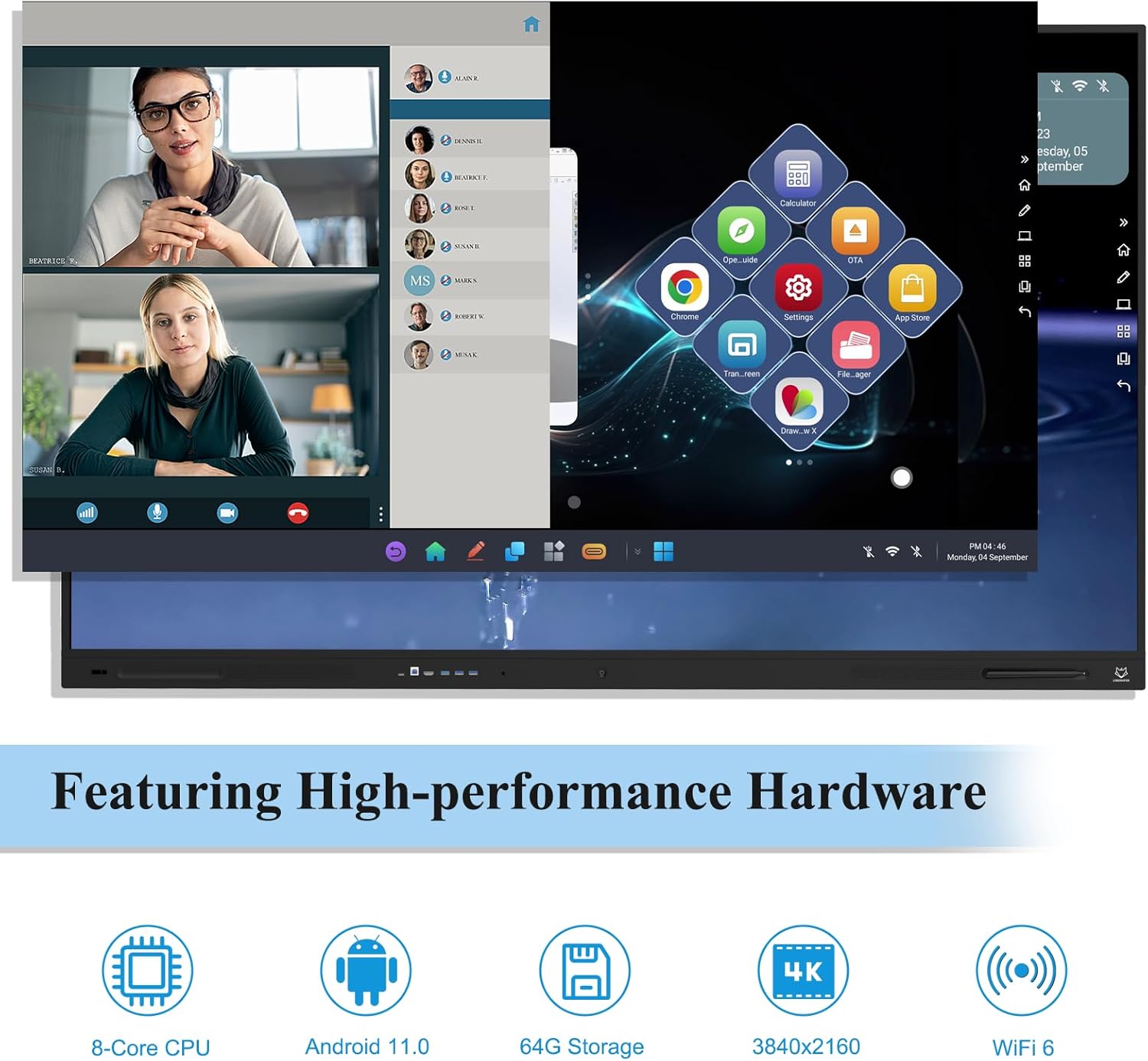
Image: Visual representation of the smart board's core hardware specifications.
3.2. Natural and Smooth Writing Experience
The interactive whiteboard supports up to 20-point touch with a response time under 8ms, providing a fluid writing experience similar to traditional paper. Shortcut tools are available to streamline presentations and boost efficiency. Users can annotate any interface, and content can be saved to cloud storage or exported as images or PDFs via phone scans.

Image: Children interacting with the smart board, demonstrating its intuitive writing capabilities.
3.3. Easier Screen Sharing
The smart board facilitates wireless screen sharing from up to four devices simultaneously. It also includes multiple interfaces, notably an HDMI-OUT port, allowing connection to a larger screen for extended display. Front-facing ports offer convenient access for various connectivity needs. Magnetic grooves are integrated to securely hold the stylus, preventing loss.

Image: Demonstrating the multi-device screen sharing and display capabilities of the smart board.
3.4. Open App Ecosystem
The smart board features a built-in App store for direct software downloads. Users can also download applications from the Google Play Store or install them via a USB drive. Popular third-party video conferencing applications such as Zoom and Webex are supported, catering to diverse meeting requirements.

Image: The smart board's open app ecosystem, showing compatibility with various popular applications.
3.5. 4K UHD Display
The 75-inch screen offers stunning 4K UHD resolution, providing crisp and clear visuals for all content. The board integrates functions of a tablet, whiteboard, monitor, audio system, TV, and projector into one comprehensive unit.

Image: Illustrating the superior 4K display quality of the 75-inch smart board.
4. Setup and Installation
The LINGHUFOX 75 Inch Smart Board offers flexible installation options to suit your needs:
4.1. Movable Stand Installation
The included movable stand features four sturdy, lockable wheels, allowing for easy relocation of the smart board. This option is ideal for creating flexible meeting or learning spaces.
4.2. Wall Mount Installation
For a more permanent setup, the smart board can be securely mounted to a wall using the provided wall mount bracket. Ensure the wall can support the weight of the unit (approximately 119 pounds).
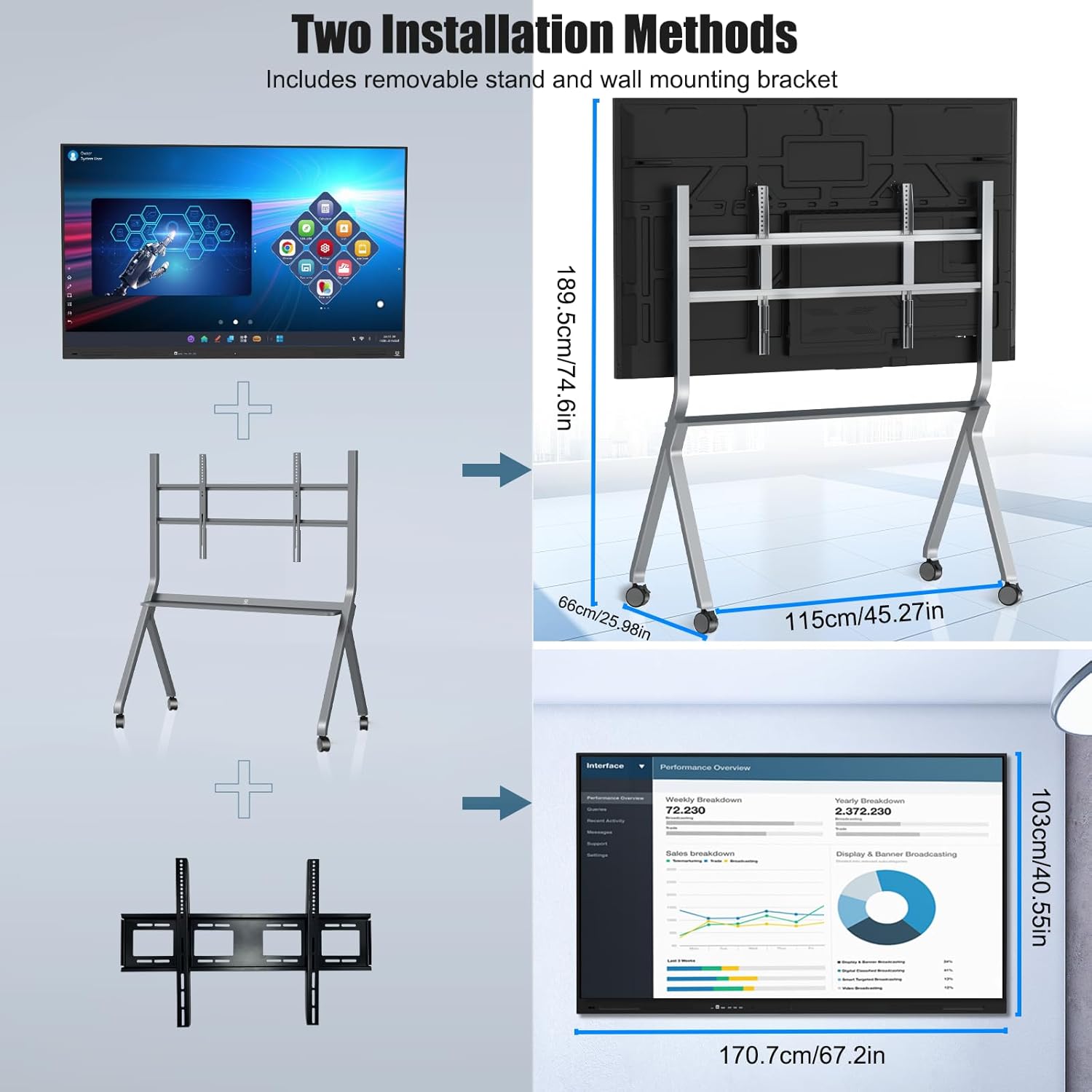
Image: Visual guide to the two available installation methods for the smart board.
Please refer to the detailed assembly instructions provided in the separate installation guide for either the movable stand or wall mount.
5. Operating Instructions
This section provides general guidance on operating your LINGHUFOX Smart Board. For detailed software and application usage, please refer to the on-screen tutorials or specific app documentation.
5.1. Powering On/Off
- To power on, press the power button located on the side or bottom of the board.
- To power off, press and hold the power button until a shutdown prompt appears, then confirm.
5.2. Basic Navigation
The smart board operates similarly to a large Android tablet. Use touch gestures (tap, swipe, pinch-to-zoom) to navigate the interface. The included stylus can be used for precise writing and drawing.
5.3. Using the Whiteboard Function
Access the built-in whiteboard application from the main menu. You can select various pen tools, colors, and shapes. Content can be saved, shared via QR code, or exported as a PDF or image file.
5.4. Screen Mirroring
To wirelessly share your device's screen, open the screen sharing application on the smart board and follow the on-screen instructions to connect your laptop, tablet, or smartphone. Multiple devices can be connected simultaneously.
5.5. Connecting External Devices
Utilize the various ports (HDMI, USB, Type-C) on the smart board to connect external devices such as laptops, cameras, or storage drives. Refer to the port labels for specific functions.
6. Maintenance
Proper maintenance ensures the longevity and optimal performance of your LINGHUFOX Smart Board.
- Cleaning the Screen: Use a soft, lint-free cloth slightly dampened with water or a non-abrasive screen cleaner. Avoid harsh chemicals, alcohol, or ammonia-based cleaners, as they can damage the screen coating.
- Cleaning the Body: Wipe the frame and stand with a soft, dry cloth.
- Storage: When not in use for extended periods, store the smart board in a cool, dry place, away from direct sunlight and extreme temperatures.
- Cable Management: Ensure all cables are neatly organized and not under strain to prevent damage.
7. Troubleshooting
This section addresses common issues you might encounter. If the problem persists, please contact customer support.
- No Power: Ensure the power cable is securely connected to both the smart board and a working power outlet. Try a different outlet.
- No Display: Check all video cable connections (e.g., HDMI) if using an external source. Ensure the board is powered on.
- Touchscreen Unresponsive: Restart the smart board. Ensure the screen is clean and free of obstructions.
- Wireless Connectivity Issues: Check if Wi-Fi is enabled in the settings. Restart your router and the smart board. Ensure you are within range of the Wi-Fi signal.
- Audio Problems: Check volume settings on the board and any connected external audio devices. Ensure speakers are not muted.
8. Specifications
| Attribute | Detail |
|---|---|
| Brand | LINGHUFOX |
| Model Number | LINGHUFOX-75S |
| Screen Size | 75 Inch |
| Resolution | 4K UHD (3840x2160) |
| CPU | 2.28Ghz, 8-core |
| RAM | 8GB |
| ROM | 64GB |
| Operating System | Android 11.0 |
| Wireless Connectivity | WiFi 6 |
| Touch Points | Up to 20-point touch |
| Response Time | Under 8ms |
| Product Dimensions | 67.2 x 67.2 x 40.6 inches |
| Item Weight | 119 pounds |
| Material | Aluminum |
| Color | Black |
9. Warranty and Support
For warranty information and customer support, please refer to the documentation included with your product or visit the official LINGHUFOX website. A digital version of this user manual is also available for download:
For any technical assistance or inquiries, please contact LINGHUFOX customer service.
10. Official Product Videos
No official product videos from the seller were provided in the product data for embedding in this manual.