1. Introduction
Welcome to Double Dragon Gaiden: Rise of the Dragons for the Nintendo Switch. This manual provides essential information for setting up, playing, and maintaining your game. Set in a post-apocalyptic 199X New York City, this game offers a fresh take on the classic beat 'em up genre with roguelite elements.
Players will control iconic characters like Billy and Jimmy Lee, along with Marian and Uncle Matin, and other unlockable fighters, to combat criminal gangs and restore order to the city. The game features a dynamic mission structure, ensuring a unique experience with each playthrough.

Image 1.1: Game banner featuring the main cast of Double Dragon Gaiden: Rise of the Dragons.
2. Setup
2.1 System Requirements
- Nintendo Switch console
- Sufficient storage space for game data and updates
2.2 Inserting the Game Card
- Ensure your Nintendo Switch console is powered off or in sleep mode.
- Locate the game card slot on the top right side of your Nintendo Switch console.
- Insert the Double Dragon Gaiden: Rise of the Dragons game card into the slot with the label facing the same direction as the console's screen. Push gently until it clicks into place.
- Power on your Nintendo Switch. The game icon will appear on the HOME Menu.
2.3 Initial Game Launch
Select the game icon from the HOME Menu to start the game. Follow any on-screen prompts for initial setup, such as language selection or software updates.

Image 2.1: Front cover of the Double Dragon Gaiden: Rise of the Dragons Nintendo Switch game.
3. Operating Instructions (Gameplay)
3.1 Basic Controls
The game utilizes standard Nintendo Switch controls. Refer to your Nintendo Switch console manual for detailed controller layout. Key actions typically include:
- Movement: Left Analog Stick
- Attack: A Button (or similar)
- Jump: B Button (or similar)
- Special Move: Y Button (or similar)
- Tag Character: L/R Buttons (or similar)
- Pause Menu: + Button
3.2 Tag Team Action
Select two fighters before starting a mission. You can seamlessly switch between them during gameplay using the designated tag button. This allows for strategic combos and adapting to different enemy types.
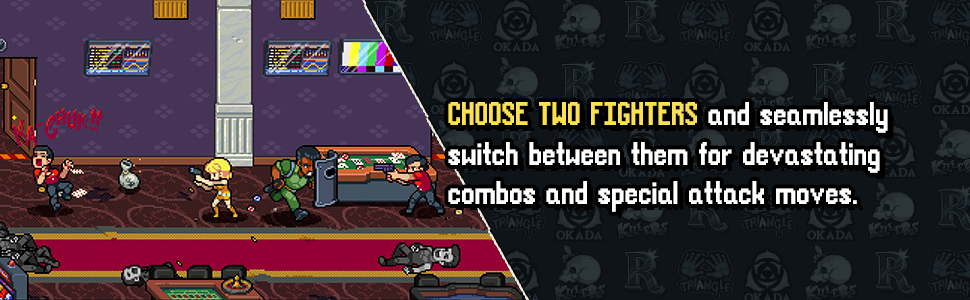
Image 3.1: In-game screenshot demonstrating the tag-team mechanic.
3.3 Roguelite Elements
The game incorporates roguelite mechanics, offering dynamic mission selection. The difficulty and length of missions change based on the order you choose to play them. This ensures varied playthroughs and encourages strategic planning.

Image 3.2: The Mission Select screen, where players choose their next objective.
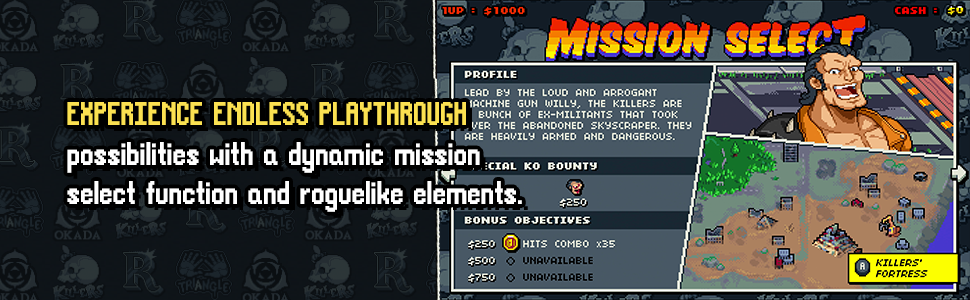
Image 3.3: Banner highlighting the dynamic mission select feature.
4. Game Modes
4.1 Local Co-op
Team up with a friend in local co-op mode to tackle the streets of New York together. This mode supports up to two players, allowing for combined strategies and increased action.

Image 4.1: Banner promoting the local co-op feature.
4.2 Survival Mode
Test your combat skills against continuous waves of enemies. The difficulty increases as you progress. Tokens earned in this mode can be used to unlock additional content.
4.3 Versus Mode
Engage in player-versus-player combat. Select two characters and apply upgrades to battle against friends and determine the ultimate Dragon Warrior. This mode and special backgrounds are unlocked via the token shop.
5. Characters and Upgrades
The game features a roster of 13 unique playable characters, each with distinct playstyles and special abilities. Initially, Billy, Jimmy, Marian, and Uncle Matin are available, with 9 additional characters unlockable.

Image 5.1: Banner showcasing the diverse roster of characters in action.
5.1 Unlocking Characters and Content
Earn tokens during gameplay to unlock new characters and bonus content from the Token Shop. Adjusting the game difficulty can affect the amount of tokens earned per session.
5.2 In-Game Upgrades
During a run, you can purchase upgrades for your characters using in-game cash. These upgrades can enhance health, special abilities, and other attributes, providing strategic advantages.

Image 5.2: The character upgrade screen, displaying available enhancements.
6. Maintenance
6.1 Game Card Care
- Keep the game card clean and free from dust or debris.
- Store the game card in its protective case when not in use.
- Avoid exposing the game card to extreme temperatures or direct sunlight.
6.2 Software Updates
Periodically check for software updates for Double Dragon Gaiden: Rise of the Dragons. Updates often include bug fixes, performance improvements, and new content. Ensure your Nintendo Switch is connected to the internet to download updates.
7. Troubleshooting
7.1 Game Not Loading
- Ensure the game card is correctly inserted into the Nintendo Switch console.
- Clean the game card's contacts with a soft, dry cloth.
- Restart your Nintendo Switch console.
- Check if your console's system software is up to date.
7.2 Game Freezing or Crashing
- Close the game and restart it.
- Ensure there is sufficient free space on your console's internal storage or microSD card.
- Check for any available game software updates.
- If issues persist, try deleting and reinstalling the game software (your save data will typically remain intact).
7.3 Controller Input Issues
- Ensure your Joy-Con controllers are properly attached or paired wirelessly.
- Check the battery level of your controllers.
- Calibrate your controllers through the Nintendo Switch system settings if necessary.
8. Specifications
| Attribute | Detail |
|---|---|
| Product Title | Modus - Double Dragon Gaiden: Rise of the Dragons Nintendo Switch Game |
| Brand | Maximum Entertainment |
| Model Number | 481901 |
| Platform | Nintendo Switch |
| Language | English |
| Product Dimensions | 7.2 x 4.7 x 0.5 inches |
| Item Weight | 1.6 ounces |
| Manufacturer | Maximum Games |
| ASIN | B0C44749TY |
9. Warranty
Warranty information for Double Dragon Gaiden: Rise of the Dragons is typically provided by the game publisher, Maximum Entertainment, or the console manufacturer, Nintendo. Please refer to the official website of Maximum Entertainment or the documentation included with your Nintendo Switch console for specific warranty terms and conditions.
10. Support
For technical assistance, gameplay questions, or other support inquiries regarding Double Dragon Gaiden: Rise of the Dragons, please contact:
- Maximum Entertainment Support: Visit the official Maximum Entertainment website for support resources and contact information.
- Nintendo Support: For issues related to your Nintendo Switch console or general system functionality, please visit the official Nintendo Support website.
You can also visit the Maximum Entertainment Store on Amazon for more product information.