1. Introduction
This manual provides detailed instructions for the assembly, operation, and maintenance of your kowo Electric Height Adjustable Soft Side End Table, Model K3001-6-01-61. This versatile table is designed to offer a flexible workspace, allowing seamless transitions between sitting and standing positions. Its integrated rechargeable battery and caster wheels provide portability, making it suitable for various environments, including beside a sofa, bed, or as a mobile workstation.
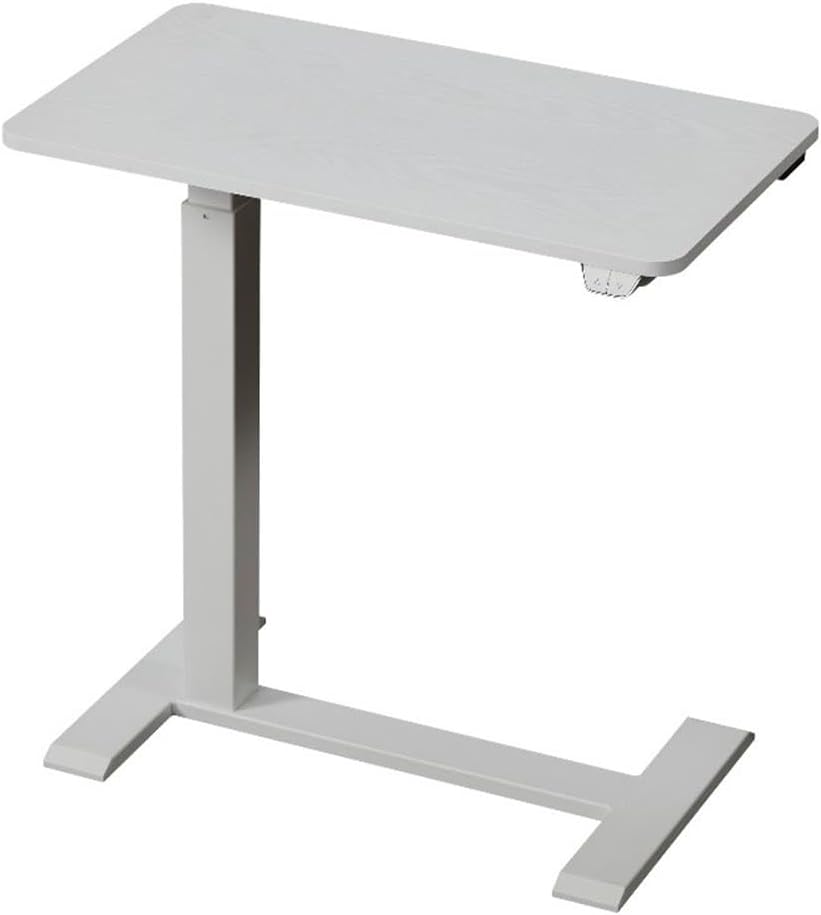
Image 1.1: The kowo Electric Height Adjustable Soft Side End Table.

Image 1.2: Side view of the kowo table, highlighting its C-shaped base for easy placement.
2. Product Features
- Electric Height Adjustment: Easily switch between sitting and standing positions with the touch of a button.
- Rechargeable Battery: Integrated battery allows for cordless operation and portability.
- Mobile Design: Equipped with hidden 360° swiveled caster wheels for easy movement.
- Durable Construction: Made from high-quality wood and metal, supporting up to 55 pounds.
- Water Resistance: Features a protective finish for enhanced durability.
- Compact Size: Ideal for small spaces, functioning as an end table, sofa table, or laptop desk.

Image 2.1: The kowo table used in various settings, demonstrating height adjustability.
3. Setup and Assembly
Your kowo Electric Height Adjustable Soft Side End Table requires minimal assembly. An assembly guide is included with your product. Please follow the instructions carefully. A screwdriver is the only recommended tool for assembly.
3.1. Components Overview
Before beginning assembly, ensure all components are present and undamaged. Key components include the tabletop, support column, base, power plug, digital display control panel, and caster wheels.

Image 3.1: Key components of the kowo table.
3.2. Assembly Steps
- Unpack all parts and lay them out on a clean, soft surface to prevent scratches.
- Attach the support column to the base using the provided hardware and a screwdriver.
- Secure the tabletop to the top of the support column.
- Ensure all connections are tight and stable.
- Connect the power plug to the table's power input.
4. Operating Instructions
4.1. Adjusting Table Height
The table's height can be adjusted electronically using the control panel located on the underside of the tabletop. Press the 'up' arrow button to raise the table and the 'down' arrow button to lower it. The table moves smoothly at approximately 25mm per second.

Image 4.1: Digital display control panel for height adjustment.

Image 4.2: Height adjustment range and speed.
4.2. Charging the Battery
The kowo table features a removable rechargeable battery. To charge, locate the battery pack, typically found underneath the tabletop. Disconnect it and connect it to a USB-C charging cable (not included). A full charge allows for approximately 90 height adjustments. Ensure the battery is fully charged before initial use for optimal performance.
Video 4.1: Demonstration of the kowo table's features, including height adjustment and battery charging. This video illustrates the table's use as an over-bed table, sofa table, and podium stand, highlighting its cable-free operation and 360-degree spinning wheels.
4.3. Mobility
The table is equipped with hidden 360° swiveled caster wheels, allowing for easy repositioning. To move the table, gently push it to your desired location. Ensure the path is clear to prevent damage or tipping.
5. Maintenance
Regular maintenance ensures the longevity and optimal performance of your kowo table.
- Cleaning: Wipe the tabletop and frame with a soft, damp cloth. Avoid abrasive cleaners or harsh chemicals that may damage the finish. The tabletop has a water-resistant protective finish, but spills should be wiped promptly.
- Battery Care: Charge the battery regularly, even if not in frequent use, to maintain its health. Avoid fully depleting the battery for extended periods.
- Inspections: Periodically check all screws and connections to ensure they remain tight. Retighten if necessary.
- Movement: When moving the table, lift slightly over uneven surfaces to prevent strain on the caster wheels.
6. Troubleshooting
If you encounter issues with your kowo table, refer to the following common solutions:
| Problem | Possible Cause | Solution |
|---|---|---|
| Table does not adjust height. | Battery is depleted or not properly connected. | Charge the battery using a USB-C cable. Ensure the battery pack is securely connected to the table. |
| Table movement is not smooth or makes unusual noises. | Loose connections or obstruction in the lifting mechanism. | Check all assembly screws and tighten if loose. Ensure no objects are obstructing the lifting column. |
| Difficulty rolling the table. | Caster wheels are obstructed or on an uneven surface. | Clear any debris from the caster wheels. Lift the table slightly when moving over carpets or uneven flooring. |
7. Specifications
| Feature | Detail |
|---|---|
| Brand | kowo |
| Model Number | K3001-6-01-61 |
| Color | White |
| Materials | Wood, Metal |
| Product Dimensions (D x W x H) | 15.7"D x 27.5"W x 42.5"H |
| Item Weight | 27.2 Pounds |
| Maximum Weight Recommendation | 55 Pounds |
| Maximum Lifting Height | 42.13 Inches |
| Tools Recommended for Assembly | Screwdriver |
| Included Components | Assembly Guide |

Image 7.1: Detailed dimensions and weight capacity.
8. Warranty and Support
For warranty information and detailed support, please refer to the product description on the original purchase platform or visit the official kowo store page. Keep your purchase receipt for warranty claims.
If you require further assistance or have questions not covered in this manual, please contact kowo customer support through the vendor's contact information provided at the point of purchase or on their official website.