
1. Introduction
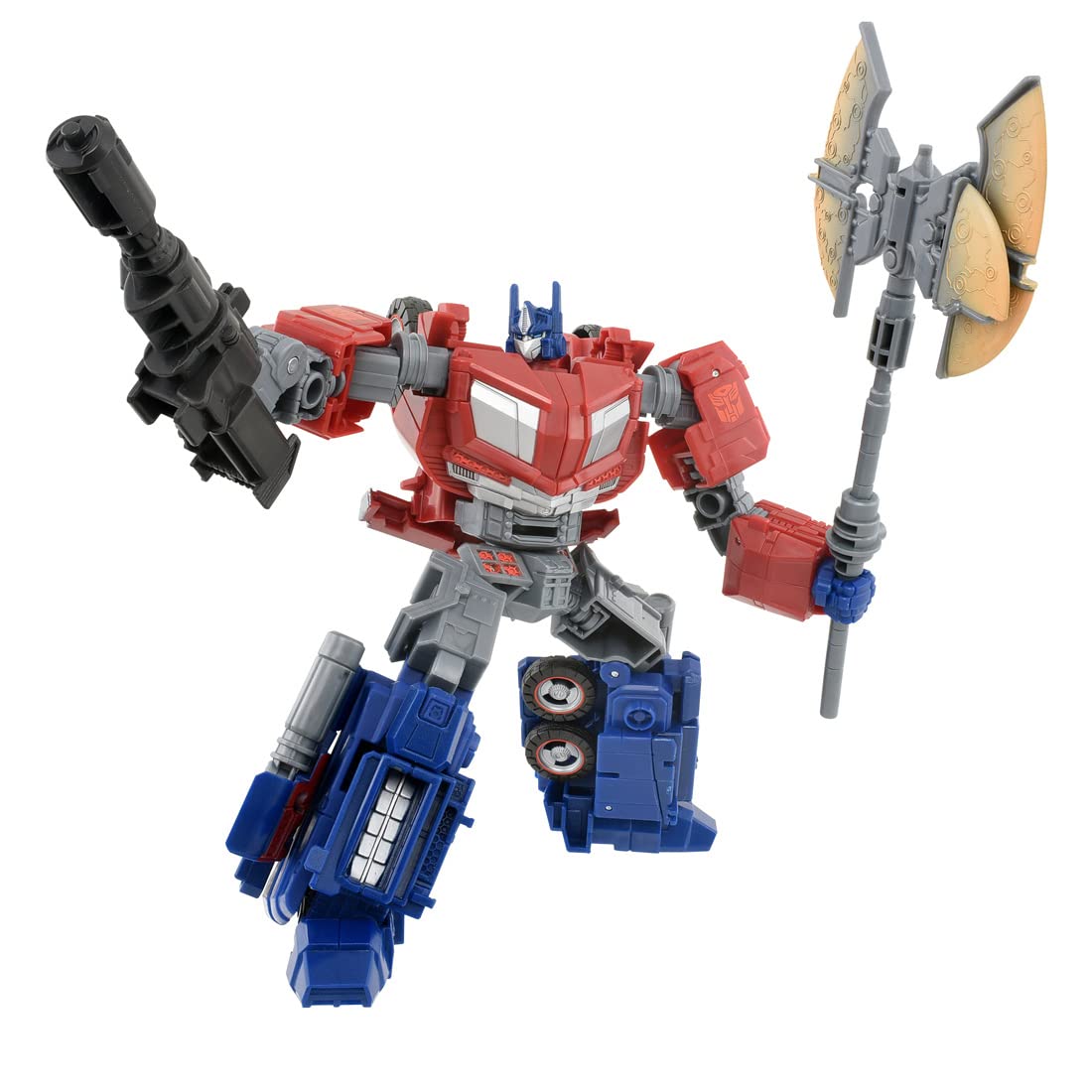
This instruction manual provides guidance for the TOMY Takara Transformers SS GE-01 Optimus Prime action figure. This figure is inspired by the Transformers War for Cybertron game and features the iconic Autobot leader, Optimus Prime, capable of transforming between his robot mode and a Cybertronian truck vehicle mode. Please read these instructions carefully before handling the figure to ensure proper use and enjoyment.
2. Components Included
Verify that all components are present in the package:
- Optimus Prime main body (1)
- Weapons (3) - Includes a large axe and a blaster.
- Instruction manual (1)
3. Setup
Upon unboxing, carefully remove the Optimus Prime figure and its accessories from the packaging. Inspect all parts for any visible damage. The figure is pre-assembled and does not require additional assembly. Familiarize yourself with the figure's joints and articulation points before attempting transformation.

Figure in Robot Mode. This is the default configuration out of the box.
4. Operating Instructions: Transformation
The Optimus Prime figure can transform between two distinct modes: Robot Mode and Cybertronian Truck Mode. Handle the figure with care during transformation to avoid damage.
4.1. Robot Mode to Cybertronian Truck Mode
- Remove Accessories: Detach any weapons (axe, blaster) from Optimus Prime's hands or back.
- Fold Hands: Fold Optimus Prime's hands into his forearms.
- Rotate Torso: Rotate the upper torso 180 degrees at the waist.
- Position Legs: Straighten the legs and bring them together. Fold the feet upwards.
- Collapse Chest: Collapse the chest panels inward to form the front of the truck.
- Adjust Arms: Position the arms alongside the body, folding them to form the sides or rear sections of the truck. Ensure all panels align.
- Connect Sections: Securely connect the leg and arm sections to form the complete truck chassis.
- Final Adjustments: Ensure all panels are flush and locked into place to form a stable Cybertronian truck.

Figure in Cybertronian Truck Mode. Weapons can be mounted on the vehicle.
4.2. Cybertronian Truck Mode to Robot Mode
- Remove Mounted Weapons: Detach any weapons mounted on the vehicle mode.
- Separate Sections: Carefully unclip and separate the various panels and sections that form the truck.
- Extend Legs: Unfold the leg sections from the rear of the truck and extend them downwards. Unfold the feet.
- Unfold Arms: Unfold the arm sections from the sides or rear, extending them outwards. Unfold the hands.
- Form Torso: Reconfigure the chest and back panels to form Optimus Prime's robot mode torso.
- Rotate Torso: Rotate the upper torso 180 degrees to face forward.
- Final Adjustments: Ensure all joints are locked, and panels are aligned to form a stable robot mode.
Overview of both Robot and Vehicle Modes.
4.3. Accessory Usage
The Optimus Prime figure comes with several accessories:
- Large Axe: The axe can be held in either of Optimus Prime's hands via the 5mm peg.
- Blaster: The blaster can also be held in either hand. It can be stored on the figure's back or attached to elbow ports in robot mode.
- Matrix of Leadership: The chest of Optimus Prime can open to reveal a Matrix of Leadership accessory. This can be removed and held by the figure.

Optimus Prime holding the large axe accessory.

Optimus Prime's chest cavity revealing the Matrix of Leadership.
5. Maintenance
- Cleaning: Use a soft, dry cloth to gently wipe the figure. For stubborn dirt, a slightly damp cloth can be used, followed by immediate drying. Avoid harsh chemicals or abrasive cleaners.
- Storage: Store the figure away from direct sunlight, extreme temperatures, and high humidity to prevent discoloration or material degradation.
- Joint Care: Avoid forcing joints. If a joint feels stiff, gently work it back and forth. Do not apply excessive force.
6. Troubleshooting
- Parts Not Aligning in Transformation: Ensure all previous steps are completed correctly. Check for any tabs or pegs that are not fully engaged. Do not force parts; retrace steps and try again.
- Loose Joints: Over time, some joints may become loose. This is typical with articulated figures. There are various hobbyist methods to tighten joints (e.g., clear nail polish, floor polish), but proceed with caution as these are not officially recommended and may void any implied warranty.
- Accessory Not Fitting: Ensure the accessory is oriented correctly and the peg aligns with the port. Do not force accessories into ports.
7. Specifications
| Feature | Detail |
|---|---|
| Brand | TOMY |
| Model Name | Optimus Prime (SS GE-01) |
| Model Number | 918387 |
| Toy Figure Type | Action Figure |
| Character | Optimus Prime |
| Team Name | Autobots |
| Theme | Video Game (War for Cybertron) |
| Material Type | Plastic |
| Item Dimensions (L x W x H) | 3.94" x 5.12" x 6.3" |
| Item Weight | 0.16 Kilograms |
| Batteries Required | No |
8. Warranty and Support
This product is manufactured by TOMY. For any questions regarding product defects, missing parts, or operational issues not covered in this manual, please contact TOMY customer support. Specific warranty details may vary by region; please refer to the packaging or the official TOMY website for the most current warranty information.


