
1. Introduction
This manual provides detailed instructions for the assembly, operation, and maintenance of your LVSOMT RGB LED Jewelry Mirror Cabinet. This product combines a full-length mirror, a vanity mirror, and a jewelry organizer with integrated LED lighting, designed to enhance your daily routine.
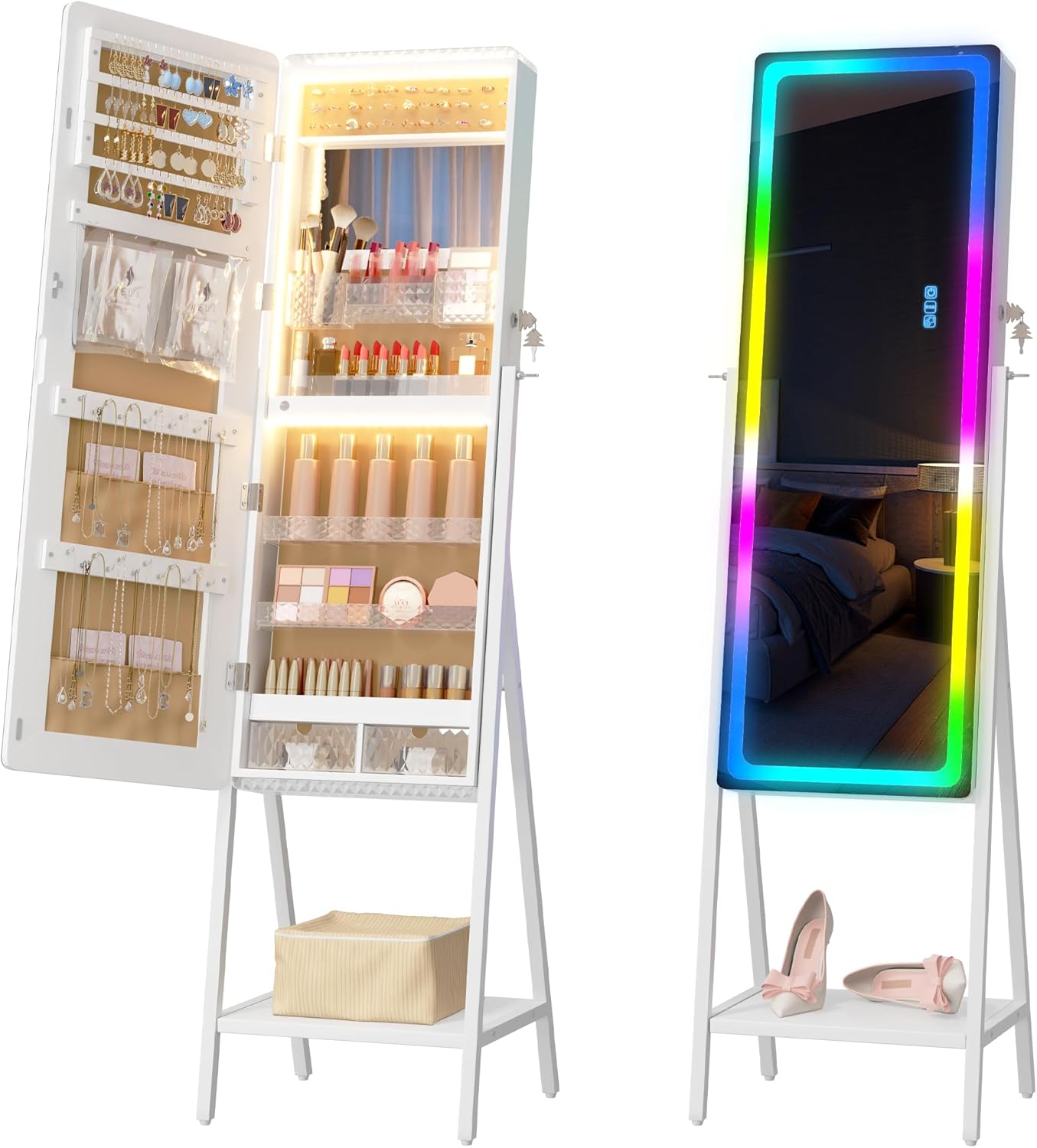
Image 1.1: The LVSOMT RGB LED Jewelry Mirror Cabinet shown in both its closed, full-length mirror configuration and its open, jewelry storage configuration.
2. Package Contents
Please verify that all components are present before beginning assembly:
- Cabinet Body (pre-assembled)
- Support Legs (2)
- Bottom Shelf (1)
- Hardware Pack (screws, wrench, etc.)
- Keys (2)
- Remote Control (1)
- Instruction Manual (this document)
3. Assembly Instructions
The main cabinet body of your LVSOMT Jewelry Mirror Cabinet comes pre-assembled. Only the stand and bottom shelf require assembly. Follow these steps:
- Carefully unpack all components and place them on a soft, clean surface to prevent scratches.
- Attach the two support legs to the bottom of the cabinet body using the provided hardware. Ensure they are securely fastened.
- Install the bottom shelf between the two support legs, securing it with the appropriate hardware.
- Once assembled, ensure the cabinet is stable before placing any items inside or using the mirror.
Mounting Options: This cabinet is designed for freestanding use. Hardware for over-the-door or wall-mount installation may be included for alternative setup, if desired. Refer to the specific hardware instructions for these methods.
4. Product Features
4.1. Spacious Storage Capacity
The interior of the cabinet is designed for comprehensive jewelry and accessory organization, featuring a velvet liner to protect your items from scratches.
- 72 Earring Slots
- 39 Ring Slots
- 24 Necklace Hooks
- 3 Storage Shelves
- 2 Acrylic Drawers
- 2 PVC Storage Bags
- 1 Storage Fabric Bag
- 1 Bottom Shelf (external)
- Makeup brush & lipstick acrylic storage box

Image 4.1: Detailed view of the cabinet's interior, highlighting various storage compartments for jewelry and cosmetics.
4.2. Built-in Inner LED Lights
The interior vanity mirror is equipped with LED lights offering three color modes to assist with makeup application and jewelry selection.
- Blue Light: Provides a cool, bright illumination.
- White Light: Offers a neutral, clear illumination.
- Warm Light: Delivers a soft, inviting illumination.

Image 4.2: The interior LED lights can be set to blue, white, or warm tones.
4.3. RGB Full-Length Mirror Lighting
The exterior full-length mirror features RGB LED lighting with multiple static and dynamic modes, allowing for customizable ambiance.
- 7 Static Light Modes: White, Blue, Pink, Red, Yellow, Light Blue, Green.
- 7 RGB Dynamic Modes: Various color-changing patterns.
- Dimmable Brightness: Adjustable from 10% to 100%.
- Adjustable Speed: Control the pace of dynamic light modes.

Image 4.3: The full-length mirror's RGB lighting offers 7 static color modes and dimmable brightness.

Image 4.4: The full-length mirror also features 7 dynamic RGB modes with adjustable speed.
4.4. Security Features
The cabinet includes a lock and two keys to secure your valuables and prevent unauthorized access.
5. Operation
5.1. Controlling Inner LED Lights
The inner LED lights are controlled via a touch button located near the vanity mirror. Tap the button to cycle through blue, white, and warm light modes. Long-press the button to adjust brightness.
5.2. Controlling RGB Full-Length Mirror Lights
The RGB lights on the full-length mirror can be controlled using either the touch buttons on the mirror surface or the provided 17-key remote control.
- Touch Buttons: Use the sensitive touch buttons on the mirror to change light colors and modes. Long-press to adjust brightness (10%-100%). The memory function will retain the last brightness setting.
- Remote Control: The 17-key remote allows convenient adjustment of LED light color, modes, brightness, and dynamic speed from a distance.
6. Maintenance
To ensure the longevity and appearance of your jewelry mirror cabinet, follow these maintenance guidelines:
- Cleaning the Mirror: Use a soft, lint-free cloth and a non-abrasive glass cleaner. Spray cleaner onto the cloth, not directly onto the mirror, to avoid liquid seeping into edges.
- Cleaning the Cabinet: Wipe the exterior and interior surfaces with a soft, damp cloth. Avoid harsh chemicals or abrasive cleaners.
- Velvet Liner Care: Gently dust the velvet-lined areas with a soft brush or vacuum with a brush attachment to remove dust and debris.
- Avoid Moisture: Keep the cabinet in a dry environment. Avoid exposure to excessive humidity or direct water contact.
- Protect from Direct Sunlight: Prolonged exposure to direct sunlight may cause fading or damage to the finish.
7. Troubleshooting
If you encounter any issues with your LVSOMT RGB LED Jewelry Mirror Cabinet, please refer to the following common solutions:
- Lights Not Turning On:
- Ensure the power adapter is securely plugged into both the cabinet and a working power outlet.
- Check if the power outlet is functional by plugging in another device.
- For remote control issues, ensure the remote has working batteries and is pointed directly at the mirror's sensor.
- Remote Control Not Responding:
- Replace the batteries in the remote control.
- Ensure there are no obstructions between the remote and the mirror's sensor.
- Cabinet Instability:
- Verify that all assembly screws for the legs and bottom shelf are tightened securely.
- Ensure the cabinet is placed on a flat, level surface.
If problems persist, please contact LVSOMT customer support for further assistance.
8. Specifications
Key specifications for the LVSOMT RGB LED Jewelry Mirror Cabinet:
| Feature | Specification |
|---|---|
| Brand | LVSOMT |
| Model Number | Jewelry Armoires |
| Color | RGB White |
| Material | Glass, Wood (Engineered Wood for inner material) |
| Product Dimensions (D x W x H) | 14.5"D x 16.1"W x 59.4"H |
| Item Weight | 36.6 pounds |
| Mounting Type | Freestanding |
| Type of Bulb | LED |
| Special Features | Dustproof, Hardware Included, Lighting, Lock, Mirror |
| Number of Drawers | 2 |
| Number of Compartments | 2 |

Image 8.1: Product dimensions for the LVSOMT RGB LED Jewelry Mirror Cabinet.
9. Warranty and Support
This product comes with a limited warranty. For specific details regarding warranty coverage, duration, and terms, please refer to the documentation included with your purchase or contact LVSOMT customer support directly.
For technical assistance, replacement parts, or any other inquiries, please reach out to LVSOMT customer service through their official channels.


