
1. Introduction
The ADMARK AD-42 is a professional high-power Class-D audio amplifier designed for demanding live sound and stage environments. This amplifier delivers exceptional power output, featuring 2 x 7800 Watts at 4 Ohms per channel, and is housed in a compact 1U rack-mount chassis. It incorporates intelligent soft boot, sophisticated short-circuit, overload, and overheat protection mechanisms, ensuring reliable and safe operation. The AD-42 is capable of operating in stereo, parallel, and bridge modes, offering versatility for various audio setups.
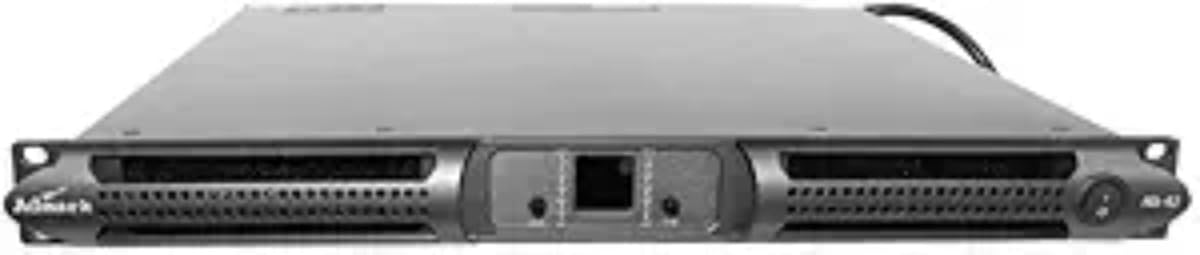
Figure 1: Front view of the ADMARK AD-42 Professional Class-D Power Amplifier, showing the dual digital signal LEDs and control layout.
2. What's in the Box
Upon unpacking, please ensure all items are present and in good condition.
- ADMARK AD-42 Power Amplifier
- Power Cord (1.5 meters long)
- User Manual (this document)
3. Setup
3.1 Rack Mounting
The ADMARK AD-42 is designed for standard 1U rack mounting. Ensure adequate ventilation space around the unit, especially at the front and rear, to facilitate proper cooling.
- Dimensions: 482 mm (W) x 44 mm (H) x 380-470 mm (D)
- Net Weight: 10-12 kg (22.04-26 lbs)
3.2 Power Connection
Connect the supplied power cord to the amplifier's power inlet and then to a suitable AC power outlet. The amplifier operates within a wide voltage range.
- Rated Power Demand: 100 - 240 V +/- 10%, 50/60 Hz
- Operation Voltage: 90V - 270V
3.3 Audio Input Connections
The AD-42 features two input channels. Connect your audio source (e.g., mixer, preamplifier) to the balanced XLR female input connectors on the rear panel.
- Input Type: Balanced XLR (with lock) female
- Input Impedance: 10 k Ohms balanced
3.4 Audio Output Connections
Connect your loudspeakers to the SPEAKON output connectors. Ensure correct polarity and impedance matching for optimal performance and to prevent damage to the amplifier or speakers.
- Output Type: SPEAKON per channel
4. Operating Instructions
4.1 Powering On/Off
Press the power switch on the front panel to turn the amplifier on or off. The intelligent soft boot feature ensures a smooth power-up sequence.
4.2 Mode Selection
The AD-42 supports three operational modes: Stereo, Parallel, and Bridge. Use the Mode Switch on the rear panel to select the desired configuration. Refer to the diagrams on the amplifier's rear panel for specific wiring instructions for each mode.
- Stereo Mode: Each channel operates independently, driving separate loudspeakers.
- Parallel Mode: Both input channels are summed, and the signal is sent to both output channels, typically for driving multiple speakers with the same signal.
- Bridge Mode: Combines the power of both channels into a single, higher-power output for driving a single, high-power loudspeaker (e.g., a subwoofer). Ensure the connected speaker's impedance is suitable for bridge mode operation (e.g., 4 Ohms or 8 Ohms bridged).
4.3 Sensitivity Adjustment
The amplifier features two Sensitivity Switches, allowing you to adjust the input gain to match your audio source's output level. Available gain settings are 32dB, 35dB, 38dB, and 41dB. Adjust these to achieve optimal signal-to-noise ratio without clipping.
4.4 Clip Indicator
The Clip Switch and Dual Digital Signal LEDs provide visual feedback on the input and output signal levels. If the Clip LED illuminates frequently or stays lit, reduce the input signal level or the amplifier's gain to prevent distortion and potential damage to speakers.
5. Maintenance
5.1 Cleaning
Regularly clean the exterior of the amplifier with a soft, dry cloth. Avoid using liquid cleaners or solvents, as these can damage the finish or internal components. Ensure the amplifier is powered off and disconnected from the mains before cleaning.
5.2 Ventilation
The AD-42 utilizes a tunnel-through cooling system. Ensure that the front and rear ventilation grilles are clear of obstructions to allow for proper airflow. Operating the amplifier in an environment with restricted airflow can lead to overheating and activation of protection circuits.
5.3 Operating Environment
Operate the amplifier within the specified temperature range to ensure longevity and stable performance.
- Operating Temperature: 0°C - 45°C (32°F - 113°F)
6. Troubleshooting
This section provides solutions to common issues you might encounter. The AD-42 features intelligent protection circuits to safeguard against various faults.
6.1 No Power
- Ensure the power cord is securely connected to both the amplifier and a live AC outlet.
- Verify the AC outlet is functioning correctly by plugging in another device.
- Check for tripped circuit breakers in your power distribution.
6.2 No Sound Output
- Confirm that audio input cables are correctly connected to the amplifier and the source device.
- Check that speaker cables are securely connected to the amplifier's SPEAKON outputs and the loudspeakers.
- Ensure the input source is active and producing an audio signal.
- Verify the amplifier's gain/sensitivity settings are appropriate.
- If the amplifier is in protection mode (indicated by specific LEDs), refer to the "Protection Mode Activated" section below.
6.3 Distorted Sound / Clipping
- If the Clip LED is illuminated, reduce the input signal level from your source or decrease the amplifier's sensitivity setting.
- Ensure the connected loudspeakers are rated for the amplifier's output power and impedance.
- Check speaker cables for damage or short circuits.
6.4 Protection Mode Activated
The AD-42 includes sophisticated short-circuit, overload, and overheat protection. If the amplifier enters protection mode (often indicated by a specific LED or cessation of audio output), perform the following steps:
- Immediately power off the amplifier.
- Disconnect all speaker cables and input cables.
- Allow the unit to cool down for at least 15-30 minutes if overheating is suspected (e.g., hot chassis, restricted ventilation).
- Inspect all speaker cables for short circuits or damage.
- Verify that the connected speaker impedance is within the amplifier's specified operating range for the selected mode (Stereo, Parallel, or Bridge).
- Reconnect cables and power on the amplifier. If the issue persists, contact customer support.
7. Specifications
| Feature | Specification |
|---|---|
| Model | AD-42 |
| Channels | 2 |
| Power Output (EIAJ Test Standard, 1 kHz, 1% THD) |
|
| 1/8 Maximum Power Output (4 Ohms) | 2228 Watts, 12 Amps (2 Channel); 2228 Watts, 24.6 Amps (Bridged) |
| 1/4 Maximum Power Output (4 Ohms) | 3920 Watts, 23 Amps (2 Channel); 3920 Watts, 47.1 Amps (Bridged) |
| Power Supply | PFC Power |
| Rated Power Demand | 100 - 240 V +/- 10%, 50/60 Hz |
| Operation Voltage | 90V - 270V |
| Power Correction Factor cos (f) | >0.95 @ >500 W |
| Standby Power | 47W and 0.8A |
| Gain, Sensitivity | 32dB, 35dB, 38dB, 41dB |
| Maximum Output Voltage/Current | 185V/85A (370V in BRIDGE MODE) |
| Power Consumption | 230V (115V in BRIDGE MODE) |
| Operating Temperature | 0°C - 45°C (32°F - 113°F) |
| Cooling System | Tunnel through cooling system |
| Frequency Response | 20 Hz - 20 kHz (1 W @ 8 ohms, +/- 0.5 dB) |
| Signal-to-Noise Ratio | >110 dBA (20 Hz - 20 kHz, A weighted) |
| Crosstalk | > 66 dB @ 1 kHz |
| Input Impedance | 10 k Ohms balanced |
| Total Harmonic Distortion (THD) | <0.5% from 1 W to full power (Typical value <0.05%) |
| Intermodulation Distortion (IMD) | <0.5% from 1 W to full power (Typical value <0.05%) |
| Product Dimensions | 482 x 44 x 380mm / 482 x 44 x 470mm (18.98 x 1.73 x 14.96-18.5 inches) |
| Net Weight | 10Kg/12Kg (22.04 -26 lbs) |
8. Warranty and Support
8.1 Warranty Information
Specific warranty terms and conditions for the ADMARK AD-42 amplifier may vary by region and retailer. Please refer to the warranty card included with your product or contact your point of purchase for detailed warranty information. It is recommended to retain your proof of purchase for warranty claims.
8.2 Customer Support
For technical assistance, troubleshooting beyond this manual, or service inquiries, please contact your authorized ADMARK dealer or the manufacturer's customer support directly. Have your product model number (AD-42) and serial number ready when contacting support.