
GeoMax Zone20 HV
GeoMax Zone20 HV Self-Leveling Rotary Laser User Manual
Model: Zone20 HV
1. Introduction
Thank you for choosing the GeoMax Zone20 HV Self-Leveling Rotary Laser. This versatile and efficient laser level is designed for a wide range of indoor and outdoor applications, including leveling, grading, and alignment tasks. This manual provides essential information for the safe and effective operation, setup, and maintenance of your device.
The Zone20 HV comes equipped with a ZRB90 Basic Receiver for accurate laser detection and a ZRC20 Remote Control for convenient remote operation.
2. What's Included
Your GeoMax Zone20 HV package includes the following components:
- Zone20 HV Self-Leveling Rotary Laser
- ZRB90 Basic Laser Receiver
- Receiver Bracket
- ZRC20 Remote Control
- User Manual (this document)
- Hard Carrying Case

Image: The GeoMax Zone20 HV rotary laser, accompanied by its ZRB90 basic receiver and ZRC20 remote control.
3. Setup
3.1 Powering the Device
The Zone20 HV requires 4 D-cell alkaline or Li-Ion batteries for operation. Ensure batteries are inserted with correct polarity. The device offers a battery life exceeding 60 hours with alkaline batteries or over 40 hours with Li-Ion batteries.
3.2 Mounting the Laser
The Zone20 HV can be placed on a stable, level surface or mounted on a tripod for elevated applications. Ensure the mounting surface is secure to prevent movement during operation.

Image: Front view of the GeoMax Zone20 HV rotary laser mounted on a tripod.

Image: Side view of the GeoMax Zone20 HV rotary laser mounted on a tripod.
4. Operating Instructions
4.1 Self-Leveling Operation
The Zone20 HV features dual axes for horizontal self-leveling. Once powered on and placed on a relatively level surface, the device will automatically self-level within a range of ± 6 degrees. The laser will begin rotating once self-leveling is complete.
- Accuracy: ± 3/32" at 100 feet.
- Working Diameter: 600 meters (1,968 feet).
- Rotation Speed: 600 rotations per minute.
4.2 Manual Slope Adjustments
The Zone20 HV allows for manual slope adjustments, providing flexibility for grading and specific alignment tasks. Refer to the ZRC20 Remote Control section for details on adjusting slope remotely.
4.3 Using the ZRB90 Basic Receiver
The ZRB90 Basic Receiver is designed to detect the laser beam emitted by the Zone20 HV, providing both visual and audible indications of the beam's position. This ensures precise measurements, especially over longer distances or in bright conditions.
- Working Diameter: 600 meters (1,968 feet).
- Detection Window: 3.1 inches.
- Accuracy: ±2.5 mm (±1/10 inch).
- Mounting: Easily mounts on a rod or staff using the included bracket.

Image: Front view of the GeoMax ZRB90 Basic Receiver.
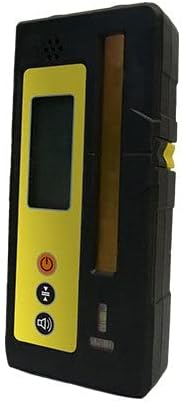
Image: Side view of the GeoMax ZRB90 Basic Receiver.
4.4 Using the ZRC20 Remote Control
The ZRC20 Remote Control provides convenient and easy control of the laser level from a distance of up to 150 meters. It features a user-friendly interface for adjusting various settings, such as slope, rotation, and scan modes, without needing to directly access the laser unit.
5. Maintenance
Proper maintenance ensures the longevity and accuracy of your GeoMax Zone20 HV.
- Cleaning: Use a soft, damp cloth to clean the exterior of the laser and receiver. Do not use abrasive cleaners or solvents. Ensure the laser output window is clean for optimal performance.
- Storage: When not in use, store the device and its accessories in the hard carrying case in a dry, cool place, away from direct sunlight and extreme temperatures.
- Battery Care: Remove batteries if the device will not be used for an extended period to prevent leakage.
- Calibration: For professional use, periodic calibration checks are recommended to maintain accuracy. Consult a certified service center if recalibration is needed.
6. Troubleshooting
If you encounter issues with your Zone20 HV, refer to the following common problems and solutions:
- Laser not turning on: Check battery installation and ensure batteries have sufficient charge.
- Laser not self-leveling: Ensure the device is placed on a surface within its ± 6 degree self-leveling range. If the surface is too uneven, adjust it manually.
- Receiver not detecting laser: Ensure the receiver is within the 600-meter working diameter. Check for obstructions between the laser and receiver. Verify the laser is powered on and rotating.
- Remote control not working: Check batteries in the remote control. Ensure there are no obstructions between the remote and the laser unit.
- Inaccurate readings: Ensure the laser and receiver are clean. Verify the device has self-leveled correctly. Consider professional calibration if accuracy issues persist.
For further assistance, please contact GeoMax customer support.
7. Specifications
| Feature | Specification |
|---|---|
| Model | Zone20 HV |
| Brand | GeoMax |
| Laser Type | 636 nm (visible) / Class 2 / 2.05mW |
| Self-Leveling Accuracy | ± 3/32" at 100 feet |
| Self-Leveling Range | ± 6 degrees |
| Working Diameter | 600 meters (1,968 feet) |
| Rotation Speed | 600 rotations per minute |
| Power Source | 4 D-cell alkaline or Li-Ion batteries |
| Battery Life | > 60 hours (alkaline), > 40 hours (Li-Ion) |
| IP Protection Level | IP67 |
| Item Weight | 15 Pounds |
| Material | Aluminum |
| Color | Yellow |
8. Warranty and Support
For information regarding product warranty, please refer to the warranty card included with your purchase or visit the official GeoMax website. For technical support, service, or spare parts, please contact your authorized GeoMax dealer or GeoMax customer service.
GeoMax AG
www.geomax-positioning.com
Related documentsZone20 HV


Ask a question about this manual
Ask about setup, troubleshooting, compatibility, parts, safety, or missing instructions. Manuals+ will review the question and use this page’s manual context to help answer it.