
Introduction
This manual provides essential instructions for the safe and efficient operation, maintenance, and troubleshooting of your Alldeer 15"x15" Smart Auto Heat Press Machine (Model YF65A15). Please read this manual thoroughly before using the machine to ensure proper function and to prevent damage or injury.
Safety Instructions
- Always operate the heat press on a stable, heat-resistant surface.
- Keep hands and other body parts clear of the heating platen during operation to avoid burns.
- Do not leave the machine unattended while it is heating or in operation.
- Ensure proper ventilation in the work area.
- Disconnect the power cord from the outlet when the machine is not in use or before cleaning and maintenance.
- The machine features an automatic opening mechanism upon completion of pressing. If not used for 30 minutes, it enters hibernation ("SLP" display) and gradually cools down. Press the start button to resume heating.
- This appliance is not intended for use by persons (including children) with reduced physical, sensory or mental capabilities, or lack of experience and knowledge, unless they have been given supervision or instruction concerning use of the appliance by a person responsible for their safety.
Product Components
Familiarize yourself with the main parts of your Alldeer heat press machine.

Image: Overview of the Alldeer heat press machine, highlighting the Teflon-coated heating platen, digital LED controller, and elastic silicone pad.
- Heating Platen: 15"x15" Teflon-coated surface for heat transfer.
- Digital LED Controller: For setting and monitoring temperature and time.
- Elastic Silicone Pad: Provides even pressure and heat resistance.
- Pressure Adjustment: Automatic pressure adjustment based on material thickness.
- Auto-Release Mechanism: The heating plate automatically opens upon completion of the pressing cycle.
Setup
The Alldeer Smart Auto Heat Press Machine is designed for out-of-the-box use with no assembly required.
- Unpacking: Carefully remove the heat press from its packaging.
- Placement: Place the machine on a sturdy, level, and heat-resistant surface. Ensure there is adequate space around the machine for safe operation and ventilation.
- Power Connection: Plug the power cord into a grounded electrical outlet.
- Initial Inspection: Before first use, inspect the machine for any visible damage.
Operation
Setting Temperature and Time
The digital LED controller allows precise adjustment of temperature and time for various heat transfer materials. The maximum temperature setting is 240°C (464°F).
- Power On: Turn on the machine using the power switch.
- Set Temperature: Press the "SET" button once to enter temperature setting mode. Use the "▲" and "▼" buttons to adjust the desired temperature.
- Set Time: Press the "SET" button again to enter time setting mode. Use the "▲" and "▼" buttons to adjust the desired time (0-499 seconds).
- Confirm Settings: Press the "SET" button a third time to confirm and exit the setting mode. The machine will begin heating to the set temperature.
Video: Demonstrates how to set the temperature and time on the Alldeer heat press machine's digital controller.

Image: Close-up view of the digital LED controller, showing temperature and time displays and setting buttons.
Performing a Heat Transfer
- Prepare Item: Place the item (e.g., T-shirt) flat on the silicone pad. Ensure it is smooth and wrinkle-free.
- Position Design: Place your heat transfer material (HTV, sublimation print, etc.) onto the item in the desired position.
- Cover (Optional): Depending on the material, you may need to cover the design with a Teflon sheet or parchment paper. For HTV vinyl, an insulation film is typically not needed.
- Start Press: Press the start button to lower the heating platen. The machine will automatically adjust pressure and begin the heat transfer cycle.
- Auto-Release: Once the set time expires, the heating platen will automatically lift, indicating the completion of the transfer.
- Remove Item: Carefully remove the transferred item. Allow it to cool if it's a cold peel transfer.
Video: Guide on applying HTV vinyl, specifying 320°F for 20 seconds without insulation film.
Video: Step-by-step demonstration of completing a T-shirt transfer using the Alldeer heat press.
Video: A brief display of the Alldeer automatic heat press machine in operation, showcasing its auto-press function.
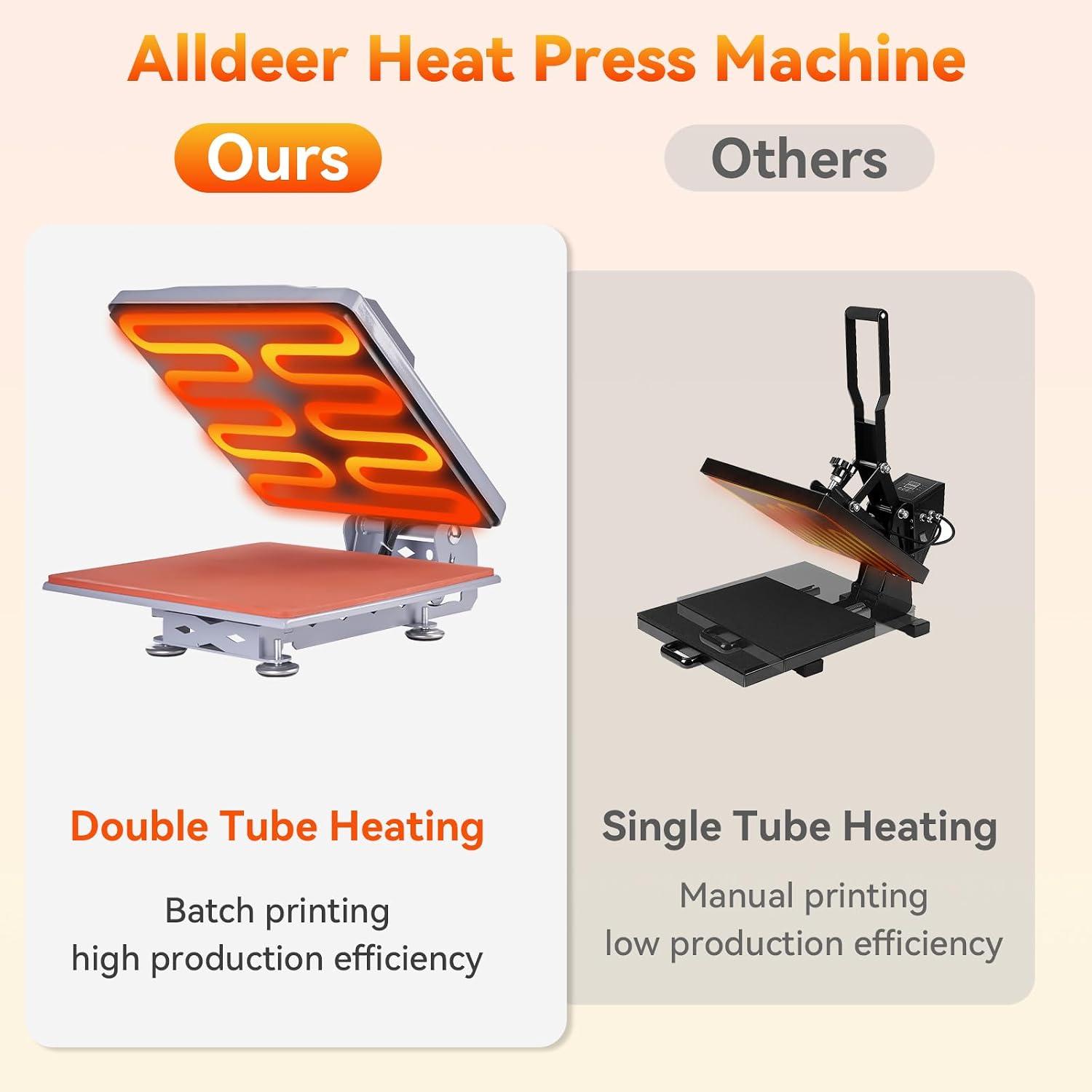
Image: The Alldeer heat press machine with its 45-degree opening angle, showing the 15x15 inch platen size.

Image: Diagram illustrating the double tube heating element for even heat distribution in the Alldeer heat press.
Maintenance
- Cleaning the Platen: Ensure the machine is cool and unplugged. Wipe the Teflon-coated heating platen with a soft, damp cloth. For stubborn residue, use a non-abrasive cleaner specifically designed for heat press platens.
- Cleaning the Silicone Pad: The elastic silicone pad can be wiped clean with a damp cloth. Ensure it is dry before next use.
- General Cleaning: Wipe down the exterior of the machine with a dry or slightly damp cloth to remove dust and debris.
- Storage: Store the heat press in a dry, dust-free environment when not in use.
Troubleshooting
| Problem | Possible Cause | Solution |
|---|---|---|
| Machine does not power on. | Power cord not properly connected; power outlet issue. | Check power cord connection. Try a different outlet. Ensure power switch is ON. |
| Machine not heating up. | Temperature not set; machine in hibernation mode. | Verify temperature settings. If "SLP" is displayed, press the start button to resume heating. |
| Transfer material not adhering properly. | Incorrect temperature or time settings; insufficient pressure. | Adjust temperature and time according to material manufacturer's recommendations. The machine automatically adjusts pressure, but ensure the item is flat. |
| Machine does not auto-open. | Malfunction in auto-release mechanism. | Ensure the machine completes its cycle. If the issue persists, contact customer service. |
| "SLP" displayed on screen. | Machine entered hibernation mode due to inactivity. | Press the start button to reactivate the machine and resume heating. |
Specifications
| Feature | Detail |
|---|---|
| Brand | Alldeer |
| Model Number | YF65A15 |
| Product Dimensions | 15"L x 15"W x 15"H |
| Heating Platen Size | 15" x 15" |
| Material | Metals |
| Color | Grey |
| Maximum Temperature | 240 °C (464 °F) |
| Time Control | 0 - 499 Seconds |
| Opening Angle | 45° |
| Special Features | Auto-release, Automatic Pressure Adjustment, Double Tube Heating, Hibernation Mode |
Warranty and Support
For any issues or questions regarding your Alldeer heat press machine, please contact customer service. While a specific warranty description is not provided, the manufacturer is committed to customer satisfaction.
How to Contact Support:
- Visit the Alldeer store page on Amazon.
- Click on "Ask a question".
- Select "An order I placed" and describe your issue.