
LVYUAN VTUS-2000
LVYUAN 2000VA Voltage Converter Transformer User Manual
Model: VTUS-2000
Brand: LVYUAN
1. Introduction
This user manual provides essential information for the safe and efficient operation of your LVYUAN 2000VA Voltage Converter Transformer. This device is designed to convert electrical voltage between 110V-120V and 220V-240V, allowing you to use electronic appliances from different regions. Please read this manual thoroughly before using the converter.
2. Safety Instructions
Always adhere to the following safety precautions to prevent electric shock, fire, or damage to the unit and connected appliances.
- Ensure the input voltage selector switch on the back of the unit is set to the correct voltage matching your local power supply (e.g., 110V for North America, 220V for Europe). Incorrect setting can damage the unit and connected devices.
- Do not overload the converter. The total wattage of all connected appliances must not exceed the converter's maximum capacity (2000VA).
- Use the converter in a well-ventilated area. Do not block ventilation openings.
- Keep the converter away from water, moisture, and extreme temperatures.
- Do not open the converter casing. There are no user-serviceable parts inside. Refer servicing to qualified personnel.
- Always unplug the converter from the power outlet before connecting or disconnecting appliances.
- Keep out of reach of children.
3. Product Components and Features
Familiarize yourself with the different parts of your LVYUAN Voltage Converter.

Figure 3.1: Front view of the LVYUAN 2000VA Voltage Converter Transformer, showing the main unit and detachable power cables.

Figure 3.2: Detailed front panel view. This image highlights the 230V OUTPUT Sockets, 110V OUTPUT Sockets, Power LED, and the On/Off Switch.
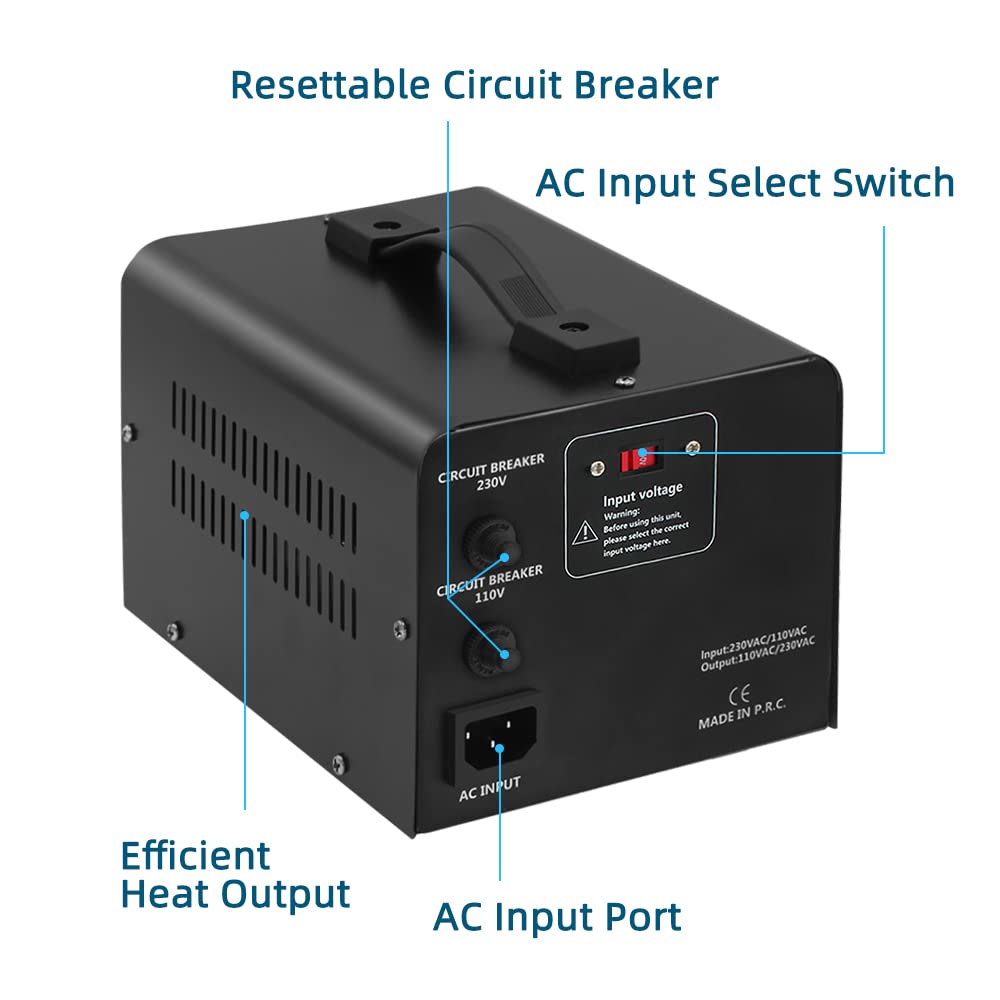
Figure 3.3: Detailed rear panel view. This image points out the Resettable Circuit Breakers (for 230V and 110V), the AC Input Select Switch, and the AC Input Port. Also visible are the ventilation grilles for efficient heat output.
- 230V OUTPUT Sockets: For connecting appliances requiring 220V-240V power.
- 110V OUTPUT Sockets: For connecting appliances requiring 110V-120V power.
- Power LED: Illuminates when the unit is powered on.
- On/Off Switch: Controls the power to the converter.
- Resettable Circuit Breakers: Provide overload protection. If tripped, allow the unit to cool, reduce load, and then press to reset.
- AC Input Select Switch: Crucial switch to select the input voltage (110V or 220V) based on your local power supply.
- AC Input Port: Where the detachable power cord connects to the unit.
- Efficient Heat Output: Ventilation grilles designed for optimal heat dissipation.
4. Setup
- Unpack: Carefully remove the converter from its packaging. Inspect for any signs of damage.
- Placement: Place the converter on a stable, flat surface in a well-ventilated area, away from direct sunlight, heat sources, and moisture. Ensure adequate space around the unit for air circulation.
- Select Input Voltage: Locate the AC Input Select Switch on the rear panel. Before plugging in the converter, set this switch to match your local power supply voltage (e.g., if your wall outlet is 110V, set the switch to 110V; if 220V, set to 220V). This is a critical step to prevent damage.

Figure 4.1: Rear panel detail showing the AC Input Select Switch and the warning regarding input voltage selection. The replaceable power cord is also shown.
- Connect Power Cord: Connect the provided detachable power cord to the AC Input Port on the rear of the converter.
- Connect to Wall Outlet: Ensure the converter's On/Off switch is in the "OFF" position. Plug the other end of the power cord into a grounded wall outlet.
- Connect Appliances: With the converter still OFF, plug your appliance(s) into the appropriate output socket(s) on the front panel (110V for 110V-120V appliances, 230V for 220V-240V appliances). Ensure the total wattage does not exceed 2000VA.
5. Operating Instructions
Once setup is complete, follow these steps to operate the voltage converter:
- Power On: Flip the On/Off switch on the front panel to the "ON" position. The Power LED will illuminate, indicating the unit is receiving power.
- Use Appliance: Turn on your connected appliance. The converter will automatically step up or step down the voltage as required.
- Power Off: When finished, turn off your appliance first, then flip the converter's On/Off switch to the "OFF" position. Unplug the converter from the wall outlet if not in use for an extended period.
Important Considerations:
- For motor-driven appliances (e.g., refrigerators, power tools, pumps), it is recommended to use a converter with a wattage capacity at least 2-3 times higher than the appliance's rated wattage due to high startup current.
- For heating appliances (e.g., coffee makers, toasters, heaters), the converter's wattage should be at least 1.5 times higher than the appliance's rated wattage.
- Always verify the voltage requirements of your appliance before connecting it to the converter.
6. Maintenance
The LVYUAN Voltage Converter is designed for minimal maintenance. Follow these guidelines to ensure longevity:
- Cleaning: Disconnect the converter from all power sources before cleaning. Use a soft, dry cloth to wipe the exterior. Do not use liquid cleaners or aerosols.
- Ventilation: Regularly check that the ventilation openings are free from dust and debris to ensure proper heat dissipation.
- Storage: If storing the unit for an extended period, keep it in a cool, dry place, away from direct sunlight and extreme temperatures.
7. Troubleshooting
| Problem | Possible Cause | Solution |
|---|---|---|
| Converter does not power on (Power LED off). |
|
|
| Appliance not working. |
|
|
| Converter gets hot. |
|
|
8. Specifications
| Feature | Detail |
|---|---|
| Model | VTUS-2000 |
| Input Voltage | 110V-120V AC or 220V-240V AC (selectable) |
| Output Voltage | 110V-120V AC and 220V-240V AC (simultaneous) |
| Maximum Capacity | 2000VA (Watts) |
| Power Source | Corded Electric |
| Mounting Type | Portable |
| Dimensions (L x W x H) | Approx. 8.26 x 5.90 x 5.90 inches (21 x 15 x 15 cm) Figure 8.1: Dimensions of the LVYUAN 2000VA Voltage Converter Transformer. |
| Weight | Approx. 10.67 Pounds (4.84 kg) |
| Core Components | Pure copper coil, anti-slip gasket, top sheeting, chassis. Designed for odorless and noise-free operation. Figure 8.2: Exploded view of the converter's high-quality core components, including the pure copper coil. |
| Safety Standard | UL Compliant |
9. Warranty Information
LVYUAN products are manufactured to high-quality standards. For specific warranty terms and conditions, please refer to the warranty card included with your product or visit the official LVYUAN website. Keep your purchase receipt as proof of purchase for warranty claims.
10. Customer Support
If you encounter any issues or have questions regarding your LVYUAN Voltage Converter, please contact our customer support team. Contact information can typically be found on the product packaging, the official LVYUAN website, or through your retailer.
Ask a question about this manual
Ask about setup, troubleshooting, compatibility, parts, safety, or missing instructions. Manuals+ will review the question and use this page’s manual context to help answer it.