
FITNMORE PSTK 800 E3
PARKSIDE® PSTK 800 E3 Jigsaw User Manual
Model: PSTK 800 E3
Brand: PARKSIDE® (Manufactured by FITNMORE)
1. Safety Instructions
Always read and understand all safety warnings, instructions, illustrations, and specifications provided with this power tool. Failure to follow all instructions listed below may result in electric shock, fire, and/or serious injury.
- Keep work area clean and well lit. Cluttered or dark areas invite accidents.
- Do not operate power tools in explosive atmospheres, such as in the presence of flammable liquids, gases, or dust. Power tools create sparks which may ignite the dust or fumes.
- Keep children and bystanders away while operating a power tool. Distractions can cause you to lose control.
- Always wear eye protection. Use a dust mask, non-skid safety shoes, hard hat, or hearing protection for appropriate conditions.
- Disconnect the plug from the power source and/or remove the battery pack, if detachable, from the power tool before making any adjustments, changing accessories, or storing power tools. Such preventive safety measures reduce the risk of starting the power tool accidentally.
2. Product Overview
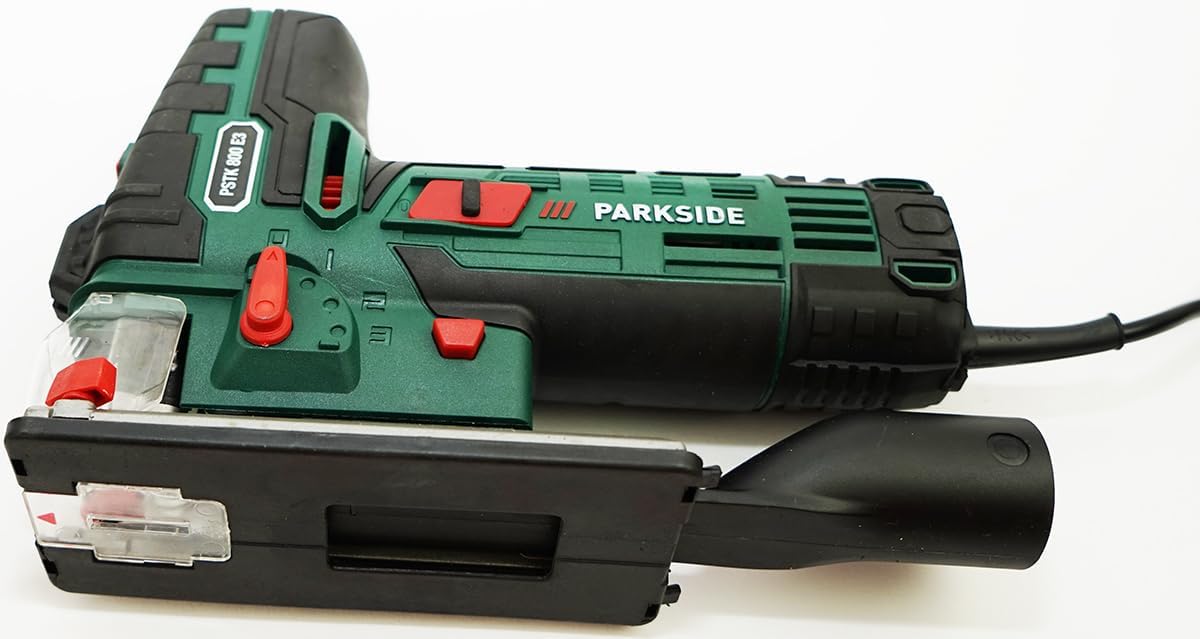
The PARKSIDE® PSTK 800 E3 Jigsaw is a powerful electric tool designed for precise cutting in various materials. It features a laser guide, LED work light, and adjustable pendulum action for efficient operation.



3. Setup
3.1 Unpacking
Carefully remove all components from the packaging. Ensure all parts listed in the 'What's in the Box' section are present and undamaged. Keep the packaging for future storage or transport.
3.2 Blade Installation
The jigsaw features a SAW LOCK quick-release chuck for easy blade changes.
- Ensure the tool is unplugged from the power source.
- Open the SAW LOCK quick-release chuck.
- Insert the saw blade with an Einnockenschaft (single lug shank) until it clicks into place.
- Verify the blade is securely fastened before operation.
3.3 Adjusting the Base Plate
The base plate can be adjusted tool-lessly for various cutting angles.
- Loosen the base plate locking mechanism.
- Adjust the base plate to the desired angle (0°, 22.5°, or 45°).
- Securely tighten the locking mechanism.
3.4 Dust Extraction Connection
For a cleaner work environment, connect an external dust extraction system.
- Attach the provided dust extraction adapter to the tool's exhaust port.
- Connect a suitable vacuum cleaner hose to the adapter.
4. Operating Instructions
4.1 Powering On/Off
Connect the jigsaw to a 230V power supply. Press the power switch to turn the tool on, and release to turn it off.
4.2 Adjusting Stroke Rate
The electronic stroke rate adjustment allows for optimal cutting speed based on the material.
- Use the stroke rate dial to select a speed between 0 and 3100 strokes per minute.
- Lower speeds are suitable for harder materials or precise cuts, while higher speeds are for softer materials and faster cutting.
4.3 Pendulum Action Settings
The 3-stage adjustable pendulum action and fine cut setting enhance cutting efficiency and quality.
- Stage 0 (Fine Cut): No pendulum action, for very fine and precise cuts, especially in delicate materials.
- Stages 1-3: Increasing pendulum action for faster cutting in wood and other soft materials. Higher stages provide quicker material removal but may result in a rougher cut.
4.4 Laser Guide and LED Work Light
Activate the laser guide and LED work light for improved visibility and cutting accuracy.
- The laser projects a line onto the workpiece, indicating the cutting path.
- The LED work light illuminates the cutting area.
- Ensure the laser guide is calibrated correctly for accurate cuts. If the laser line does not match the actual cutting line, refer to the troubleshooting section or consult a service professional.
4.5 Blower Function and Splinter Guard
The integrated blower function keeps the cutting line clear of chips, and the splinter guard minimizes tear-out.
- The blower function automatically clears sawdust from the cutting path.
- Attach the splinter guard to the base plate to prevent splintering on the top surface of the workpiece, especially when cutting wood.
5. Maintenance
5.1 Cleaning
Regular cleaning ensures optimal performance and extends the tool's lifespan.
- Always unplug the tool before cleaning.
- Use a soft brush or compressed air to clean the ventilation slots and the area around the saw blade.
- Do not use water or chemical cleaning agents.
5.2 Blade Replacement
Replace saw blades when they become dull or damaged to maintain cutting performance and safety. Refer to section 3.2 for blade installation.
5.3 General Care
Store the jigsaw in a dry, secure place, away from direct sunlight and extreme temperatures. Use the provided carrying case for protection.
6. Troubleshooting
This section addresses common issues you might encounter with your jigsaw.
6.1 Inaccurate Cuts / Laser Misalignment
- Issue: The laser guide does not align with the actual cutting line.
- Solution: Check if the blade is correctly installed and not bent. Ensure the base plate is securely fastened. If the issue persists, the laser may require calibration by a qualified service technician.
6.2 Reduced Cutting Performance
- Issue: The saw cuts slowly or struggles with materials.
- Solution: Replace the saw blade with a new, sharp one suitable for the material being cut. Ensure the correct stroke rate and pendulum action setting are selected for the material.
6.3 Tool Not Starting
- Issue: The jigsaw does not power on.
- Solution: Check the power connection and ensure the outlet is functional. Verify that the power switch is fully engaged.
7. Specifications
| Feature | Specification |
|---|---|
| Model Number | PARKSIDE® PSTK 800 E3 |
| Power Consumption | 800 Watt |
| Voltage | 230 Volt |
| No-load Stroke Rate | 0–3100 min⁻¹ |
| Pendulum Stroke Stages | 1–3 and Fine Cut Setting |
| Stroke Length | 26 mm |
| Max. Cutting Depth (Wood) | 80 mm |
| Max. Cutting Depth (Aluminum) | 12 mm |
| Max. Cutting Depth (Metal) | 8 mm |
| Bevel Cut Angles | 0°/22.5°/45° (left/right) |
| Weight | Approx. 2.4 kg |
| Dimensions (Jigsaw) | Approx. 26.9 x 19 x 7.4 cm |
| Material | Plastic, Fiberglass |
| Included Accessories | 1x Wood Saw Blade (Swiss Made), 1x Metal Saw Blade (Swiss Made), 1x Parallel Guide, 1x Dust Extraction Adapter (pre-assembled), 1x Carrying Case |