
ohyes ZX0988
ohyes Bluetooth Speaker Instruction Manual
Brand: ohyes
Model: ZX0988
1. Introduction
Thank you for purchasing the ohyes Bluetooth Speaker. This portable speaker is designed for versatility and durability, making it ideal for job sites, camping, parties, and general outdoor use. It is compatible with Milwaukee 18V battery packs, providing extended playtime and the convenience of using existing power tool batteries. This manual provides detailed instructions for setup, operation, maintenance, and troubleshooting to ensure optimal performance and longevity of your speaker.
Key Features:
- 18V Battery Compatibility: Designed to work seamlessly with Milwaukee 18V battery packs (battery not included). Features automatic shutdown if battery voltage drops below 15.5V to prevent overload damage.
- Effortless Connectivity: Equipped with Bluetooth 5.3 for rapid and stable pairing, offering a strong connection up to 52 feet.
- USB Audio Source: Supports music playback directly from a USB disk via the integrated USB-A port.
- Powerful Sound: Delivers strong, clear, and distortion-free audio with a 20W built-in speaker.
- Dual Speaker Connection (TWS): Pair two ohyes speakers together using True Wireless Stereo (TWS) technology for an immersive stereo sound experience.
- Power Bank Functionality: Features USB-A and USB-C charging outputs to charge your mobile devices while playing music.
- Compact and Portable: Small and lightweight design for easy transport to any location.
2. Package Contents
Please verify that all items are present and in good condition upon opening the package:
- ohyes Bluetooth Speaker (Model: ZX0988)
- User Manual
Note: Milwaukee 18V battery pack is not included and must be purchased separately.
3. Product Overview
3.1 Speaker Components and Controls

Figure 1: ohyes Bluetooth Speaker with Milwaukee 18V Battery (battery not included).

Figure 2: Internal components and 20W speaker for powerful audio output.
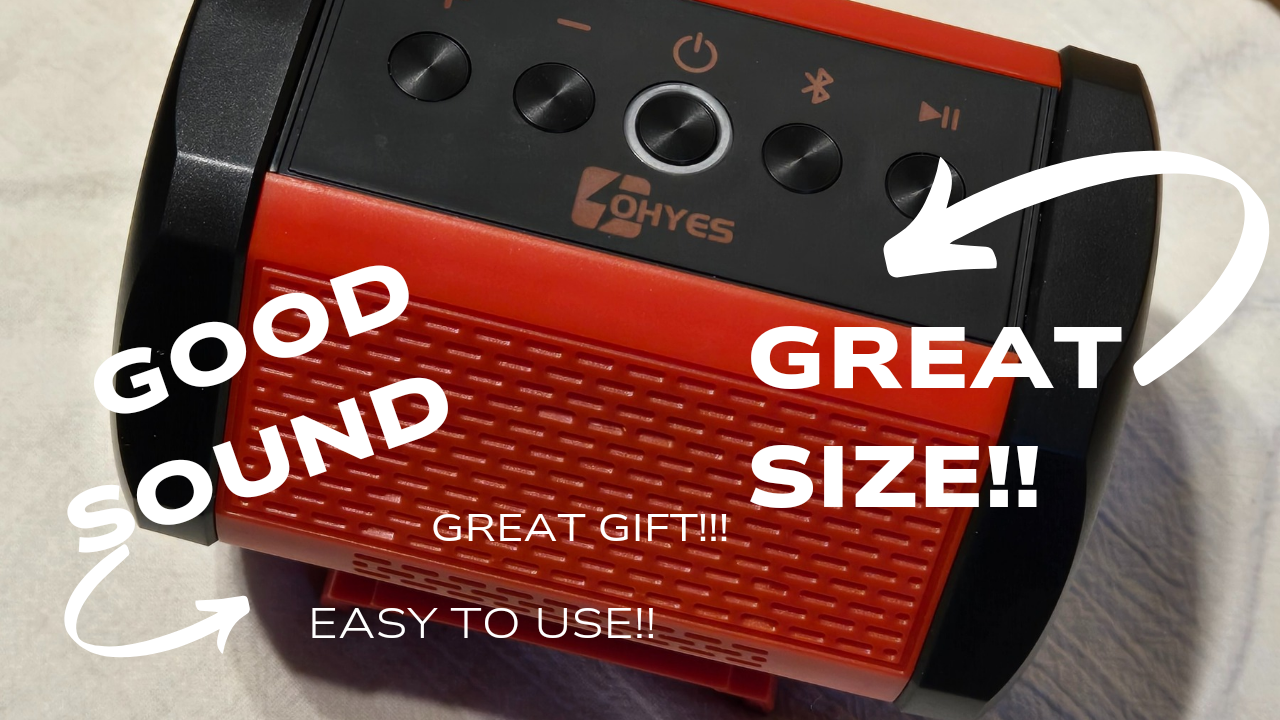
Figure 3: Top panel with control buttons for power, volume, and playback.
| Button | Function |
|---|---|
| Power Button (Circle with vertical line) | Press and hold to Power ON/OFF. Short press to Play/Pause music. |
| Volume Down / Previous Track (Minus sign) | Short press to decrease volume. Long press for previous track. |
| Volume Up / Next Track (Plus sign) | Short press to increase volume. Long press for next track. |
| Bluetooth Button (Bluetooth symbol) | Press to enter Bluetooth pairing mode. |
| Play/Pause Button (Play/Pause symbol) | Short press to Play/Pause music. |
3.2 Ports and Indicators

Figure 4: Dual charging ports (USB-A/C) and charging switch.
- USB-C Port: DC 5V Charging output.
- USB-A Port: DC 5V Charging output and USB disk input for music playback.
- Charging Switch: Activates/deactivates the charging function for external devices.
- LED Indicator: Indicates power status, Bluetooth pairing status, and charging status.
4. Setup
4.1 Attaching the Battery
The ohyes Bluetooth Speaker is designed for use with Milwaukee 18V battery packs. Ensure your battery is charged before use.
- Align the speaker's battery slot with the Milwaukee 18V battery pack.
- Slide the speaker firmly onto the battery until it clicks into place, ensuring a secure connection.
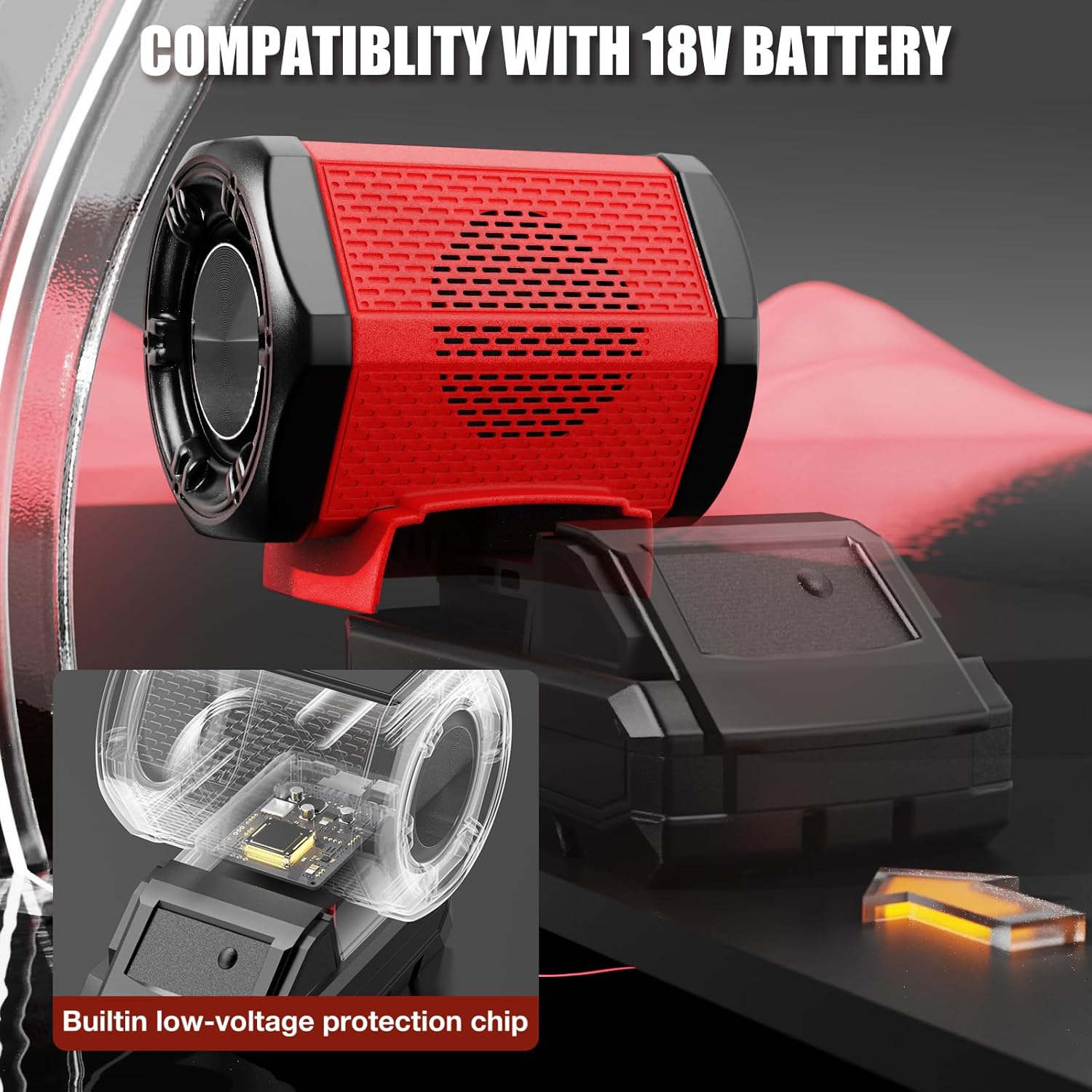
Figure 5: Speaker securely attached to a Milwaukee 18V battery.
Video 1: Demonstration of attaching the speaker to a Milwaukee 18V battery and basic power-on. (Source: Wissens)
4.2 Powering On and Bluetooth Pairing
- With the battery attached, press and hold the Power Button on the top panel for 2-3 seconds until the LED indicator lights up and you hear an audible prompt.
- The speaker will automatically enter Bluetooth pairing mode, and the LED indicator will flash.
- On your mobile device (smartphone, tablet, etc.), enable Bluetooth and search for available devices.
- Select "OHYES ZX0988" from the list of devices to pair. Once successfully paired, you will hear a confirmation tone, and the LED indicator will turn solid blue.
Video 2: Powering on the speaker and connecting via Bluetooth. (Source: Wissens)
5. Operating Instructions
5.1 Basic Music Playback
- Play/Pause: Short press the Power Button or the Play/Pause Button.
- Volume Adjustment: Short press the Volume Up (+) or Volume Down (-) buttons.
- Next/Previous Track: Long press the Volume Up (+) for next track or Volume Down (-) for previous track.
5.2 USB Disk Playback
Insert a USB flash drive containing MP3 audio files into the USB-A port. The speaker will automatically detect the USB disk and begin playing music.
Figure 6: USB-A port for direct audio playback from a USB disk.
5.3 True Wireless Stereo (TWS) Pairing
For an enhanced stereo experience, you can pair two ohyes Bluetooth Speakers together.
- Ensure both ohyes speakers are powered on and not connected to any other Bluetooth device.
- On one speaker (this will be the primary speaker), press and hold the Bluetooth Button until you hear a pairing tone.
- The two speakers will automatically search for and connect to each other. Once connected, you will hear a confirmation tone, and the LED indicators on both speakers will turn solid blue.
- Now, connect your mobile device to the primary speaker via Bluetooth as described in Section 4.2. Audio will play through both speakers in stereo.

Figure 7: Dual pairing (TWS) for immersive stereo sound.
6. Charging External Devices
The ohyes Bluetooth Speaker can act as a power bank to charge your mobile devices.
- Ensure the speaker is powered on and has a Milwaukee 18V battery attached.
- Connect your mobile device to either the USB-A or USB-C charging port on the speaker using an appropriate charging cable.
- Flip the Charging Switch to the ON position to begin charging your device.

Figure 8: Speaker providing power to charge a smartphone.
7. Maintenance
- Cleaning: Use a soft, dry cloth to clean the speaker's exterior. Do not use abrasive cleaners or solvents.
- Storage: When not in use for extended periods, store the speaker in a cool, dry place away from direct sunlight and extreme temperatures. Remove the battery pack before storage.
- Battery Care: Always ensure the Milwaukee 18V battery is properly inserted and removed. The speaker has a low-voltage protection feature, but it is recommended to remove the battery when not in use to prevent excessive discharge.
- Avoid Water Exposure: This speaker is NOT waterproof. Avoid exposing it to rain, splashes, or submersion in water.
8. Troubleshooting
| Problem | Possible Cause | Solution |
|---|---|---|
| Speaker does not power on. | Battery not properly attached or discharged. | Ensure the Milwaukee 18V battery is fully charged and securely attached. |
| Cannot pair via Bluetooth. | Speaker is not in pairing mode; device Bluetooth is off; too far from device. | Press the Bluetooth button to enter pairing mode. Ensure Bluetooth is enabled on your device. Move device closer to speaker (within 52 ft). |
| No sound or low volume. | Volume too low on speaker or connected device; incorrect audio source. | Increase volume on both the speaker and your connected device. Ensure correct audio source (Bluetooth or USB disk) is selected. |
| Sound distortion. | Volume too high; weak Bluetooth connection. | Decrease volume. Move closer to the speaker to improve Bluetooth signal. |
| TWS pairing fails. | Speakers are already paired to other devices; too far apart. | Ensure both speakers are disconnected from other devices. Place speakers close to each other during TWS pairing. |
| External device not charging. | Charging switch is off; battery is low; cable issue. | Ensure the Charging Switch is ON. Check battery level. Try a different USB cable. |
9. Specifications
| Feature | Detail |
|---|---|
| Model Name | MK-SPK (ZX0988) |
| Brand | ohyes |
| Material | Acrylonitrile Butadiene Styrene (ABS) |
| Speaker Type | Outdoor |
| Speaker Maximum Output Power | 20 Watts |
| Speaker Size | 4 Inches |
| Audio Output Mode | Stereo |
| Connectivity Technology | Bluetooth |
| Bluetooth Version | 5.3 |
| Maximum Range | 52-53 Feet |
| Power Source | Battery Powered (Compatible with Milwaukee 18V battery packs) |
| Product Dimensions | 4.7"D x 3.6"W x 3.9"H |
| Item Weight | 9.5 ounces (270 Grams) |
| Is Waterproof | FALSE |
| Included Components | User Manual, Speaker |
10. Warranty and Support
The ohyes Bluetooth Speaker comes with a 12-Month Warranty from the date of purchase.
For any product issues, technical assistance, or warranty claims, please contact our customer service team. We offer 24/7 Customer Service to assist you.
Contact Information: Please refer to the contact details provided on the product packaging or our official website.
Disclaimer: This product is not an original Milwaukee item.
Ask a question about this manual
Ask about setup, troubleshooting, compatibility, parts, safety, or missing instructions. Manuals+ will review the question and use this page’s manual context to help answer it.