
LONPOO AMP-615
LONPOO Bluetooth Audio Amplifier User Manual
Model: AMP-615
Introduction
This manual provides detailed instructions for the setup, operation, and maintenance of your LONPOO Bluetooth Audio Amplifier, Model AMP-615. Please read this manual thoroughly before using the product to ensure proper functionality and to maximize your audio experience.

Image: The LONPOO Bluetooth Audio Amplifier (Model AMP-615) shown with its included remote control. The amplifier is a compact black unit with front panel controls for treble, bass, and volume, along with AUX IN and USB ports. An antenna is visible on the top rear.
Setup
1. Unpacking and Contents
Carefully remove all components from the packaging. Verify that all items listed below are present and in good condition.

Image: Contents of the LONPOO amplifier box, including the 1X Bluetooth Amplifier, 1X Remote Control, 1X AC Cord, 1X Optical Cable, and 1X User Manual. Dimensions of the amplifier are also shown: 55mm (2.16 inches) height, 132mm (5.19 inches) depth, and 140mm (5.51 inches) width, with a weight of 1.71 lbs.
- 1x LONPOO Bluetooth Amplifier (Model AMP-615)
- 1x Remote Control
- 1x AC Power Cord
- 1x Optical Cable
- 1x User Manual (this document)
2. Connections
Before connecting, ensure the amplifier is powered off and unplugged from the AC outlet. Connect your audio sources and speakers as described below.
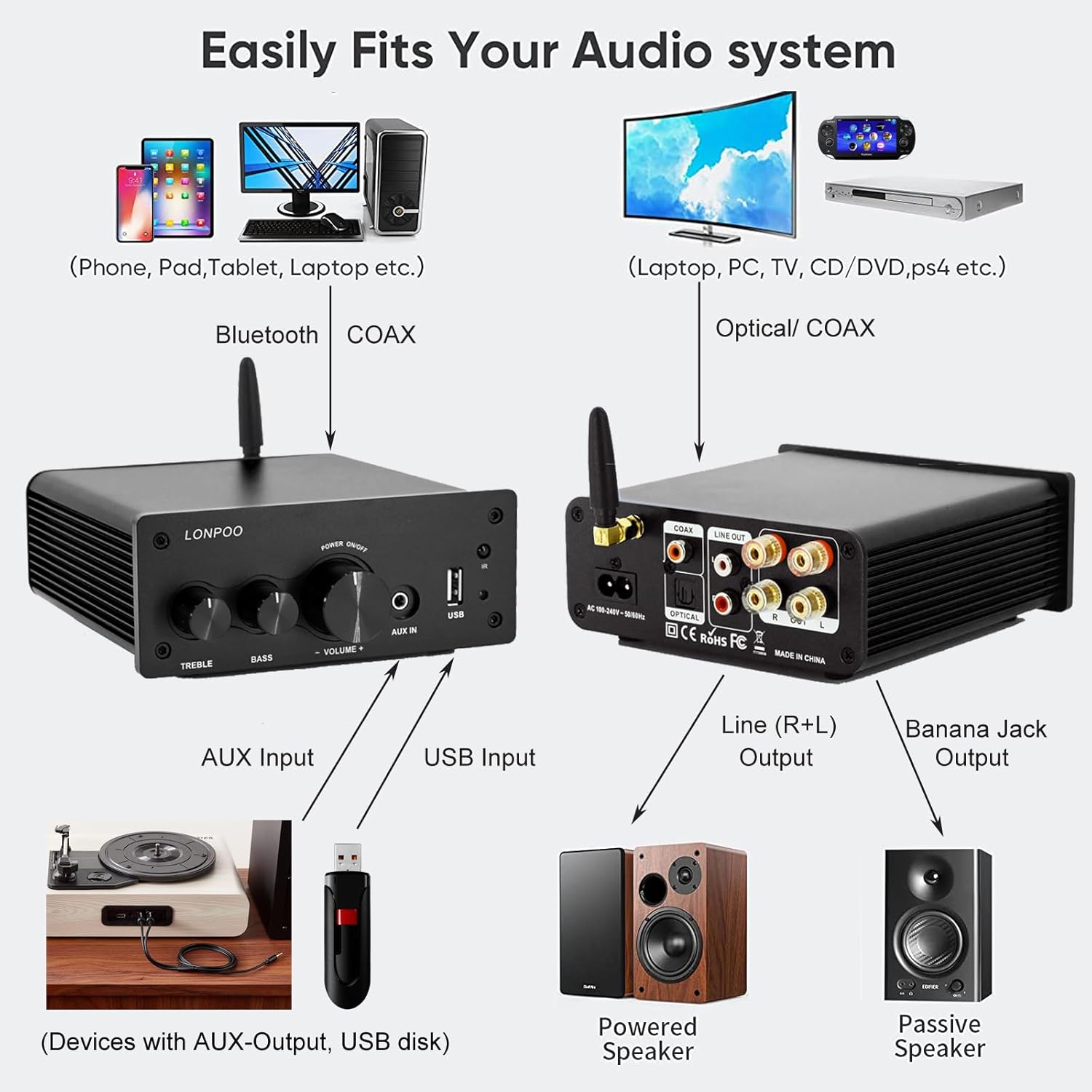
Image: A diagram illustrating various connection options for the LONPOO amplifier. It shows connections for Bluetooth, Coaxial, Optical, AUX Input, USB Input, Line (R+L) Output for powered speakers, and Banana Jack Output for passive speakers. Examples of connected devices include phones, tablets, laptops, PCs, TVs, CD/DVD players, PS4, turntables, USB disks, powered speakers, and passive speakers.
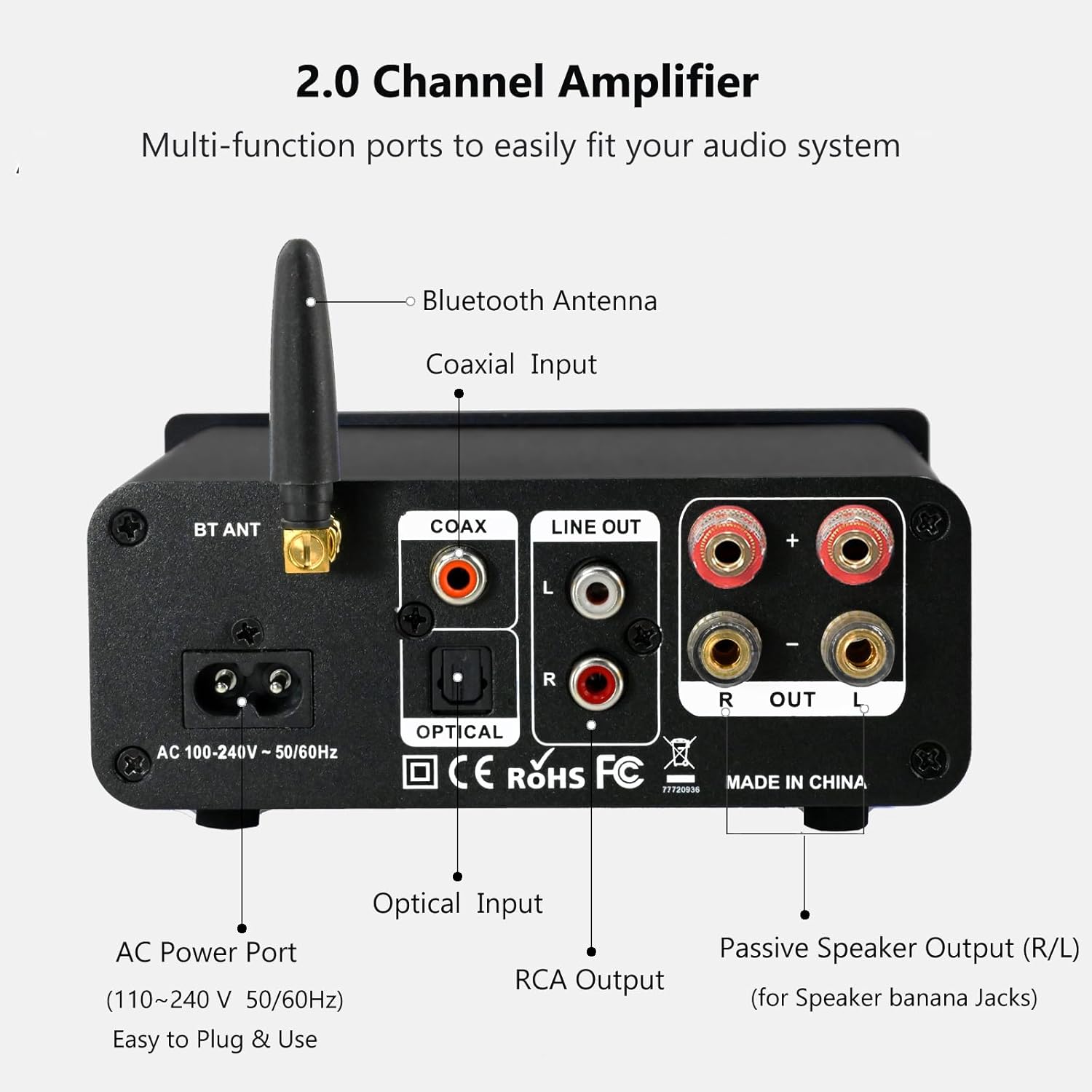
Image: A detailed view of the rear panel of the LONPOO amplifier, highlighting the AC Power Port (100-240V 50/60Hz), Bluetooth Antenna, Coaxial Input, Optical Input, RCA Output (Line Out R/L), and Passive Speaker Output (R/L) for speaker banana jacks.
- Speaker Connection: Connect your passive bookshelf speakers to the "OUT R" and "OUT L" terminals on the rear panel using speaker wires. Ensure correct polarity (+ to + and - to -).
- Audio Input:
- Optical/Coaxial Input: Connect digital audio sources (e.g., TV, CD player) to the OPTICAL or COAXIAL input ports.
- RCA Input: Use the RCA (Line In) ports for analog audio sources.
- AUX Input (Front Panel): For quick connection of portable devices, use the 3.5mm AUX IN jack on the front panel.
- USB Input (Front Panel): Insert a USB disk for direct audio playback.
- Power Connection: Once all audio connections are made, connect the AC power cord to the amplifier's AC Power Port and then to a wall outlet.
3. Power On
Press the "POWER ON/OFF" knob on the front panel to turn on the amplifier. The indicator light will illuminate.
Operation
1. Front Panel Controls

Image: A detailed diagram of the LONPOO amplifier's front panel. It shows the Treble Control knob, Bass Control knob, Multi-Function Knob (for Volume +/- by rotation, Mode selection by short press, and Power Off by long press), 3.5mm AUX Input, USB Input, Infrared (IR) receiver, and Indicator Light. The indicator light colors are explained: Red for Standby/Power, Blue for Bluetooth, Green for AUX, Yellow for Coaxial, and Light Blue for Optical.
- TREBLE Control: Adjusts the high-frequency response.
- BASS Control: Adjusts the low-frequency response.
- Multi-Function Knob (Volume/Mode/Power):
- Rotate to adjust volume.
- Short press to cycle through input modes (Bluetooth, AUX, USB, Coaxial, Optical).
- Long press to power off the unit.
- AUX IN: 3.5mm input for external audio devices.
- USB: USB port for playing audio from a USB disk.
- IR: Infrared receiver for the remote control.
- Indicator Light: Displays the current input mode (Red: Standby/Power, Blue: Bluetooth, Green: AUX, Yellow: Coaxial, Light Blue: Optical).
2. Bluetooth Pairing
The amplifier features Bluetooth 5.3 for stable wireless connection.

Image: A hand holding a smartphone, indicating a Bluetooth connection to the LONPOO amplifier. The amplifier is placed on a console table with books and a plant, demonstrating its compact size and suitability for home environments.
- Turn on the amplifier and select Bluetooth mode using the Multi-Function Knob or the remote control. The indicator light will turn blue.
- On your Bluetooth device (smartphone, tablet, etc.), enable Bluetooth and search for "LONPOO AMP-615".
- Select "LONPOO AMP-615" to pair. Once connected, the indicator light will remain solid blue.
- You can now play audio from your device through the amplifier.
3. AUX and USB Input
The amplifier automatically detects and plays audio from AUX or USB inputs when connected.

Image: The LONPOO amplifier connected to a laptop via a 3.5mm AUX cable and a USB flash drive inserted into the front USB port. A small white speaker is also visible, indicating a typical setup for desktop audio.
- AUX Input: Plug a 3.5mm audio cable from your device into the "AUX IN" port on the front panel. The amplifier will automatically switch to AUX mode (green indicator light).
- USB Input: Insert a USB flash drive containing audio files into the "USB" port on the front panel. The amplifier will automatically switch to USB mode and begin playback.
4. Remote Control
The included remote control provides convenient access to various functions.
- Power: Turn the amplifier on/off.
- Mode: Cycle through input sources (Bluetooth, AUX, USB, Coaxial, Optical).
- Volume +/-: Adjust the master volume.
- Treble +/-: Adjust treble levels.
- Bass +/-: Adjust bass levels.
- Mute: Mute/unmute audio output.
- Playback Controls: (For USB mode) Play/Pause, Previous/Next Track.
Maintenance
To ensure the longevity and optimal performance of your LONPOO amplifier, follow these maintenance guidelines:
- Cleaning: Use a soft, dry cloth to clean the exterior of the amplifier. Do not use liquid cleaners or abrasive chemicals, as they may damage the finish or internal components.
- Ventilation: Ensure adequate ventilation around the amplifier. Do not block the ventilation slots on the sides. Avoid placing the unit in enclosed spaces or on soft surfaces that may impede airflow.
- Environment: Keep the amplifier away from direct sunlight, heat sources, excessive dust, moisture, and strong electromagnetic fields.
- Power Off: When not in use for extended periods, unplug the amplifier from the power outlet.
Troubleshooting
If you encounter any issues with your amplifier, refer to the following common problems and solutions:
| Problem | Possible Cause | Solution |
|---|---|---|
| No power | Power cord not connected; Power outlet faulty; Amplifier is off. | Ensure power cord is securely plugged in; Try a different outlet; Press the Power knob on the front panel. |
| No sound output | Incorrect input source selected; Volume too low; Speakers not connected properly; Mute function active. | Press the Mode button to select the correct input; Increase volume; Check speaker connections and polarity; Press Mute on the remote. |
| Bluetooth pairing failed | Amplifier not in Bluetooth mode; Device too far; Interference; Device's Bluetooth is off. | Switch amplifier to Bluetooth mode; Move device closer; Avoid obstacles; Ensure Bluetooth is enabled on your device. |
| Distorted sound | Volume too high; Incorrect audio source settings; Poor cable connection. | Reduce volume; Check audio source output settings; Ensure all cables are securely connected. |
| Remote control not working | Batteries are dead or inserted incorrectly; Obstruction between remote and amplifier; Remote not pointed at IR receiver. | Replace batteries; Remove any obstructions; Point remote directly at the IR receiver on the front panel. |
Specifications
Key technical specifications for the LONPOO Bluetooth Audio Amplifier (Model AMP-615):
| Brand | LONPOO |
| Model Number | AMP-615 |
| Channels | 2.0 Channel Stereo |
| Power Output | 100W + 100W (200W Total) |
| Bluetooth Version | 5.3 |
| Inputs | Bluetooth, AUX (3.5mm), USB, Optical, Coaxial, RCA (Line In) |
| Outputs | Passive Speaker Output (Banana Jack compatible), RCA Line Out (for powered speakers) |
| Power Supply | AC 100-240V, 50/60Hz |
| Dimensions (L x W x H) | 140mm x 132mm x 55mm (5.51 in x 5.19 in x 2.16 in) |
| Weight | Approx. 0.77 kg (1.71 lbs) |
Warranty and Support
LONPOO products are designed and manufactured to the highest quality standards. For information regarding warranty coverage, technical support, or service inquiries, please refer to the warranty card included with your product or visit the official LONPOO website. Please retain your proof of purchase for any warranty claims.
Ask a question about this manual
Ask about setup, troubleshooting, compatibility, parts, safety, or missing instructions. Manuals+ will review the question and use this page’s manual context to help answer it.