1. Introduction
This manual provides essential information for the proper use and maintenance of your Belife Replacement Remote Control. This remote is specifically designed to be compatible with Silvercrest Soundbar models SSB-50A1, SSB-60A1, and SSB-70C3, offering full functionality without the need for complex programming.
Please read this manual thoroughly before using the remote control to ensure optimal performance and longevity.
2. Setup and First Use
The Belife Replacement Remote Control is designed for immediate use with the specified Silvercrest soundbar models. No programming or pairing is required.
2.1. Battery Installation
- Locate the battery compartment on the back of the remote control.
- Open the battery compartment cover.
- Insert two (2) AAA alkaline batteries (not included) into the compartment, ensuring the correct polarity (+/-) as indicated inside the compartment.
- Close the battery compartment cover securely.
Once batteries are installed, the remote control is ready for operation.

Figure 2.1: Front view of the Belife Replacement Remote Control. This image displays the layout of buttons including power, shift, menu, mode, navigation arrows, volume controls, HDMI inputs, AUX, USB, Bluetooth, sound effects, and woofer controls. A wrist strap is attached to the bottom of the remote.
3. Operating Instructions
This replacement remote control provides full functionality for your Silvercrest soundbar, mirroring the capabilities of the original remote. Below is a general guide to its functions.
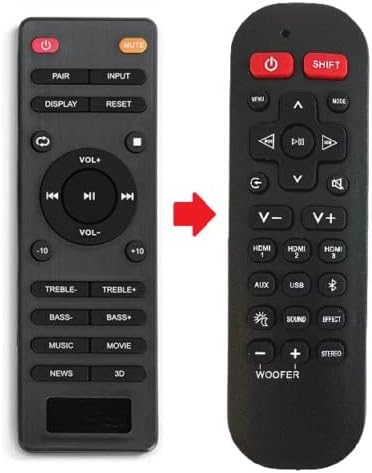
Figure 3.1: This image illustrates the visual similarity and functional replacement of the original Silvercrest soundbar remote control (left) with the Belife Replacement Remote Control (right). A red arrow points from the original to the replacement, signifying its role as a direct substitute.
3.1. Button Functions Overview
The remote features a comprehensive set of buttons for controlling various aspects of your soundbar. Refer to the table below for a detailed mapping of functions between the original and replacement remote controls.
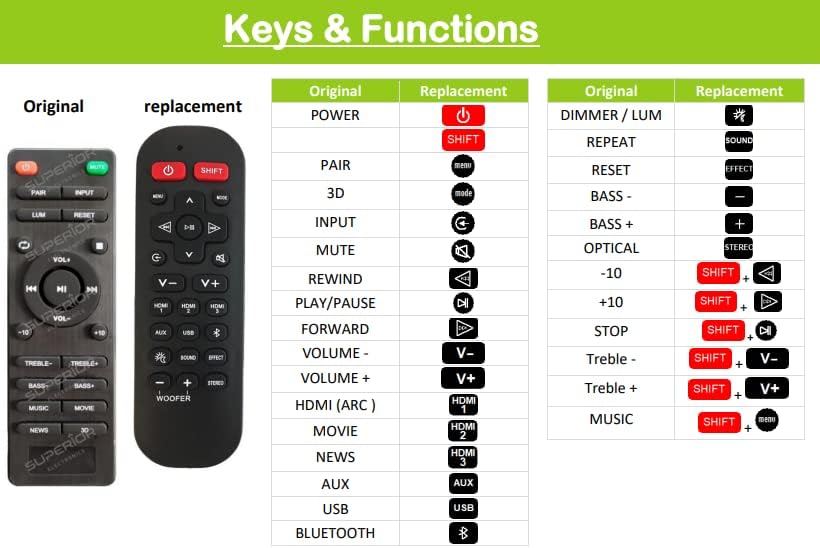
Figure 3.2: A detailed table comparing the keys and functions of the original soundbar remote control with the Belife Replacement Remote Control. It lists functions such as Power, Pair, 3D, Input, Mute, Rewind, Play/Pause, Forward, Volume controls, HDMI (ARC), Movie, News, AUX, USB, Bluetooth, Dimmer/Lum, Repeat, Reset, Bass controls, Optical, Stereo, +10, Stop, Treble controls, and Music, showing their corresponding buttons on both remotes.
- Power Button (⏻): Turns the soundbar on or off.
- SHIFT Button (SHIFT): Used in combination with other buttons to access secondary functions, as indicated in Figure 3.2.
- MENU / MODE Buttons: Navigate through soundbar menus or switch between sound modes.
- Navigation Arrows (▲ ▼ ◀ ►): Used for menu navigation and track control (rewind, play/pause, forward).
- Volume Controls (V- / V+): Adjust the soundbar's volume level.
- Input Selection (HDMI 1, HDMI 2, HDMI 3, AUX, USB, Bluetooth): Select the desired audio input source.
- Sound Effect Buttons (SOUND, EFFECT, STEREO, WOOFER): Control various audio settings and sound enhancements.
- Mute Button: Mutes or unmutes the sound.
- Other Specific Buttons: Refer to Figure 3.2 for detailed mapping of buttons like PAIR, 3D, RESET, BASS+/-, TREBLE+/-, etc.
4. Maintenance and Care
Proper care will ensure the longevity and reliable operation of your remote control.
- Cleaning: Wipe the remote control with a soft, dry cloth. Do not use abrasive cleaners, waxes, or solvents.
- Battery Replacement: Replace batteries when the remote's responsiveness decreases or it stops functioning. Always replace both batteries at the same time with new ones of the same type (AAA Alkaline).
- Storage: If the remote control will not be used for an extended period, remove the batteries to prevent leakage and potential damage.
- Environment: Avoid exposing the remote control to extreme temperatures, direct sunlight, high humidity, or liquids. Do not drop or subject the remote to strong impacts.
5. Troubleshooting
If you experience issues with your Belife Replacement Remote Control, please refer to the following common solutions:
| Problem | Possible Cause | Solution |
|---|---|---|
| Remote control does not work. | Batteries are dead or incorrectly inserted. | Replace batteries with new AAA alkaline batteries, ensuring correct polarity. |
| Remote control works intermittently. | Low battery power or obstruction between remote and soundbar. | Replace batteries. Ensure a clear line of sight between the remote and the soundbar's IR receiver. |
| Specific buttons do not respond. | Button stuck or internal issue. | Gently press the button multiple times. If the issue persists, the remote may require replacement. |
| Remote does not control the soundbar. | Incorrect soundbar model or remote is faulty. | Verify that your soundbar model is one of the compatible models (SSB-50A1, SSB-60A1, SSB-70C3). If so, and troubleshooting steps above fail, contact customer support. |
6. Product Specifications
| Brand: | Belife |
| Manufacturer: | BE-LIFE |
| Model Number: | d48967b7-4079-4d1c-81c2-c881ff465ef3 |
| Compatible Devices: | Silvercrest Soundbar Models: SSB-50A1, SSB-60A1, SSB-70C3 |
| Connectivity Technology: | Infrared (IR) |
| Battery Type: | 2 x AAA Alkaline (not included) |
| Special Features: | No programming required, full functionality replacement. |
| Maximum Range: | 10 Meters (approx. 33 feet) |
7. Warranty and Support
For any questions, issues, or support regarding your Belife Replacement Remote Control, please contact the seller or manufacturer directly through your purchase platform.
Return Policy: The product is subject to a 14-day refund/replacement return policy from the date of purchase, as per standard terms.
Please retain your proof of purchase for warranty claims or support inquiries.


