
1. Introduction
Thank you for choosing the SEVEN WARRIOR Gaming Desk. This manual provides detailed instructions for the assembly, operation, and maintenance of your new gaming desk. Designed for an optimal gaming experience, this desk combines functionality with a sleek, ergonomic design, featuring integrated LED lighting and convenient power solutions.

Image: The SEVEN WARRIOR Gaming Desk with its integrated LED lighting activated, showcasing its modern design.
2. Safety Information
Please read and understand all safety warnings before assembly and use. Failure to follow these instructions may result in injury or damage to the product.
- Weight Capacity: Avoid overloading the desk. The maximum weight recommendation is 220 pounds (approximately 100 kg). Ensure that the total weight of items placed on the desk, including monitors, does not exceed this limit to maintain stability and prevent damage.
- Electrical Safety: Ensure all power connections are secure and properly grounded. Do not expose the power strip or cables to water or excessive moisture.
- Assembly: Follow all assembly steps carefully. Do not overtighten screws. It is recommended that 1 person assemble this desk.
- Placement: Place the desk on a flat, stable surface. Avoid placing it in direct sunlight or near heat sources.
3. Product Features
The SEVEN WARRIOR Gaming Desk is equipped with several features designed to enhance your gaming and work experience:
- Powerful Charging Station: Includes a built-in power strip with 2 AC Outlets, 2 USB Ports, and 1 Type-C Port for convenient charging of up to 5 devices.
- Cool & Smart LED Lights: RGB LED light system controllable via APP, offering 12 modes and over 60,000 colors. Features a memory function to retain the last mode.
- User-Friendly Design: Full monitor stand provides additional space and promotes better posture. Integrated cup holder and headphone hook keep essentials within reach.
- Ample Gaming Desktop & Leg Room: 39.4" x 19.7" desk surface accommodates dual monitors and mechanical keyboards. Height of 29" ensures comfortable leg room.
- More Stability & Sturdy: Heavy-duty Z-shaped legs and high-quality metal frame provide superior stability and strong load-bearing capacity. Adjustable leg pads ensure stability on uneven ground.

Image: A complete gaming setup on the SEVEN WARRIOR desk, demonstrating ample space for equipment.

Image: The gaming desk illuminated with vibrant purple LED lights, creating an immersive gaming atmosphere.

Image: A user seated at the desk, highlighting the ergonomic monitor stand that helps maintain proper posture.
4. Setup Guide
Assembly of the SEVEN WARRIOR Gaming Desk is straightforward and all necessary tools are included. It is recommended for one person to assemble the desk.
Assembly Steps:
- Unpack Components: Carefully remove all parts from the packaging and lay them out on a clean, soft surface to prevent scratches. Verify all components are present against the parts list provided in your package.
- Assemble Frame: Attach the Z-shaped legs to the main desk frame using the provided screws and tools. Ensure all connections are secure but do not fully tighten until all parts are aligned.
- Attach Desktop: Secure the carbon fiber surface desktop to the assembled frame.
- Install Monitor Shelf: Attach the monitor shelf to the designated supports on the desktop.
- Install Accessories: Mount the cup holder and headphone hook to the desired locations on the desk.
- Connect Power Strip: Integrate the built-in power strip into its designated slot and connect its power cable.
- Final Tightening: Once all parts are in place and aligned, fully tighten all screws.
- Adjust Leveling Feet: Adjust the leg pads at the bottom of the desk to ensure stability on uneven floors.
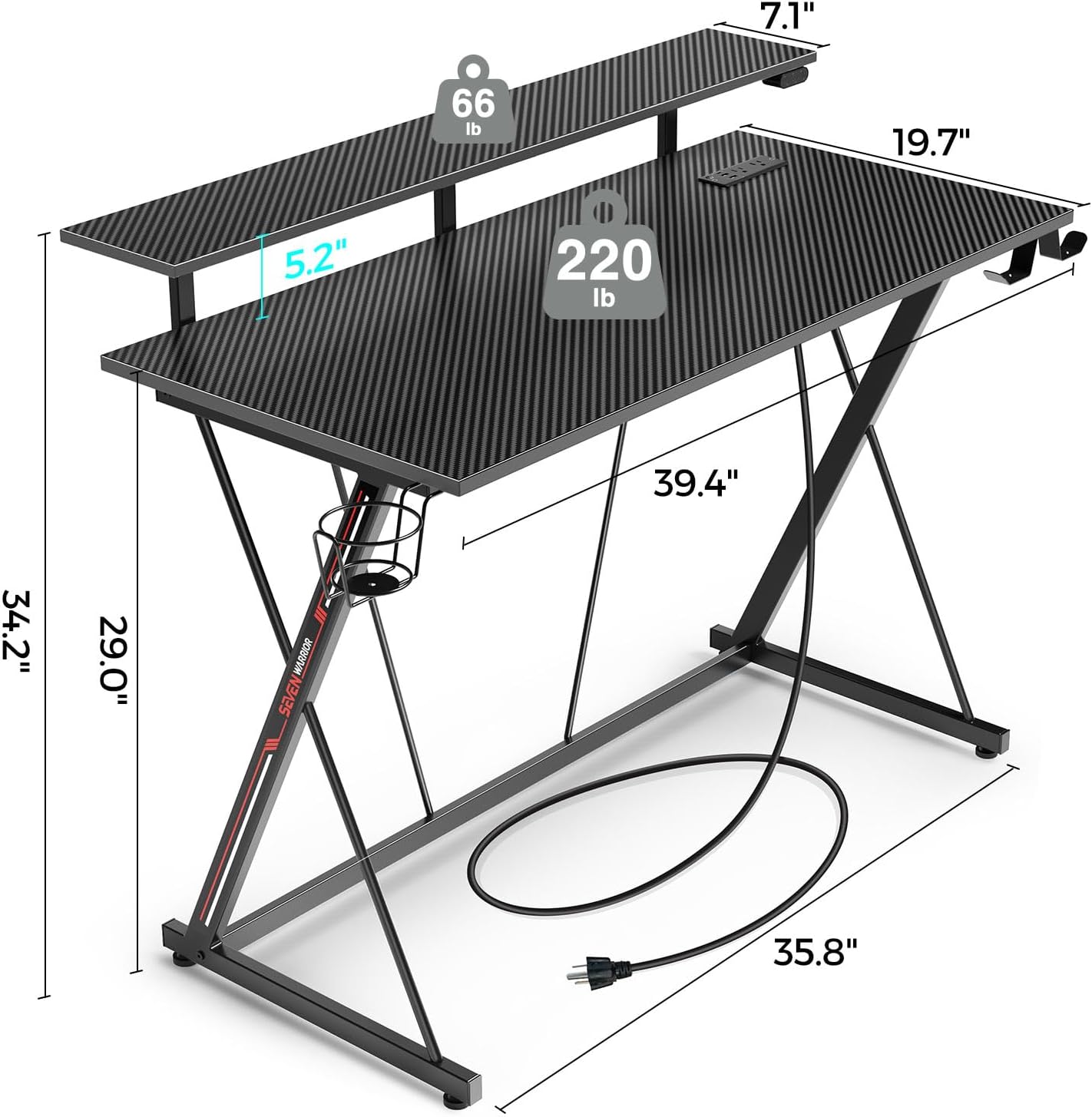
Image: Detailed dimensions and weight capacities of the SEVEN WARRIOR Gaming Desk, including the monitor shelf.
5. Operating Instructions
LED Lights Operation:
The RGB LED lights can be controlled via a dedicated mobile application. Follow these steps:
- Download APP: Scan the QR code in the included LED light manual or search for the specified app in your device's app store.
- Connect: Follow the in-app instructions to connect your device to the desk's LED lighting system via Bluetooth.
- Control: Use the app to select from 12 preset modes, choose from over 60,000 colors, adjust brightness, and set timing functions. The memory function will keep the LED lights on the last selected mode when turned on again.

Image: A close-up view of the LED light controller and the smartphone application interface for color and mode selection.
Power Outlets Usage:
The integrated power strip provides convenient access to power for your devices.
- Plug the desk's main power cord into a grounded wall outlet.
- Use the 2 AC outlets for standard electronics.
- Utilize the 2 USB-A ports (5V/2.4A) and 1 USB-C port (5V/3A) for charging smartphones, tablets, and other USB-powered devices.
- Ensure devices are compatible with the provided voltage and current.

Image: A detailed view of the integrated power strip, showing the AC outlets, USB-A ports, and USB-C port.
6. Maintenance
To ensure the longevity and appearance of your SEVEN WARRIOR Gaming Desk, follow these maintenance guidelines:
- Cleaning: Wipe the carbon fiber surface with a soft, damp cloth. Avoid abrasive cleaners or harsh chemicals that could damage the finish.
- Spills: Immediately wipe up any spills to prevent liquid from seeping into the desk material or electrical components.
- Inspections: Periodically check all screws and connections to ensure they remain tight. Retighten if necessary.
- Cable Management: Keep cables organized to prevent tripping hazards and maintain a tidy workspace.
7. Troubleshooting
If you encounter any issues with your gaming desk, refer to the following common problems and solutions:
| Problem | Possible Cause | Solution |
|---|---|---|
| Desk is wobbly | Uneven floor; loose connections | Adjust leveling feet; tighten all screws. |
| LED lights not working | Power not connected; app not paired; faulty LED strip | Ensure desk is plugged in; re-pair with app; contact support if issue persists. |
| Power outlets not providing power | Desk not plugged in; circuit breaker tripped; faulty power strip | Check main power connection; reset circuit breaker; contact support. |
| Missing parts during assembly | Packaging error | Contact SEVEN WARRIOR customer support with your purchase details. |
8. Specifications
| Attribute | Detail |
|---|---|
| Brand | SEVEN WARRIOR |
| Model Number | hq-dnzh008-01 |
| Product Dimensions | 19.7"D x 39.4"W x 29"H |
| Color | Black |
| Style | Modern |
| Base Material | Metal |
| Top Material Type | Carbon Fiber Surface |
| Finish Type | Laminated |
| Special Features | Built-In USB Outlet, Ergonomic, Monitor Stand, Scratch Resistant |
| Recommended Uses | Gaming |
| Included Components | Gaming desk, LED Light, Cup holder, Headphone hook holder, Installation tool |
| Required Assembly | Yes |
| Recommended People for Assembly | 1 |
| Maximum Weight Recommendation | 220 Pounds |
| Item Weight | 23.5 Pounds |
| Number Of Shelves | 1 |
9. Warranty and Support
Warranty Information:
This product is sold with No Warranty as per manufacturer specifications. Please inspect the product upon receipt for any defects or damage.
Customer Support:
For any questions, concerns, or assistance with your SEVEN WARRIOR Gaming Desk, please contact the seller or manufacturer directly through the platform where the purchase was made. Provide your order number and a detailed description of the issue for prompt support.