
TEM-70CHSAAK5, TEM-26CHSAKA5, TEM-35CHSAKA, TEM-50CHSAKA, TEM-35CHSABH, TEM-35CHSF
User Manual for AKAI Air Conditioner Remote Control
Model Compatibility: TEM-70CHSAAK5, TEM-26CHSAKA5, TEM-35CHSAKA, TEM-50CHSAKA, TEM-35CHSABH, TEM-35CHSF
Introduction
This manual provides comprehensive instructions for the setup, operation, and maintenance of your new replacement remote control for various AKAI Air Conditioner models. This remote is designed to provide seamless control over your air conditioning unit's functions.
Compatibility
This remote control is compatible with the following AKAI Air Conditioner models:
- AKAI TEM-70CHSAAK5
- AKAI TEM-26CHSAKA5
- AKAI TEM-35CHSAKA
- AKAI TEM-50CHSAKA
- AKAI TEM-35CHSABH
- AKAI TEM-35CHSF
If your specific model is not listed, please verify compatibility with the seller before use.
Setup
Battery Installation
The remote control requires AAA batteries (not included) for operation. Follow these steps to install the batteries:
- Locate the battery compartment cover on the back of the remote control.
- Press down on the tab and slide the cover downwards to open the compartment.
- Insert two (2) AAA batteries, ensuring the positive (+) and negative (-) terminals align correctly with the markings inside the compartment.
- Slide the battery compartment cover back into place until it clicks securely.
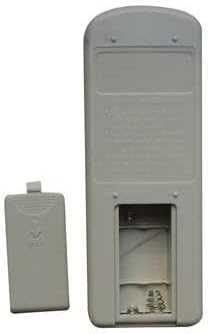
Image: Rear view of the remote control with the battery cover removed, revealing the empty battery slots. This illustrates where to insert the AAA batteries.
Important: Always replace both batteries at the same time. Do not mix old and new batteries, or different types of batteries.
Operating Instructions
Basic Functions
Point the remote control directly at the air conditioner's receiver when operating. Ensure there are no obstructions between the remote and the unit.
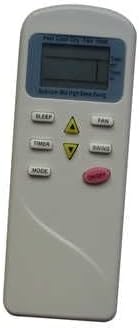
Image: Front view of the remote control, displaying its buttons and LCD screen. Key buttons visible include SLEEP, TIMER, MODE, FAN, SWING, and temperature adjustment arrows.
| Button | Function |
|---|---|
| POWER (Red Button) | Turns the air conditioner ON or OFF. |
| MODE | Cycles through operating modes: Auto, Cool, Dry, Fan, Heat (if applicable to your AC model). |
| FAN | Adjusts fan speed: Auto, Low, Medium, High. |
| SLEEP | Activates or deactivates the Sleep mode for comfortable night operation. |
| TIMER | Sets the ON/OFF timer for the air conditioner. Refer to your AC unit's manual for detailed timer settings. |
| SWING | Controls the vertical swing of the air deflector. |
| ▲ / ▼ (Temperature Arrows) | Adjusts the desired temperature setting. |
Maintenance
Cleaning the Remote Control
To maintain the remote control's appearance and functionality, clean it regularly:
- Wipe the surface with a soft, dry cloth.
- For stubborn dirt, slightly dampen the cloth with water and a mild detergent, then wipe dry immediately.
- Do not use abrasive cleaners, alcohol, or corrosive liquids, as these can damage the remote's surface or internal components.
Battery Replacement
Replace batteries when the remote's response becomes sluggish or the display fades. Refer to the "Battery Installation" section under Setup for detailed steps. Dispose of used batteries responsibly according to local regulations.
Troubleshooting
Common Issues and Solutions
| Problem | Possible Cause / Solution |
|---|---|
| Remote control not responding. |
|
| Display is dim or blank. |
|
| Air conditioner does not respond to specific commands. |
|
Specifications
| Feature | Detail |
|---|---|
| Frequency | 433 MHz |
| Wireless Communication | Infrared (IR) |
| Power Source | 2 x AAA Batteries (not included) |
| Intended Use | Air Conditioner Remote Control |
| Manufacturer | DAVITU |
| ASIN | B0C3HN7QCS |
| Date First Available | April 25, 2023 |
Warranty and Support
Return Policy
This product is subject to a 30-day return policy for refund or replacement from the date of purchase. This policy covers manufacturing defects and malfunctions not caused by human damage or improper use.
Customer Support
For any questions, concerns, or issues regarding your remote control, please contact the seller, DAVITU, through the platform where the purchase was made. Provide your order details for faster assistance.
Ask a question about this manual
Ask about setup, troubleshooting, compatibility, parts, safety, or missing instructions. Manuals+ will review the question and use this page’s manual context to help answer it.