Introduction
This manual provides comprehensive instructions for the setup, operation, and maintenance of your new Generic AC A/C Remote Control, model 6711A20111K. This remote is designed as a replacement for various LG and Goldstar air conditioner models, including 6711A20111K, 6711A90023E, 6711A20010A, and 6711A20111F. Please read this manual thoroughly before use to ensure proper functionality and longevity of your device.
Setup and Battery Installation
Before using the remote control, batteries must be installed correctly.
Battery Type:
- Requires AAA batteries.
Installation Steps:
- Locate the battery compartment on the back of the remote control.
- Slide the battery cover downwards to open it.
- Insert two new AAA batteries, ensuring the positive (+) and negative (-) terminals align with the markings inside the compartment.
- Slide the battery cover back into place until it clicks securely.
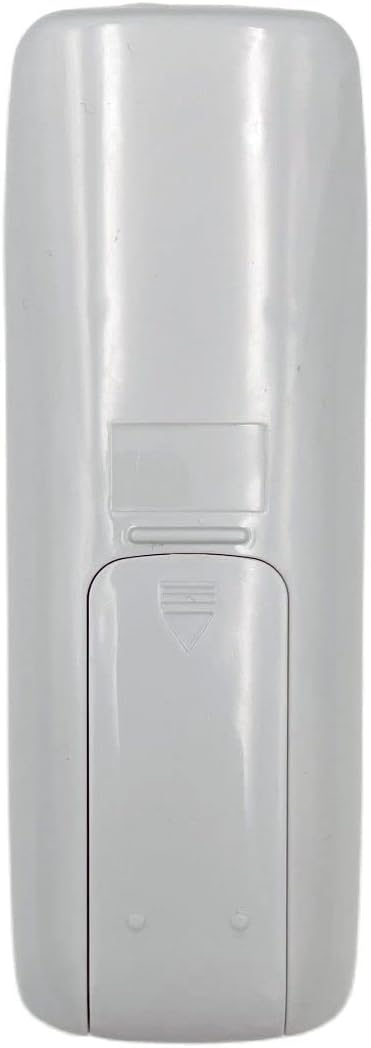
Image: Back of the remote control with the battery cover. This view helps identify the battery compartment for installation.
Important: If the remote is not working after battery installation, try rolling the batteries inside the compartment to ensure good contact with the springs. Ensure the remote is compatible with your specific LG or Goldstar air conditioner model. This remote typically does not require programming as it is a direct replacement for the specified models.
Operating Instructions
This remote control operates via infrared (IR) technology. Ensure there is a clear line of sight between the remote and the air conditioner's IR receiver.

Image: Front view of the remote control. The LCD screen displays temperature and mode, while various buttons control functions.
Key Functions:
| Button/Indicator | Function |
|---|---|
| Power Button (Blue oval button) | Turns the air conditioner ON or OFF. |
| Temperature Up/Down (Grey arrow buttons) | Adjusts the desired temperature setting. |
| Mode Button (Button with sun/water drop/fan icons) | Cycles through operating modes (e.g., Cool, Dry, Fan, Heat). |
| Fan Speed Button (Button with fan icon) | Adjusts the fan speed (e.g., Low, Medium, High, Auto). |
| Swing Button (Button with oscillating arrows) | Controls the louver swing function. |
| Timer Button (Button with clock icon) | Sets the ON/OFF timer for the air conditioner. |
| ECONO Button | Activates or deactivates economy mode for energy saving. |
| LCD Display | Shows current temperature, operating mode, fan speed, and other settings. |
For specific advanced functions or programming, refer to your air conditioner's original operating manual, as this remote is a replacement and may not support all features of every compatible unit.
Maintenance
Proper maintenance ensures the longevity and reliable operation of your remote control.
- Cleaning: Wipe the remote control with a soft, dry cloth. Do not use liquid cleaners, abrasive cleaners, or chemical solvents, as these can damage the surface or internal components.
- Battery Replacement: Replace batteries when the remote's range decreases or the display becomes dim. Always replace both batteries at the same time with new ones of the same type.
- Storage: If the remote control will not be used for an extended period, remove the batteries to prevent leakage and potential damage to the remote. Store in a cool, dry place.
- Avoid Drops: Protect the remote from physical impact. Dropping the remote can damage internal circuitry or the LCD screen.
Troubleshooting
If you experience issues with your remote control, refer to the following common problems and solutions:
| Problem | Possible Cause & Solution |
|---|---|
| Remote not working / No response from AC unit. |
|
| Remote range is reduced. |
|
| LCD display is dim or blank. |
|
If the problem persists after attempting these solutions, contact customer support or refer to the original air conditioner manual for further assistance.
Specifications
| Feature | Detail |
|---|---|
| Model Numbers | 6711A20111K, 6711A90023E, 6711A20010A, 6711A20111F |
| Brand | Generic |
| Compatibility | LG/Goldstar Air Conditioners |
| Connectivity Technology | Infrared (IR) |
| Controller Type | Button Control |
| Special Feature | Universal (as a replacement for specified models) |
| Battery Type | AAA (2 required) |
| Manufacturer | DAVITU |
| First Available Date | April 25, 2023 |
Warranty Information
This product is typically covered by a standard return policy. For specific warranty details, please refer to the seller's policy at the point of purchase. The buybox winner indicates a return policy of 30 days for refund/replacement.
For issues related to defects in materials or workmanship, please contact the seller directly within the specified return period.
Customer Support
For further assistance, technical support, or inquiries regarding your Generic AC A/C Remote Control, please contact the seller directly through the platform where the purchase was made.
Seller: DAVITU
When contacting support, please provide your order number and the model number of your remote control (6711A20111K).


