
Blomiky SM-3P 7.4V 600mAh Li-ion Battery and USB Charger
Blomiky SM-3P Plug 7.4V 2S 600mAh 4.44Wh 10C Battery and USB Charger Cable Instruction Manual
Model: SM-3P 7.4V 600mAh Li-ion Battery and USB Charger
Brand: Blomiky
1. Introduction
This manual provides essential information for the safe and effective use of your Blomiky 7.4V 600mAh Li-ion Battery and USB Charger Cable. This product is designed for use with compatible RC vehicles, including specific models like the Russan G03060R Amphibious RC Car, Deerc DE82 RC Car, and Threeking TK3082B RC Car, as well as other new version amphibious waterproof RC trucks that utilize the 14500/600mAh 7.4V Li-ion battery with an SM-3P plug.
Please read this manual thoroughly before initial use to ensure proper operation, maximize battery life, and prevent potential hazards.

Figure 1: Blomiky 7.4V 600mAh Li-ion Battery and USB Charger Cable set.
2. Safety Information
WARNING: Failure to follow these safety instructions may result in fire, electric shock, injury, or damage to the product or property.
- Always use the provided USB charger cable. Using incompatible chargers may damage the battery or cause fire.
- Do not leave charging batteries unattended.
- Keep batteries away from heat sources, direct sunlight, and flammable materials.
- Do not puncture, disassemble, short-circuit, or expose batteries to water or extreme temperatures.
- If the battery becomes hot, swells, or shows any signs of damage during charging or use, discontinue use immediately and dispose of it properly.
- Keep out of reach of children.
- Ensure the battery plug polarity matches your device's connector before insertion. Incorrect polarity can cause severe damage.
3. Package Contents
Verify that all items are included in your package:
- Blomiky 7.4V 600mAh Li-ion Battery (x2)
- USB Charger Cable with SM-3P Connector (x2)
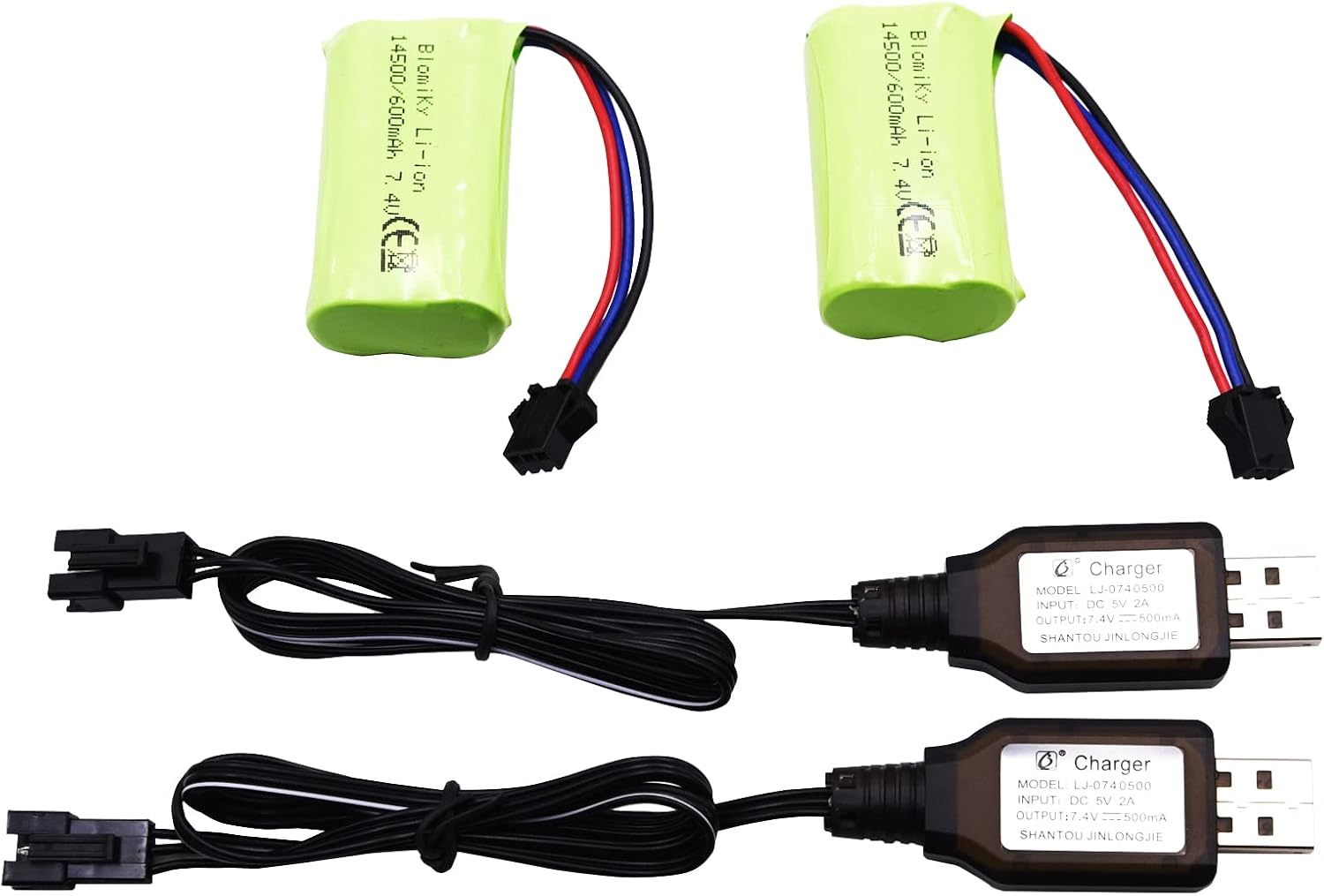
Figure 2: Contents of the Blomiky battery and charger package.
4. Setup
Before using the battery, ensure it is fully charged. The battery features an SM-3P black 3-pin connector. The red and blue cables are positive polar, and the black cable is negative polar. The battery dimensions are approximately 54mm (2.14 inches) in length, 28.5mm (1.12 inches) in width, and 14.6mm (0.57 inches) in height.

Figure 3: Battery dimensions and SM-3P plug configuration.
Important: Verify that your RC device requires a 14500/600mAh 7.4V Li-ion battery with an SM-3P plug and the correct polarity (red/blue positive, black negative) to ensure compatibility and prevent damage.
5. Operating Instructions (Charging)
The USB charger cable has a built-in over-charged protection circuit board to ensure safe charging.
- Connect the USB charger cable to a standard USB power source (e.g., computer USB port, USB wall adapter). The red light on the charger will illuminate solid.
- Carefully connect the SM-3P plug of the battery to the SM-3P connector of the USB charger cable. Ensure the flat side of the battery plug aligns with the flat side of the charger connector, and the grooved side aligns with the convex side.
- During charging, the green light on the USB charger cable will flash.
- Once the battery is fully charged, the green light will stop flashing and remain solid. The red light will also remain solid.
- Charging typically takes approximately 1 to 2 hours, depending on the battery's discharge level and the power output of the USB source.
- Disconnect the battery from the charger once charging is complete.

Figure 4: Connecting the battery to the USB charger for charging.
Video 1: Demonstration of the Blomiky 7.4V 600mAh Li-ion Battery and USB Charger Cable, including compatibility and charging process.
6. Maintenance
- Store batteries in a cool, dry place away from direct sunlight and extreme temperatures.
- Do not store fully charged batteries for extended periods. For long-term storage, it is recommended to discharge the battery to approximately 50% capacity.
- Regularly inspect the battery and charger cable for any signs of damage, such as frayed wires, cracked casings, or corrosion. Do not use damaged components.
- Clean the connectors periodically with a dry, soft cloth to ensure good electrical contact.
7. Troubleshooting
| Problem | Possible Cause | Solution |
|---|---|---|
| Battery not charging. | Charger not properly connected to USB source; faulty USB source; damaged charger cable; incorrect battery connection. | Ensure USB charger is securely plugged in. Try a different USB port or power adapter. Check for visible damage on the cable. Re-connect the battery to the charger, ensuring correct alignment. |
| Green light not flashing during charging. | Battery already fully charged; poor connection; charger or battery fault. | Check if the green light is solid (indicating full charge). Re-connect the battery. If the issue persists, the charger or battery may be faulty. |
| Battery not powering device. | Battery not charged; incorrect plug type/polarity; device fault. | Charge the battery fully. Verify the battery type (14500/600mAh 7.4V Li-ion) and SM-3P plug with your device's requirements. Ensure correct polarity (red/blue positive, black negative). Test the device with another known good battery if possible. |
8. Specifications
| Feature | Detail |
|---|---|
| Battery Type | Li-ion (Lithium-ion) |
| Battery Model | 14500 |
| Voltage | 7.4V (2S) |
| Capacity | 600mAh (Max up to 800mAh) |
| Energy | 4.44Wh |
| Discharge Rate | 10C |
| Battery Plug Type | SM-3P Black 3-pin Connector |
| Plug Head Cross-section Size | 8mm x 5mm (0.32in x 0.2in) |
| Battery Dimensions (L*W*H) | 54mm x 28.5mm x 14.6mm (2.14in x 1.12in x 0.57in) |
| Battery Net Weight | 41 grams (1.45 ounces) |
| Charger Input | USB 5V 2A |
| Charger Output | 7.4V 500mA |
| Protection Features | Over-discharge protection board (battery), Over-charged protection circuit board (charger) |
9. Warranty and Support
Blomiky products are manufactured to high-quality standards. For warranty claims or technical support, please contact the seller or manufacturer directly through your purchase platform. Keep your proof of purchase for warranty validation.
For additional information or assistance, please visit the official Blomiky Store: Blomiky Store on Amazon.
Ask a question about this manual
Ask about setup, troubleshooting, compatibility, parts, safety, or missing instructions. Manuals+ will review the question and use this page’s manual context to help answer it.