
1. Introduction
Thank you for choosing the Misolant Ergonomic Office Chair MI500-2. This manual provides detailed instructions for the assembly, operation, and maintenance of your new office chair. Please read this manual thoroughly before assembly and use to ensure proper function and longevity of the product.

Image 1: Misolant Ergonomic Office Chair MI500-2
The Misolant MI500-2 is designed for comfort and support during long periods of sitting, featuring ergonomic lumbar support, adjustable headrest, and flip-up armrests.
2. Safety Information
- Ensure all components are present and undamaged before assembly. Do not use if any parts are missing or broken.
- Follow assembly instructions carefully. Incorrect assembly can lead to instability and injury.
- Do not stand on the chair.
- Do not use the chair for purposes other than its intended use as an office chair.
- Keep children away from the chair during assembly. Small parts may be a choking hazard.
- The maximum weight capacity for this chair is 300 pounds (136 kg). Do not exceed this limit.
- Regularly check all bolts and screws to ensure they are tightened.
3. Package Contents
Verify that all the following components are included in your package:
- Headrest: 1pc
- Armrest: 2pc
- Backrest: 1pc
- Seat Cushion: 1pc
- Chair Base: 5pc
- Base Plate: 1pc
- Gas Lift: 1pc
- Casters: 5pc
- Screws: 19pc
- Allen Wrench: 1pc
- Side Caps: 6pc
4. Assembly Instructions
Assembly typically takes around 20 minutes. A detailed instruction manual with diagrams is included in the product packaging. Please refer to that manual for step-by-step visual guidance. The general steps are as follows:
- Attach the casters to the chair base.
- Insert the gas lift into the center hole of the chair base.
- Secure the base plate to the underside of the seat cushion using the provided screws.
- Place the seat cushion assembly onto the gas lift.
- Attach the backrest to the seat cushion assembly.
- Install the armrests to the sides of the seat cushion and backrest.
- Attach the headrest to the top of the backrest.
- Cover any exposed screw holes with side caps.
Ensure all screws are tightened securely before using the chair.
5. Operating Instructions
Your Misolant Ergonomic Office Chair MI500-2 offers several adjustable features to customize your seating experience:
5.1. Chair Height Adjustment
To adjust the chair height, locate the lever on the right side beneath the seat. Pull the lever upwards while sitting to lower the chair, or pull the lever upwards while standing to raise the chair. Release the lever to lock the height.
5.2. Backrest Recline and Tilt Lock
The chair features three tilt back postures: 90° (work), 105° (relax), and 115° (take a nap). To adjust the recline, use the adjustable handle located on the side. To lock the backrest at your desired angle, push the handle inwards. Pull it outwards to unlock and recline.

Image 2: Three Back Tilt Angle Adjustment
5.3. Headrest Adjustment
The 3D headrest can be adjusted for both height and angle to provide optimal neck support. Gently pull or push the headrest to adjust its height (approximately 3.15 inches of lifting range) and tilt it to find your preferred angle (up to 45° reclining).

Image 3: Adjustable Headrest
5.4. Armrest Adjustment
The armrests are designed to flip up 90 degrees, allowing you to push the chair closer to your desk or save space when not in use. Simply lift the armrests upwards to flip them out of the way.

Image 4: Flip Up Armrest
5.5. Ergonomic Lumbar Support
The chair features a double-back structure that provides integrated support for both the backrest and lumbar region. This design promotes a balanced pressure distribution across your body, enhancing comfort and maintaining proper posture.

Image 5: Effective Lumbar Support with Breathable Mesh
5.6. Ergonomic S-Shape Design and Seat Cushion
The chair's S-shape design aligns with the natural curve of the spine, promoting healthy posture. The seat cushion is constructed with a polymer knitted fabric layer for breathability and a thick memory foam layer for comfortable bottom support.

Image 6: Ergonomic S-Shape Design
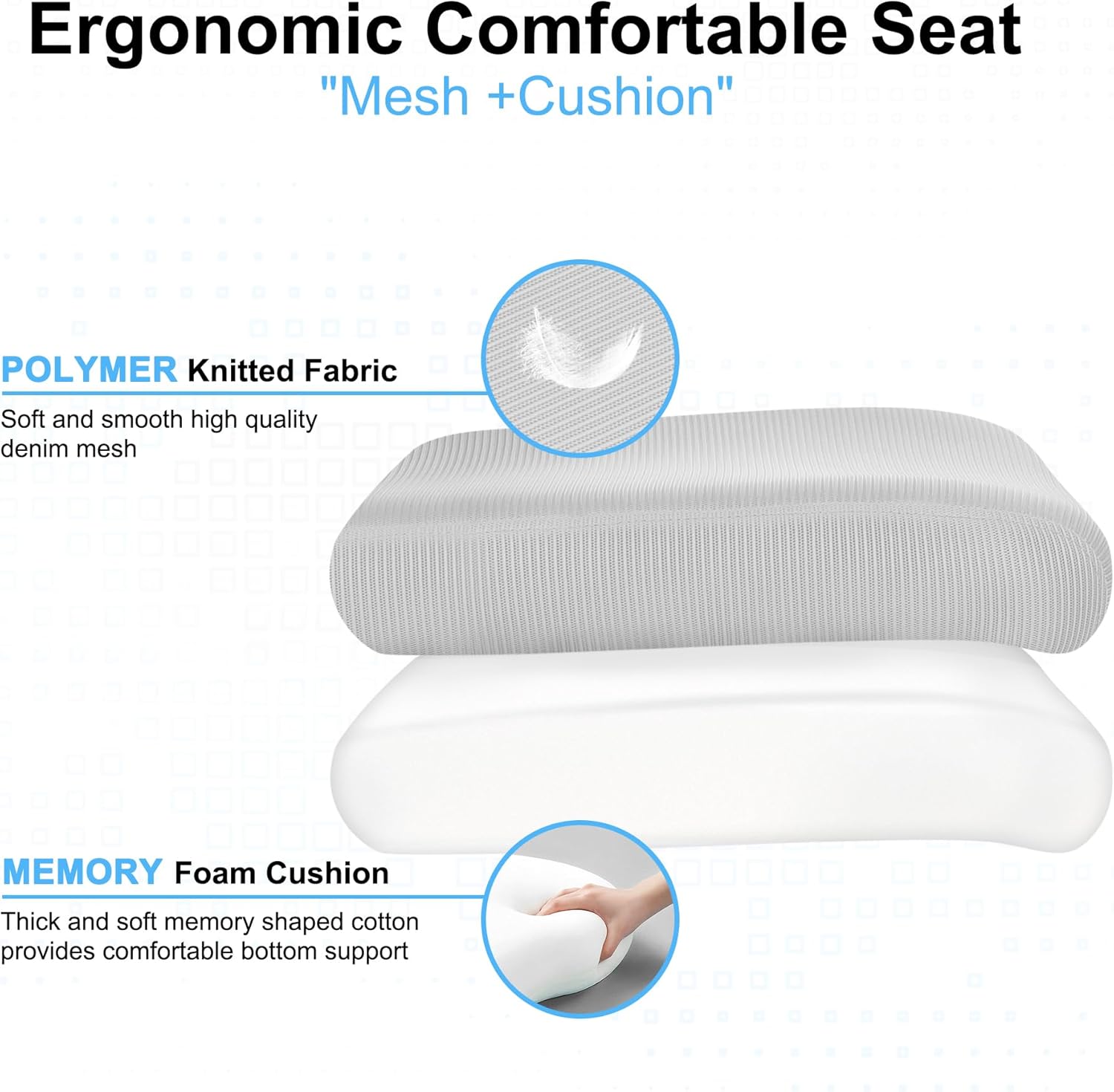
Image 7: Ergonomic Comfortable Seat Construction
5.7. Product Features Demonstration Video
Video 1: This video demonstrates the various adjustable features of the Misolant MI500-2 office chair, including height, recline, and headrest adjustments, showcasing its ergonomic design and functionality.
6. Maintenance
- Cleaning: Wipe clean with a damp cloth. Avoid harsh chemicals that may damage the material.
- Inspection: Periodically check all screws and bolts for tightness. Re-tighten as necessary to maintain stability.
- Casters: Keep casters free of debris (hair, dust) to ensure smooth movement.
- Gas Lift: Do not attempt to disassemble the gas lift. It contains pressurized components.
7. Troubleshooting
- Chair does not adjust height: Ensure the gas lift lever is fully engaged and the gas lift is correctly installed. If the issue persists, the gas lift may need replacement.
- Chair wobbles: Check that all screws, especially those connecting the base plate to the seat and the backrest, are securely tightened. Ensure the chair base is properly assembled.
- Casters not rolling smoothly: Inspect casters for trapped debris (hair, lint) and clean them. Ensure they are properly inserted into the chair base.
- Backrest does not recline or lock: Verify that the recline mechanism lever is functioning correctly and not obstructed.
8. Specifications
| Feature | Specification |
|---|---|
| Brand | Misolant |
| Model Number | MI500-2 |
| Color | Gray |
| Material | Textile (Mesh), Foam or Polyurethane (Seat) |
| Product Dimensions (D x W x H) | 21.7"D x 24"W x 52.8"H |
| Item Weight | 35.3 Pounds |
| Maximum Weight Recommendation | 300 Pounds |
| Reclining Position Count | 3 (90°, 105°, 115°) |
| Additional Features | Adjustable Headrest, Flip-up Armrests, Ergonomic Lumbar Support |

Image 8: Product Dimensions
9. Warranty and Support
The Misolant Ergonomic Office Chair MI500-2 comes with a one-year quality guarantee on parts (non-artificial damage). For any questions, replacement parts, or support needs, please contact Misolant customer service. Our dedicated team is ready to assist you.
Contact Information: Please refer to the contact details provided in your product packaging or visit the official Misolant website for support.