
1. Introduction
Thank you for choosing the DIGISHUO 14.6V 10A LiFePO4 Battery Charger. This charger is specifically designed for charging and maintaining 12V (12.8V) LiFePO4 lithium-ion batteries. It features a 2-stage constant current/constant voltage (CC/CV) charge algorithm to optimize charging efficiency and battery lifespan. Please read this manual thoroughly before use to ensure safe and effective operation.
2. Safety Information
WARNING: Risk of Electric Shock. Do not open the charger casing.
- This charger is designed exclusively for 12V (12.8V) LiFePO4 batteries. Do not use it with other battery types (e.g., lead-acid, Ni-Cd, Ni-MH) as this may cause damage to the battery or charger, or result in injury.
- Ensure the charger is connected to a power outlet with the correct voltage (100-220V AC).
- Always connect the charger to the battery terminals correctly: red clip to positive (+), black clip to negative (-). Reverse connection can cause damage.
- Operate the charger in a well-ventilated area. Do not cover the charger during operation.
- Keep the charger away from water, moisture, and flammable materials.
- Do not use the charger if the cables, clips, or casing are damaged.
- Unplug the charger from the power outlet before making or breaking connections to the battery.
- Keep out of reach of children.

Image: The DIGISHUO LiFePO4 Battery Charger features built-in protections against over-temperature, reverse polarity, over-voltage, and short-circuit.
3. Product Overview
The DIGISHUO 14.6V 10A LiFePO4 Battery Charger includes the main charging unit, power supply cable, and alligator clips for battery connection.
Package Contents:
- 1 x 14.6V Lithium Battery Charger with Crocodile Clip
- 1 x US Plug Power Supply Cable
- 1 x English Manual (this document)
- 1 x Backup Fuse

Image: The package includes the charger unit, power cable, and alligator clips.
Charger Components:
- Charger Unit: Durable aluminum alloy casing with built-in cooling fan.
- LED Indicator: Displays charging status (Red for charging, Green for fully charged).
- Alligator Clips: Red for positive (+), Black for negative (-).
- Power Input Port: For connecting the AC power cable.
- Fuse Holder: Contains a replaceable fuse for protection.

Image: Front view of the charger showing the main unit, alligator clips, and power cord.
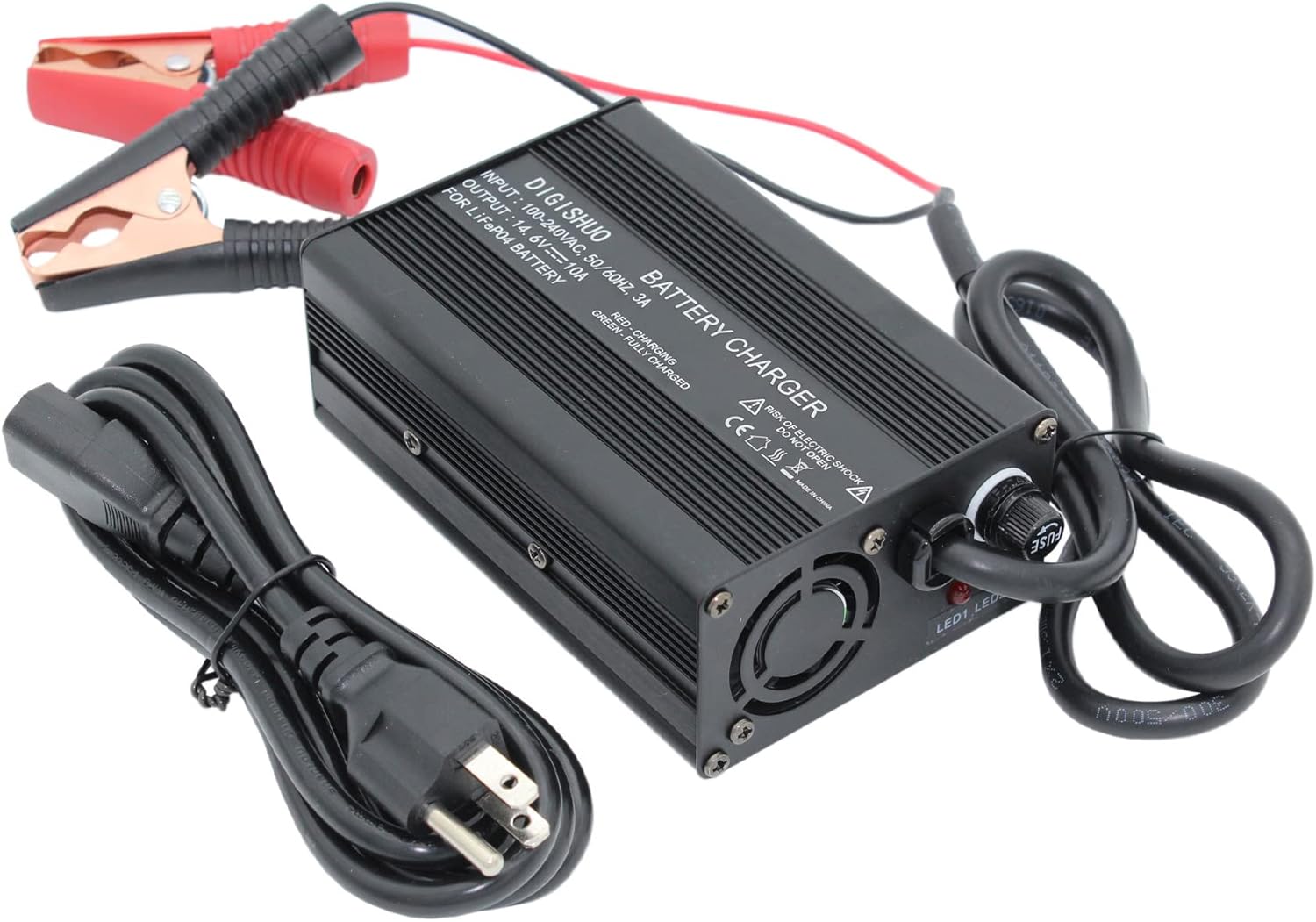
Image: Angled view highlighting the cooling fan and fuse holder on the charger unit.
4. Specifications
| Brand | DIGISHUO |
| Model | B0C3GYRHS4 |
| Input Voltage | 100-220V AC |
| Output Voltage | 14.6V |
| Charging Current | 10 Amps |
| Recommended Battery Capacity | 30~50 Amp Hours and above (12V LiFePO4) |
| Product Dimensions | 8"D x 4"W x 2"H |
| Housing Material | Durable Aluminum Alloy |
| Cooling | Built-in Cooling Fan |
5. Setup
- Prepare the Battery: Ensure the 12V LiFePO4 battery is clean and its terminals are free from corrosion.
- Connect to Battery:
- Connect the RED alligator clip to the positive (+) terminal of the battery.
- Connect the BLACK alligator clip to the negative (-) terminal of the battery.
- Connect to Power: Insert the AC power cable into the charger's power input port, then plug the other end into a standard 100-220V AC wall outlet.
Important: Always connect the charger to the battery first, then to the AC power outlet. When disconnecting, unplug from the AC outlet first, then disconnect from the battery.
6. Operating Instructions
Charging Process:
- Once properly connected (as per Section 5), the charger will automatically begin the charging process.
- The LED indicator on the charger will illuminate RED, indicating that the battery is currently charging.
- The charger employs a 2-stage Constant Current/Constant Voltage (CC/CV) algorithm for efficient and safe charging.
- When the battery is fully charged, the LED indicator will turn GREEN. The charger will automatically stop charging to prevent overcharging.
0V Charging Function (Battery Reactivation):
This charger supports a 0V charging function, which can help reactivate or repair long-unused LiFePO4 batteries that have entered a deep discharge state. When connected to such a battery, the charger will attempt to bring its voltage up to a level where normal charging can commence. This process may take longer than regular charging.
7. Maintenance
- Keep the charger clean and dry. Wipe the exterior with a soft, dry cloth. Do not use solvents or abrasive cleaners.
- Regularly inspect the cables and alligator clips for any signs of damage, fraying, or corrosion. Replace if necessary.
- Ensure the cooling fan is not obstructed to allow for proper heat dissipation.
- Store the charger in a cool, dry place when not in use.
- If the fuse blows, replace it with a fuse of the same type and rating (a backup fuse is included in the package).
8. Troubleshooting
| Problem | Possible Cause | Solution |
|---|---|---|
| Charger LED does not light up. | No power from outlet; Loose connection; Blown fuse. | Check power outlet; Ensure all connections are secure; Check and replace fuse if necessary. |
| LED remains RED for an extended period. | Battery is deeply discharged or high capacity; Battery fault. | Allow more time for charging, especially for large or deeply discharged batteries. If it never turns green, the battery may be faulty. |
| LED immediately turns GREEN after connecting. | Battery is already fully charged; Poor connection. | This is normal if the battery is full. If not, check connections for proper contact. |
| Charger gets hot during operation. | Normal operation; Obstructed cooling fan. | Some heat is normal. Ensure the cooling fan is not blocked and the charger is in a well-ventilated area. If excessively hot, disconnect and contact support. |
9. Warranty and Support
This DIGISHUO product comes with a 1-year warranty from the date of purchase, covering defects in materials and workmanship under normal use. This warranty does not cover damage caused by misuse, accident, unauthorized modification, or improper installation.
For technical support, warranty claims, or any questions regarding your DIGISHUO charger, please contact our customer service team through the retailer where the product was purchased or visit the official DIGISHUO website for contact information.