
Introduction
This manual provides detailed instructions for the setup, operation, and maintenance of your PASNEW C20 Pro Military Smart Watch. Please read this guide thoroughly to ensure proper use and to maximize the features of your device. The C20 Pro is designed for durability and functionality, offering extensive sports tracking, health monitoring, and smart communication features.
What's in the Box
- PASNEW C20 Pro Smart Watch
- USB Charging Cable
- User Manual (this document)
Product Overview
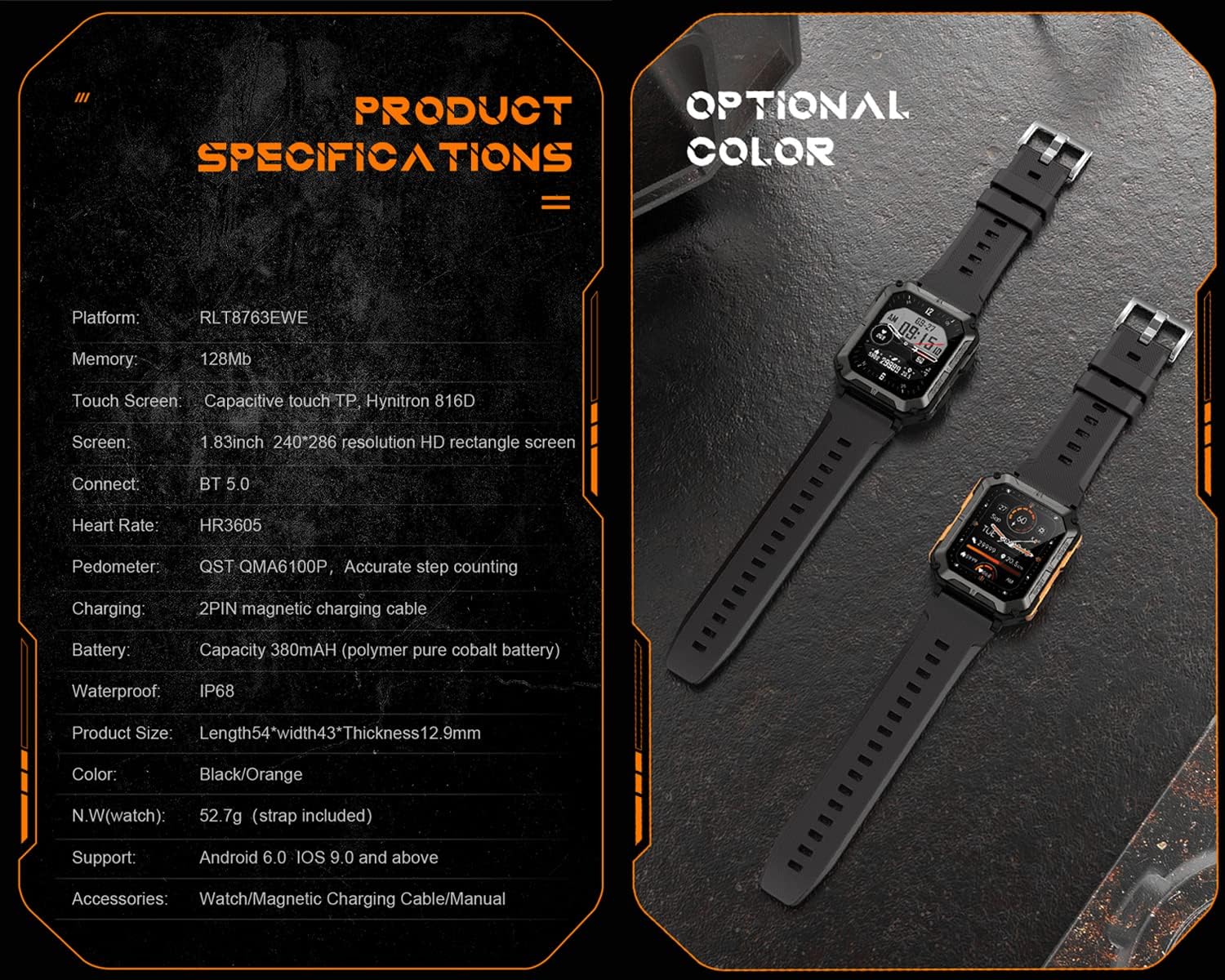
The PASNEW C20 Pro features a rugged design with a 1.83-inch HD colorful screen. It is equipped with multiple sensors for health and fitness tracking, and supports Bluetooth connectivity for calls and notifications.

Front view of the PASNEW C20 Pro Smart Watch, displaying the time and activity data.

Overview of the PASNEW C20 Pro highlighting IP68 waterproof rating and 123 sport modes.

Rear view of the PASNEW C20 Pro Smart Watch, showing the heart rate and blood oxygen sensors.
Setup
1. Charging the Device
Before first use, fully charge your C20 Pro Smart Watch. Connect the provided USB charging cable to the magnetic charging points on the back of the watch and to a standard USB power adapter (not included).
- Charging Time: Approximately 1.5 hours for a full charge.
- Battery Life: Up to 7-14 days of normal use, or 35 days in standby mode.
The PASNEW C20 Pro Smart Watch connected to its magnetic USB charging cable.
2. App Installation and Device Pairing
To access all features and synchronize data, download the companion application on your smartphone. The app is compatible with Android 6.0/iOS 9.0 or higher and Bluetooth 5.0 or higher.
- Scan the QR code in the included manual or search for the app name (usually specified in the manual or on the watch screen) in your phone's app store (Google Play Store for Android, Apple App Store for iOS).
- Install and open the application.
- Enable Bluetooth on your smartphone.
- In the app, follow the on-screen instructions to search for and pair with your PASNEW C20 Pro Smart Watch.
- Confirm the pairing request on both your phone and the watch.
Operating Instructions
1. Basic Navigation
- Touch Screen: Swipe left, right, up, or down to navigate through menus and features. Tap to select.
- Side Buttons: The watch typically has "POWER" and "SPORT" buttons.
- POWER Button: Press to wake/sleep the screen, long press to power on/off.
- SPORT Button: Quick access to sports modes.

The watch interface showing various application icons for navigation.
2. Making and Answering Calls
Once paired via Bluetooth, your C20 Pro can handle calls directly from your wrist.
- Making Calls: Access the dialer or contact list on the watch to initiate a call.
- Answering Calls: When a call comes in, tap the green answer icon on the watch screen.

The PASNEW C20 Pro Smart Watch showing an incoming call notification.
3. Sports Modes
The watch supports 123 sports modes. Select your activity to track real-time data such as steps, distance, calories burned, and heart rate.
- Press the SPORT button or navigate to the Sports menu.
- Select your desired activity from the list.
- Start your workout. The watch will begin recording data.
- To end the workout, pause and then stop the activity on the watch.
4. Health Monitoring
The C20 Pro monitors various health metrics. Ensure the watch is worn snugly on your wrist for accurate readings.
- Heart Rate (HR): Provides 24-hour real-time heart rate monitoring.
- Blood Pressure (BP): Measures blood pressure.
- Blood Oxygen (SpO2): Monitors blood oxygen levels.
- Sleep Monitoring: Tracks sleep patterns and quality.
- Sedentary Reminder: Alerts you to move after periods of inactivity.

The PASNEW C20 Pro Smart Watch showing health data, including heart rate and exercise metrics, on a user's wrist.
5. Notifications
Receive notifications for calls, messages, and app alerts directly on your watch. Ensure notification permissions are enabled in your phone's settings and the companion app.
6. Customization
Personalize your watch with different watch faces. The C20 Pro supports 10 built-in dials, 1 custom dial, and additional dials available through the app.
Maintenance
1. Water Resistance (IP68)
The C20 Pro is IP68 waterproof and dustproof, meaning it can withstand immersion in water up to 1 meter deep for 30 minutes. It is suitable for daily use, such as washing hands or getting caught in the rain. Note: Avoid contact with hot water, as this can compromise the seal.

The PASNEW C20 Pro Smart Watch demonstrating its IP68 waterproof capabilities under splashing water.
2. Cleaning
Wipe the watch and strap regularly with a soft, damp cloth. Avoid using harsh chemicals or abrasive materials that could damage the device.
3. Battery Care
To prolong battery life, avoid extreme temperatures and do not allow the battery to fully discharge frequently. Charge the watch when the battery level is low.
Troubleshooting
- Watch not turning on: Ensure the watch is fully charged. Connect it to the charger for at least 30 minutes.
- Cannot pair with phone:
- Ensure Bluetooth is enabled on your phone.
- Make sure the watch is within range of your phone.
- Restart both the watch and your phone.
- Check if the companion app is updated to the latest version.
- Inaccurate health data: Ensure the watch is worn snugly on your wrist, not too tight or too loose. Clean the sensors on the back of the watch.
- Notifications not appearing: Check app permissions on your phone to ensure the companion app has access to notifications. Verify notification settings within the companion app.
- Screen unresponsive: Restart the watch by long-pressing the POWER button. If unresponsive, allow the battery to drain completely and then recharge.
Specifications
| Feature | Detail |
|---|---|
| Model | C20 Pro |
| Screen Size | 1.83 Inches |
| Resolution | 240 x 286 |
| Memory Storage Capacity | 128 MB |
| Battery Capacity | 380 mAh |
| Battery Average Life | 14 days (typical use) |
| Battery Charge Time | 1.5 Hours |
| Water Resistance Level | IP68 (Waterproof up to 1 meter) |
| Connectivity Technology | Bluetooth 5.0 |
| Operating System Compatibility | Android 6.0 / iOS 9.0 or higher |
| Health Monitoring | Heart Rate, Blood Pressure, Blood Oxygen, Sleep Monitor |
| Sports Modes | 123 modes |
| Case Material | Plastic |
| Band Material | Silicone |
Official Product Video
Watch this official video for a visual guide to the PASNEW C20 Pro Smart Watch's features and durability.
Official product video showcasing the PASNEW C20 Pro Smart Watch's features, including its ruggedness, waterproof capabilities, and various functions.
Warranty Information
The PASNEW C20 Pro Smart Watch comes with a limited warranty. Please refer to the warranty card included in your product packaging for specific terms, conditions, and duration. Retain your proof of purchase for warranty claims.
Support
For technical support, troubleshooting assistance, or further inquiries, please contact PASNEW customer service. Contact details can typically be found on the manufacturer's website or on the packaging materials.
You may also visit the PASNEW Store on Amazon for additional product information and support resources.