
Introduction
The GYENNO Parkinson Spoon, Bravo Twist, is an advanced adaptive utensil designed to significantly improve the dining experience for individuals experiencing hand tremors due to conditions such as Parkinson's Disease, Parkinson's Syndrome, or Essential Tremor. This medical-grade silicone utensil utilizes dynamic stabilizing technology to counteract tremors, promoting independence and dignity during meals.
Beyond its primary function, the spoon also collects user tremor data, which can be visualized through a mobile application, offering valuable insights for monitoring tremor levels and informing treatment approaches. The device is designed for continuous improvement through firmware and algorithm updates via Over-The-Air (OTA) technology.

Figure 1: GYENNO Parkinson Spoon, Bravo Twist with its components.
Product Features and Technology
The GYENNO Parkinson Spoon incorporates cutting-edge technology to provide effective tremor compensation:
- Dynamic Stabilizing Technology: Based on a built-in intelligence chip with the latest algorithms and a high-precision digital motor, the spoon actively detects and counteracts hand tremors to stabilize the spoon head.
- Visualization Tremor Record: The device collects user tremor data and displays it as a graph on a mobile device application when charging. This feature allows users and caregivers to visually track tremor levels and progression.
- Over-The-Air (OTA) Updates: Firmware and algorithms can be updated wirelessly, ensuring the device benefits from continuous optimization and improvements by the scientific research team.
- Medical-Grade Silicone: Ensures safety and durability for daily use.

Figure 2: Internal technology of the GYENNO Bravo Twist, showing the intelligent servo system and tri-axis linkage.

Figure 3: Illustration of the unique tremor assist technology, demonstrating the conversion of tremor motion into stable movement.
Setup and Getting Started
Before using your GYENNO Parkinson Spoon, it is recommended to perform a usability test to ensure optimal benefit for your specific tremor type.
Usability Test via Mobile App:
- Download the App: Download and install the 'GYENNO SPOON' APP from Google Play Store or Apple App Store.
- Register and Login: Create an account and log in to the application.
- Perform Test: Follow the in-app instructions to complete the usability test. The test will help determine if the GYENNO Parkinson Spoon is suitable for your tremor.

Figure 4: Steps to download the GYENNO SPOON app and perform a usability test.
Operating Instructions
The GYENNO Parkinson Spoon is designed for ease of use:
- Power On: Press and hold the On/Off button for 2 seconds to start the spoon.
- Secure the Strap: For added security and to prevent accidental drops, put the wrist strap on your wrist.
- Begin Eating: Enjoy your meal with improved stability. The device adapts to both left and right dominant hands.

Figure 5: Simple steps for operating the GYENNO Parkinson Spoon.
Changing Attachments and Twist Function:
- Attachment Change: The spoon and fork attachments can be changed quickly and easily. Simply pull to remove and push to attach.
- Twist Function: For the fork attachment, press and hold the button to enter the Twist mode. Release the button to stop. Based on spatial perception technology, the GYENNO BRAVO Twist automatically stops the fork attachment horizontally upwards after twisting.

Figure 6: Human-centric design features including interchangeable attachments and twist function.
Maintenance and Cleaning
Proper maintenance ensures the longevity and hygiene of your GYENNO Parkinson Spoon.
Cleaning Procedure:
- Power Off: After finishing your meal, press and hold the power button for 1 second to turn off the device.
- Clean Head Attachment: Once the device is off, remove the head attachment (spoon or fork) from the handle. Clean the head attachment with water. The head attachment is dishwasher safe.
- Clean Handle Part: To clean stains on the handle part, use a moist towelette or alcohol pad to wipe, then dry with a clean cloth.
Important Cleaning Warnings:
- NEVER clean the handle part with a dishwasher.
- STRICTLY PROHIBIT high-temperature sterilization for the handle part.
- DO NOT put the handle part in the microwave.
- Avoid splashing or immersing the handle part in water.
Video 1: Official tutorial on storage and cleaning for the BRAVO Twist. This video demonstrates how to power off the device, clean the head attachment with water, and wipe the handle part with a moist cloth, while also highlighting important warnings about not dishwashing or microwaving the handle.
Troubleshooting
If you encounter any issues with your GYENNO Parkinson Spoon, please consider the following:
- Device Not Powering On: Ensure the device is fully charged. Connect it to the charger and allow sufficient time for charging.
- Reduced Stabilization Performance: Verify that the head attachment is securely connected. Ensure the device is clean and free from food debris that might impede movement.
- App Connectivity Issues: Check your mobile device's Bluetooth settings and ensure the GYENNO SPOON app has the necessary permissions. Restart both the device and the app if issues persist.
- Unusual Noises or Vibrations: Power off the device immediately and inspect for any visible damage or obstructions. Do not attempt to disassemble the handle part.
For persistent problems or issues not covered here, please refer to the Warranty and Support section for contact information.
Specifications
| Feature | Detail |
|---|---|
| Model Number | TC200 |
| Product Dimensions | 10.31 x 3.94 x 2.36 inches |
| Weight | 1.1 Pounds |
| Battery Type | 1 Lithium Ion battery (included) |
| Manufacturer | GYENNO SCIENCE |
| First Available Date | June 2, 2023 |
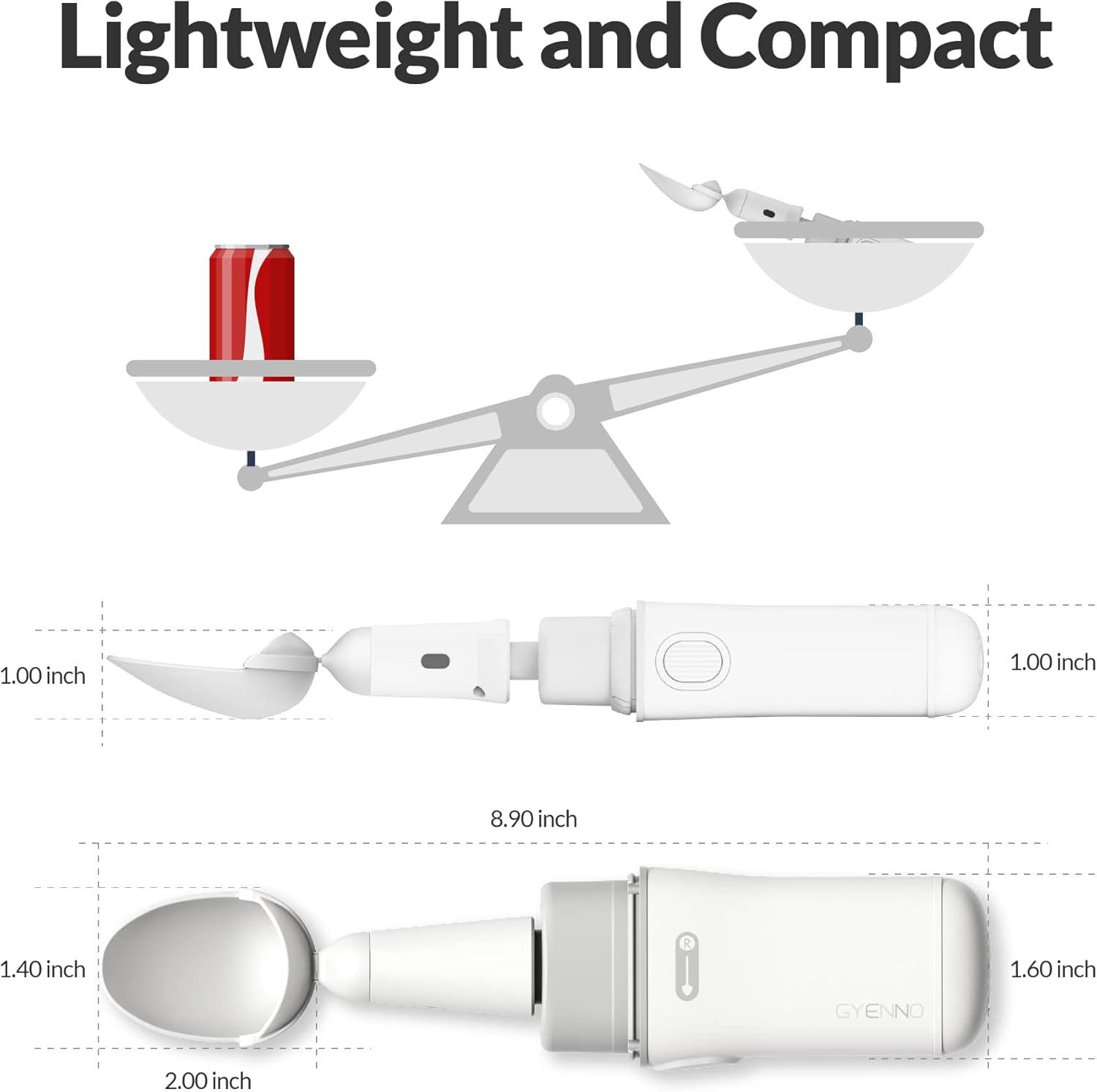
Figure 7: Dimensions of the GYENNO Parkinson Spoon.
Package Contents:
The package typically includes:
- GYENNO Parkinson Spoon Handle
- Spoon Attachment
- Fork Attachment
- Charging Cable
- Wrist Strap
- User Manual (this document)

Figure 8: Contents of the GYENNO Parkinson Spoon package.
Safety Information
Please read and adhere to the following safety guidelines:
- Pacemakers/Electrical Stimulation Devices: For patients with pacemakers or other electrical stimulation devices, do not place the product near your heart or other electrical stimulation devices due to the magnetic components of the product.
- Intended Use: The GYENNO BRAVO Twist is an FDA-approved motion assistance medical device intended for improving hand tremor patients' dining experience. It is not intended to diagnose, treat, cure, or prevent any disease or health condition.
- Medical Advice: Always consult with a healthcare professional regarding your condition and treatment options. The usability test via the app is a preliminary assessment and not a substitute for professional medical advice.
Warranty and Support
GYENNO SCIENCE is committed to providing excellent customer support for your product.
- Warranty Period: The GYENNO Parkinson Spoon comes with a 2-year warranty.
- Customer Care: GYENNO SCIENCE has an efficient and professional customer care team available to provide you with support services.
If you have any questions, require technical assistance, or need to claim warranty service, please contact GYENNO customer support through their official channels. Refer to the product packaging or the official GYENNO website for the most current contact information.