
1. Introduction
Thank you for choosing the BARCODE-USA Replacement Battery for your Zebra DS8178 Wireless Barcode Scanner. This high-performance Li-Ion rechargeable battery is designed to provide extended life and reliable power for your device. It is a direct replacement for original battery models BTRY-DS81EAB0E-00, 81-176890-01, and 71-176890-01.
This manual provides essential information to ensure safe and optimal use of your new battery.
2. Safety Information
Please read and understand all safety instructions before using the battery. Failure to follow these instructions may result in fire, electric shock, or injury.
- Do not short circuit: Avoid contact between the battery terminals and metal objects.
- Do not dispose in fire: Lithium-ion batteries can explode or catch fire if exposed to high temperatures.
- Do not disassemble: Tampering with the battery can be dangerous and voids the warranty.
- Keep away from water: Do not expose the battery to moisture or liquids.
- Use only with compatible devices: This battery is specifically designed for Zebra DS8178 Wireless Barcode Scanners.
- Recycle properly: Dispose of used batteries according to local regulations. Do not discard with household waste.
3. Setup and Installation
Follow these steps to install your new replacement battery into the Zebra DS8178 Wireless Barcode Scanner.
- Unpack the Battery: Carefully remove the battery from its packaging.
- Initial Charge: It is recommended to fully charge the battery before its initial use to optimize performance and lifespan.
- Remove Old Battery: Power off your Zebra DS8178 scanner. Refer to your scanner's original manual for specific instructions on how to safely open the battery compartment and remove the old battery.
- Insert New Battery: Align the contacts of the BARCODE-USA replacement battery with the terminals in the scanner's battery compartment. Gently push the battery into place until it is securely seated.
- Close Compartment: Close the battery compartment cover securely.
- Power On: Power on your Zebra DS8178 scanner. The device should now recognize the new battery.
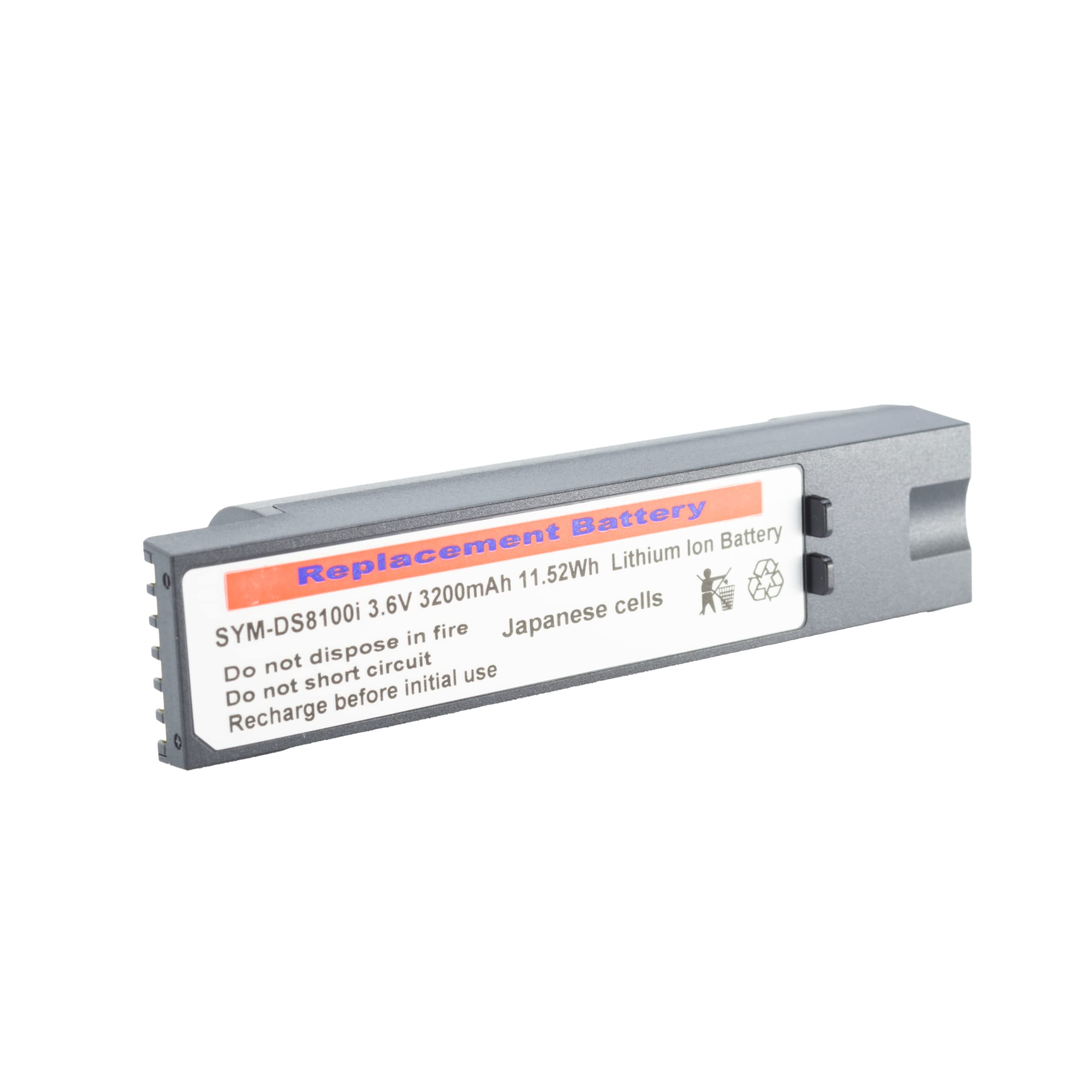
Image: The BARCODE-USA replacement battery is securely packaged in a cardboard box, with the battery itself sealed in an anti-static bag.

Image: The replacement battery, still in its protective anti-static bag, features a prominent yellow sticker advising 'CHARGE BEFORE USE'.

Image: The replacement battery, removed from its packaging, clearly displays its gold contact pins designed for connection within the scanner.
4. Operating the Battery
This 3200mAh Li-Ion battery is designed for extended operational periods. The actual runtime will vary based on scanner usage, settings, and environmental conditions.
Charging
- Use only the original Zebra charging cradle or a compatible charger designed for the DS8178 scanner.
- Avoid overcharging the battery. Modern Li-Ion batteries have built-in protection, but prolonged connection to a charger after full charge can still reduce lifespan over time.
- Charge the battery in a well-ventilated area, away from direct sunlight or extreme temperatures.
5. Maintenance
Proper maintenance can extend the life and performance of your battery.
- Regular Charging: For optimal performance, avoid completely draining the battery frequently. Charge it when the scanner indicates low battery.
- Storage: If storing the battery for an extended period (more than a month), charge it to approximately 50-60% capacity and store it in a cool, dry place (15°C to 25°C or 59°F to 77°F). Avoid extreme temperatures.
- Cleaning: Keep the battery contacts clean and free of debris. Use a dry, soft cloth to wipe them if necessary. Do not use harsh chemicals or abrasive materials.
- Inspection: Periodically inspect the battery for any signs of damage, swelling, or leakage. If any issues are observed, discontinue use immediately and replace the battery.
6. Troubleshooting
If you encounter issues with your replacement battery, try the following troubleshooting steps:
- Battery Not Charging:
- Ensure the scanner is properly seated in the charging cradle or the charging cable is securely connected.
- Verify that the charger and power outlet are functioning correctly.
- Clean the battery contacts on both the battery and the scanner/charger.
- Short Battery Runtime:
- Ensure the battery has been fully charged before use.
- Check scanner settings; high brightness or continuous scanning can reduce battery life.
- If the battery is old, its capacity may have degraded over time.
- Scanner Not Powering On:
- Confirm the battery is correctly installed and fully charged.
- Try removing and reinserting the battery.
If these steps do not resolve the issue, please contact customer support.
7. Specifications

Image: Two different angles of the BARCODE-USA replacement battery, highlighting its physical design and the informational label.
| Specification | Detail |
|---|---|
| Brand | BARCODE-USA |
| Battery Cell Composition | Lithium Ion |
| Battery Capacity | 3200 Milliamp Hours (mAh) |
| Reusability | Rechargeable |
| Replaces Part Numbers | BTRY-DS81EAB0E-00, 81-176890-01, 71-176890-01 |
| Compatible Device | Zebra DS8178 Wireless Barcode Scanners |
8. Warranty and Support
Your BARCODE-USA replacement battery is designed for quality and reliability. For information regarding warranty coverage, please refer to the purchase documentation or the seller's policy on the platform where the product was acquired. Typically, products are covered by a standard return policy, such as a 30-day refund/replacement period.
For technical assistance, troubleshooting beyond this manual, or warranty claims, please contact BARCODE-USA customer support directly. You can often find contact information on the seller's page or through your purchase history.
Visit the BARCODE-USA Store on Amazon for more information.