
Motag B0C3DVPXYL
Smrt Fitness Handweights and Jump Rope Workout Kit User Manual
Model: B0C3DVPXYL | Brand: Motag
1. Introduction
The Smrt Fitness Handweights and Jump Rope Workout Kit is designed to enhance your fitness routine with versatile and adjustable equipment. This kit includes adjustable handweights and an interchangeable jump rope system, featuring both a traditional rope and cordless weighted balls. The integrated smart features, including an LCD display and a rechargeable smart sensor, aim to provide a more informed workout experience. This manual provides essential information for the safe and effective use, setup, operation, and maintenance of your new fitness kit.
2. Safety Information
Please read all safety instructions before using the product. Failure to follow these instructions may result in injury or damage to the product.
- Consult with a healthcare professional before starting any new exercise program.
- Ensure all components are securely assembled before each use.
- Use the product on a clear, level surface, free from obstructions.
- Keep children and pets away from the product during use.
- Do not modify the product in any way.
- Stop exercising immediately if you feel pain, dizziness, or shortness of breath.
- Store the product in a cool, dry place when not in use.
3. Package Contents
Verify that all items are present in your package:
- 2x Adjustable Handweights
- 2x Jump Rope Handles
- 2x Cordless Weighted Balls
- 1x Jump Rope
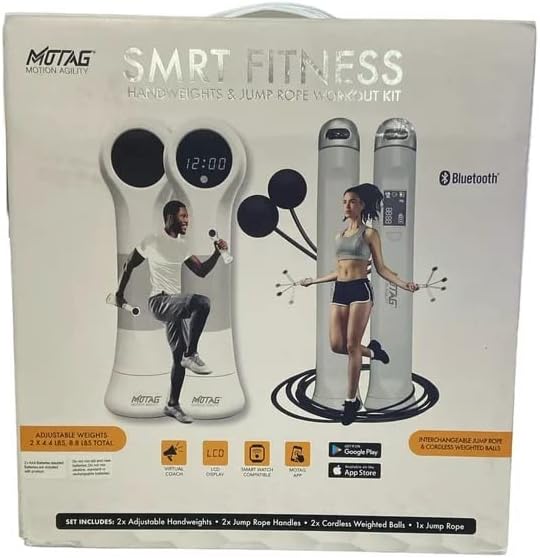
Figure 3.1: Front packaging of the Smrt Fitness Kit, illustrating included components and smart features like LCD display and app compatibility.
4. Setup
4.1 Adjustable Handweights Assembly
The handweights feature adjustable inserts to customize your desired weight. The available weight options are 2.2 lbs, 3.3 lbs, and 4.4 lbs per handweight.
- Unscrew the end cap of the handweight handle.
- Insert or remove the weight inserts to achieve your preferred weight. Ensure the inserts are fully seated.
- Securely screw the end cap back onto the handle until tight.
- Repeat for the second handweight.
4.2 Jump Rope Configuration
The kit offers two jump rope configurations: a traditional rope and cordless weighted balls.
- Attaching the Rope: Insert each end of the jump rope into the designated slots on the jump rope handles. Ensure they click into place securely.
- Adjusting Rope Length: To adjust the rope length, open the locking mechanism on the handle, pull the rope through to the desired length, and then secure the locking mechanism. The ideal length is typically when the handles reach your armpits when standing on the middle of the rope.
- Attaching Cordless Weighted Balls: If using the cordless option, attach one weighted ball to each jump rope handle in the same manner as the rope. These are ideal for indoor use or when space is limited.

Figure 4.1: Back packaging of the Smrt Fitness Kit, showing detailed views of the adjustable handweights and jump rope components.
4.3 Initial Charging and App Connection
The smart sensor within the handles is rechargeable. Ensure it is fully charged before first use. For smart features, download the companion application (e.g., "SMRT fitness" as indicated on packaging) from your device's app store. Follow the in-app instructions to pair your device via Bluetooth.
5. Operating Instructions
5.1 Using the Handweights
Hold the handweights with a firm but comfortable grip. The anti-slip pad on the handle ensures stability during your workout. The adjustable weight feature allows you to increase or decrease resistance as needed for various exercises, such as jogging, walking, or strength training.
5.2 Using the Jump Rope
Whether using the traditional rope or the cordless weighted balls, ensure you have adequate space. The LCD display screen on the handle will show relevant workout data, such as jump count or time, depending on the mode. The rechargeable smart sensor tracks your activity.
- Traditional Jump Rope: Stand with the rope behind your heels. Swing the rope over your head and jump as it approaches your feet. Maintain a steady rhythm.
- Cordless Weighted Balls: Hold the handles and simulate the motion of jumping rope. The weighted balls provide resistance and mimic the feel of a real rope without the need for large clear space.
5.3 LCD Display and Smart Features
The LCD display provides real-time feedback during your workout. Refer to the companion app for detailed tracking, workout programs, and historical data. Ensure Bluetooth is enabled on your device for seamless data synchronization.
6. Maintenance
- Cleaning: Wipe down the handweights and jump rope handles with a damp cloth after each use. Do not use abrasive cleaners or solvents.
- Storage: Store the kit in a clean, dry place away from direct sunlight and extreme temperatures.
- Battery Care: Recharge the smart sensor regularly to maintain battery health. Avoid fully discharging the battery for extended periods.
7. Troubleshooting
| Problem | Possible Cause | Solution |
|---|---|---|
| LCD display not turning on. | Low battery or device off. | Charge the smart sensor. Press the power button (if applicable) to turn on. |
| Cannot connect to the app via Bluetooth. | Bluetooth off, app issue, or device not discoverable. | Ensure Bluetooth is enabled on your phone. Restart the app and your phone. Check if the app is available and compatible with your device's operating system. Some apps may be discontinued or have limited platform availability. |
| Jump rope tangles frequently. | Rope length incorrect or improper technique. | Adjust the rope length to fit your height. Practice proper jump rope technique. Consider using the cordless weighted balls for indoor or confined spaces. |
| Handweights feel loose. | End cap not tightened or inserts not fully seated. | Ensure the end cap is securely screwed on. Verify that all weight inserts are properly seated inside the handle. |
8. Specifications
| Feature | Detail |
|---|---|
| Brand | Motag |
| Model | B0C3DVPXYL |
| Target Audience | Adult |
| Special Feature | Adjustable Length (Jump Rope), Adjustable Weights (Handweights) |
| Material | Plastic, Metal, Rubber |
| Handle Material | Plastic |
| Color | White |
| Item Weight | Approximately 11 Pounds (total kit) |
| UPC | 683828725036 |
| Item Package Dimensions (L x W x H) | 12 x 11.5 x 4 inches |
9. Warranty and Support
For warranty information or technical support, please contact the manufacturer, Motag, or the seller directly through your purchase platform. Keep your proof of purchase for any warranty claims.
Ask a question about this manual
Ask about setup, troubleshooting, compatibility, parts, safety, or missing instructions. Manuals+ will review the question and use this page’s manual context to help answer it.