
SKMEI 2020PK
SKMEI LED Backlight Large Screen Analog-Digital Watch User Manual
Model: 2020PK
Introduction
Thank you for choosing the SKMEI Model 2020PK Analog-Digital Watch. This timepiece combines classic analog display with modern digital functionality, designed for versatility and durability. This manual provides detailed instructions on setting up, operating, and maintaining your watch to ensure optimal performance and longevity.

Figure 1: Front view of the SKMEI Model 2020PK watch, showcasing its analog and digital displays within a pink transparent casing.
Product Overview
The SKMEI 2020PK features a robust design with multiple functions. Familiarize yourself with the watch's components:
- Analog Display: Traditional hour and minute hands.
- Digital Display: Shows time, date, and other digital functions.
- Buttons: Typically four buttons (A, B, C, D) for mode selection, setting, and light activation.
- Crown: For setting analog time.
- EL Backlight: Electroluminescent backlight for visibility in low light conditions.
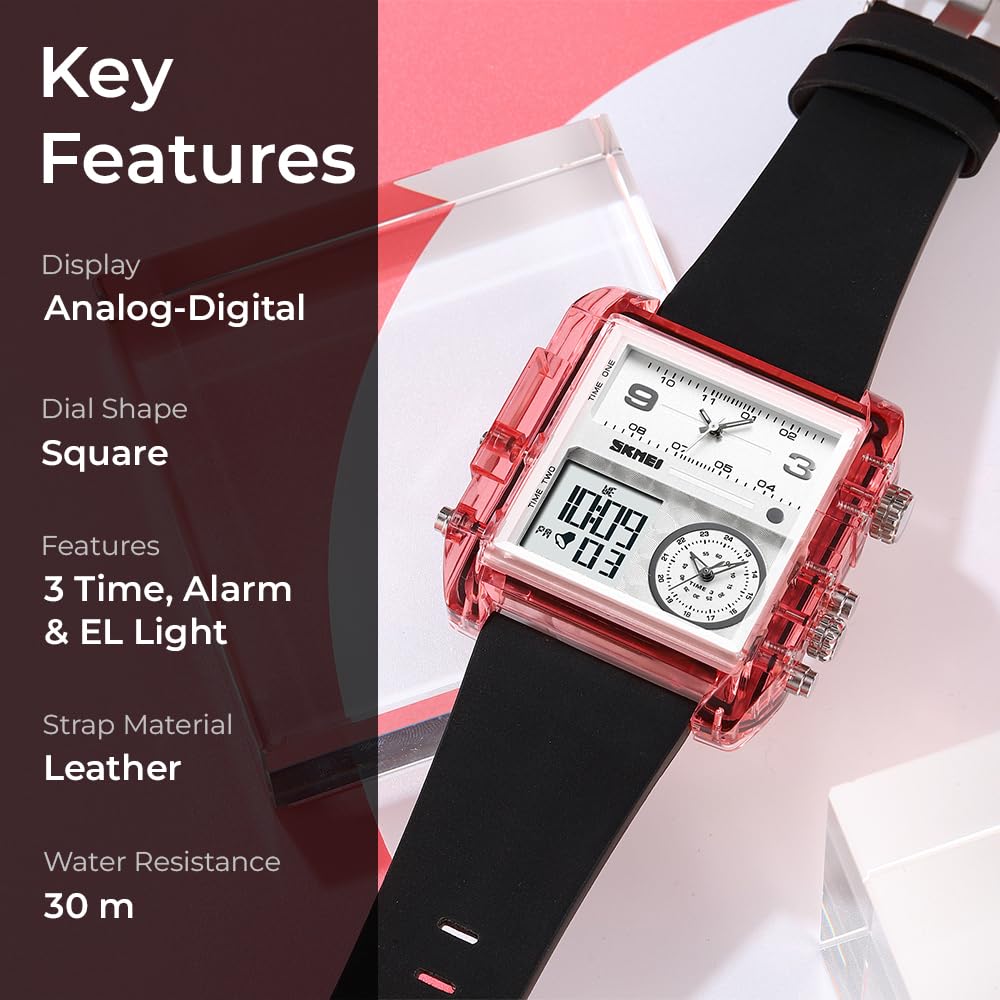
Figure 2: Key features of the SKMEI 2020PK watch, including its dual display, square dial, multi-functionality, leather strap, and water resistance.
Setup and Initial Configuration
Battery Information
Your SKMEI watch comes with a pre-installed C battery. No initial battery installation is required. If the display dims or functions become erratic, it may be time for a battery replacement. It is recommended to have battery replacement performed by a qualified watch technician to maintain water resistance.
Setting Analog Time
- Pull out the crown located on the right side of the watch.
- Rotate the crown to adjust the hour and minute hands to the desired time.
- Push the crown back in to secure the time setting.
Setting Digital Time and Date
The digital display typically has multiple modes. Refer to the specific button functions for your model:
- Press the Mode button (often labeled 'B' or 'M') repeatedly until the time setting mode is activated (usually indicated by flashing digits).
- Use the Adjust button (often labeled 'A' or 'S') to select the digit or setting you wish to change (e.g., hours, minutes, year, month, day).
- Use the Reset/Start button (often labeled 'C' or 'R') to increment the selected value.
- Once all settings are correct, press the Mode button again to exit the setting mode.
Operating Instructions
Mode Switching
Press the Mode button to cycle through the different functions:
- Time Display: Shows current time (hour, minute, second), day of the week, and date.
- Chronograph (Stopwatch):
- Press Start/Stop to begin/pause timing.
- Press Reset to clear the stopwatch.
- Alarm Setting:
- In alarm mode, use Adjust to select hours/minutes.
- Use Reset/Start to set the alarm time.
- Press Mode to confirm and exit.
- Press Adjust and Reset/Start simultaneously to toggle alarm ON/OFF.
- Multiple Time Zones: Your watch supports up to three time zones. Follow similar setting procedures as the main time, typically by cycling through modes or using specific buttons for "Time One," "Time Two," and "Time Three" as indicated on the watch face.
EL Backlight
Press the Light button (often labeled 'D' or with a light bulb icon) to illuminate the digital display for a few seconds, enhancing visibility in dark environments.

Figure 3: Close-up of the SKMEI 2020PK watch face, highlighting the digital time and date display, along with the analog sub-dial for the third time zone.
Maintenance and Care
Proper care will extend the life and maintain the appearance of your SKMEI watch.
- Cleaning: Wipe the watch case and strap regularly with a soft, dry cloth. For the leather strap, avoid excessive moisture.
- Water Resistance (30M): This watch is 30-meter (3ATM) water resistant, meaning it is suitable for daily use, splashes, and rain. It is not suitable for showering, swimming, diving, or any prolonged water immersion. Do not operate buttons underwater.
- Temperature: Avoid exposing the watch to extreme temperatures (hot or cold) or sudden temperature changes, as this can affect accuracy and battery life.
- Chemicals: Keep the watch away from solvents, detergents, perfumes, and other chemicals, which can damage the case, strap, or internal components.
- Impact: Avoid strong impacts or dropping the watch.

Figure 4: The SKMEI 2020PK watch worn on a wrist, demonstrating its aesthetic and proportions.
Troubleshooting
| Problem | Possible Cause | Solution |
|---|---|---|
| Digital display is blank or dim. | Low battery. | Replace battery. |
| Analog time is incorrect. | Crown pulled out or moved accidentally. | Reset analog time using the crown. |
| Digital time is incorrect. | Incorrect setting. | Re-enter time setting mode and adjust. |
| Buttons are unresponsive. | Watch may be in a locked mode or battery is very low. | Try pressing all buttons to see if any respond. If not, consider battery replacement. |
| Condensation inside the watch. | Exposure to extreme temperature changes or water ingress. | Seek professional repair immediately to prevent damage. |
Specifications
- Model Number: 2020PK
- Display Type: Analog-Digital
- Movement Type: Quartz
- Case Material: PC (Polycarbonate)
- Band Material: Leather
- Band Color: Black
- Case Diameter: 5.2 Centimeters
- Case Thickness: 1.6 Centimeters
- Product Dimensions (LxWxH): 26.5 x 5.2 x 1.6 cm
- Item Weight: 87.9 Grams
- Water Resistance Depth: 30 Meters (3ATM)
- Battery: 1 C battery (included)
- Functions: Chronograph, Alarm, Three Time Zones, Date & Week Display, 12/24 Hour Format, EL Backlight.

Figure 5: Detailed dimensions of the SKMEI 2020PK watch, including case height, width, thickness, and strap width.
Warranty and Support
Your SKMEI watch comes with a Limited Warranty. Please refer to the warranty card included with your purchase for specific terms and conditions. For technical support, service, or warranty claims, please contact your retailer or the official SKMEI customer service channel.
Manufacturer: SKMEI
Importer: SKMEI

Figure 6: Rear view of the SKMEI 2020PK watch, displaying the stainless steel case back and engraved details.
Ask a question about this manual
Ask about setup, troubleshooting, compatibility, parts, safety, or missing instructions. Manuals+ will review the question and use this page’s manual context to help answer it.