
1. Introduction
The Jyving 8PK-366N-G Desoldering Pump is a hand tool designed for efficient removal of molten solder from electronic components and circuit boards. Constructed from durable ABS plastic, it features a double-loop airtight design for effective suction. Its ergonomic design supports comfortable, one-handed operation, making it suitable for extended use. The tool is designed for easy disassembly and cleaning, ensuring longevity and consistent performance. It includes an anti-rust spring and an easily replaceable tip for convenience.
2. Safety Information
- Always wear appropriate personal protective equipment, including safety glasses, to protect against molten solder splashes.
- Ensure adequate ventilation in your workspace to disperse solder fumes.
- Handle the desoldering pump and soldering iron with care, as they operate at high temperatures. Allow components to cool before handling.
- Keep the tool away from children and pets.
- Do not use the desoldering pump for purposes other than its intended use of solder removal.
3. Package Contents
Verify that all items are present in your package:
- 1 x Jyving 8PK-366N-G Desoldering Pump
- Multiple interchangeable tin nozzles/tips
- 1 x Cleaning rod
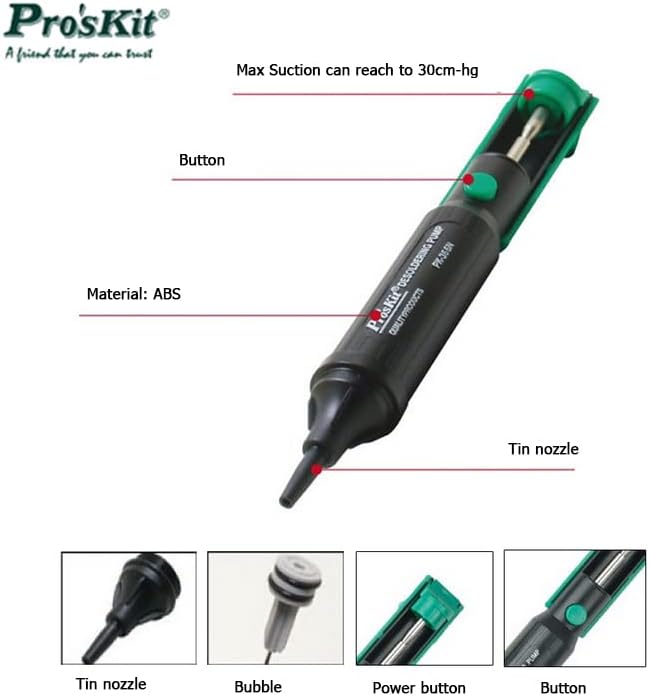
Image: The Jyving 8PK-366N-G Desoldering Pump, highlighting its tin nozzle, button, and showing additional interchangeable tips and a cleaning rod.
4. Setup
- Select the Appropriate Nozzle: Choose a tin nozzle that best fits the size of the solder joint you intend to desolder. The pump comes with multiple tips for various applications.
- Attach the Nozzle: Securely screw the chosen nozzle onto the front end of the desoldering pump.
- Prepare the Pump: Push the plunger down until it locks into place. The pump is now cocked and ready for use.
5. Operating Instructions
Follow these steps for effective solder removal:
- Heat the Solder Joint: Using a heated soldering iron, apply heat to the solder joint you wish to remove until the solder melts and becomes liquid.
- Position the Pump: Immediately place the tip of the desoldering pump directly over the molten solder, ensuring a good seal around the joint.
- Activate Suction: Press the release button on the desoldering pump. The plunger will retract rapidly, creating a vacuum that sucks the molten solder into the pump's chamber.
- Remove the Pump: Once the solder has been removed, lift the desoldering pump away from the circuit board.
- Clear the Pump: Push the plunger down again to eject any collected solder from the pump. Repeat the process if necessary for stubborn joints.
Video: Demonstration of the desoldering pump in action, showing how to heat a solder joint and use the pump to remove molten solder from a circuit board.
6. Maintenance
Regular cleaning and maintenance will ensure optimal performance and extend the lifespan of your desoldering pump.
- Disassembly: Unscrew the nozzle and the rear cap of the pump to access the internal components.
- Clean the Nozzle: Use the provided cleaning rod to clear any solder residue from the nozzle.
- Clean the Chamber and Spring: Remove any accumulated solder or debris from the internal chamber and around the spring. A cotton swab can be used for thorough cleaning.
- Reassembly: Reassemble the pump by screwing the nozzle and rear cap back into place. Ensure all parts are securely fastened to maintain airtightness.
- Tip Replacement: If the nozzle tip becomes worn or damaged, replace it with a new one to maintain effective suction.
Video: A detailed guide on maintaining the desoldering pump, including how to disassemble, clean, and reassemble the unit to prevent clogging and ensure powerful suction.
7. Troubleshooting
- Poor Suction:
- Check if the nozzle is clogged with solder. Clean it thoroughly using the cleaning rod.
- Ensure the nozzle and rear cap are screwed on tightly to prevent air leaks.
- Inspect the nozzle tip for wear or damage. Replace if necessary.
- Solder Not Melting:
- Verify that your soldering iron is reaching the correct temperature for the type of solder being used.
- Ensure sufficient contact time between the soldering iron and the solder joint.
8. Specifications

Image: The Jyving 8PK-366N-G Desoldering Pump, illustrating its design and key specifications.
| Feature | Specification |
|---|---|
| Model | 8PK-366N-G |
| Body Material | ABS (Acrylonitrile Butadiene Styrene) |
| Color | Black + Green |
| Suction Capacity | 30cm-Hg |
| Length | 205mm (8.07 inches) |
| Item Weight | 58g (2.07 oz) |
| Style | Gun |
| Special Feature | Portable |
| Usage | Electronics repair and assembly |
9. Warranty Information
This product is covered by a standard manufacturer's warranty against defects in materials and workmanship. Please retain your proof of purchase for any warranty claims. For specific warranty terms and conditions, refer to the documentation provided at the time of purchase or contact the retailer.
10. Support
For technical assistance, troubleshooting, or inquiries regarding your Jyving 8PK-366N-G Desoldering Pump, please contact the retailer or the manufacturer's customer support channels. Have your product model number and purchase details ready when seeking support.