
Sun Flame CS3D0001-PI
J-Axis CS3D0001-PI Smartwatch User Manual
Model: CS3D0001-PI | Brand: Sun Flame
Product Overview
The J-Axis CS3D0001-PI Smartwatch is a versatile wearable device designed to enhance your daily life with various smart functions. It features Bluetooth ver4.0 connectivity and IP65 JIS waterproof performance, making it suitable for everyday use. The device is powered by a 3.7V 150mAh Lithium Polymer battery, which can be charged using the included USB cable in approximately 2 hours, providing an operating time of about 5 to 7 days.

Figure 1: Front view of the J-Axis CS3D0001-PI Smartwatch in pink, displaying the time 10:10.

Figure 2: Overhead view of the J-Axis CS3D0001-PI Smartwatch in pink with its strap extended.
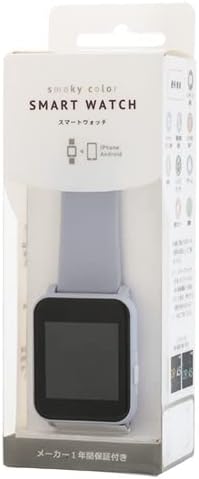
Figure 3: Retail packaging for the 'Smoky Color Smart Watch', showing the smartwatch inside.
Setup Guide
1. Initial Charging
Before first use, fully charge your smartwatch. Connect the included USB charging cable to the charging port on the watch and a standard USB power source. The approximate charging time is 2 hours.
2. App Installation and Pairing
To unlock the full potential of your smartwatch, install the dedicated mobile application. The J-Axis CS3D0001-PI uses the FitCloudPro app.
- Download the FitCloudPro app from your smartphone's app store (App Store for iOS, Google Play Store for Android).
- Ensure your smartphone's Bluetooth is enabled.
- Open the FitCloudPro app and follow the on-screen instructions to register an account and pair your smartwatch.
- The app supports iOS 10.0 or later and Android 5.0 or later.

Figure 4: App compatibility information for FitCloudPro on iOS and Android devices, along with Bluetooth compliance.
Operating Instructions
1. Basic Navigation
The smartwatch features a circular button (O) for primary interaction. The LCD screen itself is not touch-sensitive.
- Short Press: Typically used to wake the screen or confirm selections.
- Long Press (approx. 3 seconds): Used to switch between different display modes or watch faces.

Figure 5: Illustration of basic screen operation using the circular button.
2. Customizing Watch Faces
Your smartwatch offers two distinct watch face designs. To switch between them, simply long-press the circular button (O) for approximately 3 seconds while on the main watch display.
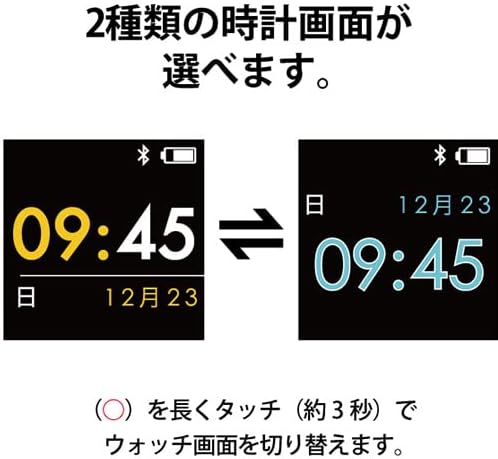
Figure 6: Examples of the two available watch face designs.
3. Key Features Overview
The smartwatch provides a range of features categorized into Notifications, Health, and Convenience functions.

Figure 7: Overview of smartwatch functions.
4. Health Tracking Functions
The smartwatch includes basic health tracking features. Please note that these are for reference only and not intended for medical purposes. Results are estimates and may vary.
- Pedometer (Steps): Automatically counts your steps throughout the day. The count resets at midnight. Arm movements alone may be counted, leading to variations from actual steps.

Figure 8: Pedometer display.
- Distance (KM): Estimates the distance traveled based on your step count. The distance display resets at midnight.

Figure 9: Distance tracking display.
- Calorie (kcal): Estimates calorie consumption based on your activity. The calorie display resets at midnight.
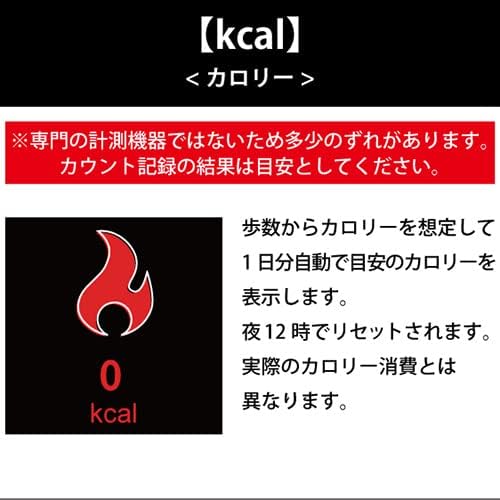
Figure 10: Calorie tracking display.
- Sleep Tracking: Estimates sleep duration by detecting periods of inactivity while worn. The standard measurement period is from 9 PM to 8 AM. Actual sleep time may differ, and movement detected as waking can stop the count prematurely.

Figure 11: Sleep tracking display.
5. Convenience Functions
- Camera Remote: When the watch is connected to your phone, you can use it as a remote shutter. Touch the screen or shake your arm to activate a 3-2-1 countdown and take a photo on your paired smartphone.
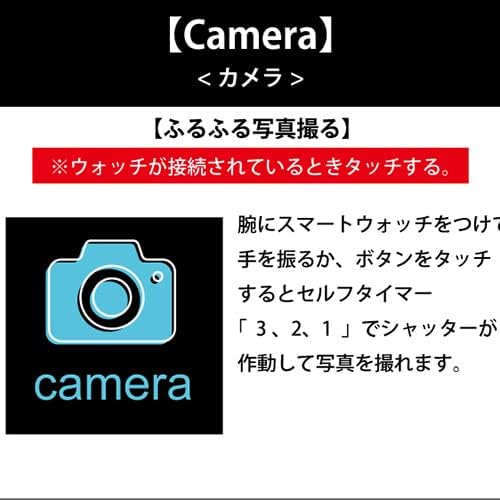
Figure 12: Camera remote function display.
- Find Phone: If your smartwatch is connected to your phone, you can use this function to locate your phone. Long-press the circular button (O) on the watch to make your phone emit a sound and vibrate. Note: If your phone is in silent mode, only vibration will occur. This function cannot be used if the connection is lost.

Figure 13: Find Phone function display.
Maintenance
1. Cleaning
To keep your smartwatch in optimal condition, regularly wipe the screen and strap with a soft, dry cloth. For stubborn dirt, a slightly damp cloth can be used, but ensure the watch is completely dry before wearing or charging.
2. Water Resistance
The J-Axis CS3D0001-PI Smartwatch has an IP65 JIS waterproof rating. This means it is protected against dust ingress and low-pressure water jets from any direction. It is suitable for everyday use like hand washing or light rain. However, it is not suitable for swimming, showering, or submersion in water.
Troubleshooting
Connection Issues
- Watch not pairing with app: Ensure Bluetooth is enabled on your phone and the watch is sufficiently charged. Try restarting both the watch and your phone.
- Frequent disconnections: Ensure the watch is within Bluetooth range of your phone. Check for app updates and ensure the app is running in the background.
Inaccurate Health Data
- Pedometer/Distance/Calorie: As noted, these are estimates and not professional measurements. Factors like arm movement (not actual walking) can affect accuracy. Ensure the watch is worn snugly on your wrist.
- Sleep Tracking: Movement during sleep or waking up briefly can affect the accuracy of sleep duration. Ensure the watch is worn during sleep.
Other Issues
- Watch not turning on: Ensure the watch is fully charged. If it still doesn't turn on, contact customer support.
- Screen unresponsive: The LCD screen is not touch-sensitive. All interactions are via the circular button. If the button is unresponsive, try restarting the watch.
Product Specifications
| Feature | Specification |
|---|---|
| Model Number | CS3D0001-PI |
| Brand | Sun Flame |
| Bluetooth Version | 4.0 |
| Waterproof Rating | IP65 JIS |
| Battery Type | Lithium Polymer 3.7V |
| Battery Capacity | 150mAh |
| Charging Time | Approx. 2 hours |
| Operating Time | Approx. 5-7 days |
| Package Dimensions | 16 x 5.8 x 4.4 cm |
| Item Weight | 70 g |
| First Available Date | June 14, 2023 |
Warranty and Support
For warranty information and customer support, please refer to the documentation included with your purchase or contact the manufacturer, Sun Flame, directly. Details regarding warranty period and service procedures are typically provided at the point of sale or on the manufacturer's official website.
Ask a question about this manual
Ask about setup, troubleshooting, compatibility, parts, safety, or missing instructions. Manuals+ will review the question and use this page’s manual context to help answer it.