
Introduction
This manual provides detailed instructions for the safe and effective operation, maintenance, and troubleshooting of your ENEACRO 1600W Rotary Car Buffer Polisher Waxer. Please read this manual thoroughly before using the product and retain it for future reference.
Safety Instructions
Always observe basic safety precautions to reduce the risk of fire, electric shock, and personal injury.
- Read all instructions: Familiarize yourself with the controls and proper use of the tool.
- Wear appropriate safety gear: Always wear safety glasses, hearing protection, and a dust mask when operating the polisher.
- Secure workpiece: Ensure the item being polished is stable and secure.
- Avoid accidental starting: Ensure the switch is in the off position before plugging in the tool.
- Maintain a safe work area: Keep the area well-lit and free of clutter. Do not operate in explosive atmospheres, such as in the presence of flammable liquids, gases, or dust.
- Keep children and bystanders away: Distractions can cause you to lose control.
- Use the right tool for the job: Do not force the tool; it will perform better and safer at the rate for which it was designed.
- Disconnect power: Always unplug the tool from the power source before making any adjustments, changing accessories, or storing the tool.
- Inspect for damage: Before each use, check for damaged parts. Do not use the tool if any part is damaged.
- Use original accessories: Only use accessories recommended by the manufacturer.
Package Contents
Verify that all items listed below are included in your package:
- 1 x ENEACRO Rotary Polisher
- 1 x 6-Inch Loop Backing Plate
- 1 x 7-Inch Loop Backing Plate
- 6 x 6-inch Sponge Wheels (various types)
- 1 x 7-inch Wool Polishing Disc
- 10 x 6-inch Sandpapers
- 1 x D-Handle
- 1 x Side Handle
- 1 x Hex Wrench
- 1 x ENEACRO Tool Bag
- 2 x Carbon Brushes
- 1 x User Manual

Image: The ENEACRO Rotary Polisher displayed with all its included accessories, such as backing plates, sponge wheels, wool disc, sandpapers, handles, hex wrench, tool bag, carbon brushes, and user manual.
Setup Instructions
1. Attaching the Handle
Your ENEACRO Polisher comes with two detachable handles: a D-handle and a side handle. Choose the handle that provides the most comfortable and secure grip for your task.
- Side Handle: Screw the side handle into the threaded hole on either side of the polisher's gear housing. Tighten securely.
- D-Handle: Attach the D-handle to the top of the gear housing using the provided screws and hex wrench. Ensure it is firmly attached.

Image: Illustration showing the ENEACRO polisher with both the side handle and D-handle attached, demonstrating different grip options.
2. Installing Backing Plates and Pads
The polisher supports both 6-inch and 7-inch backing plates. Select the appropriate size for your application.
- Attach Backing Plate: Align the backing plate with the spindle of the polisher. Press the spindle lock button (usually located on top of the gear housing) and rotate the spindle until it locks. Screw the backing plate onto the spindle clockwise until tight. Release the spindle lock.
- Attach Polishing Pad: The backing plates feature a hook-and-loop design. Firmly press the desired sponge wheel, wool polishing disc, or sandpaper onto the backing plate, ensuring it is centered.

Image: A hand demonstrating how to attach a polishing pad to the hook-and-loop backing plate of the ENEACRO polisher.
Operating Instructions
1. Power Connection and Initial Check
Before connecting to power, ensure the polisher's switch is in the "OFF" position. Plug the power cord into a standard 120V AC outlet.
2. Variable Speed Control
The ENEACRO Polisher features a 6-level variable speed dial, allowing you to adjust the rotation speed from 1500 to 3500 RPM. This enables precise control for various tasks and materials.
- Rotate the speed dial to select the desired RPM. Lower speeds are generally used for waxing and finishing, while higher speeds are suitable for cutting and compounding.
- Start at a lower speed and gradually increase as needed, observing the material being worked on.
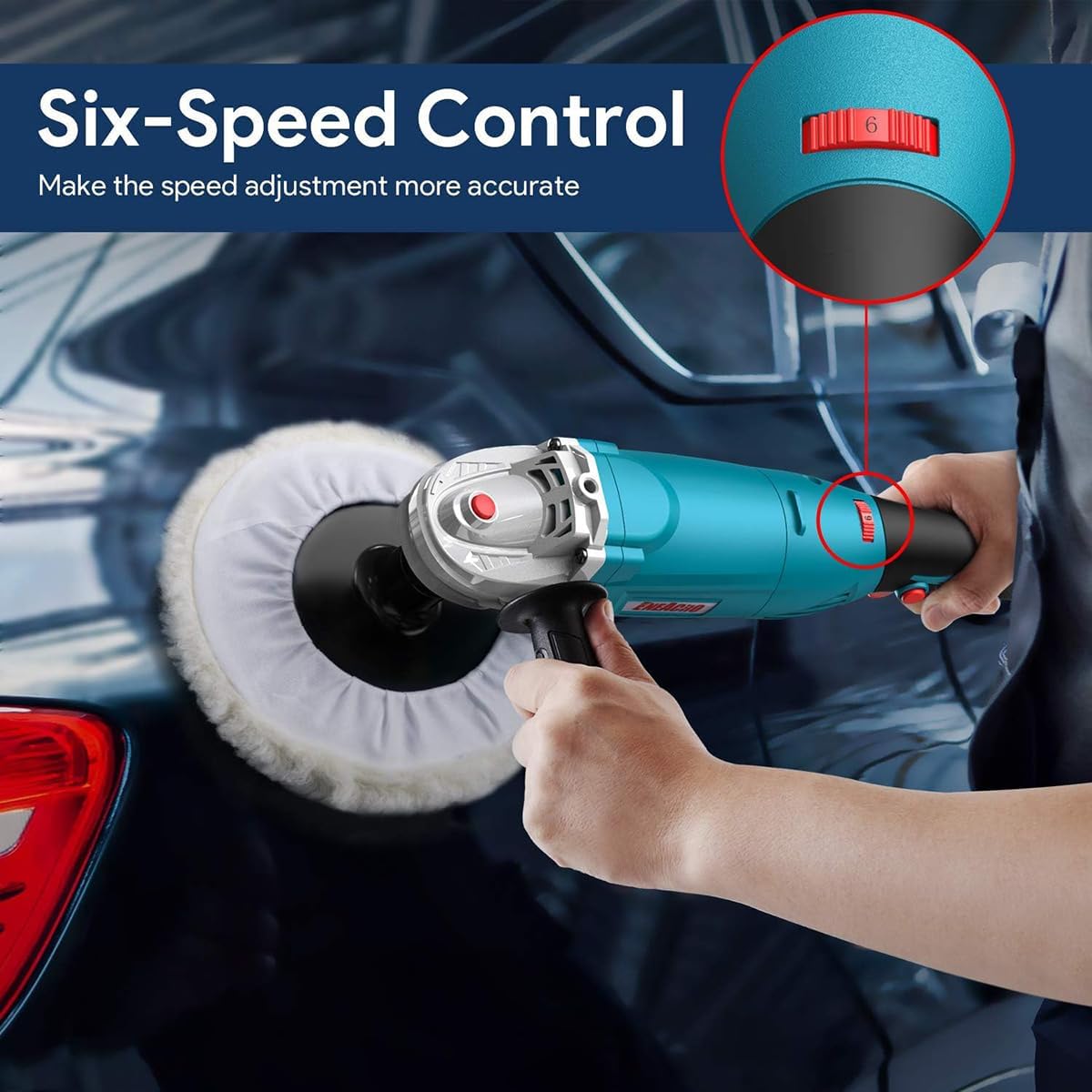
Image: Close-up of the ENEACRO polisher's speed control dial, showing the six adjustable settings for precise RPM control.
3. Self-Lock Button
For continuous operation without holding down the trigger, use the self-lock button.
- Press the power switch to start the polisher.
- While the polisher is running, press the self-lock button. The polisher will continue to operate at the selected speed.
- To turn off, press the power switch again.
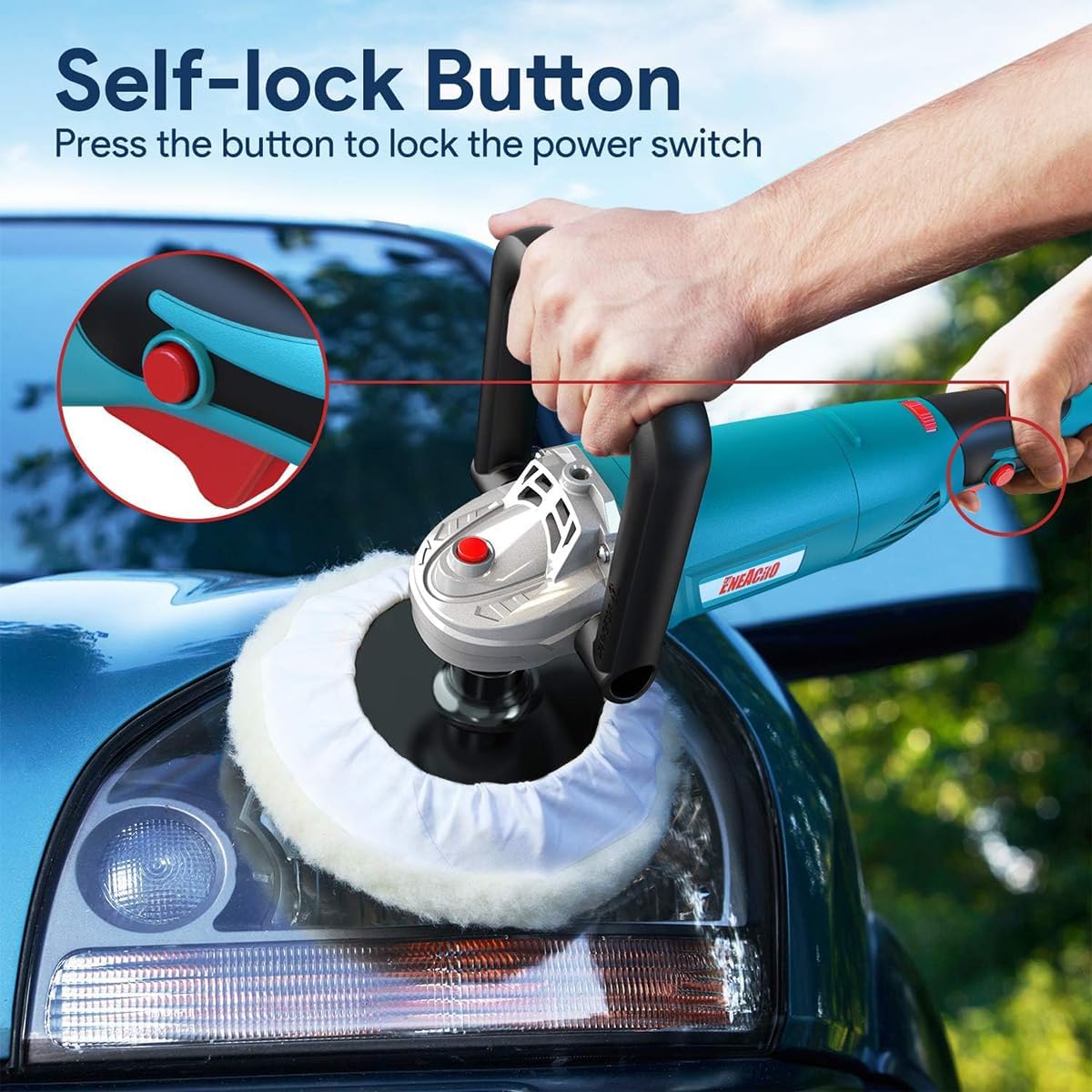
Image: A hand pressing the self-lock button on the ENEACRO polisher, enabling continuous operation without holding the trigger.
4. Application Guidelines
This rotary polisher is suitable for a wide range of applications, including:
- Car Polishing and Waxing: Ideal for removing swirls, scratches, and defects from painted vehicle surfaces.
- Boat Polishing: Effective for restoring shine to boat hulls.
- Furniture Polishing: Can be used on various furniture materials.
- Ceramic, Wood, and Metal Polishing: Adaptable for different surface types.
Always test on an inconspicuous area first to ensure compatibility and desired results. Apply even pressure and move the polisher steadily across the surface.

Image: A collage demonstrating the ENEACRO polisher being used for car waxing, glass polishing, furniture polishing, and floor waxing, highlighting its versatility.
Maintenance
1. Cleaning
After each use, disconnect the polisher from the power supply. Wipe down the exterior of the tool with a clean, damp cloth. Remove any polishing compound or debris from the backing plate and pads. Clean pads thoroughly according to their specific instructions to prolong their lifespan.
2. Carbon Brush Replacement
The polisher uses carbon brushes which wear down over time. Regularly inspect the carbon brushes. When they are worn, replace them with the provided spare brushes or genuine ENEACRO replacements.
- Unplug the polisher.
- Locate the carbon brush caps on the sides of the motor housing.
- Unscrew the caps using a flathead screwdriver.
- Remove the old carbon brushes.
- Insert new carbon brushes, ensuring they are seated correctly.
- Replace and tighten the carbon brush caps.
3. Storage
Store the polisher and its accessories in the provided tool bag in a clean, dry place, out of reach of children.
Troubleshooting
If you encounter issues with your ENEACRO Polisher, refer to the following common troubleshooting steps:
- Polisher does not start:
- Check if the power cord is securely plugged into a working outlet.
- Ensure the power switch is in the "ON" position.
- Verify that the circuit breaker has not tripped.
- Inspect the carbon brushes for wear and replace if necessary.
- Excessive vibration or noise:
- Ensure the backing plate and polishing pad are securely attached and centered.
- Check for any loose components or damage to the tool.
- Overheating:
- Avoid applying excessive pressure during operation.
- Ensure proper ventilation around the motor housing.
- Allow the tool to cool down if it becomes excessively hot.
If the problem persists after attempting these steps, contact ENEACRO customer support.
Specifications
| Feature | Specification |
|---|---|
| Brand | ENEACRO |
| Model | ENRO |
| Power Source | Corded Electric |
| Maximum Power | 1600 Watts |
| Voltage | 120 Volts |
| Speed | 1500-3500 RPM (Variable) |
| Item Weight | 5 Pounds |
| Product Dimensions | 4 x 15 x 3 inches |
| Material | Metal |
| Color | Turquoise |
Warranty and Support
ENEACRO provides a Defect Free Service and 12 working hours Quick Response Customer Support. For warranty claims, technical assistance, or any questions regarding your product, please refer to the contact information provided with your purchase documentation or visit the official ENEACRO website.