
NACODEX AJ199
NACODEX AJ199 Ultra Lightweight Wireless Gaming Mouse User Manual
Model: AJ199 | Brand: NACODEX
1. Product Overview
The NACODEX AJ199 is a high-performance, ultra-lightweight wireless gaming mouse designed for PC and Mac gamers. It features a professional-grade PAW3395 optical sensor, programmable buttons, and a replaceable honeycomb cover for customizable aesthetics and weight. This mouse offers both wireless 2.4G and wired dual-mode connectivity, ensuring stable and responsive gameplay.
Key Features:
- PAW3395 Sensor: Offers 650IPS precision and up to 26,000 DPI sensitivity for exceptional accuracy.
- Ultra-Lightweight Design: Weighs approximately 60g, with a replaceable back cover including a honeycomb option for further weight reduction and customization.
- Dual-Mode Connectivity: Supports wireless 2.4G and wired USB connections for versatile use.
- Long Battery Life: Built-in 300mAh rechargeable battery provides over 40 hours of game time.
- Programmable Buttons: Six customizable buttons for personalized gaming control.
- Durable Construction: Rated for over 80 million clicks with HUANO switches and PTFE feet for smooth glide.
- Adjustable LOD: Fine-tune Lift-Off Distance (1mm-2mm) via driver software.

Image: The NACODEX AJ199 mouse shown with both its solid and honeycomb replaceable back covers, highlighting its customizable design.
2. Package Contents
Please verify that all items are present in your package:
- NACODEX AJ199 Wireless Gaming Mouse
- USB Receiver (2.4G dongle)
- USB-C Charging Cable
- Replaceable Honeycomb Cover
- Teflon Foot Pads (pre-installed or spare)
- User Manual (this document)
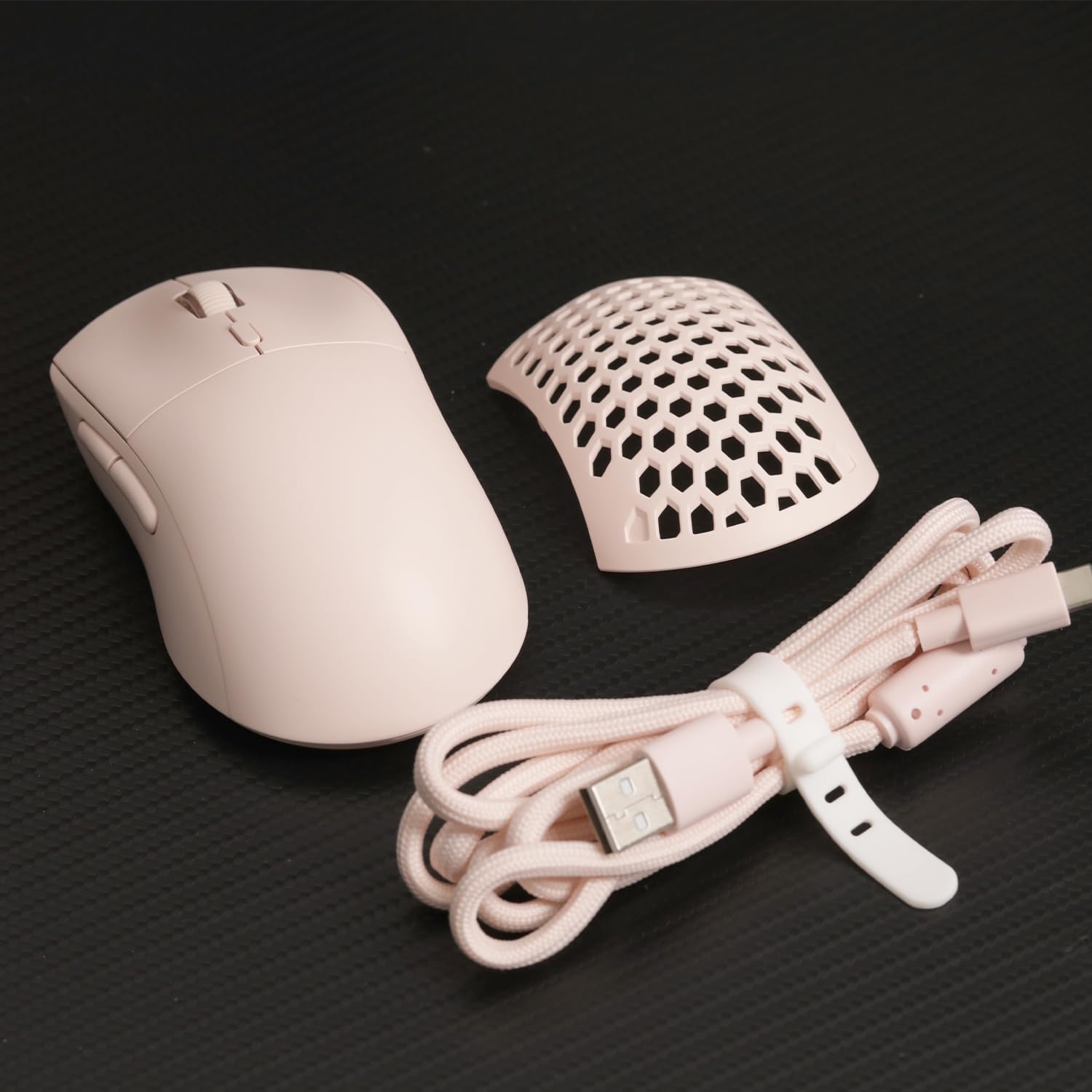
Image: The NACODEX AJ199 mouse, its honeycomb cover, and the braided USB-C charging cable, as typically found in the product package.
3. Setup Guide
3.1 Wireless Connection (2.4G)
- Locate the USB receiver (dongle) inside the mouse. It is typically stored in a compartment on the underside or under the removable cover.
- Plug the USB receiver into an available USB port on your computer.
- Turn on the mouse using the power switch located on the underside.
- The mouse should automatically connect to your computer. If not, ensure the receiver is securely plugged in and the mouse is powered on.

Image: The NACODEX AJ199 mouse positioned next to its compact USB wireless receiver, ready for connection.
3.2 Wired Connection
- Connect the USB-C end of the provided cable to the mouse.
- Connect the USB-A end of the cable to an available USB port on your computer.
- The mouse will function in wired mode and will also charge its internal battery.

Image: The NACODEX AJ199 mouse with its USB-C cable connected, illustrating its wired mode functionality.
4. Operating Instructions
4.1 DPI Adjustment
The mouse features a dedicated DPI button (usually located behind the scroll wheel) to cycle through preset DPI levels. For precise DPI adjustments and to customize the 6-level DPI settings, please download and install the official NACODEX driver software from the manufacturer's website.

Image: A graphical representation of the NACODEX mouse customization software interface, showing options for macro, DPI, polling rate, and button programming.
4.2 Programmable Buttons
The AJ199 mouse is equipped with 6 programmable buttons. These buttons can be customized to perform various functions, macros, or key combinations using the NACODEX driver software. Refer to the software's interface for detailed instructions on button assignment.
4.3 Battery and Charging
The mouse has a built-in 300mAh rechargeable battery. When the battery is low, the mouse's indicator light may change or flash. Connect the mouse to your computer using the provided USB-C cable to charge. A full charge provides over 40 hours of usage.

Image: The NACODEX AJ199 mouse shown on a laptop, illustrating its wireless connectivity and highlighting its 40-hour battery life.
5. Maintenance
5.1 Cleaning
To maintain optimal performance and hygiene, regularly clean your mouse. Use a soft, dry cloth to wipe the surface. For stubborn dirt, a slightly damp cloth can be used, but ensure no moisture enters the internal components. Avoid harsh chemicals or abrasive materials.
5.2 Swapping Covers
The NACODEX AJ199 features a replaceable back cover. To swap covers:
- Gently lift the rear edge of the installed cover until it detaches.
- Align the new cover (e.g., honeycomb or solid) with the mouse body.
- Press down firmly until it clicks into place, ensuring it is securely attached.

Image: The NACODEX AJ199 mouse featuring its honeycomb back cover, demonstrating the customizable design.
6. Troubleshooting
If you encounter issues with your NACODEX AJ199 mouse, please refer to the following common solutions:
- Mouse not responding:
- Ensure the mouse is powered on.
- For wireless mode, check if the USB receiver is securely plugged into a working USB port. Try a different USB port.
- For wired mode, ensure the USB-C cable is properly connected to both the mouse and the computer.
- Charge the mouse battery.
- Lag or erratic movement in wireless mode:
- Ensure the USB receiver is not too far from the mouse or obstructed by metal objects.
- Try plugging the receiver into a front USB port or using a USB extension cable to bring it closer to the mouse.
- Ensure there are no strong wireless interferences (e.g., other 2.4GHz devices) nearby.
- DPI settings not changing:
- Ensure the driver software is correctly installed and running.
- Restart your computer and the mouse.
- Buttons not responding or performing incorrectly:
- Check button assignments in the NACODEX driver software.
- Ensure the mouse firmware is up to date (check manufacturer's website).
7. Specifications
| Feature | Detail |
|---|---|
| Model Number | AJ199 |
| Connectivity | Wireless 2.4G, Wired (USB-C) |
| Sensor | PAW3395 Optical Sensor |
| DPI Range | Up to 26,000 DPI |
| IPS | 650 IPS |
| Acceleration | 50G |
| Polling Rate | 1000Hz |
| Buttons | 6 Programmable Buttons |
| Switch Lifespan | 80 Million Clicks (HUANO switches) |
| Battery | 300mAh Rechargeable Lithium Ion |
| Battery Life | Over 40 hours (approx.) |
| Weight | Approx. 60g (2.19 ounces) |
| Dimensions | 5.12 x 2.76 x 1.57 inches |
| Color | Pink |
8. Warranty and Support
NACODEX products are manufactured to high quality standards. This product is covered by a limited warranty against defects in materials and workmanship from the date of purchase. Please retain your proof of purchase for warranty claims.
For technical support, warranty inquiries, or to download the latest driver software, please visit the official NACODEX website or contact their customer service. Contact details can typically be found on the product packaging or the brand's official online presence.
Note: Specifications and features are subject to change without prior notice.
Related Documents - AJ199
 |
COMNIPRO Ultra Lightweight Omni Pro Wireless Mouse User Manual User manual for the COMNIPRO Ultra Lightweight Omni Pro Wireless Mouse. Learn how to connect via 2.4GHz, Bluetooth, or USB-C. Details include indicator lights, technical specifications, safety precautions, driver download, and environmental disposal information. |
 |
Ajazz AJ199 MAX Wireless Gaming Mouse User Manual User manual for the Ajazz AJ199 MAX wireless gaming mouse, detailing its features, specifications, and usage instructions. |
 |
Sharkoon Light² 180 Gaming Mouse: Manual and Specifications Comprehensive manual for the Sharkoon Light² 180 ultra-lightweight gaming mouse, covering specifications, software installation, button assignment, DPI settings, RGB illumination, advanced configurations, macro management, and profile options. |
 |
AJAZZ AJ199 Carbon Fiber Composite Wireless Gaming Mouse User Manual Comprehensive user manual for the AJAZZ AJ199 Carbon Fiber Composite Wireless Gaming Mouse, detailing its features, connection methods (2.4G, Bluetooth, Wired), DPI settings, charging, troubleshooting, and technical specifications. Optimize your gaming experience with this lightweight, high-performance mouse. |
 |
REDRAGON PREDATOR PRO M612 Gaming Mouse User Manual - Wired, 2.4G, Bluetooth Comprehensive user manual for the REDRAGON PREDATOR PRO M612 gaming mouse, covering installation, features, DPI adjustment, backlight control, software, FAQ, and safety guidelines for wired, 2.4GHz, and Bluetooth modes. |
 |
2.4GHz Wireless Optical Gaming Mouse - Detailed User Manual Comprehensive user manual for the 2.4GHz Wireless Optical Gaming Mouse. Learn about its features, technical specifications, setup instructions, troubleshooting tips, and maintenance guidelines for optimal gaming and productivity. |
Ask a question about this manual
Ask about setup, troubleshooting, compatibility, parts, safety, or missing instructions. Manuals+ will review the question and use this page’s manual context to help answer it.