
1. Introduction
Thank you for choosing the VIANIS Oil-Rubbed Bronze Motion Sensor Outdoor Wall Lantern. This manual provides essential information for the safe installation, operation, and maintenance of your new outdoor lighting fixture. Please read these instructions thoroughly before installation and retain them for future reference.

Figure 1: VIANIS Oil-Rubbed Bronze Motion Sensor Outdoor Wall Lantern
2. Product Features
- Advanced Motion Sensor: Features multiple operating modes including DIM, ECO+, D2D (Dusk to Dawn), and Override Mode for versatile lighting control.
- One-Key Mode Switching: Easily switch between DIM and ECO modes with a quick press of the sensor button. Red light indicates DIM mode, green light indicates ECO mode.
- Integrated Dimmable Function: Adjust brightness between 10% and 50% during standby in certain modes, promoting energy savings.
- Durable Construction: Made from 100% aluminum for enhanced resistance to rain and moisture, ensuring long-term outdoor use without rusting or fading.
- Weather Resistance: Designed to be waterproof, sunproof, windproof, and snowproof, suitable for various outdoor conditions.
- Easy Bulb Replacement: Features a bottom opening design for simple and quick bulb changes and improved heat dissipation.
- Standard E26 Socket: Compatible with E26 base dimmable LED bulbs or incandescent bulbs up to 100W (bulbs not included).
- Adjustable Sensing Distance: Unique function to flexibly meet lighting needs by tapping the sensor button to switch between far, medium, and near detection ranges (up to 40 ft).

Figure 2: Overview of One-click Mode Switching

Figure 3: Weather Resistance Features
3. Package Contents
Ensure all components are present before beginning installation:
- VIANIS Outdoor Wall Lantern (2 units)
- Mounting Hardware
- Shade
- User Manual
Note: Bulbs are not included. Recommended bulb type: E26 base, dimmable LED or incandescent, up to 100W.
4. Safety Information
- Always turn off the power at the circuit breaker before installing, servicing, or cleaning the fixture.
- Consult a qualified electrician if you are unsure about the installation process.
- Use only bulbs that meet the specified wattage and type (E26, up to 100W, dimmable).
- Ensure all electrical connections are secure and comply with local electrical codes.
- Do not install on a dimmable wall switch. The dimming function is integrated into the fixture's sensor.
5. Installation Instructions
Installation of the VIANIS Outdoor Wall Lantern is designed to be straightforward. Follow these general steps:
- Prepare for Installation: Turn off power at the main circuit breaker.
- Mounting Plate Installation: Attach the cross mounting plate to your junction box using the provided hardware.
- Wiring: Connect the fixture's wires to your household wiring (black to black, white to white, ground to ground). Secure connections with wire nuts.
- Secure Fixture: Carefully align the fixture with the mounting plate and secure it in place.
- Install Bulb: Insert an E26 base bulb (not included) into the socket through the bottom opening.
- Restore Power: Turn on power at the circuit breaker.
For a visual guide, please refer to the official installation video:
Video 1: VIANIS Motion Sensor Outdoor Wall Light Installation Guide. This video demonstrates the installation process for the outdoor wall light.

Figure 4: Product Dimensions and E26 Socket Information
6. Operating Modes
Your VIANIS outdoor wall lantern features four distinct operating modes, easily switchable via the sensor button. The indicator light on the sensor will change color to show the current mode.
- DIM Mode (Red Indicator Light): At night, the light maintains 30% brightness. When motion is detected, it switches to 100% brightness. It automatically turns off during the daytime.
- ECO+ Mode (Green Indicator Light): The light remains off at night. When motion is detected, it turns on at 100% brightness. It automatically turns off during the daytime.
- D2D Mode (Blue Indicator Light): The light turns on at 100% brightness at dusk and automatically turns off at dawn. Motion sensing is inactive in this mode.
- Override Mode (Indicator Light OFF): To activate, quickly turn the light OFF and then ON within 2 seconds. The light will maintain 100% brightness for approximately 8 hours, then automatically turn off at dawn and return to the previously selected automatic mode.

Figure 5: DIM Mode Operation
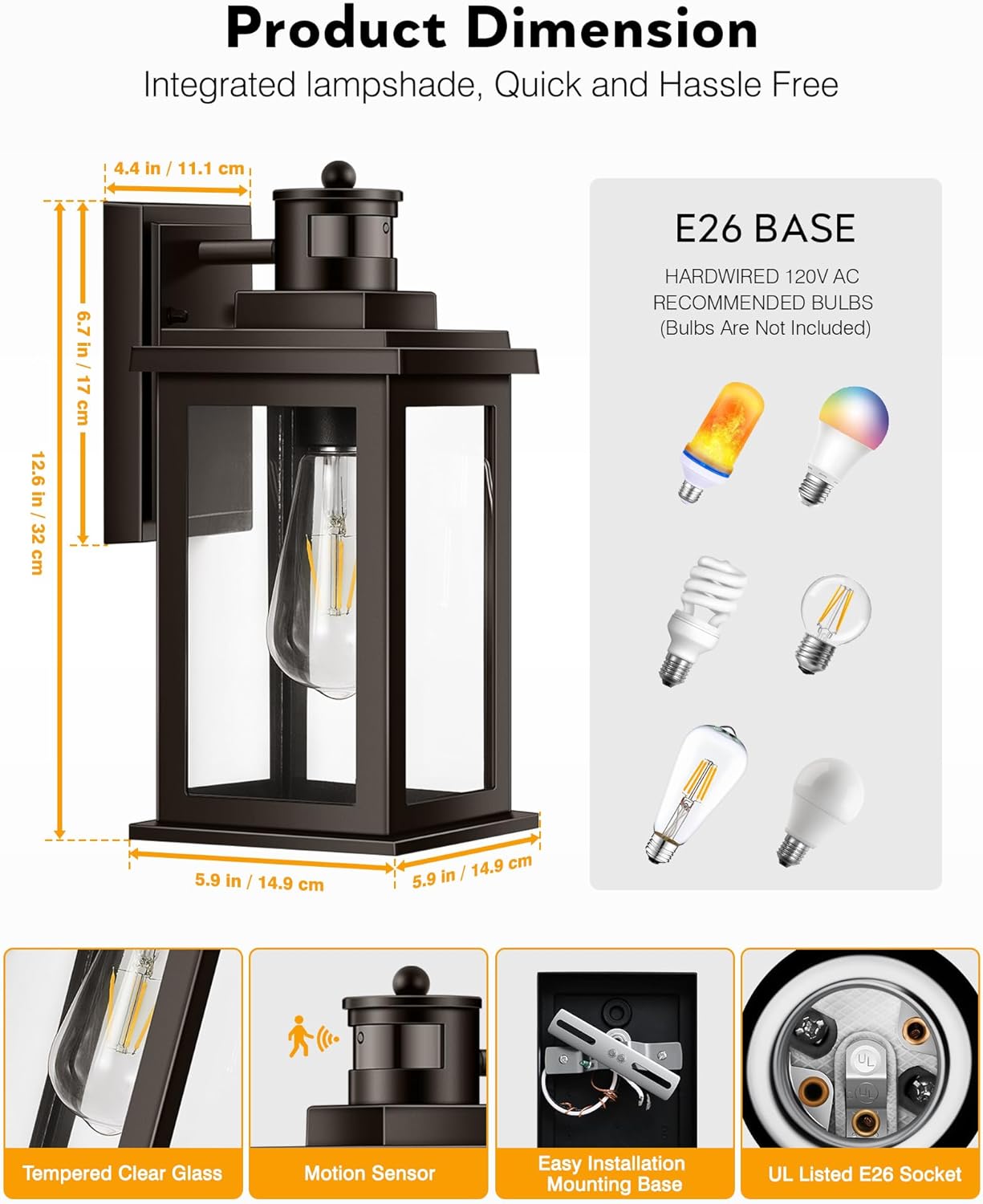
Figure 6: ECO+ Mode Operation

Figure 7: D2D Mode Operation

Figure 8: Manual Override Mode
Video 2: VIANIS Motion Sensor Wall Light Features. This video highlights the various operating modes and features of the motion sensor wall light.
7. Brightness Adjustment
In DIM and ECO+ modes, you can adjust the standby brightness between 10% and 50% by long-pressing the sensor button. This allows for customized ambient lighting and further energy savings.

Figure 9: Brightness Adjustment via Integrated Dimmer
8. Motion Sensor Distance Adjustment
The motion sensor offers a unique adjustable sensing distance, up to a maximum of 40 feet. Tap the sensor button to cycle through three settings: Far, Medium, and Near. This allows you to optimize the detection range for your specific environment, such as a courtyard party, outdoor activity, or night walk.

Figure 10: Adjustable Motion Sensing Distance
9. Maintenance
Regular maintenance ensures optimal performance and longevity of your fixture.
- Cleaning: Ensure power is off before cleaning. Wipe the fixture with a soft, damp cloth. Avoid abrasive cleaners or solvents that could damage the finish or glass.
- Bulb Replacement: Turn off power before replacing the bulb. The bottom opening design facilitates easy bulb access. Allow the old bulb to cool before removal.
- Inspection: Periodically check for any loose connections or damage to the wiring or fixture housing.
10. Troubleshooting
| Problem | Possible Cause | Solution |
|---|---|---|
| Light does not turn on. | No power; faulty bulb; incorrect wiring. | Check circuit breaker; replace bulb; verify wiring connections. |
| Light flickers. | Non-dimmable bulb used; loose connection. | Ensure a dimmable LED or incandescent bulb is used; check wiring connections. |
| Motion sensor not detecting. | Incorrect mode; sensor obstructed; distance setting too low. | Switch to DIM or ECO+ mode; clear obstructions; adjust sensing distance. |
| Light stays on constantly. | Override mode active; continuous motion; D2D mode selected. | Check if Override mode is active; ensure no constant motion; switch from D2D mode if not desired. |
11. Specifications
| Feature | Detail |
|---|---|
| Brand | VIANIS |
| Model Name | Outdoor Wall Light |
| Item Model Number | V81252BR |
| Color | Oil-Rubbed Bronze |
| Material | Aluminum (Fixture), Glass (Shade) |
| Product Dimensions | 5.9"L x 5.9"W x 12.6"H |
| Power Source | Hardwired |
| Voltage | 120 Volts (AC) |
| Bulb Base | E26 |
| Maximum Compatible Wattage | 100 Watts |
| Light Source Type | Incandescent, LED (Dimmable recommended) |
| Special Feature | Waterproof, Motion Sensor, Dusk to Dawn Sensor |
| Control Method | Touch (Sensor Button) |
| Indoor/Outdoor Usage | Outdoor |
| Item Weight | 7.44 pounds (for the 2-pack) |
12. Warranty and Support
This VIANIS product comes with a Limited Warranty. For specific warranty terms and conditions, please refer to the documentation included in your product packaging or contact VIANIS customer support.
For technical assistance, troubleshooting, or any inquiries regarding your product, please contact VIANIS customer support through the retailer where the product was purchased or visit the official VIANIS website.