1. Introduction
This manual provides essential information for the safe and efficient installation, operation, and maintenance of the Generic QUINT-PS-100-240AC/24DC/20 2938620 Power Supply. Please read this manual thoroughly before using the product and retain it for future reference. This power supply is designed to convert AC input voltage to a stable 24V DC output for industrial applications.
2. Safety Instructions
WARNING: Risk of electric shock. Ensure all power is disconnected before installation or maintenance.
- Only qualified personnel should install, operate, and maintain this device.
- Ensure the input voltage range matches the specifications of the power supply (100-240VAC).
- Do not operate the device in wet or humid conditions.
- Ensure proper grounding to prevent electric shock.
- Do not open the casing of the power supply; there are no user-serviceable parts inside.
- Provide adequate ventilation around the unit to prevent overheating.
3. Product Overview
The QUINT-PS-100-240AC/24DC/20 2938620 is a robust industrial power supply designed for reliable performance. It features clearly labeled input and output terminals, an output voltage adjustment potentiometer, and a DC OK status indicator.

Figure 3.1: Front view of the power supply. Note the AC input terminals (bottom right), DC output terminals (top right), DC OK indicator (top left), and voltage adjustment screw (middle right).

Figure 3.2: Side view illustrating the ventilation grille and heat sink, crucial for thermal management.
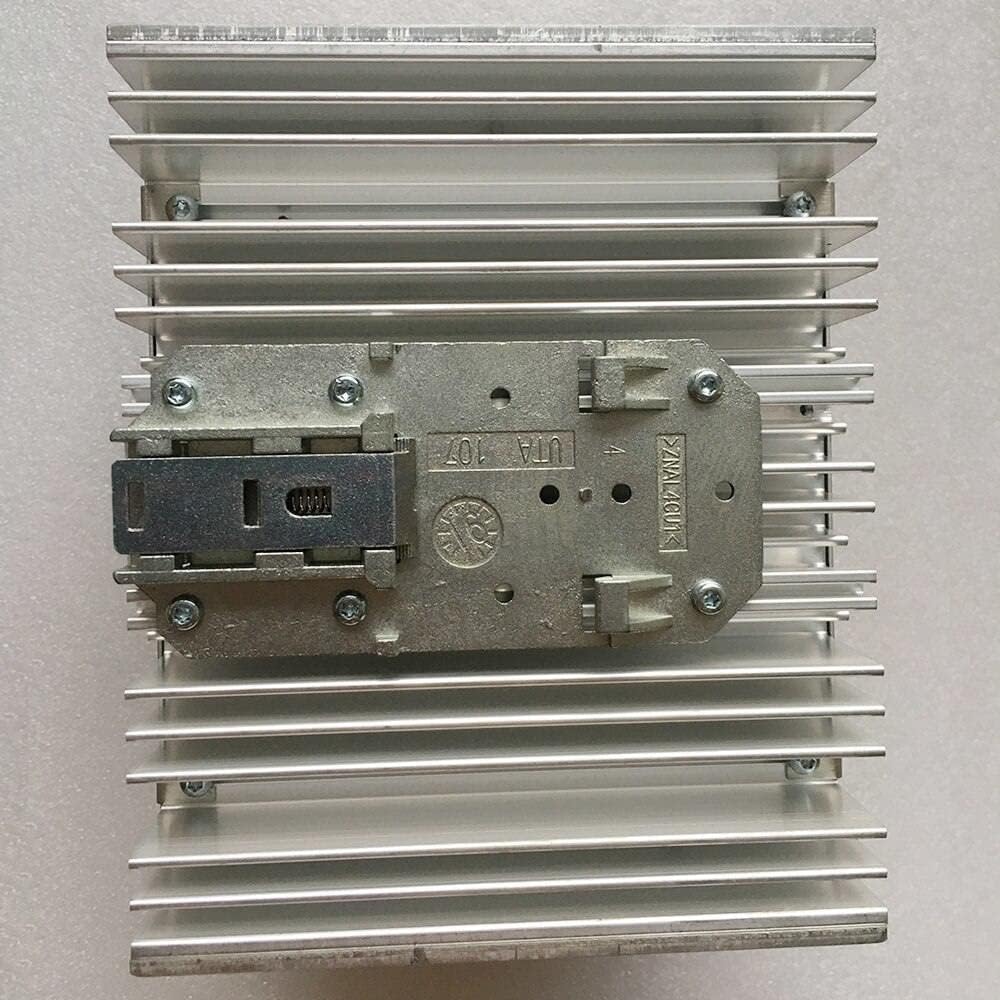
Figure 3.3: Rear view, highlighting the integrated DIN rail mounting clip for secure installation.
4. Setup and Installation
4.1 Mounting
The power supply is designed for DIN rail mounting. Ensure the mounting surface is stable and capable of supporting the unit's weight. Mount the unit vertically to optimize airflow for cooling.
- Attach the power supply to a standard 35mm DIN rail by hooking the top edge onto the rail and pressing the bottom until the clip engages.
- Verify that the unit is securely fastened and does not wobble.
4.2 Wiring Connections
CAUTION: Disconnect all power sources before making any electrical connections.
Refer to Figure 3.1 for terminal locations.
- AC Input (100-240V): Connect the AC line, neutral, and ground wires to the clearly marked input terminals (L, N, PE) at the bottom right of the unit. Use appropriate wire gauges for the expected current.
- DC Output (24V, 20A): Connect the positive (+) and negative (-) DC load wires to the corresponding output terminals at the top right. Ensure correct polarity.
- DC OK Signal (13-14): These terminals provide a potential-free contact for remote monitoring of the DC output status. Connect to a monitoring system if required.
Ensure all terminal screws are tightened securely to prevent loose connections and potential hazards.
5. Operating Instructions
5.1 Powering On
After all connections are securely made and verified, apply AC power to the input terminals. The power supply will initiate operation.
5.2 DC OK Indicator
The green "DC OK" LED indicator (visible on the front, Figure 3.1) illuminates when the output voltage is within the specified operating range. If the LED is off, it indicates a fault condition or no output voltage.
5.3 Output Voltage Adjustment
The output voltage can be finely adjusted using the potentiometer labeled "Adjust 23.5-28.5V" located on the front panel (Figure 3.1). Use a small screwdriver to turn the potentiometer clockwise to increase the voltage or counter-clockwise to decrease it. Always verify the output voltage with a multimeter after adjustment.
6. Maintenance
The QUINT-PS-100-240AC/24DC/20 power supply is designed for minimal maintenance. However, periodic checks are recommended to ensure optimal performance and longevity.
- Cleaning: Ensure the ventilation openings are free from dust and debris. Use a soft, dry cloth for external cleaning. Do not use liquid cleaners.
- Inspection: Periodically inspect all wiring connections for tightness and signs of wear or damage. Check for any discoloration or unusual odors from the unit.
- Ventilation: Ensure that the ambient temperature remains within the specified operating range and that there is sufficient space around the unit for proper airflow.
WARNING: Disconnect power before performing any maintenance.
7. Troubleshooting
This section provides guidance for common issues. For problems not listed here, contact technical support.
| Problem | Possible Cause | Solution |
|---|---|---|
| No DC output, DC OK LED off |
|
|
| Output voltage too low/high |
|
|
| Unit is hot to the touch |
|
|
8. Specifications
| Parameter | Value |
|---|---|
| Model | QUINT-PS-100-240AC/24DC/20 2938620 |
| Input Voltage Range | 100-240 VAC |
| Output Voltage | 24 VDC (Adjustable 23.5-28.5V) |
| Output Current | 20 A |
| Manufacturer | Generic |
| Mounting | DIN Rail |
9. Warranty and Support
This product is covered by a standard manufacturer's warranty against defects in materials and workmanship. For specific warranty terms and conditions, please refer to the documentation provided at the time of purchase or contact your supplier.
For technical assistance, troubleshooting beyond this manual, or warranty claims, please contact the vendor or manufacturer's customer support channels.


