1. Introduction
This manual provides detailed instructions for the operation and maintenance of your SKMEI Model 2049 Dual Display Electronic Watch. This timepiece combines analog and digital displays, offering multiple functions including triple time zones, chronograph, stopwatch, countdown timer, alarm, and date/week display. Please read this manual thoroughly to ensure proper use and longevity of your watch.

Image 1.1: Front view of the SKMEI Model 2049 watch, showcasing its dual display and overall design.
2. Key Features
- Dual Display: Analog and Digital timekeeping.
- Multi-functional: Triple time zones, chronograph, stopwatch, countdown timer, alarm, date, and week display.
- Water Resistance: 3ATM (30 meters), suitable for splashes, rain, and light swimming.
- Durable Construction: Zinc alloy case, stainless steel band, and scratch-resistant glass.
- EL Backlight: For visibility in low-light conditions.

Image 2.1: Visual summary of the watch's key features, highlighting its display type, functions, and materials.
3. Watch Components and Buttons
Familiarize yourself with the watch's buttons and crown for effective operation.
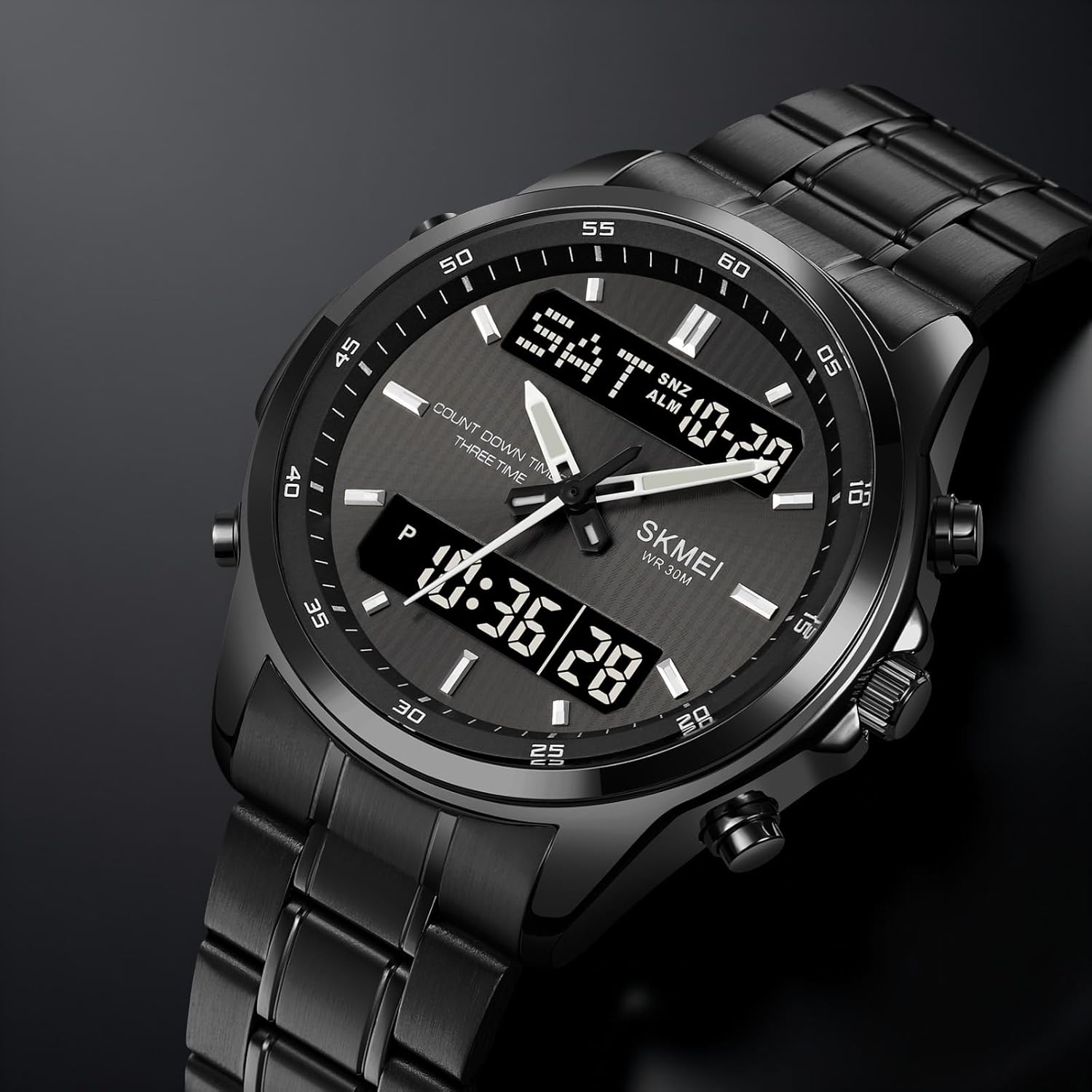
Image 3.1: Detailed view of the watch face and side buttons, indicating their positions.
- A Button (Top Left): EL Light / Reset (in setting modes).
- B Button (Bottom Left): Mode selection.
- C Button (Top Right): Start / Increase value.
- D Button (Bottom Right): Reset / Decrease value.
- Crown (Right Side): Analog time adjustment.
4. Setup and Initial Configuration
4.1. Setting Analog Time
- Pull out the crown located on the right side of the watch.
- Rotate the crown to adjust the analog hour and minute hands to the desired time.
- Push the crown back in to start the analog movement.
4.2. Setting Digital Time and Date
- Press the B Button repeatedly to cycle through modes until you reach the Time Setting mode (usually indicated by flashing digits).
- Once in Time Setting mode, press the A Button to select the item you wish to adjust (e.g., seconds, hour, minute, year, month, day).
- Use the C Button to increase the value or the D Button to decrease the value of the selected item.
- Continue pressing the A Button to move to the next setting item and adjust as needed.
- After all adjustments are made, press the B Button to exit the setting mode and return to normal time display.
4.3. Strap Adjustment
The stainless steel strap is adjustable. For precise fitting, it is recommended to have the strap adjusted by a professional watch technician to avoid damage to the watch or strap.
5. Operating Instructions
5.1. Mode Cycle
Press the B Button to cycle through the following modes:
- Normal Time Display (Hour, Minute, Second, Day, Week)
- Chronograph (Stopwatch)
- Alarm Setting
- Countdown Timer
- Dual Time Zone Setting
5.2. Chronograph (Stopwatch)
- Enter Chronograph mode by pressing the B Button.
- Press the C Button to start the stopwatch.
- Press the C Button again to pause the stopwatch.
- Press the D Button to reset the stopwatch to zero.
- To resume from pause, press the C Button.
5.3. Alarm Setting
- Enter Alarm mode by pressing the B Button.
- Press the A Button to select the hour or minute digits for adjustment (they will flash).
- Use the C Button to increase the value or the D Button to decrease the value.
- Press the B Button to confirm and exit alarm setting.
- To activate/deactivate the alarm, press the C Button while in Alarm mode (a bell icon usually indicates activation).
5.4. Countdown Timer
- Enter Countdown Timer mode by pressing the B Button.
- Press the A Button to select the hour or minute digits for adjustment.
- Use the C Button to increase the value or the D Button to decrease the value.
- Press the C Button to start the countdown.
- Press the C Button again to pause, and D Button to reset.
5.5. EL Backlight
Press the A Button at any time to activate the EL (Electroluminescent) backlight for a few seconds, illuminating the digital display for better visibility in the dark.
6. Maintenance and Care
6.1. Water Resistance (3ATM / 30M)
Your SKMEI 2049 watch is water-resistant to 30 meters (3ATM). This means it is suitable for daily use, such as accidental splashes, rain, and brief immersion in water like light swimming. It is not suitable for showering with hot water, diving, or prolonged underwater activities. Do not operate buttons while the watch is wet or submerged.

Image 6.1: Rear view of the watch, confirming its water resistance rating and model number.
6.2. Cleaning
Wipe the watch case and strap regularly with a soft, dry cloth to remove dirt and moisture. For stainless steel bands, a slightly damp cloth can be used, followed by immediate drying.
6.3. Battery Replacement
The watch uses a CR2016/SR626SW battery. When the display dims or functions become erratic, it may be time for a battery replacement. It is recommended to have the battery replaced by a qualified watch technician to ensure proper sealing and water resistance.
7. Troubleshooting
- Digital Display is Blank or Dim: Check battery level. If the battery is low, replace it. Ensure the watch is not exposed to extreme temperatures.
- Analog Hands Not Moving: Check if the crown is pushed in completely. If the issue persists, the battery may need replacement or there could be a mechanical issue requiring professional service.
- Buttons Unresponsive: Ensure the watch is not in a locked mode (if applicable, though not a feature of this model). If wet, dry thoroughly. If still unresponsive, a professional check is advised.
- Time Inaccuracy: Re-set both analog and digital times. If the watch consistently loses or gains time, the battery may be weak or the movement may require servicing.
- Backlight is Weak: This can be a sign of a low battery. Replace the battery if necessary.
8. Specifications
| Feature | Detail |
|---|---|
| Model Number | 2049 |
| Display Type | Analog-Digital |
| Case Material | Zinc Alloy |
| Band Material | Stainless Steel |
| Water Resistance | 3ATM (30 Meters) |
| Movement Type | Quartz |
| Case Diameter | 4.7 Centimeters |
| Case Thickness | 1.88 Centimeters |
| Strap/Lug Width | 20mm |
| Item Weight | 126.6 Grams |
| Battery Type | CR2016/SR626SW |

Image 8.1: Dimensional specifications of the watch, including case height, width, and strap width.
9. Warranty and Support
9.1. Warranty Information
Your SKMEI Model 2049 watch comes with a 6-month limited warranty from the date of purchase. This warranty covers manufacturing defects under normal use. It does not cover damage resulting from improper use, accidents, unauthorized repairs, or normal wear and tear. Please retain your proof of purchase for warranty claims.
9.2. Customer Support
For further assistance, technical support, or warranty inquiries, please contact SKMEI customer service through the retailer where the product was purchased or visit the official SKMEI website for contact details.