
Introduction
This manual provides comprehensive instructions for the Vinabty BN59-01376A replacement remote control. This remote is designed to function as a direct replacement for your original Samsung Smart TV remote, offering seamless control without the need for complex programming.
Compatible Models: This remote control is compatible with various Samsung Smart TV models, including but not limited to BN59-01376A, BN5901376A, UN55MU6290, and UN40MU6290.
Setup
The Vinabty BN59-01376A remote control is designed for immediate use. No programming or pairing is required. Simply insert the batteries, and it will be ready to operate your compatible Samsung Smart TV.
Inserting Batteries
- Locate the battery compartment on the back of the remote control.
- Slide the battery compartment cover downwards to open it.
- Insert two (2) AAA alkaline batteries, ensuring the positive (+) and negative (-) terminals align correctly with the markings inside the compartment.
- Close the battery compartment cover by sliding it back into place until it clicks securely.

Image: Rear view of the remote control with the battery cover removed, illustrating the correct placement for two AAA batteries.
Operating Instructions
Once batteries are installed, point the remote control directly at your Samsung Smart TV. The remote uses infrared (IR) technology to communicate with the television.
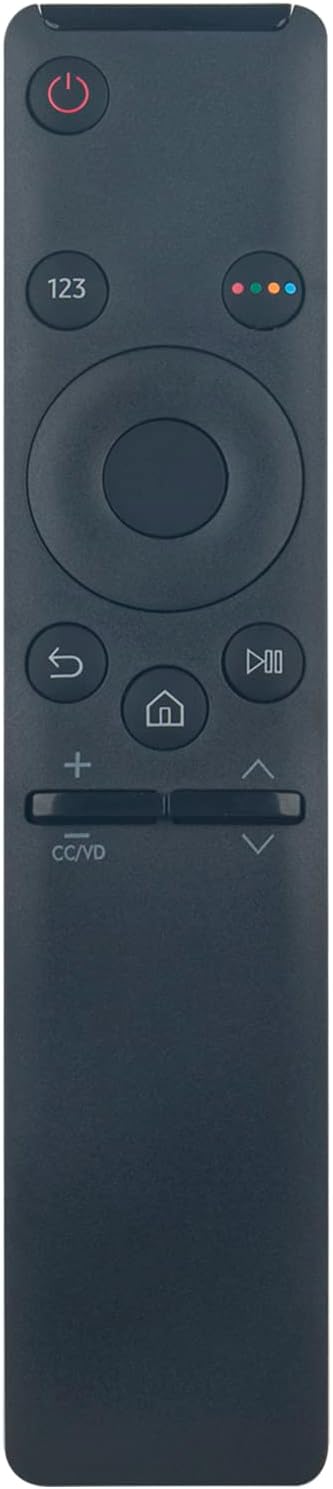
Image: Front view of the Vinabty BN59-01376A remote control, highlighting its ergonomic design and button layout.
Key Functions:
- Power Button: Turns the TV on or off.
- 123 Button: Accesses the on-screen number pad for direct channel input.
- Navigation Pad (Circular): Used to move through menus and select options. The center button confirms selections.
- Back Button (↶): Returns to the previous screen or menu.
- Home Button (⌂): Accesses the Smart Hub or home screen of your TV.
- Play/Pause Button (⏸): Controls media playback.
- Volume Buttons (+/-): Adjusts the TV volume.
- Channel Buttons (Up/Down Arrows): Changes TV channels.
- CC/VD Button: Toggles Closed Captions or Video Description.
Maintenance
To ensure the longevity and optimal performance of your remote control, follow these maintenance guidelines:
- Cleaning: Wipe the remote with a soft, dry cloth. Avoid using liquid cleaners or abrasive materials.
- Battery Replacement: Replace batteries when the remote's response becomes sluggish or stops working. Always replace both batteries at the same time with new ones of the same type (AAA alkaline).
- Storage: Store the remote in a cool, dry place away from direct sunlight and extreme temperatures. If not used for an extended period, remove the batteries to prevent leakage.
- Avoid Drops: Protect the remote from physical impact, as drops can damage internal components.
Troubleshooting
If you encounter issues with your remote control, try the following steps:
- Remote Not Responding:
- Check if the batteries are inserted correctly with the correct polarity.
- Replace the batteries with fresh AAA alkaline batteries.
- Ensure there are no obstructions between the remote control and the TV's infrared receiver.
- Confirm the remote is pointed directly at the TV.
- Limited Range:
- Ensure batteries are fresh.
- Remove any potential interference sources (e.g., bright lights, other electronic devices) near the TV's IR receiver.
- Specific Buttons Not Working:
- Clean the remote control surface, especially around the problematic buttons, to remove any dirt or debris.
- If cleaning and battery replacement do not resolve the issue, the remote may be faulty.
Specifications
| Feature | Detail |
|---|---|
| Model Number | BN59-01376A |
| Brand | VINABTY |
| Compatible Devices | Samsung Smart Televisions |
| Connectivity Technology | Infrared (IR) |
| Controller Type | Button Control |
| Maximum Range | Approximately 10 meters (33 feet) |
| Batteries Required | 2 x AAA (Alkaline recommended, not included) |
| Material | ABS |
Warranty and Support
Specific warranty details and direct support contact information are not provided within this manual. For warranty claims or technical assistance, please refer to the seller or the product packaging for further instructions.