
ANDELI MIG-270P PRO
ANDELI MIG-270P PRO Double Pulse 220V MIG Welder User Manual
Model: MIG-270P PRO | Brand: ANDELI
1. Introduction and Overview
Thank you for choosing the ANDELI MIG-270P PRO Double Pulse 220V MIG Welder. This versatile 5-in-1 inverter welding machine is designed for a wide range of welding applications, including MIG (CO2/MIX/FLUX), Lift TIG, PULSE, and MMA welding. Featuring an intuitive LCD screen and synergic controls, it offers precision and ease of use for both beginners and experienced welders. This manual provides essential information for safe and effective operation, maintenance, and troubleshooting of your welding machine.

Figure 1.1: The ANDELI MIG-270P PRO Welder with included accessories, showcasing its compact design and comprehensive setup.
2. Safety Information
WARNING: Welding can be dangerous. Always follow safety precautions to prevent injury or death.
- Electric Shock: Welding current can cause fatal electric shock. Ensure proper grounding, inspect cables for damage, and never touch live electrical parts.
- Fumes and Gases: Welding fumes and gases can be hazardous to your health. Work in a well-ventilated area or use local exhaust ventilation.
- Arc Rays: Arc rays can injure eyes and burn skin. Always wear a welding helmet with appropriate shade, safety glasses, and protective clothing.
- Fire and Explosion: Welding sparks and hot materials can cause fire or explosion. Keep flammable materials away from the welding area. Have a fire extinguisher readily available.
- Burns: Hot metal and sparks can cause severe burns. Wear flame-resistant protective clothing, gloves, and footwear.
- Noise: Excessive noise can damage hearing. Wear ear protection.
The machine features a safety protection system that automatically activates if the unit overheats or if voltage/current exceed safe ranges.
3. Product Features
- Multi-Process Capability: Supports MIG (CO2/MIX/FLUX), Lift TIG, PULSE, and MMA welding.
- LCD Display: An easy-to-access menu provides versatility for precise welding results. Parameters are clearly displayed for welding mode, material, wire type, tungsten rods, electrode, and workpiece thickness.
- Synergic Design: Offers intuitive control for wire feed speed, allowing for smooth and excellent welds, even for beginners.
- IGBT Inverters: Utilizes efficient and reliable Multiple IGBT Inverters for increased duty cycle and strong output.
- Safety Features: CE certified with automatic protection against overheating, over-voltage, and over-current.
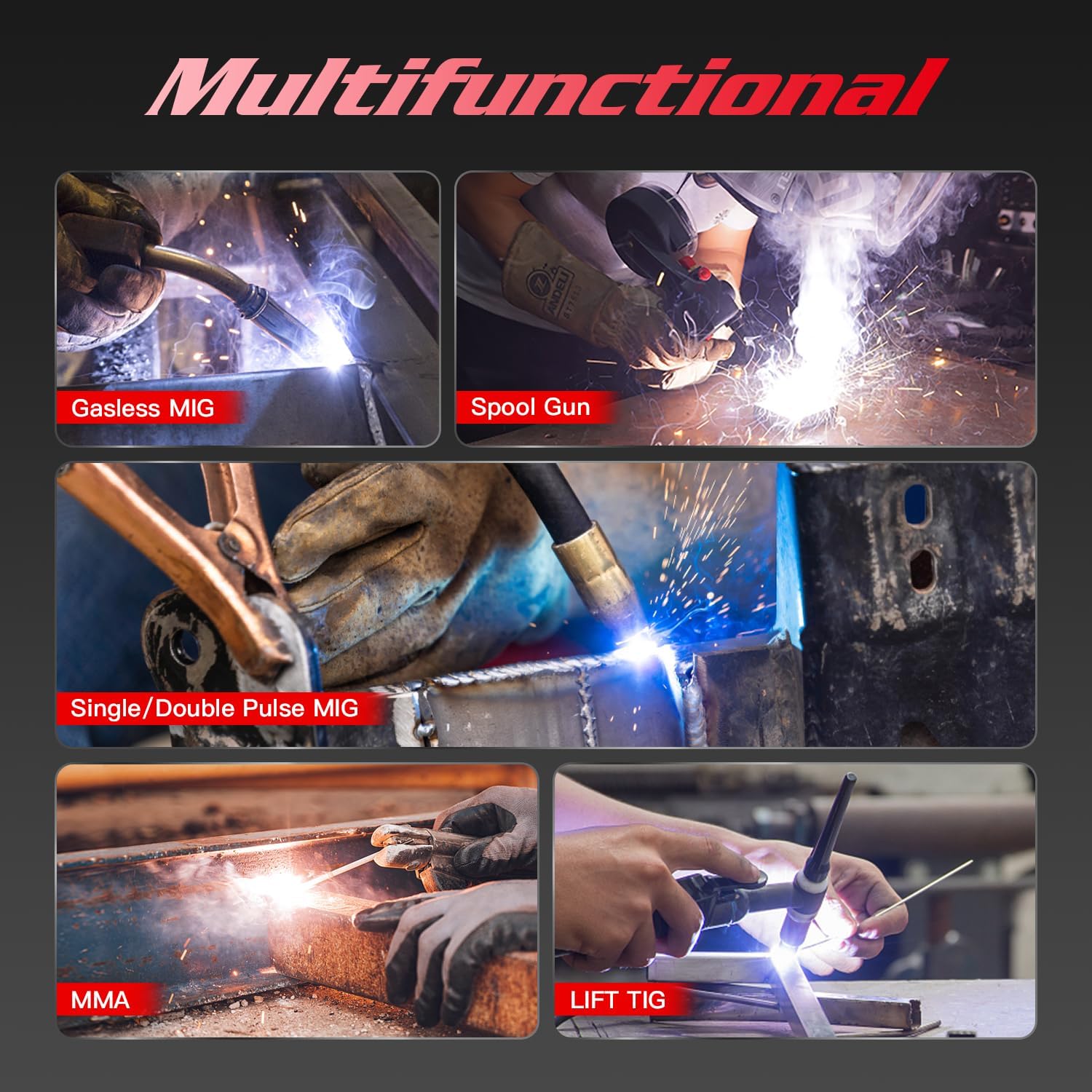
Figure 3.1: The ANDELI MIG-270P PRO, emphasizing its Double Pulse MIG welding capability and other modes.
4. Components and Parts List
The ANDELI MIG-270P PRO package typically includes the following components:
- MIG-270P PRO Welding Machine
- MIG Welding Torch
- Lift TIG Torch (optional, may vary by package)
- MMA Electrode Holder
- Ground Clamp
- Gas Hose (for MIG/TIG with gas)
- Wire Spool (e.g., 1 lb shielded wire spool)
- Consumables (contact tips, nozzles, collets, etc.)
Figure 4.1: A visual representation of the welding machine and its standard accessories.
5. Setup
5.1 Power Connection
Connect the welder to a 220V AC power source. Ensure the power outlet is properly grounded and can handle the required input current (up to 39A for MIG, 29A for Lift TIG, 40A for MMA).
5.2 Wire Spool Installation (MIG)
Open the wire feeder compartment. Place the wire spool onto the spindle, ensuring it rotates freely. Thread the welding wire through the wire feeder mechanism, making sure it passes through the correct groove on the drive roller (suitable for 0.8mm or 1.0mm wire). Secure the wire with the tension arm. Ensure the liner in the MIG gun is correctly trimmed and installed for the chosen wire diameter.
5.3 Gas Connection (for Gas MIG/TIG)
If performing Gas MIG or TIG welding, connect the gas hose from your gas cylinder (CO2, Argon, or Argon/CO2 mix) to the gas inlet on the rear of the machine. Ensure all connections are secure and leak-free.
5.4 Connecting Welding Guns/Holders
- MIG Gun: Connect the MIG gun cable to the appropriate connector on the front panel.
- Lift TIG Torch: Connect the Lift TIG torch to its designated port.
- MMA Electrode Holder: Connect the electrode holder cable to the positive (+) terminal and the ground clamp cable to the negative (-) terminal for most applications. Refer to electrode polarity recommendations.
- Ground Clamp: Attach the ground clamp securely to the workpiece or welding table, ensuring good electrical contact.
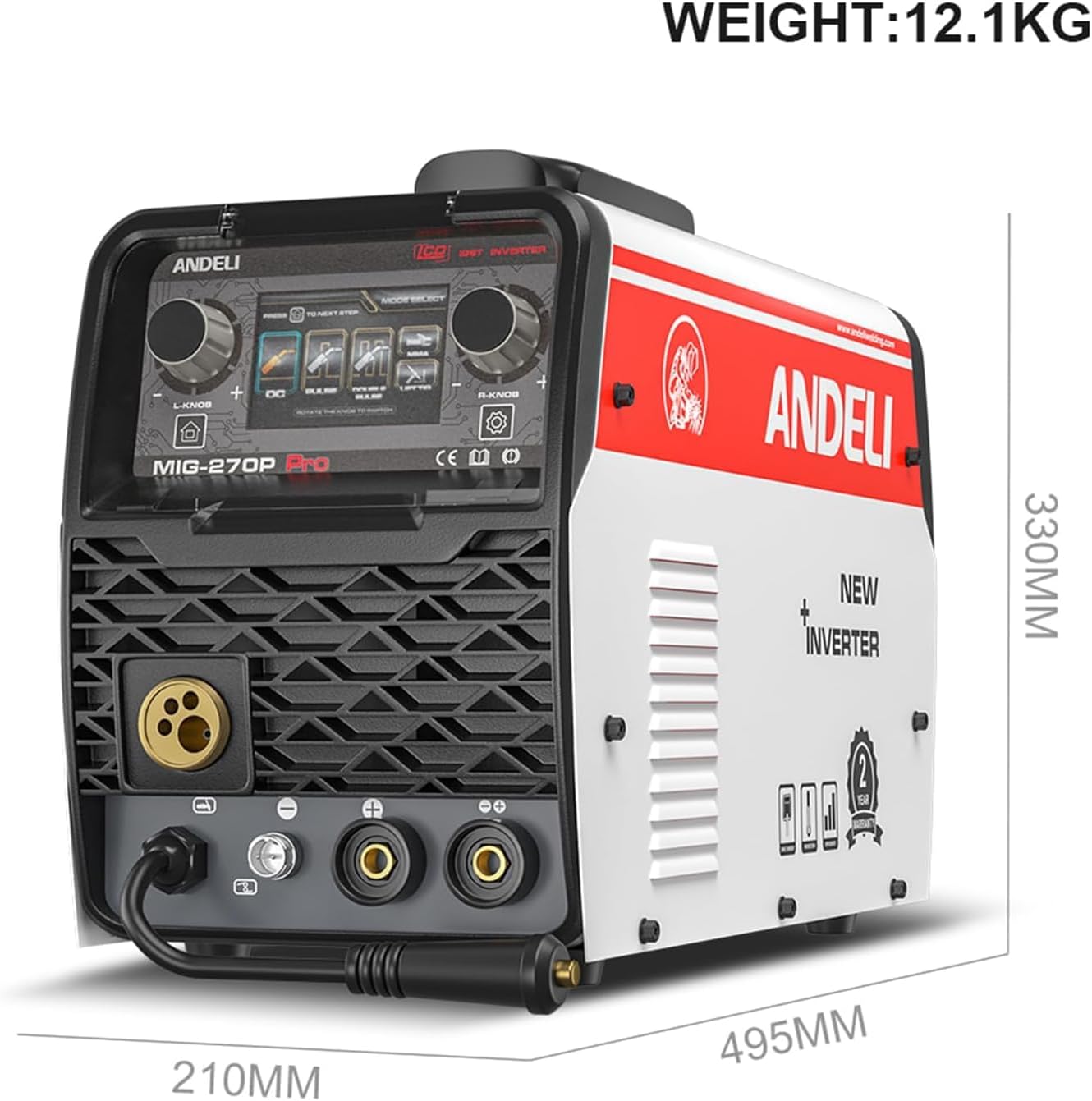
Figure 5.1: Dimensions of the MIG-270P PRO welder, useful for planning workspace and setup.
6. Operating Instructions
6.1 LCD Display and Mode Selection
The MIG-270P PRO features an LCD display for easy mode and parameter selection. Use the rotary knobs and buttons to navigate the menu. The display will show all selected parameters clearly.
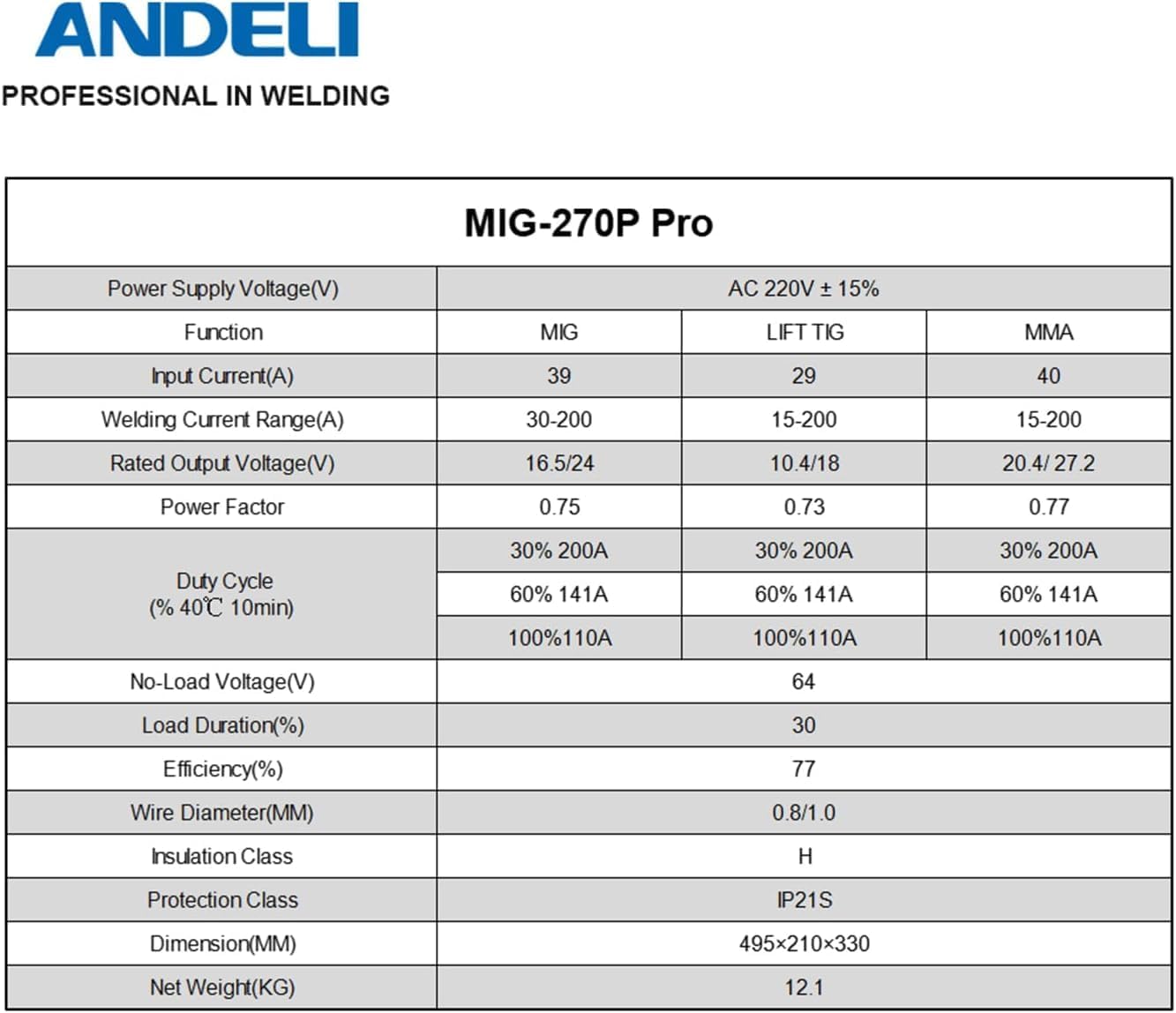
Figure 6.1: The LCD screen of the MIG-270P PRO, illustrating the various welding modes and parameter adjustments.
6.2 MIG Welding (CO2/MIX/FLUX)
Select the MIG mode on the LCD. Choose between Gas MIG (CO2 or MIX gas) or Flux-cored (gasless) welding based on your wire and application. The synergic control simplifies parameter setting, automatically adjusting wire feed speed to voltage. For advanced control, manual adjustments are available. The machine supports single and double pulse modes, particularly beneficial for aluminum welding to achieve a 'fish scale' appearance and improved weld quality.

Figure 6.2: Examples of different MIG welding processes supported by the machine.

Figure 6.3: Visual examples of weld beads produced by different MIG welding techniques, including single and double pulse.
6.3 Lift TIG Welding
Select the Lift TIG mode. This process offers high productivity and precise control. To initiate the arc, touch the tungsten electrode to the workpiece and then lift it slightly. The machine will automatically establish the arc. Adjust current and gas flow as needed for your material and thickness.
Figure 6.4: An illustration of the Lift TIG welding process.
6.4 MMA Welding (Stick)
Select the MMA mode. This mode is suitable for welding with various types of electrodes, including 3.2mm electrodes continuously. Adjust the welding current, hot start, and arc force settings on the LCD to optimize performance for your specific electrode and material. The VRD (Voltage Reduction Device) function enhances safety by reducing open-circuit voltage.
Figure 6.5: The MMA (Stick) welding process.
6.5 Official Product Videos
Video 6.1: This video provides a comprehensive overview of the ANDELI Multiprocess MIG Welder, demonstrating its various welding capabilities and features in action.
Video 6.2: This video focuses on the LCD screen and user interface of the MIG-270P PRO, showcasing how to select modes and adjust parameters for different welding tasks.
7. Maintenance
Regular maintenance ensures the longevity and optimal performance of your welding machine.
- Cleaning: Periodically clean the machine's exterior and ventilation openings to prevent dust and debris buildup. Use compressed air to clear internal components, ensuring the machine is unplugged.
- Cable and Connection Inspection: Regularly inspect all welding cables, connections, and the power cord for signs of wear, cuts, or damage. Replace damaged components immediately.
- Wire Feeder Maintenance: Clean the wire feeder rollers and guide tubes to ensure smooth wire feeding. Check the tension on the drive rollers.
- Consumables: Replace worn contact tips, nozzles, and other consumables as needed to maintain weld quality.
- Cooling System: Ensure the cooling fan is operating correctly and that airflow is not obstructed. The forced air cooling duct system is designed for efficient heat dissipation.
8. Troubleshooting
This section addresses common issues you might encounter. For more complex problems, contact customer support.
| Problem | Possible Cause | Solution |
|---|---|---|
| No Arc / Weak Arc | Improper grounding, incorrect settings, worn consumables, power supply issue. | Check ground clamp connection. Verify welding parameters (voltage, current, wire speed). Replace contact tip/electrode. Ensure stable power supply. |
| Poor Weld Quality | Incorrect parameters, improper technique, contaminated material, wrong gas/wire. | Adjust settings according to material and thickness. Clean workpiece. Use correct gas and wire type. Practice welding technique. |
| Overheating / Machine Shuts Off | Exceeded duty cycle, poor ventilation, internal fault. | Allow machine to cool down. Ensure adequate ventilation around the unit. Check for blocked air vents. If persistent, contact support. |
| Wire Feeding Issues | Incorrect drive roller tension, clogged liner, wrong drive roller groove, tangled wire. | Adjust drive roller tension. Clean or replace MIG gun liner. Ensure correct groove for wire size. Untangle wire spool. |
9. Specifications
| Parameter | Value |
|---|---|
| Model Number | MIG-270P PRO |
| Power Supply Voltage | AC 220V ± 15% |
| Input Current (MIG/Lift TIG/MMA) | 39A / 29A / 40A |
| Welding Current Range (MIG/Lift TIG/MMA) | 30-200A / 15-200A / 15-200A |
| Rated Output Voltage (MIG/Lift TIG/MMA) | 16.5/24V / 10.4/18V / 20.4/27.2V |
| Power Factor | 0.75 (MIG), 0.73 (Lift TIG), 0.77 (MMA) |
| Duty Cycle (40°C 10min) | 30% @ 200A, 60% @ 141A, 100% @ 110A |
| No-Load Voltage | 64V |
| Efficiency | 77% |
| Wire Diameter (MM) | 0.8 / 1.0 |
| Insulation Class | H |
| Protection Class | IP21S |
| Dimensions (L x W x H) | 495 x 210 x 330 mm |
| Net Weight | 12.1 KG (approx. 26.7 lbs) |
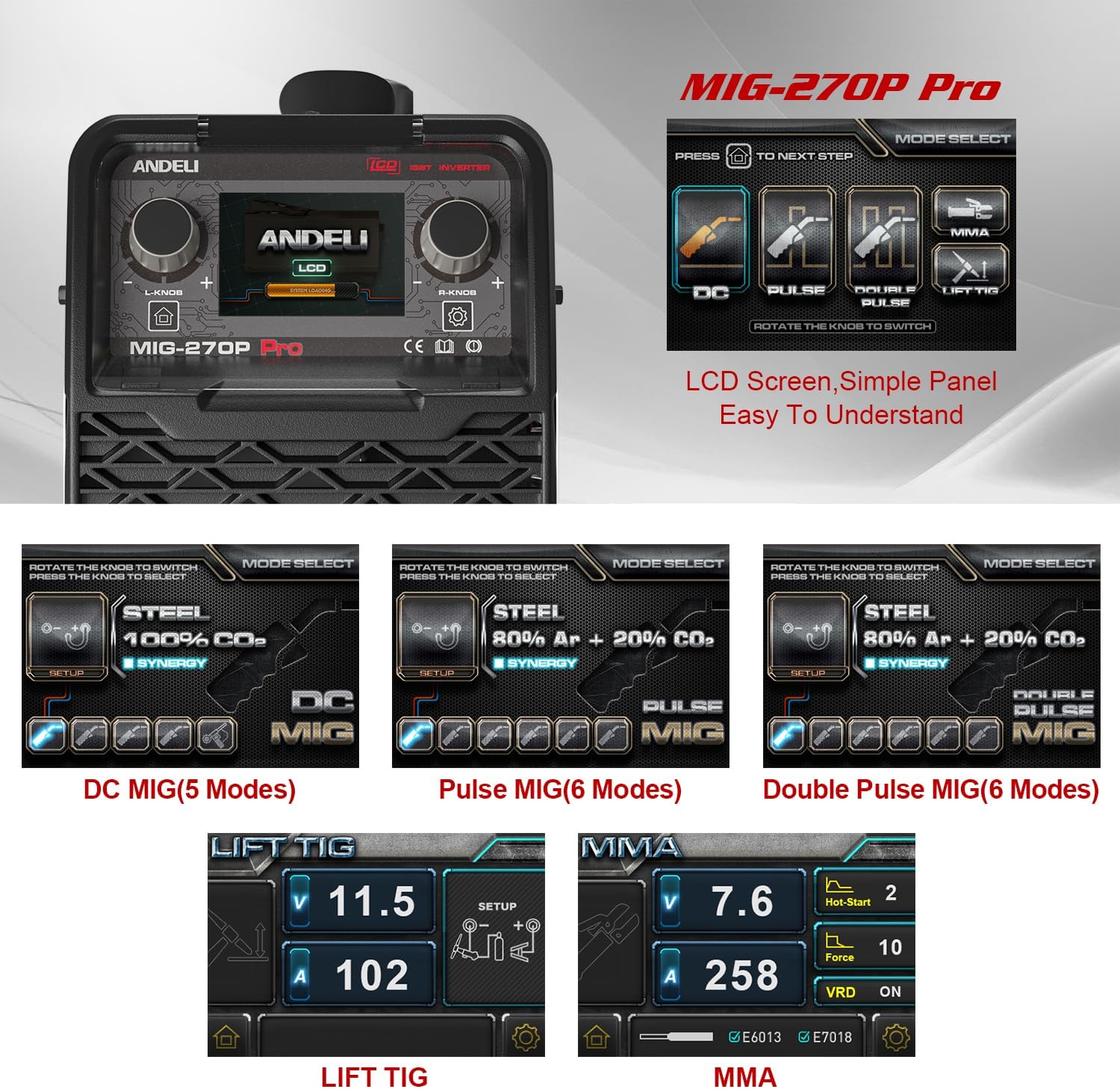
Figure 9.1: Detailed technical specifications for the MIG-270P PRO.
10. Warranty and Support
The ANDELI MIG-270P PRO comes with a two-year warranty, covering free replacement parts. For any issues encountered during the use of this product, or for technical guidance, please contact the efficient ANDELI customer service team. You can typically find contact information on the product packaging or the official ANDELI website.
Ask a question about this manual
Ask about setup, troubleshooting, compatibility, parts, safety, or missing instructions. Manuals+ will review the question and use this page’s manual context to help answer it.