
Important Safety Information
Please read and understand all safety instructions before assembly and operation. Retain this manual for future reference.
- Assembly is required for this product. Keep these instructions readily available during the entire installation process.
- Do not connect the LED lights to a power source without first reading and fully understanding the specific instructions provided for the lighting system.
- Never use damaged electrical outlets or cables. Inspect all electrical components for damage before use.
- Keep all components, especially small parts and electrical elements, out of reach of children and pets to prevent choking hazards or electrical shock.
- Ensure the TV cabinet is placed on a stable, level surface to prevent tipping.
- Do not overload the cabinet shelves. Refer to the specifications for weight limits.
Product Overview
The vidaXL TV Cabinet with LED Lights (Model 804431) is designed to provide a modern and functional entertainment solution for your living space. It features integrated LED lighting to enhance ambiance and ample storage for media devices and accessories.

Image: The vidaXL TV cabinet in concrete grey, featuring blue LED lighting, positioned beneath a wall-mounted television in a modern living room.

Image: The vidaXL TV cabinet in concrete grey, featuring red LED lighting, providing an alternative ambiance in a modern living room setup.
Package Contents
Upon opening the package, verify that all components are present and undamaged. The package should contain:
- All engineered wood panels for the cabinet structure.
- Assembly hardware (screws, dowels, hinges, etc.).
- LED light strip(s) and power adapter.
- Remote control for LED lights (if applicable).
- Assembly instruction manual.
If any parts are missing or damaged, please contact vidaXL customer support before proceeding with assembly.
Setup and Assembly Instructions
Assembly of the vidaXL TV cabinet is required. While the process is designed to be straightforward, careful attention to the provided assembly manual is crucial. It is recommended to have a second person assist with assembly.
Before You Begin:
- Clear Workspace: Ensure you have a spacious, clean, and flat area for assembly.
- Identify Parts: Lay out all components and hardware. Although parts may not be individually numbered or labeled, refer to the diagrams in the included assembly manual to identify each piece. Pay close attention to the shape and size of each panel.
- Tools Required: Gather necessary tools, typically a screwdriver (Phillips head), and possibly a hammer or mallet.
Assembly Steps:
Follow the step-by-step diagrams and instructions in the dedicated assembly manual provided in your package. The general sequence involves:
- Base Assembly: Construct the base frame of the TV cabinet.
- Side Panels: Attach the side panels to the base.
- Shelving and Dividers: Install internal shelves and dividers as indicated in the manual.
- Top Panel: Secure the top panel to complete the main structure.
- Door Installation: Attach hinges and mount the doors. Adjust hinges for proper alignment.
- LED Light Installation: Follow the separate instructions for installing the LED light strip(s) into the designated areas. Ensure all connections are secure before plugging into a power source.

Image: A technical diagram illustrating the overall dimensions and internal compartment measurements of the TV cabinet, including height, width, and depth.

Image: An interior view of the TV cabinet with its doors open, revealing the storage compartments and shelves designed for media devices and other items.
Operating Instructions (LED Lights)
The integrated LED lights provide customizable ambiance. Ensure the LED strip is correctly installed and connected to the power adapter before proceeding.
- Power Connection: Plug the LED power adapter into a functional electrical outlet.
- Remote Control: Use the provided remote control to operate the LED lights.
- Power Button: Press to turn the lights ON or OFF.
- Color Selection: Select desired colors (e.g., red, green, blue, white) using the dedicated buttons.
- Brightness Adjustment: Use the brightness up/down buttons to adjust the intensity of the lights.
- Mode Selection: Cycle through various lighting modes (e.g., flash, strobe, fade, smooth) if available on your remote.
- Battery Replacement: If the remote control stops responding, replace its battery (typically a CR2025 or CR2032 coin cell battery).
Maintenance
Proper care will ensure the longevity and appearance of your TV cabinet.
- Cleaning: Wipe the surfaces with a soft, damp cloth. Avoid using abrasive cleaners, harsh chemicals, or excessive moisture, as these can damage the engineered wood finish.
- Spills: Immediately wipe up any spills to prevent staining or damage to the material.
- Dusting: Regularly dust the cabinet with a dry, soft cloth.
- LED Lights: Ensure the LED strips remain clean and free of dust for optimal performance. Do not attempt to clean the LED strips with liquids while they are powered on.
Troubleshooting
| Problem | Possible Cause | Solution |
|---|---|---|
| LED lights do not turn on. |
|
|
| Cabinet feels unstable or wobbly. |
|
|
| Doors are misaligned or do not close properly. |
|
|
Specifications
- Model: 804431
- Brand: vidaXL
- Color: Concrete Grey
- Material: Engineered Wood
- Overall Dimensions (L x W x H): 160 cm x 35 cm x 40 cm (63" x 13.8" x 15.8")
- Weight: Approximately 28 kg (61.7 lbs)
- Assembly Required: Yes
- LED Lights: Integrated, multi-color with remote control (specific features may vary).
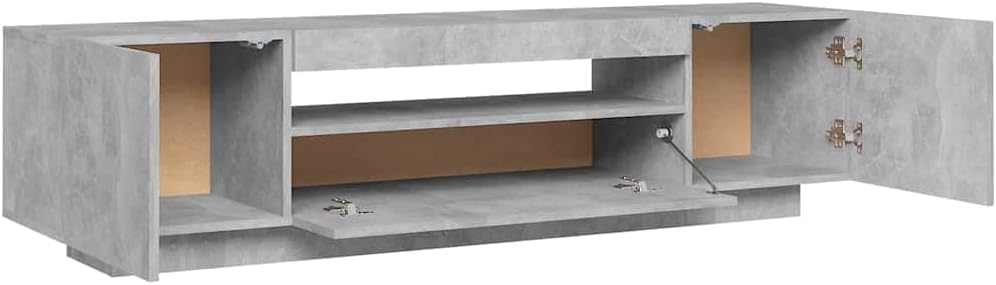
Image: An overhead view of the vidaXL TV cabinet with all doors and compartments open, showcasing the internal storage layout.
Warranty and Support
vidaXL products are manufactured with quality and durability in mind. For specific warranty information, please refer to the documentation included with your purchase or visit the official vidaXL website.
If you encounter any issues, require replacement parts, or have questions not covered in this manual, please contact vidaXL customer support. Have your model number (804431) and purchase details ready for faster assistance.
Contact Information: Please refer to your purchase receipt or the vidaXL official website for the most up-to-date customer support contact details.